App metadata ID: 10001258 • App ID: 11516649 • Listing updated: August 9, 2026 View app data JSON {
"id": 10001258,
"marketplace_developer_id": 100000121,
"app_id": 11516649,
"app_type": "app",
"security_info": {},
"gallery_assets": [
{
"url": "https://cdn.monday.com/marketplace/10001258/10001258_2026_7_9_6_14_47_qupd4o0k.png",
"type": "image"
},
{
"url": "https://cdn.monday.com/marketplace/10001258/10001258_2026_7_9_6_14_49_i2atvxs.png",
"type": "image"
},
{
"url": "https://cdn.monday.com/marketplace/10001258/10001258_2026_7_9_6_14_52_14wktxr.png",
"type": "image"
},
{
"url": "https://cdn.monday.com/marketplace/10001258/10001258_2026_7_9_6_14_55_bf8lp3v.png",
"type": "image"
},
{
"url": "https://cdn.monday.com/marketplace/10001258/10001258_2026_7_9_6_14_58_ofbhw4g.png",
"type": "image"
}
],
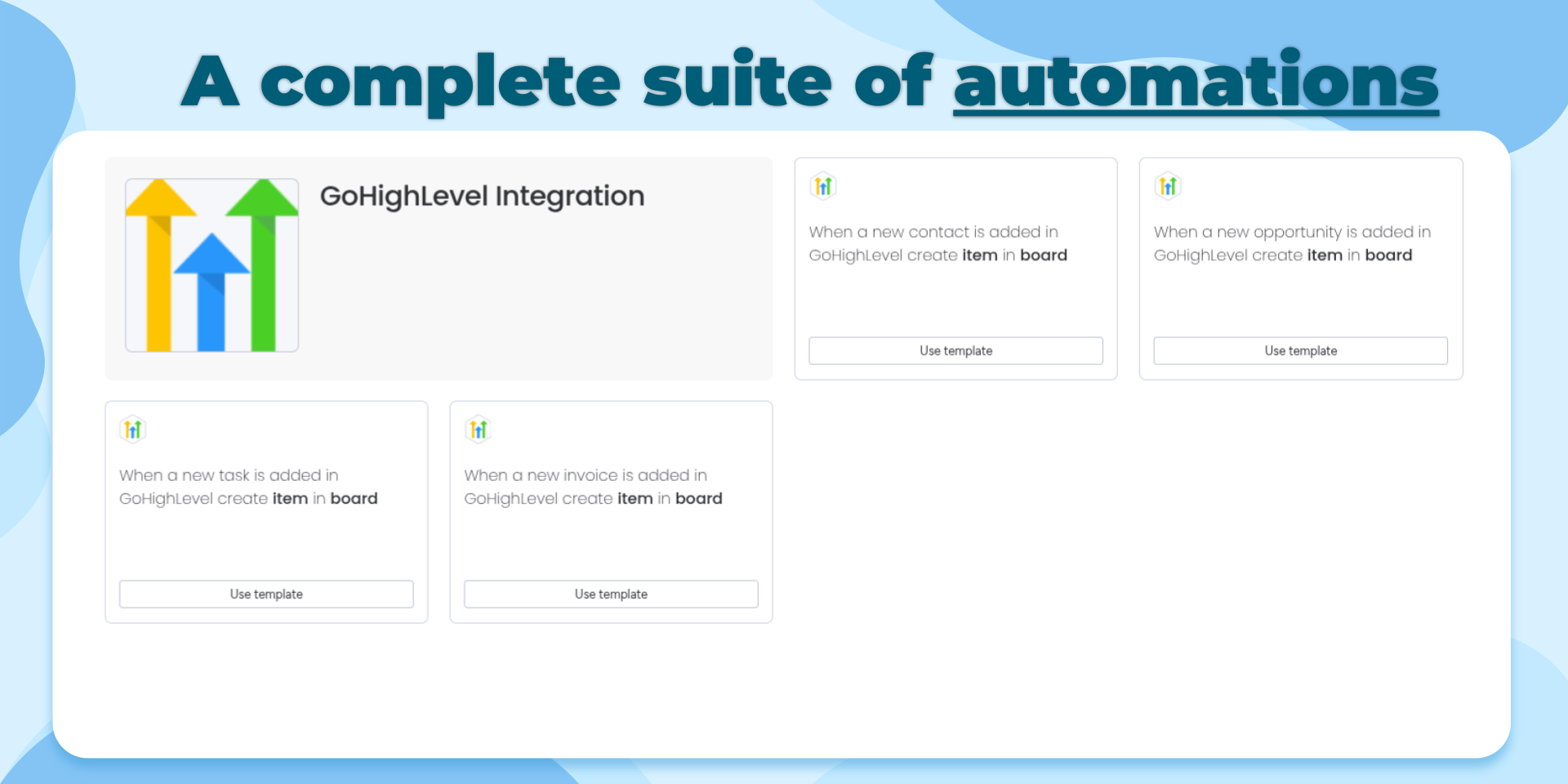
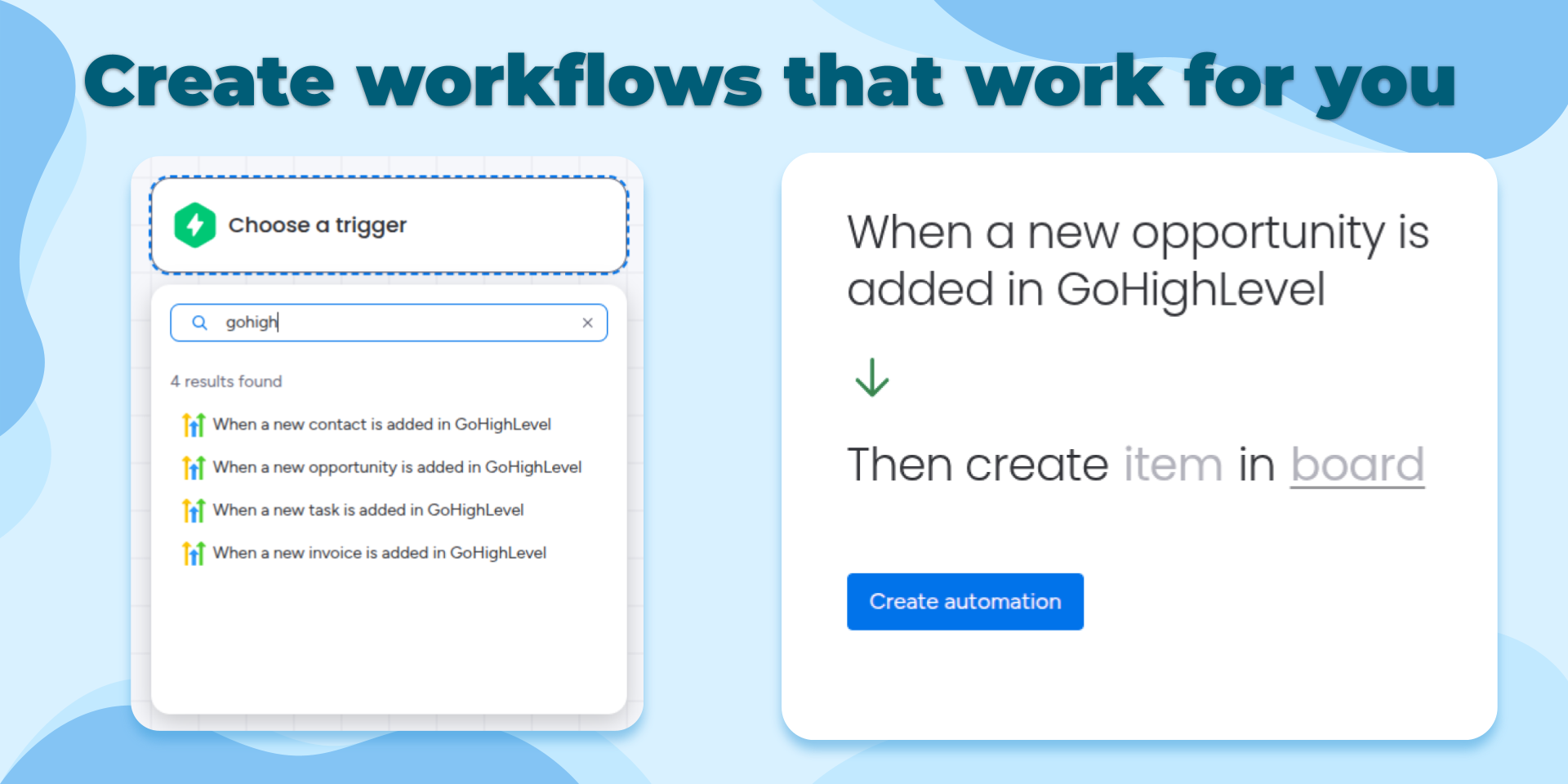
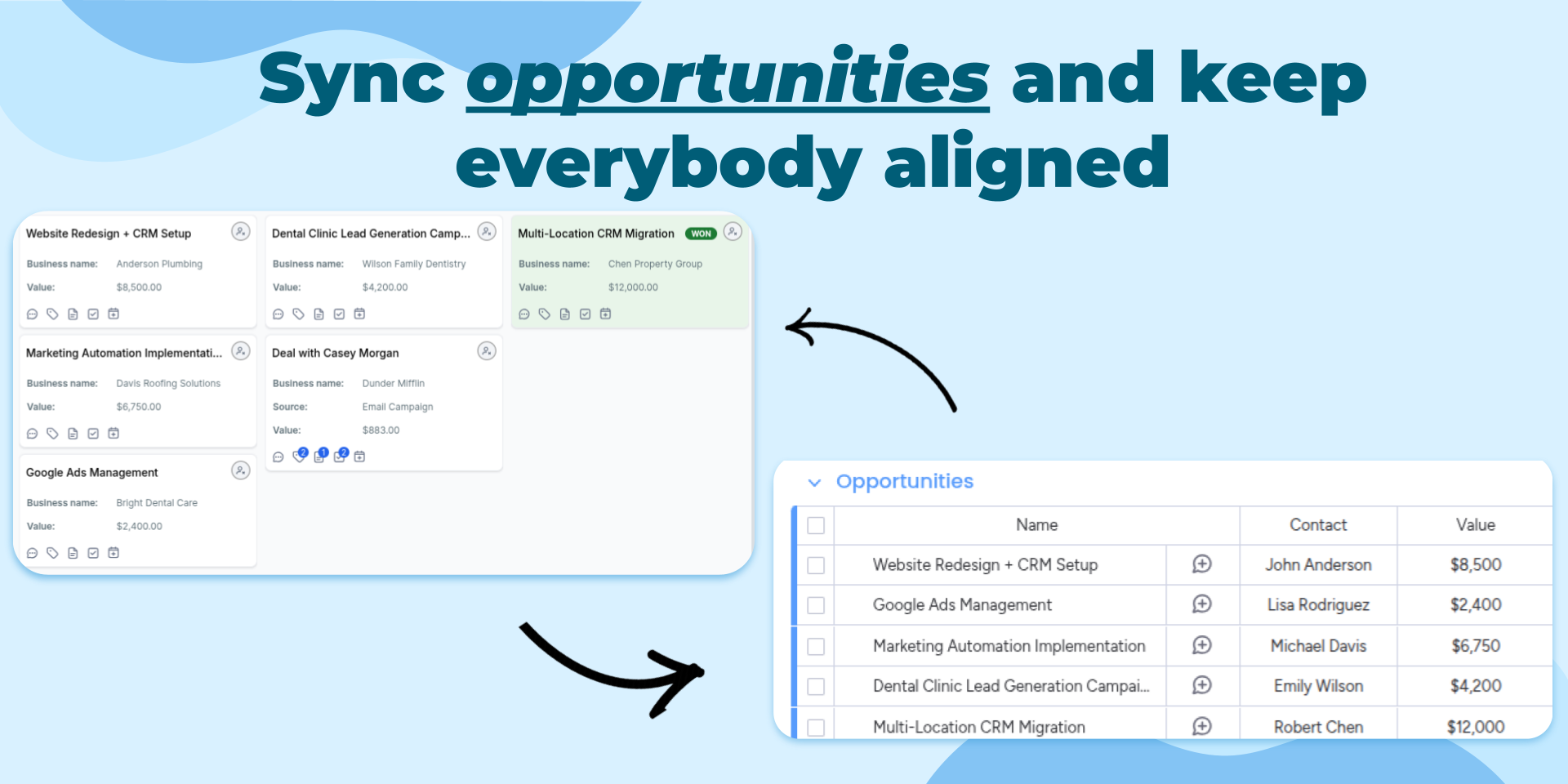
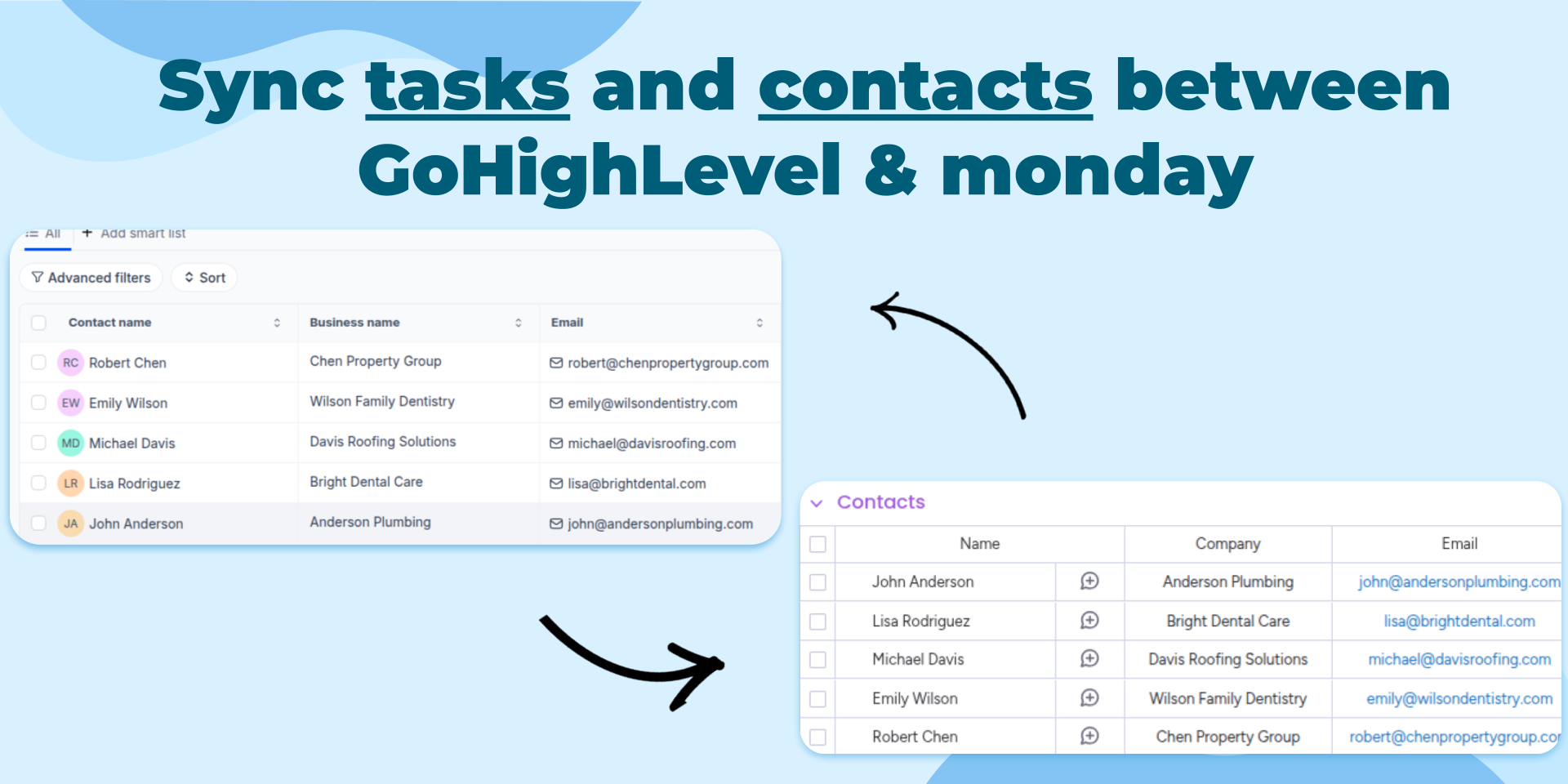
"description": "<p>Automatically connect your GoHighLevel CRM with <a href=\"http://monday.com/\" rel=\"noopener noreferrer\" target=\"_blank\">monday.com</a> and keep your sales, marketing, and operations teams aligned. Whenever a new Contact, Opportunity, Task, or Invoice is created in GoHighLevel, the integration automatically creates an item in your selected <a href=\"http://monday.com/\" rel=\"noopener noreferrer\" target=\"_blank\">monday.com</a> board, eliminating manual updates and helping your team respond faster.</p><p>Bring customer information into your existing <a href=\"http://monday.com/\" rel=\"noopener noreferrer\" target=\"_blank\">monday.com</a> workflows to improve collaboration, automate follow-up processes, and create a single operational workspace. Sales teams, agencies, and service businesses can manage customer activity using <a href=\"http://monday.com/\" rel=\"noopener noreferrer\" target=\"_blank\">monday.com</a> dashboards, automations, notifications, and reporting while continuing to work in GoHighLevel.</p><p>Common use cases include:</p><p>• Track every new Contact as it enters your CRM</p><p>• Monitor Opportunities through your sales pipeline</p><p>• Organize customer Tasks alongside internal work</p><p>• Keep Invoice activity visible for operations and finance teams</p><p>• Trigger <a href=\"http://monday.com/\" rel=\"noopener noreferrer\" target=\"_blank\">monday.com</a> automations from CRM events</p><p>• Build dashboards that combine customer, sales, and operational data</p><p>Visit our documentation and help center for setup instructions, configuration guides, and best practices.</p><p>✉️ Have an idea or feature request? Reach out anytime at <a href=\"mailto:contact@stargateapps.io\" rel=\"noopener noreferrer\" target=\"_blank\">contact@stargateapps.io</a></p>",
"short_description": "Sync monday.com and GoHighLevel with flexible automations",
"thumbnail_url": "https://cdn.monday.com/marketplace/10001258/10001258_2026_7_9_6_14_26_axta70l.png",
"logo_url": "https://cdn.monday.com/marketplace/10001258/10001258_2026_7_9_6_14_20_28l5lro.png",
"feedback_url": "contact@stargateapps.io",
"privacy_policy_url": "https://www.stargateapps.io/privacy-policy",
"featured": false,
"name": "GoHighLevel Integration",
"how_to_use_url": "https://www.stargateapps.io/how-to-use-gohighlevel-integration",
"external_pricing_url": null,
"keywords": "Workflow Automation,Marketing Automation,Tasks, Invoices,Contacts,Opportunities,Sales Pipeline,GoHighLevel,Lead Management,CRM",
"compliance_answers": [],
"created_at": "2026-08-03T10:54:27.000Z",
"updated_at": "2026-08-09T06:15:35.000Z",
"automation_app_id": null,
"marketplace_category_ids": [
13,
7,
4
],
"pinned_for_categories_ids": [],
"featured_for_categories_ids": [],
"pricing_data": null,
"label": null,
"app_values": [
"Centralize your work on monday.com"
],
"security": false,
"display_in_template_store": false,
"acquisition_source": "No touch",
"is_connector": false,
"show_connections": false,
"terms_of_service_url": "https://www.stargateapps.io/terms",
"available_for_tiers": [],
"available_for_products": [],
"google_analytics_tag_id": null,
"is_solution": false,
"cta_override": null,
"app_scope_str": "boards:read,boards:write,notifications:write,me:read",
"app_client_id": "54da28789e9ca0a06c0ef66d7fa80aee",
"app_color": {
"hsl": {
"h": 210,
"s": 0,
"l": 0.9740000000000001,
"a": 1
},
"hex": "#f8f8f8",
"rgb": {
"r": 248,
"g": 248,
"b": 248,
"a": 1
},
"hsv": {
"h": 210,
"s": 0,
"v": 0.9740000000000001,
"a": 1
},
"oldHue": 210,
"source": "hsv"
},
"plans": [
{
"id": "11516649-1-tier_free",
"appPlanId": "tier_free",
"name": "Free",
"versionId": 1,
"isTrial": false,
"prices": {
"type": "standard",
"monthly": 0,
"yearly": 0
},
"versionState": "live",
"appId": 11516649,
"description": "Get started with GoHighLevel and monday.com automation. Perfect for testing workflows and connecting your CRM, marketing, and sales processes across platforms. Includes 50 automation actions per month.",
"extraData": {
"bullets": [
"50 automation actions / month",
"Unlimited users",
"All automations included",
"Email support"
],
"monthlyFee": 0,
"yearlyFee": 0
},
"isFree": true,
"isRecommended": false,
"currency": "USD"
},
{
"id": "11516649-1-tier_1",
"appPlanId": "tier_1",
"name": "Starter",
"versionId": 1,
"isTrial": false,
"prices": {
"type": "standard",
"monthly": 25,
"yearly": 20
},
"versionState": "live",
"appId": 11516649,
"description": "Automate your essential sales and marketing workflows. Ideal for agencies and small businesses syncing contacts, opportunities, appointments, and tasks between GoHighLevel and monday.com. Includes 300 automation actions per month.",
"extraData": {
"bullets": [
"300 automation actions / month",
"Unlimited users",
"All automations included",
"Email support"
],
"monthlyFee": 25,
"yearlyFee": 20
},
"isFree": false,
"isRecommended": false,
"currency": "USD"
},
{
"id": "11516649-1-tier_2",
"appPlanId": "tier_2",
"name": "Growth",
"versionId": 1,
"isTrial": false,
"prices": {
"type": "standard",
"monthly": 50,
"yearly": 40
},
"versionState": "live",
"appId": 11516649,
"description": "Scale your client operations with more automation capacity. Great for growing teams managing multiple pipelines, leads, and customer journeys while reducing manual work. Includes 1,000 automation actions per month.",
"extraData": {
"bullets": [
"1000 automation actions / month",
"Unlimited users",
"All automations included",
"Email support"
],
"monthlyFee": 50,
"yearlyFee": 40
},
"isFree": false,
"isRecommended": false,
"currency": "USD"
},
{
"id": "11516649-1-tier_3",
"appPlanId": "tier_3",
"name": "Pro",
"versionId": 1,
"isTrial": false,
"prices": {
"type": "standard",
"monthly": 100,
"yearly": 80
},
"versionState": "live",
"appId": 11516649,
"description": "Power high-volume CRM and marketing workflows with advanced automation capacity. Designed for agencies and businesses running active sales pipelines, campaigns, appointments, and customer communications. Includes 3,000 automation actions per month.",
"extraData": {
"bullets": [
"3000 automation actions / month",
"Unlimited users",
"All automations included",
"Priority support"
],
"monthlyFee": 100,
"yearlyFee": 80
},
"isFree": false,
"isRecommended": true,
"currency": "USD"
},
{
"id": "11516649-1-tier_4",
"appPlanId": "tier_4",
"name": "Business",
"versionId": 1,
"isTrial": false,
"prices": {
"type": "standard",
"monthly": 200,
"yearly": 160
},
"versionState": "live",
"appId": 11516649,
"description": "Run your client operations at scale with reliable automation. Built for organizations where sales, marketing, and customer workflows depend on real-time synchronization between GoHighLevel and monday.com. Includes 10,000 automation actions per month.",
"extraData": {
"bullets": [
"10000 automation actions / month",
"Unlimited users",
"All automations included",
"Priority support"
],
"monthlyFee": 200,
"yearlyFee": 160
},
"isFree": false,
"isRecommended": false,
"currency": "USD"
},
{
"id": "11516649-1-tier_5",
"appPlanId": "tier_5",
"name": "Scale",
"versionId": 1,
"isTrial": false,
"prices": {
"type": "standard",
"monthly": 500,
"yearly": 400
},
"versionState": "live",
"appId": 11516649,
"description": "Maximum automation power for agencies and enterprise organizations. Best for teams managing multiple clients, high-volume customer interactions, and complex workflows across multiple pipelines and workspaces. Includes 25,000 automation actions per month.",
"extraData": {
"bullets": [
"25000 automation actions / month",
"Unlimited users",
"All automations included",
"Premium support"
],
"monthlyFee": 500,
"yearlyFee": 400
},
"isFree": false,
"isRecommended": false,
"currency": "USD"
},
{
"id": "11516649-2-tier_free",
"appPlanId": "tier_free",
"name": "Free",
"versionId": 2,
"isTrial": false,
"prices": {
"type": "standard",
"monthly": 0,
"yearly": 0
},
"versionState": "live",
"appId": 11516649,
"description": "Get started with GoHighLevel and monday.com automation. Perfect for testing workflows and connecting your CRM, marketing, and sales processes across platforms. Includes 50 automation actions per month.",
"extraData": {
"bullets": [
"50 automation actions / month",
"Unlimited users",
"All automations included",
"Email support"
],
"monthlyFee": 0,
"yearlyFee": 0
},
"isFree": true,
"isRecommended": false,
"currency": "USD"
},
{
"id": "11516649-2-tier_1",
"appPlanId": "tier_1",
"name": "Starter",
"versionId": 2,
"isTrial": false,
"prices": {
"type": "standard",
"monthly": 25,
"yearly": 20
},
"versionState": "live",
"appId": 11516649,
"description": "Automate your essential sales and marketing workflows. Ideal for agencies and small businesses syncing contacts, opportunities, appointments, and tasks between GoHighLevel and monday.com. Includes 300 automation actions per month.",
"extraData": {
"bullets": [
"300 automation actions / month",
"Unlimited users",
"All automations included",
"Email support"
],
"monthlyFee": 25,
"yearlyFee": 20
},
"isFree": false,
"isRecommended": false,
"currency": "USD"
},
{
"id": "11516649-2-tier_2",
"appPlanId": "tier_2",
"name": "Growth",
"versionId": 2,
"isTrial": false,
"prices": {
"type": "standard",
"monthly": 50,
"yearly": 40
},
"versionState": "live",
"appId": 11516649,
"description": "Scale your client operations with more automation capacity. Great for growing teams managing multiple pipelines, leads, and customer journeys while reducing manual work. Includes 1,000 automation actions per month.",
"extraData": {
"bullets": [
"1,000 automation actions / month",
"Unlimited users",
"All automations included",
"Email support"
],
"monthlyFee": 50,
"yearlyFee": 40
},
"isFree": false,
"isRecommended": false,
"currency": "USD"
},
{
"id": "11516649-2-tier_3",
"appPlanId": "tier_3",
"name": "Pro",
"versionId": 2,
"isTrial": false,
"prices": {
"type": "standard",
"monthly": 100,
"yearly": 80
},
"versionState": "live",
"appId": 11516649,
"description": "Power high-volume CRM and marketing workflows with advanced automation capacity. Designed for agencies and businesses running active sales pipelines, campaigns, appointments, and customer communications. Includes 3,000 automation actions per month.",
"extraData": {
"bullets": [
"3,000 automation actions / month",
"Unlimited users",
"All automations included",
"Priority support"
],
"monthlyFee": 100,
"yearlyFee": 80
},
"isFree": false,
"isRecommended": true,
"currency": "USD"
},
{
"id": "11516649-2-tier_4",
"appPlanId": "tier_4",
"name": "Business",
"versionId": 2,
"isTrial": false,
"prices": {
"type": "standard",
"monthly": 200,
"yearly": 160
},
"versionState": "live",
"appId": 11516649,
"description": "Run your client operations at scale with reliable automation. Built for organizations where sales, marketing, and customer workflows depend on real-time synchronization between GoHighLevel and monday.com. Includes 10,000 automation actions per month.",
"extraData": {
"bullets": [
"10,000 automation actions / month",
"Unlimited users",
"All automations included",
"Priority support"
],
"monthlyFee": 200,
"yearlyFee": 160
},
"isFree": false,
"isRecommended": false,
"currency": "USD"
},
{
"id": "11516649-2-tier_5",
"appPlanId": "tier_5",
"name": "Scale",
"versionId": 2,
"isTrial": false,
"prices": {
"type": "standard",
"monthly": 500,
"yearly": 400
},
"versionState": "live",
"appId": 11516649,
"description": "Maximum automation power for agencies and enterprise organizations. Best for teams managing multiple clients, high-volume customer interactions, and complex workflows across multiple pipelines and workspaces. Includes 25,000 automation actions per month.",
"extraData": {
"bullets": [
"25,000 automation actions / month",
"Unlimited users",
"All automations included",
"Premium support"
],
"monthlyFee": 500,
"yearlyFee": 400
},
"isFree": false,
"isRecommended": false,
"currency": "USD"
}
],
"app_live_version": {
"updated_at": "2026-10-25T18:52:47.937Z",
"id": 19266689
},
"pricing_model": null,
"monetization": {
"monetizationType": "monday",
"hasFreePlan": true,
"hasPaidPlan": true,
"hasTrialPlan": false
},
"badges_data": {
"security": false,
"app_values": [
"Centralize your work on monday.com"
],
"acquisition_source": "No touch",
"display_in_template_store": false
},
"data": {
"is_solution": false,
"cta_override": null,
"is_connector": false,
"show_connections": false,
"available_for_tiers": [],
"terms_of_service_url": "https://www.stargateapps.io/terms",
"available_for_products": [],
"google_analytics_tag_id": null
},
"display": null,
"installsDelta": {
"totalInstalls": 32,
"sevenDays": 0,
"thirtyDays": 2,
"ninetyDays": 29
}
}