Balance workload and assign work to the right person
What you can do with Workloadify:
📊 Visualize workload across connected boards
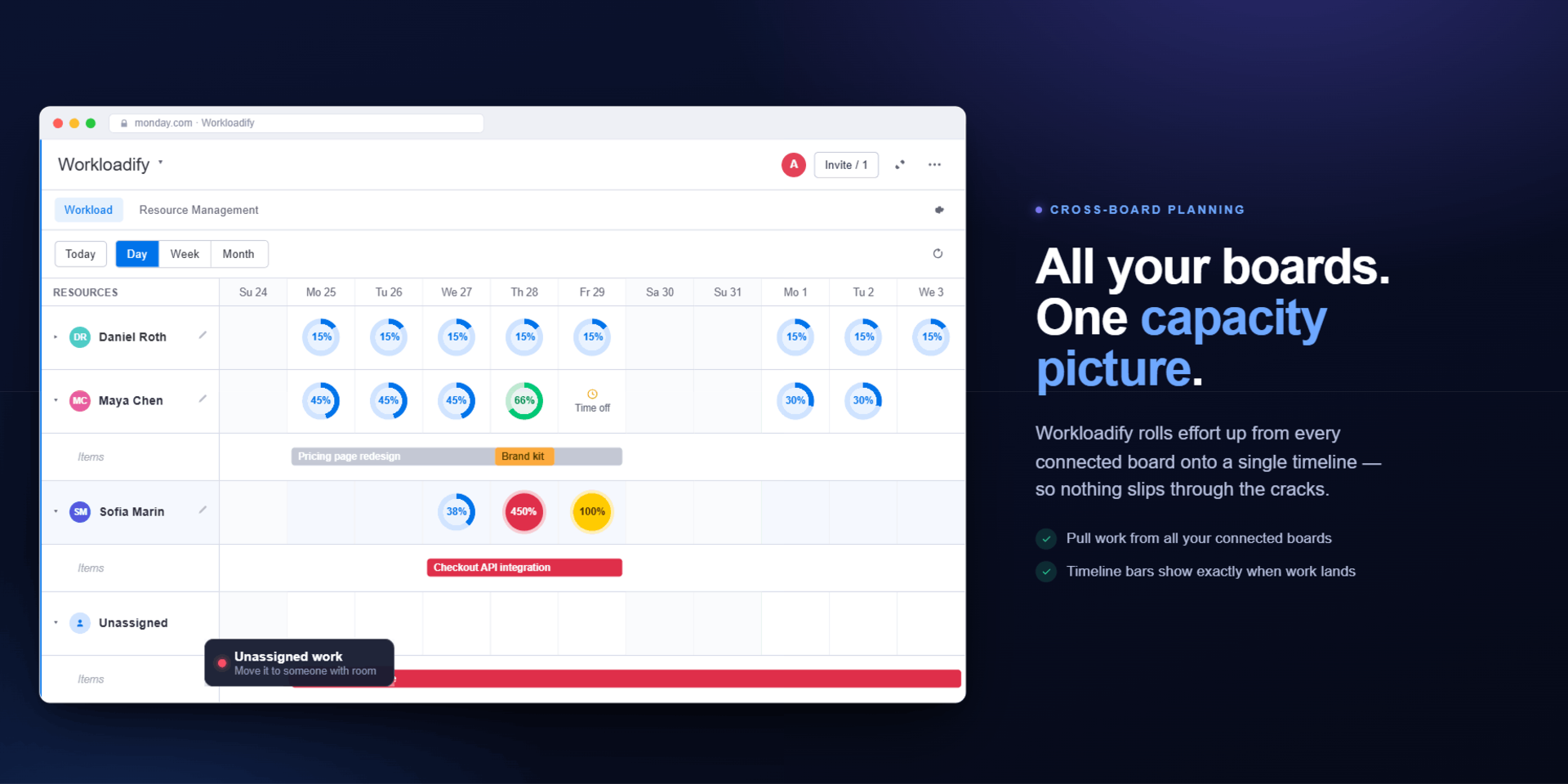
Bring work from multiple boards into one unified view.
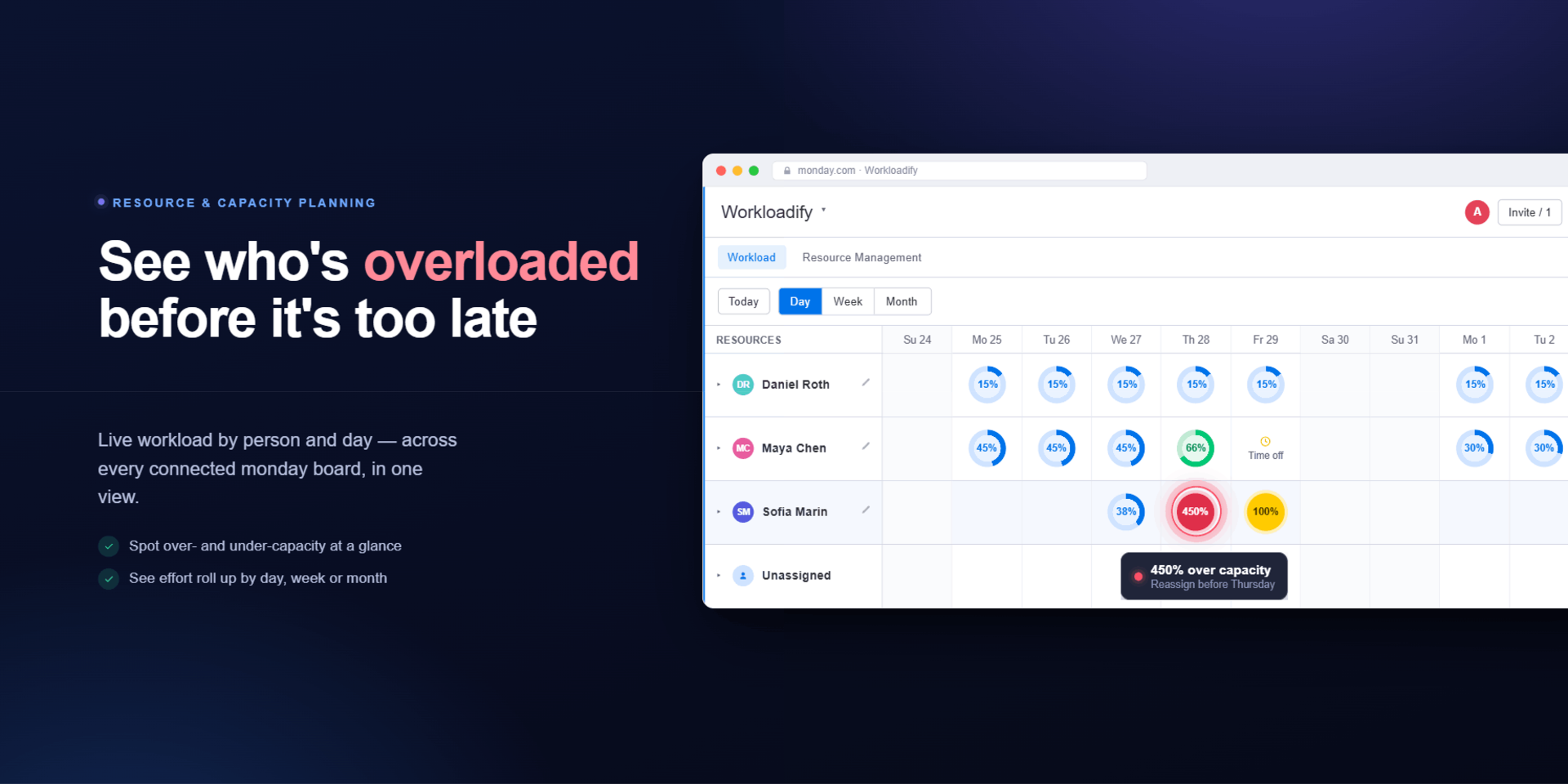
See workload by person and date in day, week, or month views, and quickly understand who is overloaded and who has room for more.
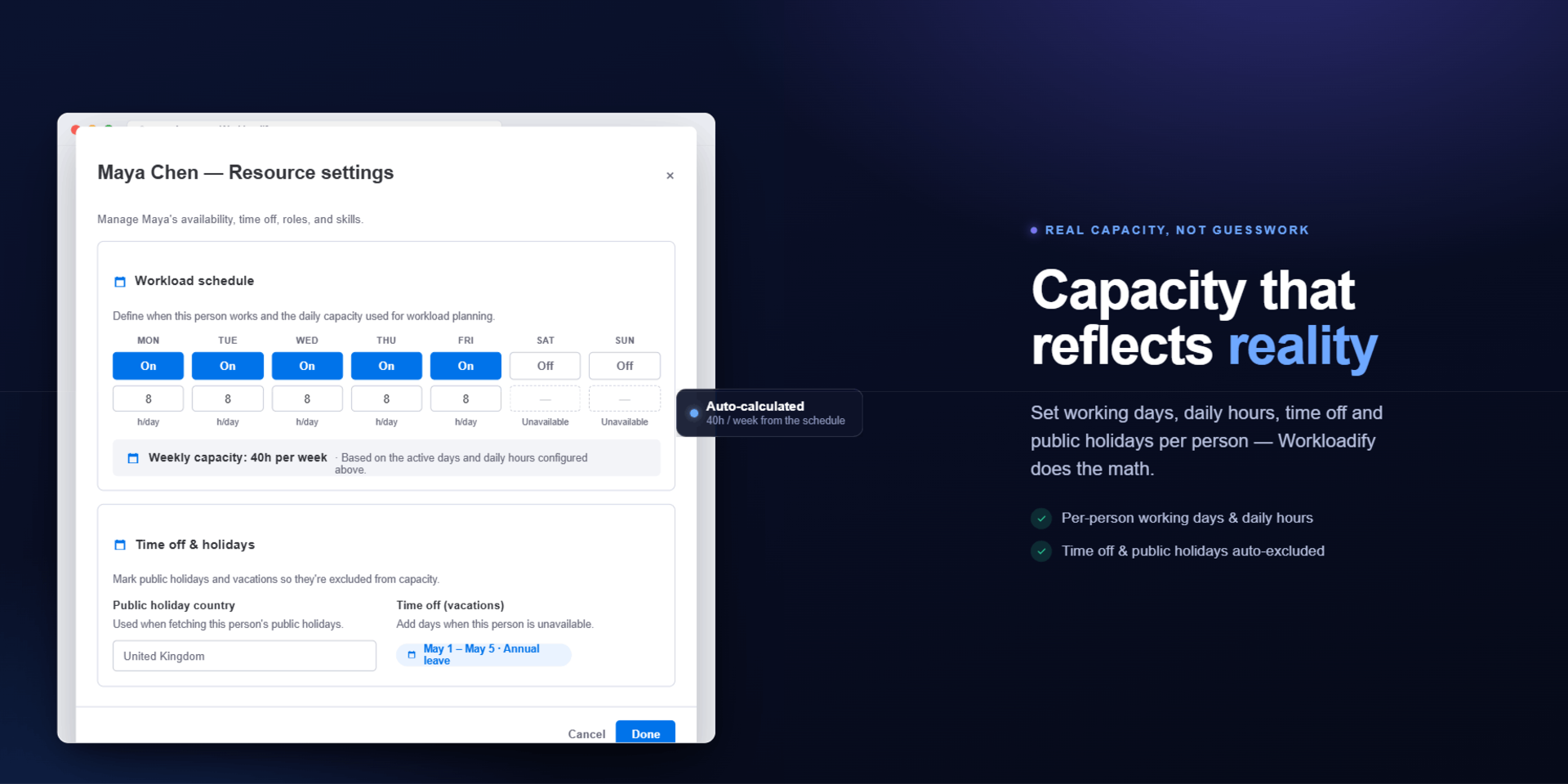
🗓️ Plan with real capacity
Set working days, daily hours, time off, and public holidays, so workload is measured against actual availability.
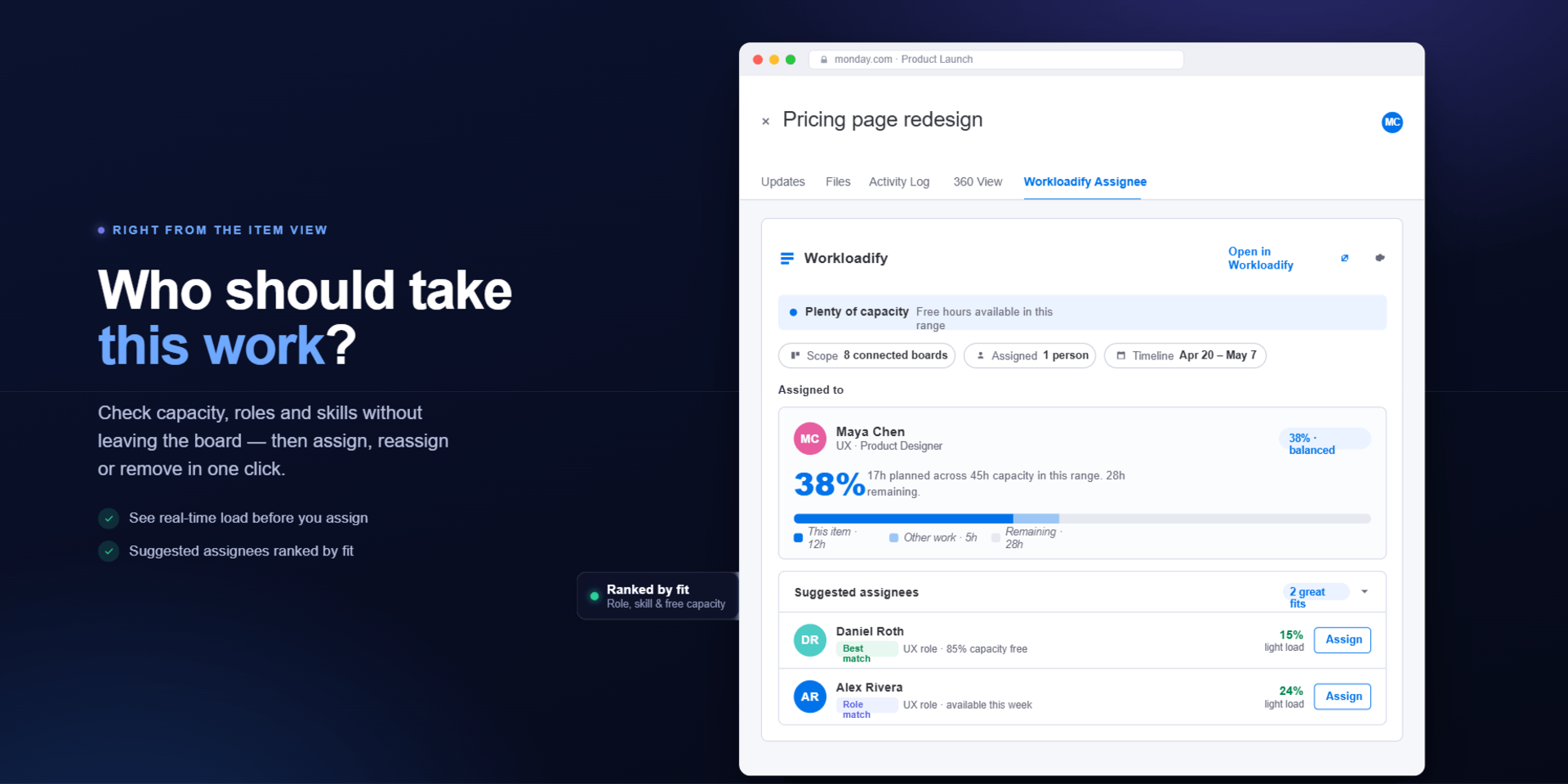
👤 Assign the right person directly from the item view
Open any monday item and compare suggested assignees based on:
Current workload and free capacity
Availability
Roles
Skills
Assign or reassign without switching to another board or tool.
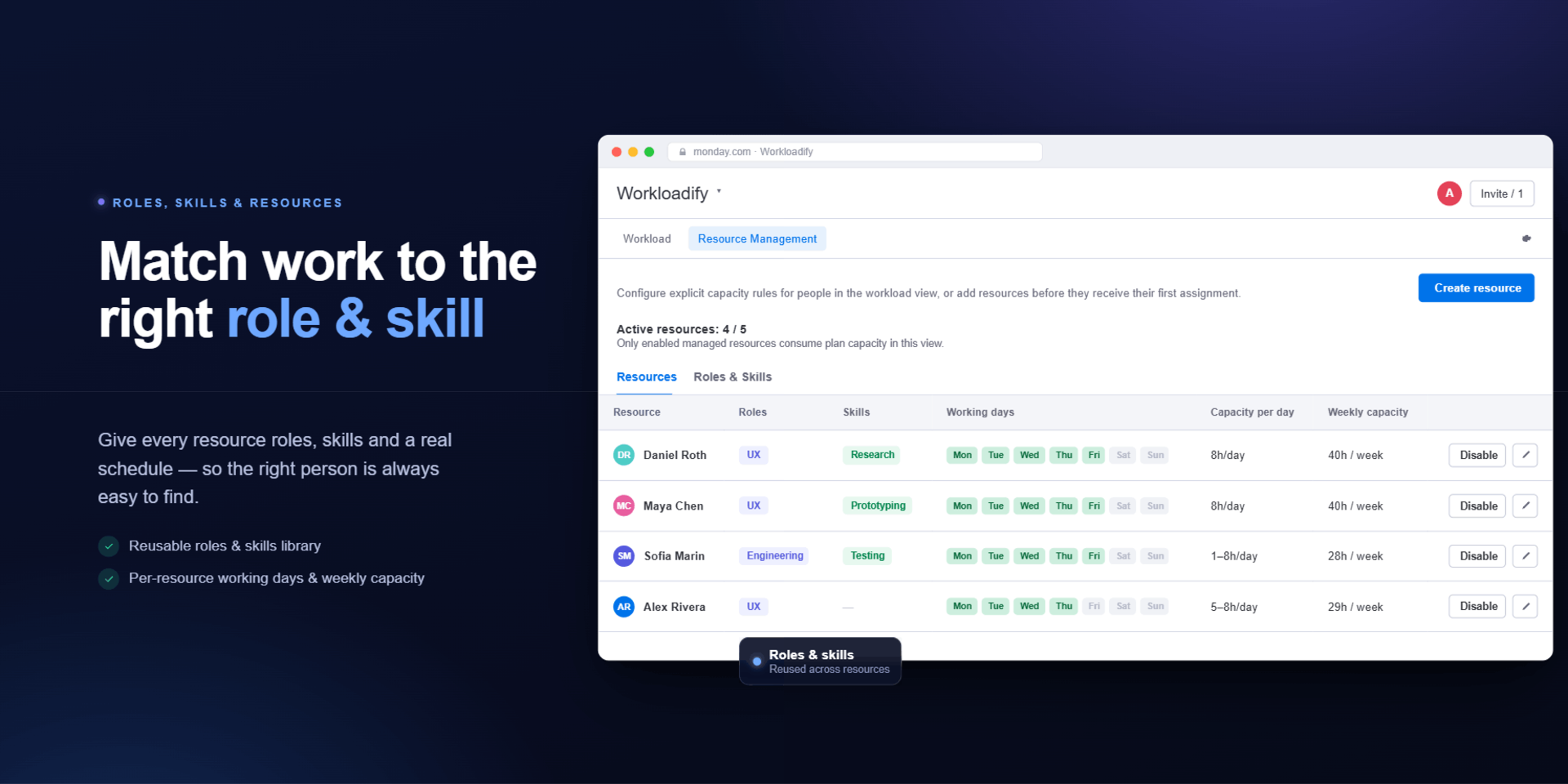
🏷️ Organize resources with roles and skills
Create reusable roles and skills to help match work with the right people faster.
Built for teams managing people and delivery
Workloadify is ideal for project managers, team leads, agencies, resource planners, and teams managing projects, sprints, client work, or billable work.
{
  "id": 10001249,
  "marketplace_developer_id": 10000186,
  "app_id": 11495969,
  "app_type": "app",
  "security_info": {},
  "gallery_assets": [
    {
      "url": "https://cdn.monday.com/marketplace/10001249/10001249_2026_6_23_11_15_41_sj6p4do.png",
      "type": "image"
    },
    {
      "url": "https://cdn.monday.com/marketplace/10001249/10001249_2026_6_23_11_15_48_iqbz0a6.png",
      "type": "image"
    },
    {
      "url": "https://cdn.monday.com/marketplace/10001249/10001249_2026_6_23_11_15_55_32f6xx1.png",
      "type": "image"
    },
    {
      "url": "https://cdn.monday.com/marketplace/10001249/10001249_2026_6_23_11_16_2_gpj4zky.png",
      "type": "image"
    },
    {
      "url": "https://cdn.monday.com/marketplace/10001249/10001249_2026_6_23_11_16_20_bjvw6ue.png",
      "type": "image"
    }
  ],
  "description": "<p><strong><u>What you can do with Workloadify:</u></strong></p><p><br></p><p>📊 <strong>Visualize workload across connected boards</strong></p><p>Bring work from multiple boards into one unified view.</p><p>See workload by person and date in day, week, or month views, and quickly understand who is overloaded and who has room for more.</p><p><br></p><p><strong>🗓️ Plan with real capacity</strong></p><p>Set working days, daily hours, time off, and public holidays, so workload is measured against actual availability.</p><p><br></p><p><strong>👤 Assign the right person directly from the item view</strong></p><p>Open any monday item and compare suggested assignees based on:</p><ul><li>Current workload and free capacity</li><li>Availability</li><li>Roles</li><li>Skills</li></ul><p>Assign or reassign without switching to another board or tool.</p><p><br></p><p><strong>🏷️ Organize resources with roles and skills</strong></p><p>Create reusable roles and skills to help match work with the right people faster.</p><p><br></p><p><strong>Built for teams managing people and delivery</strong></p><p>Workloadify is ideal for project managers, team leads, agencies, resource planners, and teams managing projects, sprints, client work, or billable work.</p><p><br></p><p><strong><u>Use it to:</u></strong></p><ul><li>Balance workload across projects</li><li>Staff new work based on capacity</li><li>Reassign tasks when priorities change</li><li>Plan around holidays and time off</li><li>Reduce overallocation and delivery risk</li></ul><p><br></p><p><strong>See how to get started</strong></p><p>👉<a href=\" https://appstorm.tech/workloadify_documentation\" rel=\"noopener noreferrer\" target=\"_blank\">How to use guide</a></p>",
  "short_description": "Balance workload and assign work to the right person",
  "thumbnail_url": "https://cdn.monday.com/marketplace/10001249/10001249_2026_6_23_11_15_0_9ce7n1q.png",
  "logo_url": "https://cdn.monday.com/marketplace/10001249/10001249_2026_6_23_11_14_29_0uknvjb.png",
  "feedback_url": "support@appstorm.tech",
  "privacy_policy_url": "https://appstorm.tech/privacy",
  "featured": false,
  "name": "Workloadify",
  "how_to_use_url": "https://appstorm.tech/workloadify_documentation",
  "external_pricing_url": null,
  "keywords": "Workload,Capacity,Assignee,Overload,Plan Work,Workload Management,Resource Planning,Team Capacity,Assign Tasks,Resource Allocation",
  "compliance_answers": [],
  "created_at": "2026-07-23T11:11:32.000Z",
  "updated_at": "2026-08-03T08:06:37.000Z",
  "automation_app_id": null,
  "marketplace_category_ids": [
    10000001,
    6,
    5
  ],
  "pinned_for_categories_ids": [],
  "featured_for_categories_ids": [],
  "pricing_data": "14 days trial",
  "label": null,
  "app_values": [
    "Easier resource management"
  ],
  "security": false,
  "display_in_template_store": false,
  "acquisition_source": "No touch",
  "is_connector": false,
  "show_connections": false,
  "terms_of_service_url": "https://appstorm.tech/tos",
  "available_for_tiers": [],
  "available_for_products": [],
  "google_analytics_tag_id": null,
  "is_solution": false,
  "cta_override": null,
  "app_scope_str": "boards:read,boards:write,workspaces:read,users:read",
  "app_client_id": "521c3e7d58c9b0e56b828e28cedb2d2d",
  "app_color": {
    "hsl": {
      "h": 11.999999999999932,
      "s": 0,
      "l": 1,
      "a": 1
    },
    "hex": "#ffffff",
    "rgb": {
      "r": 255,
      "g": 255,
      "b": 255,
      "a": 1
    },
    "hsv": {
      "h": 11.999999999999932,
      "s": 0,
      "v": 1,
      "a": 1
    },
    "oldHue": 11.999999999999932,
    "source": "hsv"
  },
  "plans": [
    {
      "id": "11495969-1-starter_plan",
      "appPlanId": "starter_plan",
      "name": "Starter",
      "versionId": 1,
      "isTrial": false,
      "prices": {
        "type": "standard",
        "monthly": 25,
        "yearly": 19
      },
      "versionState": "live",
      "appId": 11495969,
      "description": "up to 5 Resources",
      "extraData": {
        "bullets": [
          "Only pay for the people you plan work for.",
          "(Not every monday.com user needs to be a resource.)"
        ],
        "monthlyFee": 25,
        "yearlyFee": 19
      },
      "isFree": false,
      "isRecommended": false,
      "currency": "USD"
    },
    {
      "id": "11495969-1-basic_plan",
      "appPlanId": "basic_plan",
      "name": "Basic",
      "versionId": 1,
      "isTrial": false,
      "prices": {
        "type": "standard",
        "monthly": 35,
        "yearly": 29
      },
      "versionState": "live",
      "appId": 11495969,
      "description": "up to 10 Resources",
      "extraData": {
        "bullets": [
          "Only pay for the people you plan work for.",
          "(Not every monday.com user needs to be a resource.)"
        ],
        "monthlyFee": 35,
        "yearlyFee": 29
      },
      "isFree": false,
      "isRecommended": false,
      "currency": "USD"
    },
    {
      "id": "11495969-1-growth_plan",
      "appPlanId": "growth_plan",
      "name": "Growth",
      "versionId": 1,
      "isTrial": false,
      "prices": {
        "type": "standard",
        "monthly": 65,
        "yearly": 55
      },
      "versionState": "live",
      "appId": 11495969,
      "description": "up to 25 Resources",
      "extraData": {
        "bullets": [
          "Only pay for the people you plan work for.",
          "(Not every monday.com user needs to be a resource.)"
        ],
        "monthlyFee": 65,
        "yearlyFee": 55
      },
      "isFree": false,
      "isRecommended": false,
      "currency": "USD"
    },
    {
      "id": "11495969-1-team_plan",
      "appPlanId": "team_plan",
      "name": "Team",
      "versionId": 1,
      "isTrial": false,
      "prices": {
        "type": "standard",
        "monthly": 95,
        "yearly": 79
      },
      "versionState": "live",
      "appId": 11495969,
      "description": "up to 40 Resources",
      "extraData": {
        "bullets": [
          "Only pay for the people you plan work for.",
          "(Not every monday.com user needs to be a resource.)"
        ],
        "monthlyFee": 95,
        "yearlyFee": 79
      },
      "isFree": false,
      "isRecommended": false,
      "currency": "USD"
    },
    {
      "id": "11495969-1-pro_plan",
      "appPlanId": "pro_plan",
      "name": "Pro",
      "versionId": 1,
      "isTrial": false,
      "prices": {
        "type": "standard",
        "monthly": 139,
        "yearly": 109
      },
      "versionState": "live",
      "appId": 11495969,
      "description": "up to 60 Resources",
      "extraData": {
        "bullets": [
          "Only pay for the people you plan work for.",
          "(Not every monday.com user needs to be a resource.)"
        ],
        "monthlyFee": 139,
        "yearlyFee": 109
      },
      "isFree": false,
      "isRecommended": false,
      "currency": "USD"
    },
    {
      "id": "11495969-1-business_plan",
      "appPlanId": "business_plan",
      "name": "Business",
      "versionId": 1,
      "isTrial": false,
      "prices": {
        "type": "standard",
        "monthly": 169,
        "yearly": 139
      },
      "versionState": "live",
      "appId": 11495969,
      "description": "up to 80 Resources",
      "extraData": {
        "bullets": [
          "Only pay for the people you plan work for.",
          "(Not every monday.com user needs to be a resource.)"
        ],
        "monthlyFee": 169,
        "yearlyFee": 139
      },
      "isFree": false,
      "isRecommended": false,
      "currency": "USD"
    },
    {
      "id": "11495969-1-advanced_plan",
      "appPlanId": "advanced_plan",
      "name": "Advanced",
      "versionId": 1,
      "isTrial": true,
      "prices": {
        "type": "standard",
        "monthly": 199,
        "yearly": 169
      },
      "versionState": "live",
      "appId": 11495969,
      "description": "up to 100 Resources",
      "extraData": {
        "bullets": [
          "Only pay for the people you plan work for.",
          "(Not every monday.com user needs to be a resource.)"
        ],
        "monthlyFee": 199,
        "yearlyFee": 169
      },
      "isFree": false,
      "isRecommended": false,
      "currency": "USD"
    },
    {
      "id": "11495969-1-premium_plan",
      "appPlanId": "premium_plan",
      "name": "Premium",
      "versionId": 1,
      "isTrial": false,
      "prices": {
        "type": "standard",
        "monthly": 289,
        "yearly": 239
      },
      "versionState": "live",
      "appId": 11495969,
      "description": "up to 150 Resources",
      "extraData": {
        "bullets": [
          "Only pay for the people you plan work for.",
          "(Not every monday.com user needs to be a resource.)"
        ],
        "monthlyFee": 289,
        "yearlyFee": 239
      },
      "isFree": false,
      "isRecommended": false,
      "currency": "USD"
    },
    {
      "id": "11495969-1-elite_plan",
      "appPlanId": "elite_plan",
      "name": "Elite",
      "versionId": 1,
      "isTrial": false,
      "prices": {
        "type": "standard",
        "monthly": 349,
        "yearly": 279
      },
      "versionState": "live",
      "appId": 11495969,
      "description": "up to 200 Resources",
      "extraData": {
        "bullets": [
          "Only pay for the people you plan work for.",
          "(Not every monday.com user needs to be a resource.)"
        ],
        "monthlyFee": 349,
        "yearlyFee": 279
      },
      "isFree": false,
      "isRecommended": false,
      "currency": "USD"
    },
    {
      "id": "11495969-1-enterprise_plan",
      "appPlanId": "enterprise_plan",
      "name": "Enterprise",
      "versionId": 1,
      "isTrial": false,
      "prices": {
        "type": "standard",
        "monthly": 439,
        "yearly": 359
      },
      "versionState": "live",
      "appId": 11495969,
      "description": "up to 300 Resources",
      "extraData": {
        "bullets": [
          "Only pay for the people you plan work for.",
          "(Not every monday.com user needs to be a resource.)"
        ],
        "monthlyFee": 439,
        "yearlyFee": 359
      },
      "isFree": false,
      "isRecommended": false,
      "currency": "USD"
    }
  ],
  "app_live_version": {
    "updated_at": "2026-07-27T09:33:21.045Z",
    "id": 16390634
  },
  "pricing_model": null,
  "monetization": {
    "monetizationType": "monday",
    "hasFreePlan": false,
    "hasPaidPlan": true,
    "hasTrialPlan": true
  },
  "badges_data": {
    "security": false,
    "app_values": [
      "Easier resource management"
    ],
    "pricing_data": "14 days trial",
    "acquisition_source": "No touch",
    "display_in_template_store": false
  },
  "data": {
    "is_solution": false,
    "cta_override": null,
    "is_connector": false,
    "show_connections": false,
    "available_for_tiers": [],
    "terms_of_service_url": "https://appstorm.tech/tos",
    "available_for_products": [],
    "google_analytics_tag_id": null
  },
  "display": null,
  "installsDelta": {
    "totalInstalls": 9,
    "sevenDays": 0,
    "thirtyDays": 0,
    "ninetyDays": 5
  }
}