View activity across workspaces in one interactive dashboard
Stop jumping between boards and see all activity in a single, powerful and interactive dashboard widget.
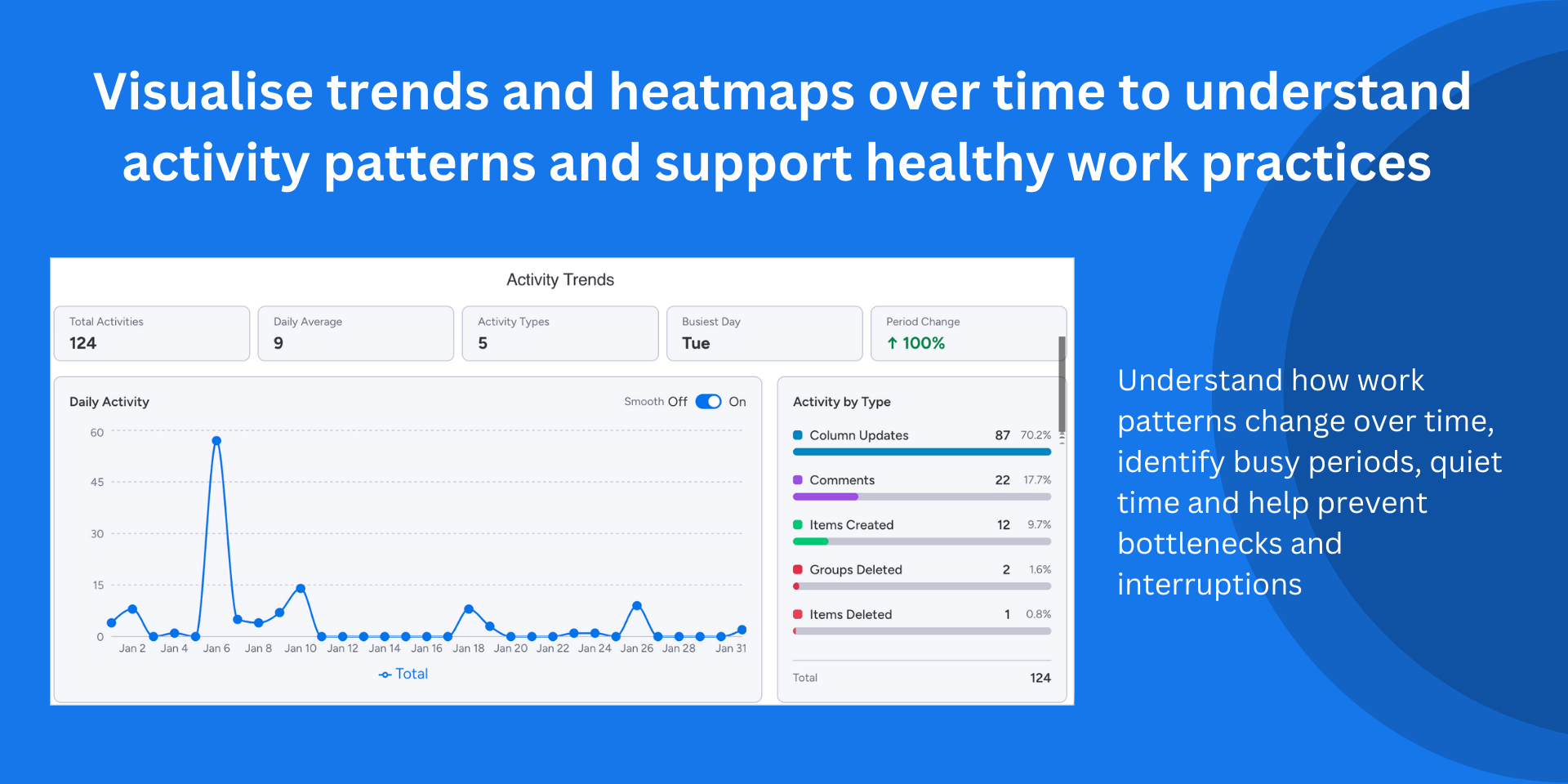
Activity Pulse brings all your activities together, regardless of board or workspace. Gain valuable insight into working patterns and trends.
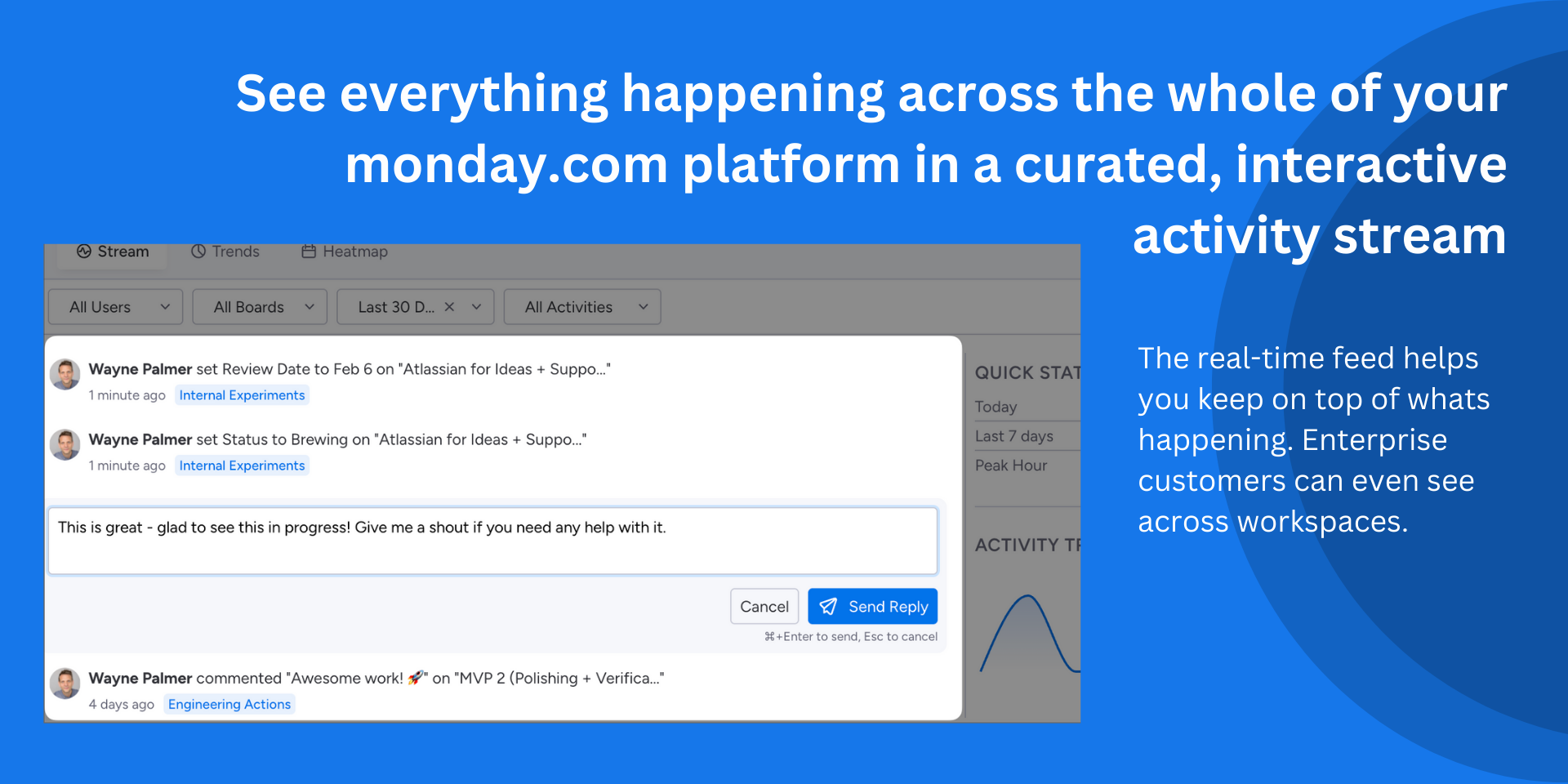
Unified, curated activity stream
See item creations, updates, status changes, and assignments from multiple boards and workspaces in real-time.
Direct replies
Create item updates directly from the activity stream to keep communication flowing.
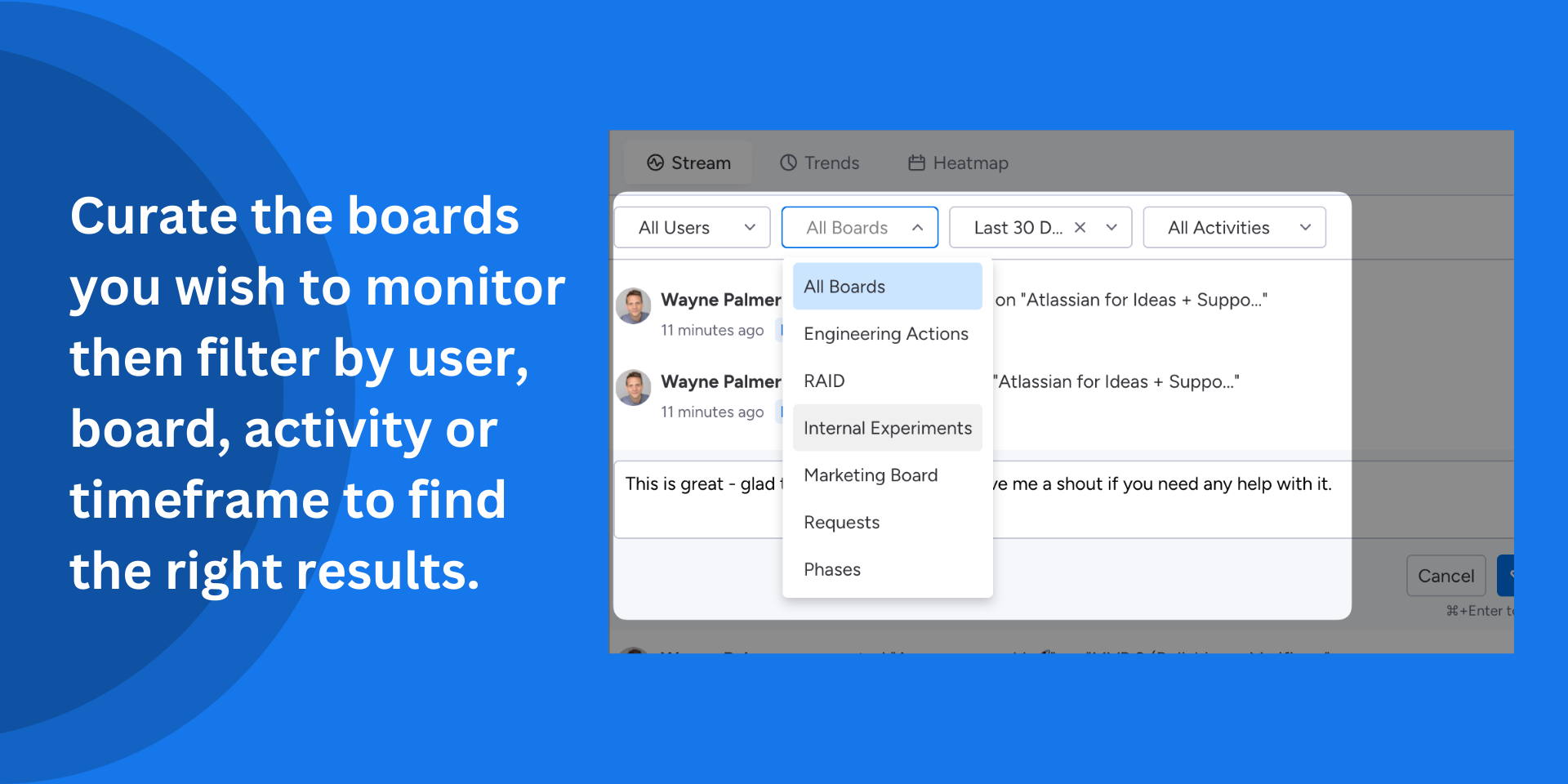
Smart filtering
Filter by specific boards, team members, activity types, or date ranges to find exactly what you need.
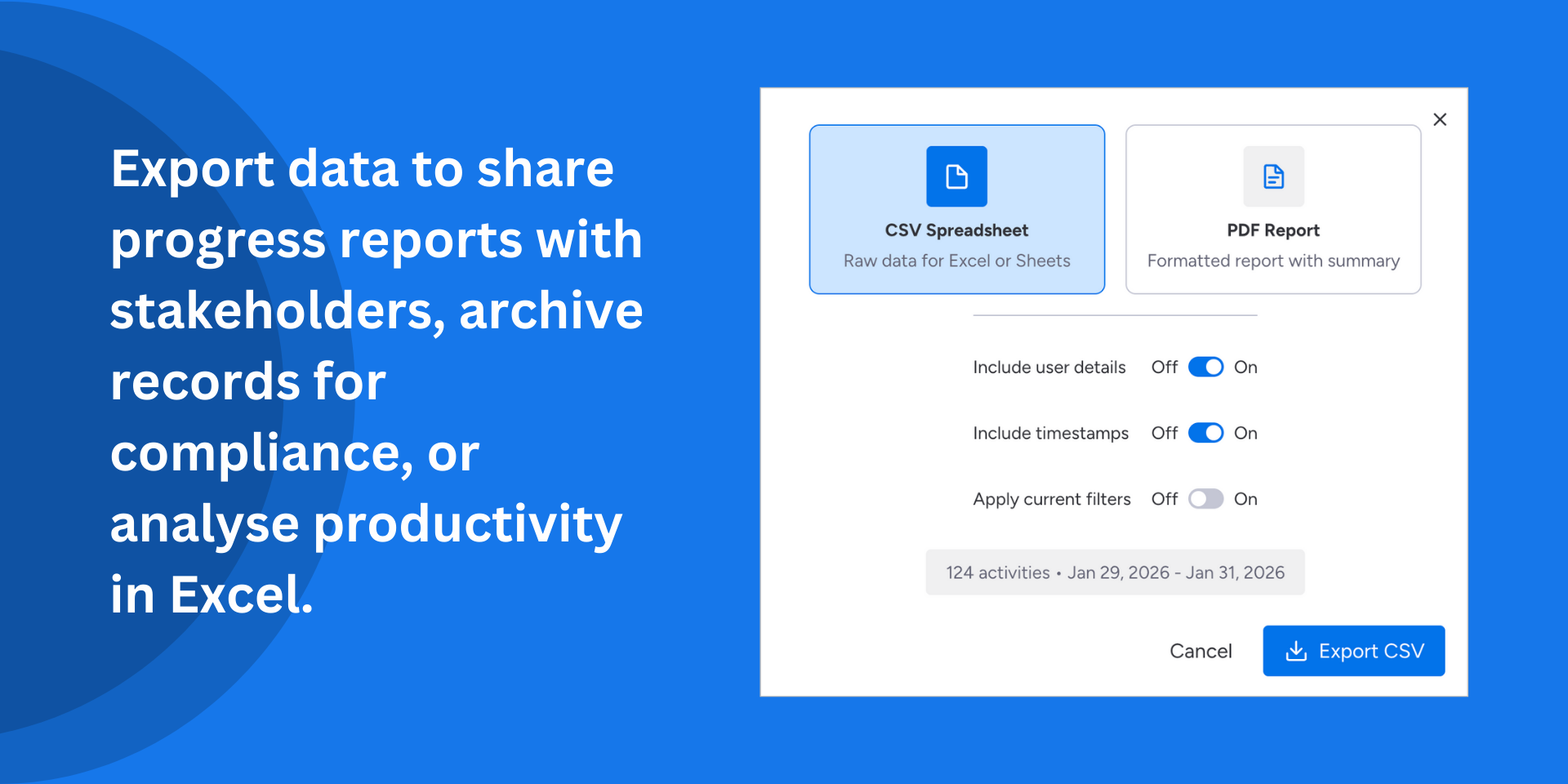
CSV and PDF export
Generate CSV or PDF reports of board activity for audits, standups, or stakeholder updates.
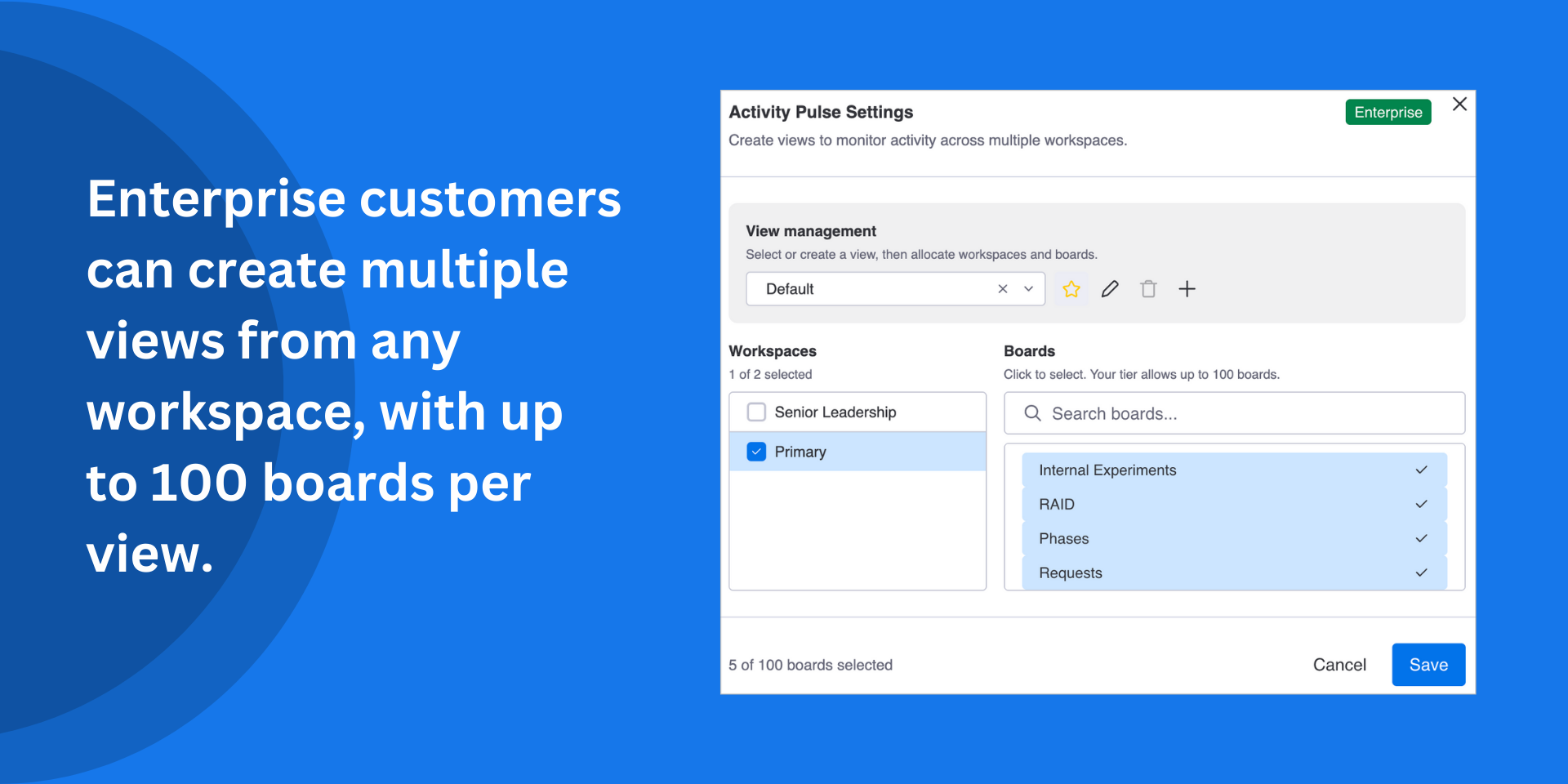
Scale with Your Team
From small teams to enterprise deployments, Activity Pulse has the ability to grow with you.
Perfect for managers who need visibility across multiple projects, team leads keeping track of their team’s work or team members trying to keep on top of their teams progress.
Does the developer periodically perform penetration testing?
Not answered
Does the developer have a dedicated security and privacy point of contact for such issues or questions?
Yes
Security and privacy inquiries can be directed to Proof via the contact email provided in the app listing. Response time is within 24 hours per the monday.com SLA requirements.
Does the app restrict redirects and forwards only to approved destinations, or show a warning when redirecting to potentially untrusted content?
Yes
Pulse does not perform any external redirects. It runs entirely within monday.com's iframe and all navigation stays within the monday.com platform.
Does the app protect against mass parameter assignment attacks?
Yes
The app has no server-side API endpoints that accept arbitrary parameters. There are no object-spread assignments from raw user input.
Does the app perform encoding and sanitization on all user supplied parameters to protect against Cross-Site Scripting?
Yes
Multiple layers of protection are implemented such as: All user-facing data is rendered through React's JSX, which automatically escapes HTML entities. Pulse removes HTML tags and decodes entities from activity log data before display. Our CSV export prevents injection by escaping fields containing commas, quotes, newlines, or formula characters.
Does the developer protect all state-changing actions against Cross-Site Request Forgery (CSRF)?
Not answered
Does the developer have mechanisms to notify monday.com in case of a security breach?
Not answered
Does this developer have a process for installing application-level updates and security patches for the service (such as software packages and databases)?
Not answered
Compliance
Is the app certified with the information security standard ISO/IEC 27001:2022?
Not answered
Is the app compliant with the Health Insurance Portability and Accountability Act (HIPAA)?
Not answered
Is the app certified with System and Organization Controls (SOC 2 or SOC 3)?
Not answered
Is the app compliant with the General Data Protection Regulation (GDPR)?
Yes
Pulse is designed with GDPR compliance in mind. All data stays within monday.com and when the app is uninstalled, monday.com automatically handles the lifecycle of instance storage, removing all app data. User names and emails are fetched live for display purposes only, held in memory, and never persisted. A privacy policy is published at proof.engineering/privacy.
Data
Does the app send any data outside of monday.com? If yes, indicate whether the data is customer-submitted (e.g., board names, item names, doc content) or non-customer-submitted (e.g., account ID, board ID, user ID).
No
The app sends zero requests to external domains. All API communication goes exclusively through the monday.com SDK. There are no analytics services, no external CDNs, no ad platforms, no monitoring tools, and no third-party integrations! All data remains within monday.com's infrastructure.
Where does the app store logs data?
other
The app is client-side only. Logs are output to the browser console via a centralised logging utility and are not persisted or transmitted anywhere. In production, only error-level logs are output. No log data is stored on any server or external service.
Where does the app store the app data?
monday
The app stores all data exclusively in monday.storage.instance, which is monday.com's built-in key-value storage infrastructure. No external databases, no localStorage, no cookies.
Does the developer ensure application logs do not contain secrets or personally-identifiable information (PII)?
Not answered
Is customer data segregated from the data of other customers (for example logically or physically)?
Yes
Activity Pulse uses monday.com storage exclusively for all data persistence. Instance storage is automatically scoped to the installing account by monday.com's infrastructure. Each installation has its own isolated storage namespace. The app has no external database or shared data store. Customer data cannot cross between accounts.
Privacy
Does the developer enforce multi-factor authentication on employees access to systems which may process customer data?
Not answered
Does the developer protect access to customer data based on the principle of least privilege?
Yes
The app requests only the minimum scopes necessary for its functionality and nothing else.
Reviews
No reviews yet.
Historical data
Installation history
We have data for December 28, 2024 onwards only. Collected sometime after 00:00 UTC daily.
Total number of installs
Change in total number of installs in last 1 day(s)
Compares the number of installs on each date with 1 days previously:
Max
Min
Current
Change in total number of installs in last 7 day(s)
Compares the number of installs on each date with 7 days previously:
Max
Min
Current
Change in total number of installs in last 30 day(s)
Compares the number of installs on each date with 30 days previously:
Max
Min
Current
Change in total number of installs in last 90 day(s)
Compares the number of installs on each date with 90 days previously:
Max
Min
Current
Change in total number of installs in last 180 day(s)
Compares the number of installs on each date with 180 days previously:
Max
Min
Current
Ratings history
Categories history
Each of the following is a yes/no answer, so the graphs show 1 for yes, and 0 for no.
{
"id": 10001097,
"marketplace_developer_id": 100000160,
"app_id": 10840015,
"app_type": "app",
"security_info": {},
"gallery_assets": [
{
"url": "https://cdn.monday.com/marketplace/10001097/10001097_2026_1_27_21_29_55_wsx3khsl.mp4",
"type": "video"
},
{
"url": "https://cdn.monday.com/marketplace/10001097/10001097_2026_1_27_21_30_4_fz8veix.png",
"type": "image"
},
{
"url": "https://cdn.monday.com/marketplace/10001097/10001097_2026_1_27_21_30_8_egg0sd2.png",
"type": "image"
},
{
"url": "https://cdn.monday.com/marketplace/10001097/10001097_2026_1_27_21_30_12_76qvwcx.png",
"type": "image"
},
{
"url": "https://cdn.monday.com/marketplace/10001097/10001097_2026_1_27_21_30_16_5ubomw4.png",
"type": "image"
},
{
"url": "https://cdn.monday.com/marketplace/10001097/10001097_2026_1_27_21_30_20_mouti1a.png",
"type": "image"
}
],
"description": "<p><strong>Stop jumping between boards and see all activity in a single, powerful and interactive dashboard widget.</strong></p><p>Activity Pulse brings all your activities together, regardless of board or workspace. Gain valuable insight into working patterns and trends.</p><p><br></p><p><strong>Unified, curated activity stream</strong></p><p>See item creations, updates, status changes, and assignments from multiple boards and workspaces in real-time.</p><p><br></p><p><strong>Direct replies</strong></p><p>Create item updates directly from the activity stream to keep communication flowing.</p><p><br></p><p><strong>Smart filtering</strong></p><p>Filter by specific boards, team members, activity types, or date ranges to find exactly what you need.</p><p><br></p><p><strong>CSV and PDF export</strong></p><p>Generate CSV or PDF reports of board activity for audits, standups, or stakeholder updates.</p><p><br></p><p><strong>Scale with Your Team</strong></p><p>From small teams to enterprise deployments, Activity Pulse has the ability to grow with you.</p><p>Perfect for managers who need visibility across multiple projects, team leads keeping track of their team’s work or team members trying to keep on top of their teams progress.</p><p><br></p><p>Visit our <a href=\"https://proof.engineering/embed/activity-pulse\" rel=\"noopener noreferrer\" target=\"_blank\">how-to guide</a> for best practices, or <a href=\"https://forms.monday.com/forms/388d9c04ecc6789b1bb6292bd934b69a?r=euc1\" rel=\"noopener noreferrer\" target=\"_blank\">reach out to Proof</a> to understand or request future enhancements!</p>",
"short_description": "View activity across workspaces in one interactive dashboard",
"thumbnail_url": "https://cdn.monday.com/marketplace/10001097/10001097_2026_1_27_21_29_51_ytpvhslk.png",
"logo_url": "https://cdn.monday.com/marketplace/10001097/10001097_2026_1_27_21_29_48_y7o781v.png",
"feedback_url": "support@proof.engineering",
"privacy_policy_url": "https://proof.engineering/privacy-policy",
"featured": false,
"name": "Activity Pulse",
"how_to_use_url": "https://proof.engineering/embed/activity-pulse",
"external_pricing_url": null,
"keywords": "compliance,project monitoring,visibility,cross-board,audit,monitor,tracker,activity,productivity",
"compliance_answers": [
{
"questionId": 19,
"shortAnswer": false,
"detailedAnswer": "The app sends zero requests to external domains. All API communication goes exclusively through the monday.com SDK. There are no analytics services, no external CDNs, no ad platforms, no monitoring tools, and no third-party integrations! \n\nAll data remains within monday.com's infrastructure."
},
{
"questionId": 18,
"detailedAnswer": "The app is client-side only. Logs are output to the browser console via a centralised logging utility and are not persisted or transmitted anywhere. \n\nIn production, only error-level logs are output. No log data is stored on any server or external service.",
"logHostingProvider": "other"
},
{
"questionId": 17,
"detailedAnswer": "The app stores all data exclusively in monday.storage.instance, which is monday.com's built-in key-value storage infrastructure. No external databases, no localStorage, no cookies.",
"dataHostingProvider": "monday"
},
{
"questionId": 14,
"shortAnswer": true,
"detailedAnswer": "Security and privacy inquiries can be directed to Proof via the contact email provided in the app listing. \n\nResponse time is within 24 hours per the monday.com SLA requirements."
},
{
"questionId": 11,
"shortAnswer": true,
"detailedAnswer": "Pulse is designed with GDPR compliance in mind. All data stays within monday.com and when the app is uninstalled, monday.com automatically handles the lifecycle of instance storage, removing all app data.\n\nUser names and emails are fetched live for display purposes only, held in memory, and never persisted.\n\nA privacy policy is published at proof.engineering/privacy."
},
{
"questionId": 10,
"shortAnswer": true,
"detailedAnswer": "Pulse does not perform any external redirects. It runs entirely within monday.com's iframe and all navigation stays within the monday.com platform. "
},
{
"questionId": 9,
"shortAnswer": true,
"detailedAnswer": "The app has no server-side API endpoints that accept arbitrary parameters. There are no object-spread assignments from raw user input."
},
{
"questionId": 6,
"shortAnswer": true,
"detailedAnswer": "The app requests only the minimum scopes necessary for its functionality and nothing else."
},
{
"questionId": 5,
"shortAnswer": true,
"detailedAnswer": "Multiple layers of protection are implemented such as:\n\nAll user-facing data is rendered through React's JSX, which automatically escapes HTML entities. \n\nPulse removes HTML tags and decodes entities from activity log data before display.\n\nOur CSV export prevents injection by escaping fields containing commas, quotes, newlines, or formula characters."
},
{
"questionId": 1,
"shortAnswer": true,
"detailedAnswer": "Activity Pulse uses monday.com storage exclusively for all data persistence. \n\nInstance storage is automatically scoped to the installing account by monday.com's infrastructure. Each installation has its own isolated storage namespace. The app has no external database or shared data store. Customer data cannot cross between accounts."
}
],
"created_at": "2026-02-27T21:29:12.000Z",
"updated_at": "2026-03-08T15:38:12.000Z",
"automation_app_id": null,
"marketplace_category_ids": [
9,
6,
5
],
"pinned_for_categories_ids": [],
"featured_for_categories_ids": [],
"pricing_data": "Free plan available",
"label": null,
"app_values": [
"Easier resource management"
],
"security": true,
"display_in_template_store": false,
"acquisition_source": "No touch",
"is_connector": false,
"show_connections": null,
"terms_of_service_url": "https://proof.engineering/terms-of-service",
"available_for_tiers": [],
"available_for_products": [],
"google_analytics_tag_id": null,
"is_solution": false,
"cta_override": null,
"app_scope_str": "me:read,boards:read,workspaces:read,users:read,account:read,updates:read,updates:write,assets:read",
"app_client_id": "65416d34d5dde0c4da936e5a67f05b7f",
"app_color": {
"hsl": {
"h": 150.94736842105263,
"s": 0.9895833333333334,
"l": 0.3764705882352941,
"a": 1
},
"hex": "#01bf63",
"rgb": {
"r": 1,
"g": 191,
"b": 99,
"a": 1
},
"hsv": {
"h": 150.94736842105263,
"s": 0.9947643979057592,
"v": 0.7490196078431373,
"a": 1
},
"oldHue": 75.28662420382165,
"source": "hex"
},
"plans": [
{
"id": "10840015-1-free",
"appPlanId": "free",
"name": "Free",
"versionId": 1,
"isTrial": false,
"prices": {
"type": "standard",
"monthly": 0,
"yearly": 0
},
"versionState": "live",
"appId": 10840015,
"description": "Basic activity monitoring for individuals and small teams evaluating Activity Pulse.",
"extraData": {
"bullets": [
"Real-time cross-board activity stream",
"Basic activity filtering",
"Up to 3 watched boards",
"7-day activity history",
"Single workspace monitoring"
],
"monthlyFee": 0,
"yearlyFee": 0
},
"isFree": true,
"isRecommended": false,
"currency": "USD"
},
{
"id": "10840015-1-standard",
"appPlanId": "standard",
"name": "Standard",
"versionId": 1,
"isTrial": false,
"prices": {
"type": "standard",
"monthly": 15,
"yearly": 12
},
"versionState": "live",
"appId": 10840015,
"description": "Team activity monitoring with trend analysis, heatmaps, and interactive replies.",
"extraData": {
"bullets": [
"Everything in Free, plus:",
"Trend analysis and activity heatmaps",
"Interactive replies from the stream",
"Up to 15 watched boards",
"30-day activity history"
],
"monthlyFee": 15,
"yearlyFee": 12
},
"isFree": false,
"isRecommended": true,
"currency": "USD"
},
{
"id": "10840015-1-professional",
"appPlanId": "professional",
"name": "Professional",
"versionId": 1,
"isTrial": true,
"prices": {
"type": "standard",
"monthly": 39,
"yearly": 29
},
"versionState": "live",
"appId": 10840015,
"description": "Full-scale activity intelligence with multi-workspace support, saved views, and compliance reporting.",
"extraData": {
"bullets": [
"Everything in Standard, plus:",
"Multi-workspace monitoring in one view",
"Save up to 25 custom view configurations",
"Export to CSV and PDF",
"Up to 100 boards with 90-day history"
],
"monthlyFee": 39,
"yearlyFee": 29
},
"isFree": false,
"isRecommended": false,
"currency": "USD"
}
],
"app_live_version": {
"updated_at": "2026-04-01T21:27:58.742Z",
"id": 13797248
},
"pricing_model": null,
"monetization": {
"monetizationType": "monday",
"hasFreePlan": true,
"hasPaidPlan": true,
"hasTrialPlan": true
},
"badges_data": {
"security": true,
"app_values": [
"Easier resource management"
],
"pricing_data": "Free plan available",
"acquisition_source": "No touch",
"display_in_template_store": false
},
"data": {
"is_solution": false,
"is_connector": false,
"available_for_tiers": [],
"terms_of_service_url": "https://proof.engineering/terms-of-service",
"available_for_products": [],
"google_analytics_tag_id": null
},
"display": null,
"installsDelta": {
"totalInstalls": 38,
"sevenDays": 1,
"thirtyDays": 1,
"ninetyDays": 6
}
}