
Embed & Sync Google Calendar
345 installs, since December 30, 2024. 14 installs/month. App updated August 26, 2026. Listing updated August 30, 2026.
Start with an embedded calendar, add sync when ready
📅 Two ways to bring Google Calendar into monday.com — use one, or both.
🔗 START WITH AN EMBED
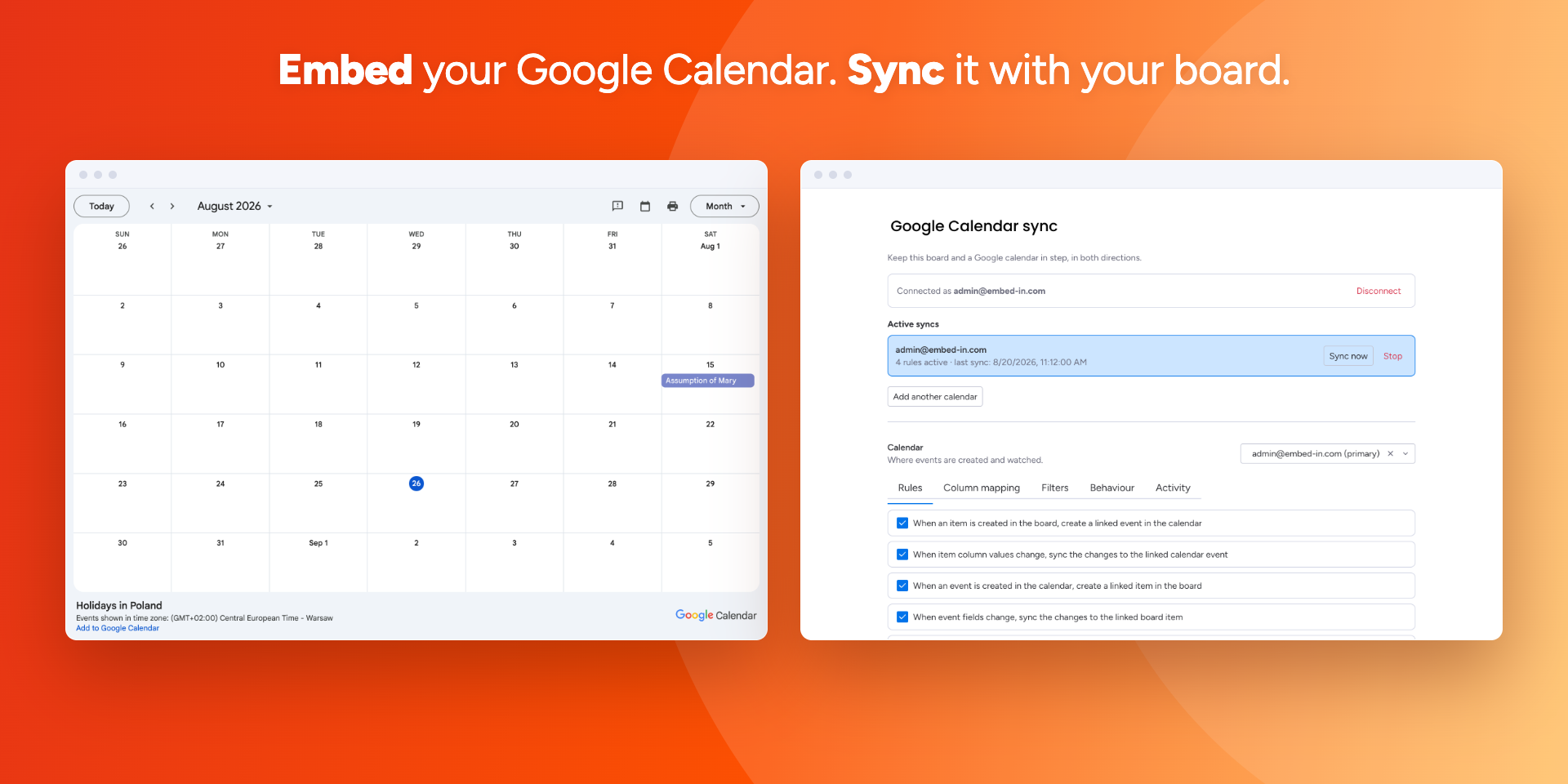
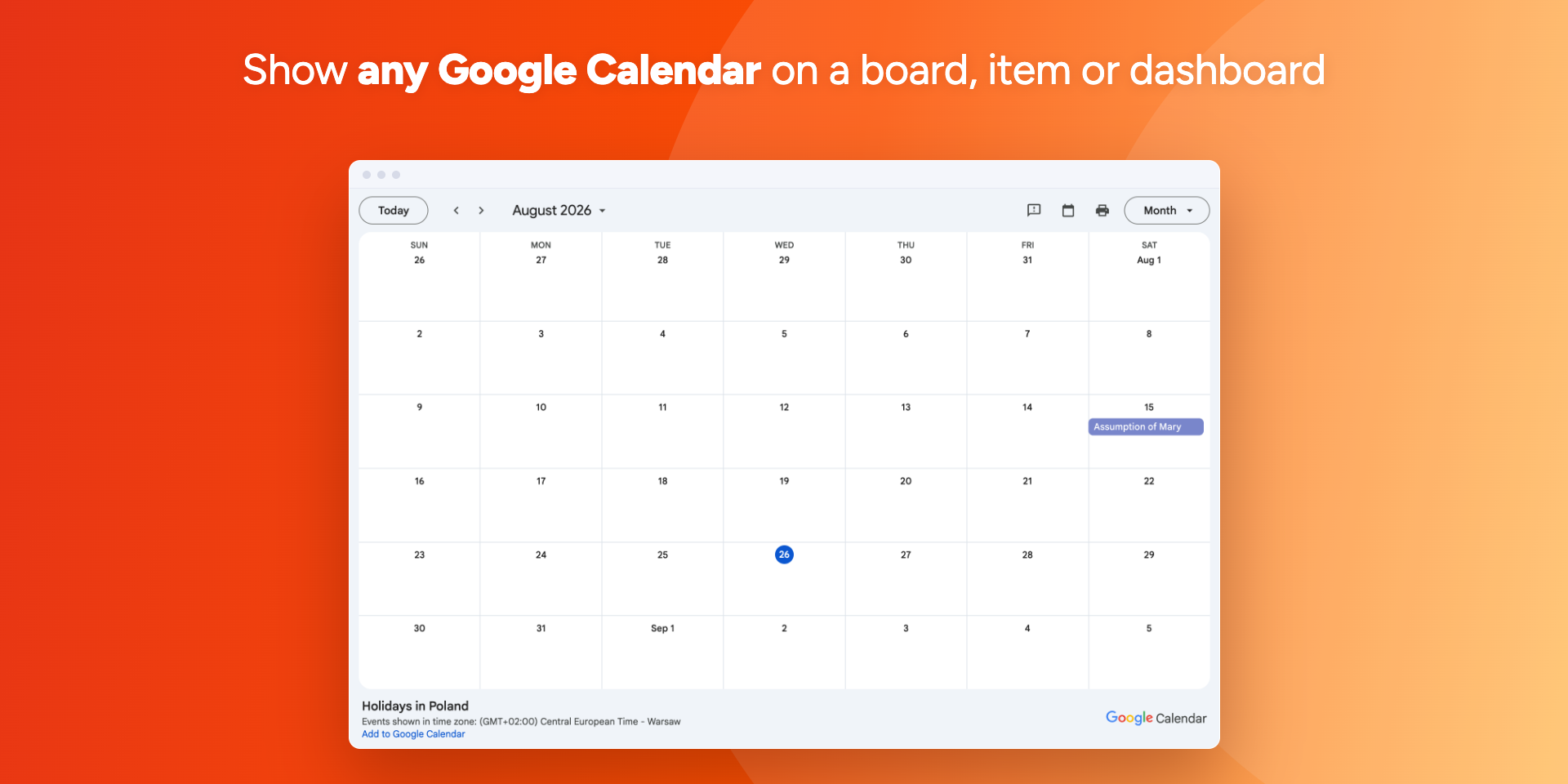
Paste a calendar URL and the calendar appears on your board, item or dashboard. Pick the default view, the first day of the week, the size and the colour. Nothing to connect, nothing to authorise — shared and read-only calendars work too.
🔄 ADD SYNC WHEN YOU NEED IT
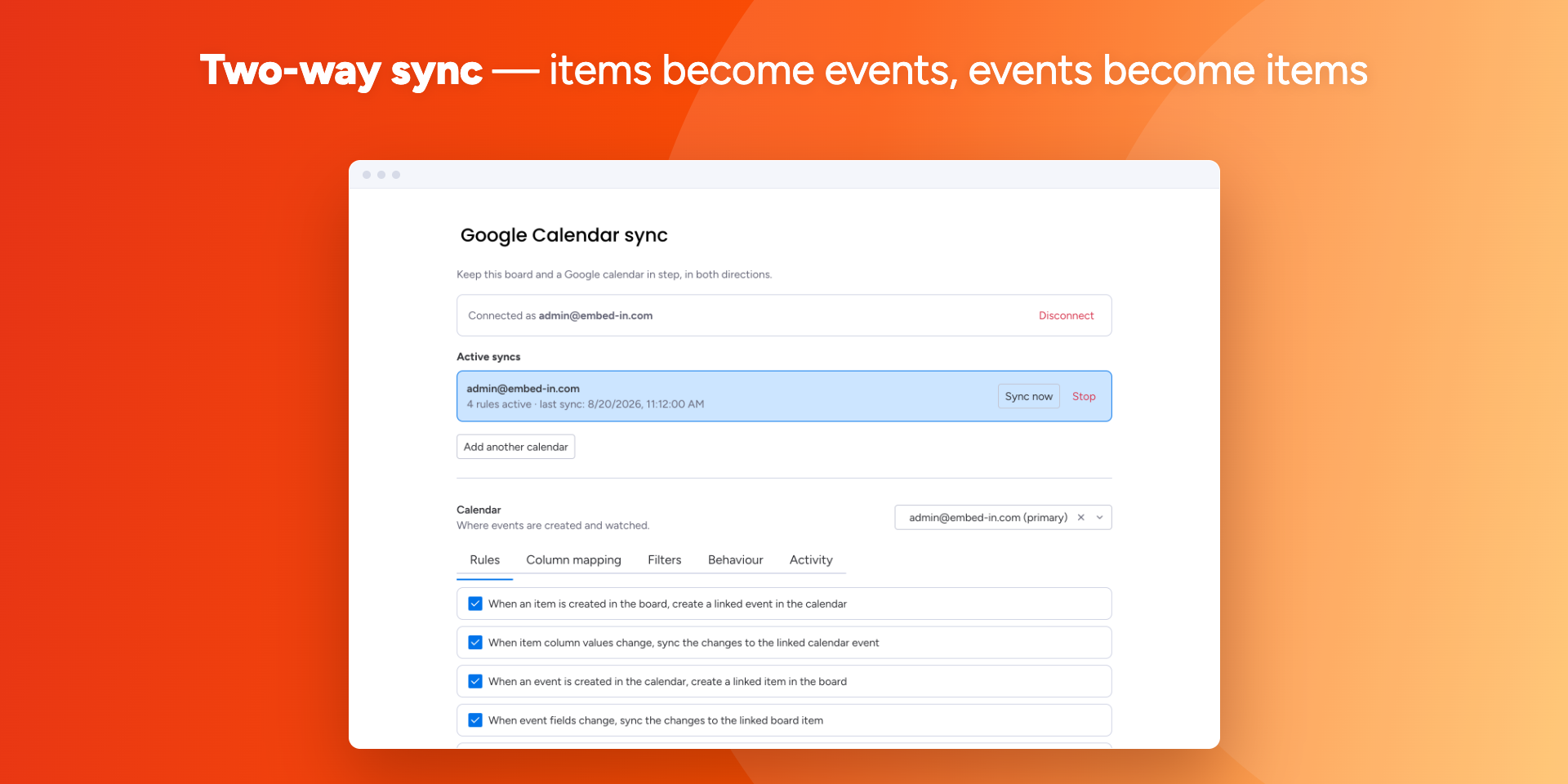
Connect a Google account once and your board keeps step with the calendar, in both directions. Items with a date become events; move an event in Google and the item follows.
✅ Pick which rules apply — create events, update them, create items from events
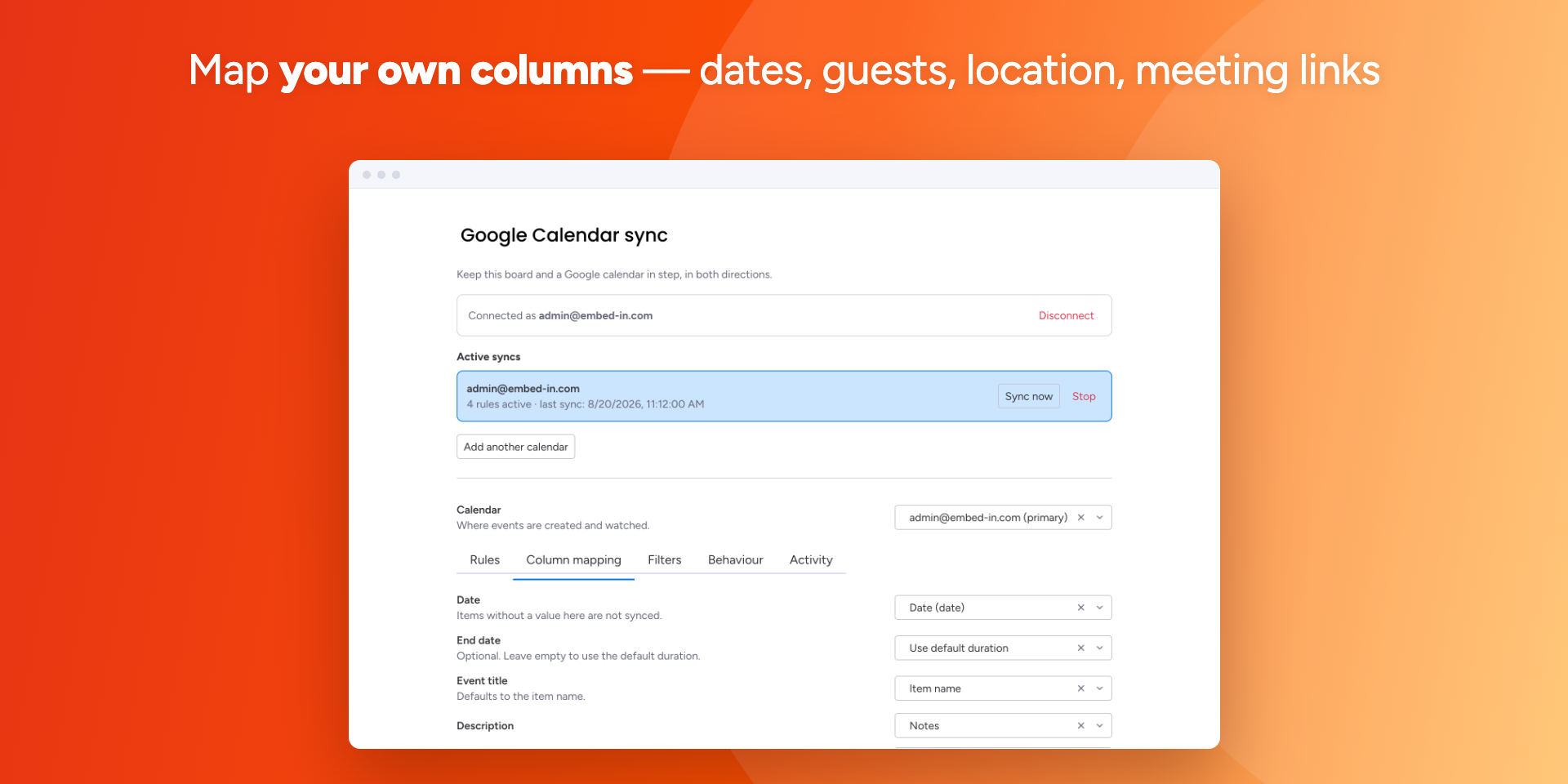
🗂️ Map your own columns: date or timeline, title, description, location, guests, meeting link
🚦 Create events only when a status changes, so nothing lands in the calendar too early
🎯 Limit the sync to specific groups or statuses
🗑️ Choose what a deleted event does: archive the item, delete it, or clear the date
⚖️ Decide which side wins when an item and its event are both edited
📆 Sync one board with several calendars at once
📊 SEE WHAT ACTUALLY HAPPENED
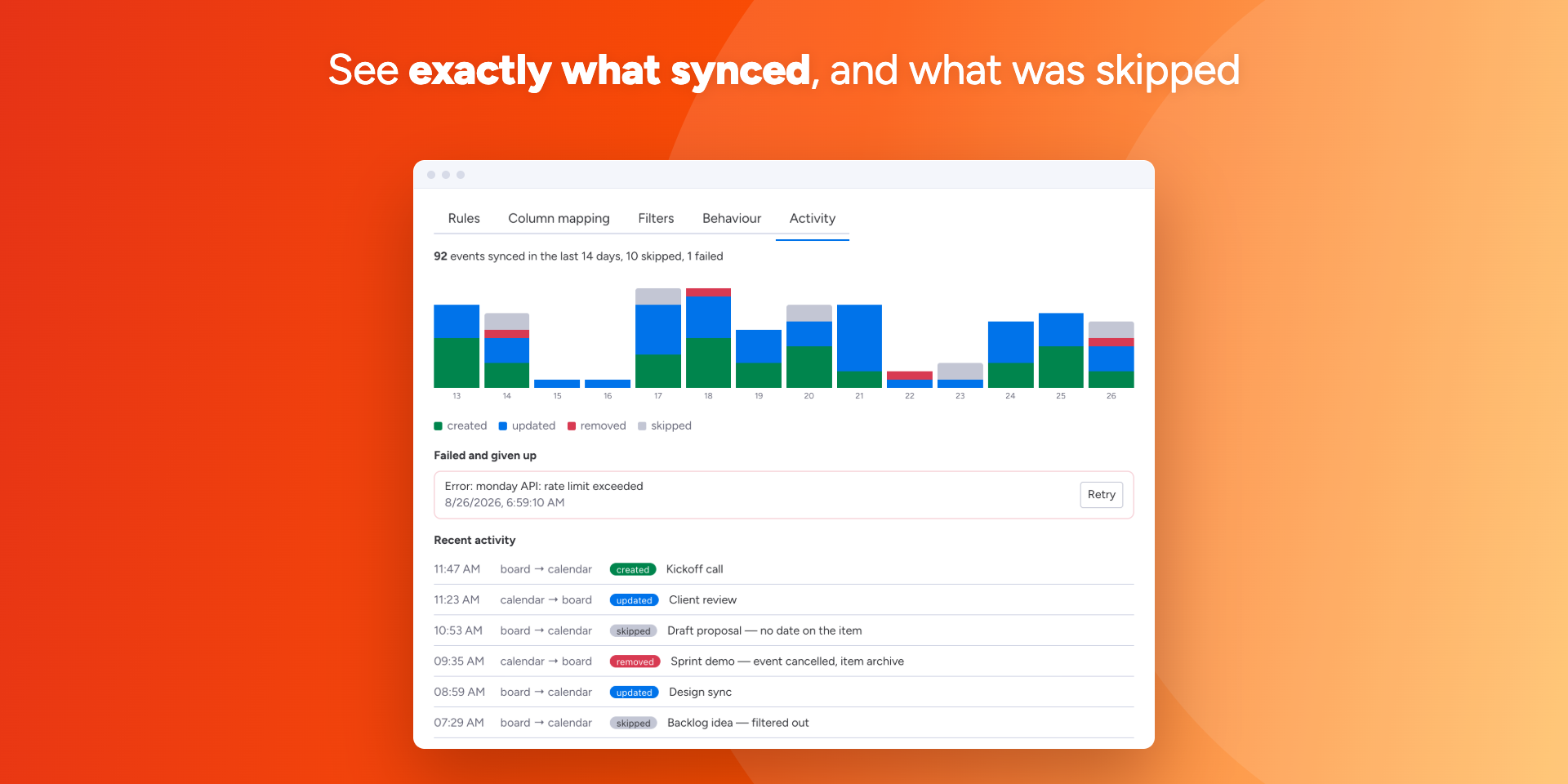
An activity log shows every change the sync made — and every one it skipped, with the reason. A 14-day chart shows the volume at a glance, and anything that failed can be retried in a click.
🔒 The two halves are independent. Embedding never asks for account access, and turning the sync off leaves your calendar exactly as it is.
💬 Questions or setup help: support@embed-in.com
Security & Compliance
The app developer did not provide the security and compliance information for this app.
Reviews
No reviews yet.
Historical data
Installation history
We have data for December 28, 2024 onwards only. Collected sometime after 00:00 UTC daily.
Total number of installs
Change in total number of installs in last 1 day(s)
Compares the number of installs on each date with 1 days previously:
Change in total number of installs in last 7 day(s)
Compares the number of installs on each date with 7 days previously:
Change in total number of installs in last 30 day(s)
Compares the number of installs on each date with 30 days previously:
Change in total number of installs in last 90 day(s)
Compares the number of installs on each date with 90 days previously:
Change in total number of installs in last 180 day(s)
Compares the number of installs on each date with 180 days previously:
Ratings history
Categories history
Each of the following is a yes/no answer, so the graphs show 1 for yes, and 0 for no.
In "Featured" category?
In "Editor's choice" category?
In "Trending this week" category?
App metadata
ID: 10000700 • App ID: 10257478 • Listing updated: August 30, 2026{
"id": 10000700,
"marketplace_developer_id": 10000278,
"app_id": 10257478,
"app_type": "app",
"security_info": null,
"gallery_assets": [
{
"url": "https://cdn.monday.com/marketplace/10000700/10000700_2026_7_26_10_5_25_aihzlx7j.png",
"type": "image"
},
{
"url": "https://cdn.monday.com/marketplace/10000700/10000700_2026_7_26_10_5_30_yacjby9.png",
"type": "image"
},
{
"url": "https://cdn.monday.com/marketplace/10000700/10000700_2026_7_26_10_5_35_tdi32g3.png",
"type": "image"
},
{
"url": "https://cdn.monday.com/marketplace/10000700/10000700_2026_7_26_10_5_42_l2wqg56.png",
"type": "image"
},
{
"url": "https://cdn.monday.com/marketplace/10000700/10000700_2026_7_26_10_5_58_phaf8l3.png",
"type": "image"
}
],
"description": "<p>📅 Two ways to bring Google Calendar into monday.com — use one, or both.</p><p><br></p><p>🔗 START WITH AN EMBED</p><p>Paste a calendar URL and the calendar appears on your board, item or dashboard. Pick the default view, the first day of the week, the size and the colour. Nothing to connect, nothing to authorise — shared and read-only calendars work too.</p><p><br></p><p>🔄 ADD SYNC WHEN YOU NEED IT</p><p>Connect a Google account once and your board keeps step with the calendar, in both directions. Items with a date become events; move an event in Google and the item follows.</p><p><br></p><p>✅ Pick which rules apply — create events, update them, create items from events</p><p>🗂️ Map your own columns: date or timeline, title, description, location, guests, meeting link</p><p>🚦 Create events only when a status changes, so nothing lands in the calendar too early</p><p>🎯 Limit the sync to specific groups or statuses</p><p>🗑️ Choose what a deleted event does: archive the item, delete it, or clear the date</p><p>⚖️ Decide which side wins when an item and its event are both edited</p><p>📆 Sync one board with several calendars at once</p><p><br></p><p>📊 SEE WHAT ACTUALLY HAPPENED</p><p>An activity log shows every change the sync made — and every one it skipped, with the reason. A 14-day chart shows the volume at a glance, and anything that failed can be retried in a click.</p><p><br></p><p>🔒 The two halves are independent. Embedding never asks for account access, and turning the sync off leaves your calendar exactly as it is.</p><p><br></p><p>💬 Questions or setup help: support@embed-in.com</p>",
"short_description": "Start with an embedded calendar, add sync when ready",
"thumbnail_url": "https://cdn.monday.com/marketplace/10000700/10000700_2024_11_30_12_39_36_7od28io.png",
"logo_url": "https://cdn.monday.com/marketplace/10000700/10000700_2024_11_30_12_39_13_psnbphk.png",
"feedback_url": "admin@embed-in.com",
"privacy_policy_url": "https://apps.embed-in.com/home/privacy-policy",
"featured": null,
"name": "Embed & Sync Google Calendar",
"how_to_use_url": "https://apps.embed-in.com/embed-google-calendar-for-monday.com",
"external_pricing_url": null,
"keywords": "google calendar,google,calendar,embed google calendar,google calendar embedder,sync google calendar with monday.com,sync google calendar",
"compliance_answers": [],
"created_at": "2024-12-30T12:38:35.000Z",
"updated_at": "2026-08-30T07:13:56.000Z",
"automation_app_id": null,
"marketplace_category_ids": [
10000001,
7,
5
],
"pinned_for_categories_ids": [],
"featured_for_categories_ids": [],
"pricing_data": "14 days trial",
"label": null,
"app_values": [
"Centralize your work on monday.com"
],
"security": null,
"display_in_template_store": null,
"acquisition_source": "No touch",
"is_connector": null,
"show_connections": null,
"terms_of_service_url": "https://apps.embed-in.com/home/end-user-license-agreement",
"available_for_tiers": null,
"available_for_products": null,
"google_analytics_tag_id": null,
"is_solution": null,
"cta_override": null,
"app_scope_str": "boards:read,boards:write,webhooks:read,webhooks:write,users:read,account:read,me:read",
"app_client_id": "65723844c677194015c03263ae6dee80",
"app_color": {
"hsl": {
"h": 231.72413793103448,
"s": 0.38666666666666666,
"l": 0.14705882352941177,
"a": 1
},
"hex": "#171b34",
"rgb": {
"r": 23,
"g": 27,
"b": 52,
"a": 1
},
"hsv": {
"h": 231.72413793103448,
"s": 0.5576923076923077,
"v": 0.20392156862745098,
"a": 1
},
"oldHue": 33.98230088495575,
"source": "hex"
},
"plans": [
{
"id": "10257478-1-UP_TO_3_USERS",
"appPlanId": "UP_TO_3_USERS",
"name": "Up to 3 users",
"versionId": 1,
"isTrial": false,
"prices": {
"type": "seat_based",
"monthly": 0,
"yearly": 0,
"maxSeats": 3
},
"versionState": "live",
"appId": 10257478,
"description": "Free for up to 3 team members.",
"extraData": {
"bullets": [],
"monthlyFee": 0,
"yearlyFee": 0,
"maxSeats": 3
},
"isFree": true,
"isRecommended": false,
"currency": "USD"
},
{
"id": "10257478-1-UP_TO_50_USERS",
"appPlanId": "UP_TO_50_USERS",
"name": "Up to 50 users",
"versionId": 1,
"isTrial": false,
"prices": {
"type": "seat_based",
"monthly": 3,
"yearly": 2,
"maxSeats": 50
},
"versionState": "live",
"appId": 10257478,
"description": "Use the app without any limitations for up to 50 team members.",
"extraData": {
"bullets": [],
"monthlyFee": 3,
"yearlyFee": 2,
"maxSeats": 50
},
"isFree": false,
"isRecommended": false,
"currency": "USD"
},
{
"id": "10257478-1-UP_TO_100_USERS",
"appPlanId": "UP_TO_100_USERS",
"name": "Up to 100 users",
"versionId": 1,
"isTrial": false,
"prices": {
"type": "seat_based",
"monthly": 6,
"yearly": 5,
"maxSeats": 100
},
"versionState": "live",
"appId": 10257478,
"description": "Use the app without any limitations for up to 100 team members.",
"extraData": {
"bullets": [],
"monthlyFee": 6,
"yearlyFee": 5,
"maxSeats": 100
},
"isFree": false,
"isRecommended": false,
"currency": "USD"
},
{
"id": "10257478-1-MORE_100_USERS",
"appPlanId": "MORE_100_USERS",
"name": "More than 100 users",
"versionId": 1,
"isTrial": true,
"prices": {
"type": "seat_based",
"monthly": 8,
"yearly": 8,
"maxSeats": 1000000
},
"versionState": "live",
"appId": 10257478,
"description": "Use the app without any limitations for more than 100 team members.",
"extraData": {
"bullets": [],
"monthlyFee": 8,
"yearlyFee": 8,
"maxSeats": 1000000
},
"isFree": false,
"isRecommended": false,
"currency": "USD"
},
{
"id": "10257478-2-UP_TO_3_USERS",
"appPlanId": "UP_TO_3_USERS",
"name": "Up to 3 users",
"versionId": 2,
"isTrial": false,
"prices": {
"type": "seat_based",
"monthly": 0,
"yearly": 0,
"maxSeats": 3
},
"versionState": "live",
"appId": 10257478,
"description": "Free for up to 3 team members.",
"extraData": {
"bullets": [
"Use the app without any limitations"
],
"monthlyFee": 0,
"yearlyFee": 0,
"maxSeats": 3
},
"isFree": true,
"isRecommended": false,
"currency": "USD"
},
{
"id": "10257478-2-UP_TO_50_USERS",
"appPlanId": "UP_TO_50_USERS",
"name": "Up to 50 users",
"versionId": 2,
"isTrial": false,
"prices": {
"type": "seat_based",
"monthly": 2,
"yearly": 1,
"maxSeats": 50
},
"versionState": "live",
"appId": 10257478,
"description": "Use the app without any limitations for up to 50 team members.",
"extraData": {
"bullets": [
"Use the app without any limitations"
],
"monthlyFee": 2,
"yearlyFee": 1,
"maxSeats": 50
},
"isFree": false,
"isRecommended": false,
"currency": "USD"
},
{
"id": "10257478-2-UP_TO_100_USERS",
"appPlanId": "UP_TO_100_USERS",
"name": "Up to 100 users",
"versionId": 2,
"isTrial": false,
"prices": {
"type": "seat_based",
"monthly": 5,
"yearly": 2,
"maxSeats": 100
},
"versionState": "live",
"appId": 10257478,
"description": "Use the app without any limitations for up to 100 team members.",
"extraData": {
"bullets": [
"Use the app without any limitations"
],
"monthlyFee": 5,
"yearlyFee": 2,
"maxSeats": 100
},
"isFree": false,
"isRecommended": false,
"currency": "USD"
},
{
"id": "10257478-2-MORE_100_USERS",
"appPlanId": "MORE_100_USERS",
"name": "More than 100 users",
"versionId": 2,
"isTrial": true,
"prices": {
"type": "seat_based",
"monthly": 7,
"yearly": 4,
"maxSeats": 1000000
},
"versionState": "live",
"appId": 10257478,
"description": "Use the app without any limitations for more than 100 team members.",
"extraData": {
"bullets": [
"Use the app without any limitations"
],
"monthlyFee": 7,
"yearlyFee": 4,
"maxSeats": 1000000
},
"isFree": false,
"isRecommended": false,
"currency": "USD"
},
{
"id": "10257478-3-DEFAULT",
"appPlanId": "DEFAULT",
"name": "default",
"versionId": 3,
"isTrial": true,
"prices": {
"type": "bucket_based",
"buckets": {
"3": {
"monthly": 1,
"yearly": 1
},
"5": {
"monthly": 2,
"yearly": 1
},
"10": {
"monthly": 3,
"yearly": 2
},
"15": {
"monthly": 5,
"yearly": 4
},
"20": {
"monthly": 6,
"yearly": 5
},
"25": {
"monthly": 8,
"yearly": 6
},
"30": {
"monthly": 9,
"yearly": 7
},
"35": {
"monthly": 11,
"yearly": 9
},
"40": {
"monthly": 12,
"yearly": 10
},
"45": {
"monthly": 14,
"yearly": 11
},
"50": {
"monthly": 15,
"yearly": 12
},
"55": {
"monthly": 17,
"yearly": 14
},
"60": {
"monthly": 18,
"yearly": 15
},
"65": {
"monthly": 20,
"yearly": 16
},
"70": {
"monthly": 21,
"yearly": 17
},
"75": {
"monthly": 23,
"yearly": 18
},
"80": {
"monthly": 24,
"yearly": 20
},
"85": {
"monthly": 26,
"yearly": 21
},
"90": {
"monthly": 27,
"yearly": 22
},
"95": {
"monthly": 29,
"yearly": 23
},
"100": {
"monthly": 30,
"yearly": 25
},
"110": {
"monthly": 32,
"yearly": 26
},
"120": {
"monthly": 34,
"yearly": 28
},
"130": {
"monthly": 36,
"yearly": 30
},
"140": {
"monthly": 38,
"yearly": 31
},
"150": {
"monthly": 40,
"yearly": 33
},
"160": {
"monthly": 42,
"yearly": 34
},
"170": {
"monthly": 44,
"yearly": 36
},
"180": {
"monthly": 46,
"yearly": 38
},
"190": {
"monthly": 48,
"yearly": 39
},
"200": {
"monthly": 50,
"yearly": 41
},
"225": {
"monthly": 55,
"yearly": 45
},
"250": {
"monthly": 60,
"yearly": 49
},
"275": {
"monthly": 65,
"yearly": 53
},
"300": {
"monthly": 70,
"yearly": 57
},
"350": {
"monthly": 80,
"yearly": 66
},
"400": {
"monthly": 90,
"yearly": 74
},
"450": {
"monthly": 100,
"yearly": 82
},
"500": {
"monthly": 110,
"yearly": 90
},
"550": {
"monthly": 111,
"yearly": 91
},
"600": {
"monthly": 111,
"yearly": 91
},
"650": {
"monthly": 112,
"yearly": 91
},
"700": {
"monthly": 112,
"yearly": 92
},
"750": {
"monthly": 113,
"yearly": 92
},
"800": {
"monthly": 113,
"yearly": 93
},
"850": {
"monthly": 114,
"yearly": 93
},
"900": {
"monthly": 114,
"yearly": 93
},
"950": {
"monthly": 115,
"yearly": 94
},
"1000": {
"monthly": 115,
"yearly": 94
},
"1100": {
"monthly": 116,
"yearly": 95
},
"1200": {
"monthly": 117,
"yearly": 96
},
"1300": {
"monthly": 118,
"yearly": 97
},
"1400": {
"monthly": 119,
"yearly": 98
},
"1500": {
"monthly": 120,
"yearly": 98
},
"1600": {
"monthly": 121,
"yearly": 99
},
"1700": {
"monthly": 122,
"yearly": 100
},
"1800": {
"monthly": 123,
"yearly": 101
},
"1900": {
"monthly": 124,
"yearly": 102
},
"2000": {
"monthly": 125,
"yearly": 103
},
"2250": {
"monthly": 128,
"yearly": 105
},
"2500": {
"monthly": 130,
"yearly": 107
},
"2750": {
"monthly": 133,
"yearly": 109
},
"3000": {
"monthly": 135,
"yearly": 111
},
"3250": {
"monthly": 138,
"yearly": 113
},
"3500": {
"monthly": 140,
"yearly": 115
},
"3750": {
"monthly": 143,
"yearly": 117
},
"4000": {
"monthly": 145,
"yearly": 119
},
"4250": {
"monthly": 148,
"yearly": 121
},
"4500": {
"monthly": 150,
"yearly": 123
},
"4750": {
"monthly": 153,
"yearly": 125
},
"5000": {
"monthly": 155,
"yearly": 127
},
"6000": {
"monthly": 165,
"yearly": 135
},
"7000": {
"monthly": 175,
"yearly": 144
},
"8000": {
"monthly": 185,
"yearly": 152
},
"9000": {
"monthly": 195,
"yearly": 160
},
"10000": {
"monthly": 205,
"yearly": 168
},
"12500": {
"monthly": 230,
"yearly": 189
},
"15000": {
"monthly": 255,
"yearly": 209
},
"17500": {
"monthly": 280,
"yearly": 230
},
"20000": {
"monthly": 305,
"yearly": 250
},
"25000": {
"monthly": 355,
"yearly": 291
},
"30000": {
"monthly": 405,
"yearly": 332
},
"35000": {
"monthly": 455,
"yearly": 373
},
"40000": {
"monthly": 505,
"yearly": 414
},
"45000": {
"monthly": 555,
"yearly": 455
},
"50000": {
"monthly": 605,
"yearly": 496
},
"60000": {
"monthly": 705,
"yearly": 578
},
"70000": {
"monthly": 805,
"yearly": 660
},
"80000": {
"monthly": 905,
"yearly": 742
},
"90000": {
"monthly": 1005,
"yearly": 824
},
"100000": {
"monthly": 1105,
"yearly": 906
},
"1000000": {
"monthly": 1105,
"yearly": 906
}
}
},
"versionState": "live",
"appId": 10257478,
"description": "Embed Google Calendar on any board, item or dashboard, and keep a board and a calendar in step in both directions. Everything is included at every account size — you pay for the seats you already have.",
"extraData": {
"bullets": [
"Unlimited embedded calendars on boards, items and dashboards",
"Two-way sync: items with a date become events, and event changes come back",
"Your own column mapping — dates, guests, location, description, meeting link",
"Filters and status rules decide what reaches the calendar, and when",
"Activity log with a 14-day chart, skip reasons and one-click retries"
],
"monthlyFee": null,
"yearlyFee": null
},
"isFree": false,
"isRecommended": false,
"currency": "USD"
}
],
"app_live_version": {
"updated_at": "2026-08-26T09:53:00.221Z",
"id": 17264048
},
"pricing_model": null,
"monetization": {
"monetizationType": "monday",
"hasFreePlan": false,
"hasPaidPlan": true,
"hasTrialPlan": true
},
"badges_data": {
"app_values": [
"Centralize your work on monday.com"
],
"pricing_data": "14 days trial",
"acquisition_source": "No touch"
},
"data": {
"terms_of_service_url": "https://apps.embed-in.com/home/end-user-license-agreement"
},
"display": null,
"installsDelta": {
"totalInstalls": 345,
"sevenDays": 1,
"thirtyDays": 2,
"ninetyDays": 4
}
}