Save subitems and groups as templates, apply everywhere.
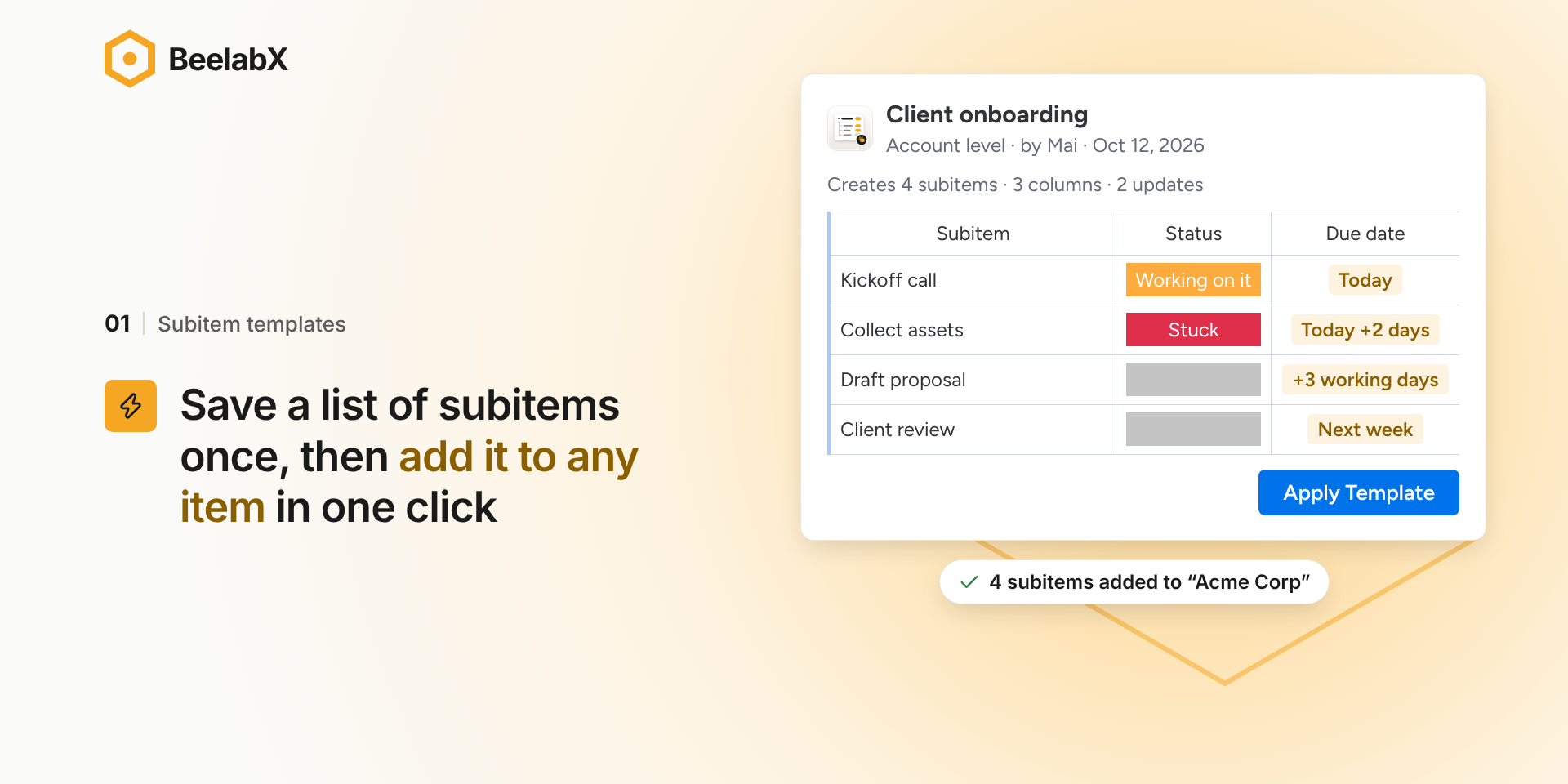
Subitems Pro Templates lets you save the way your team works and reuse it on any board. You can save a list of subitems, or a whole group with its items and subitems, and deploy it in one click.
📌 Two kinds of templates
Subitem templates: save a list of tasks with their properties and deploy them as subitems of any item, on any board.
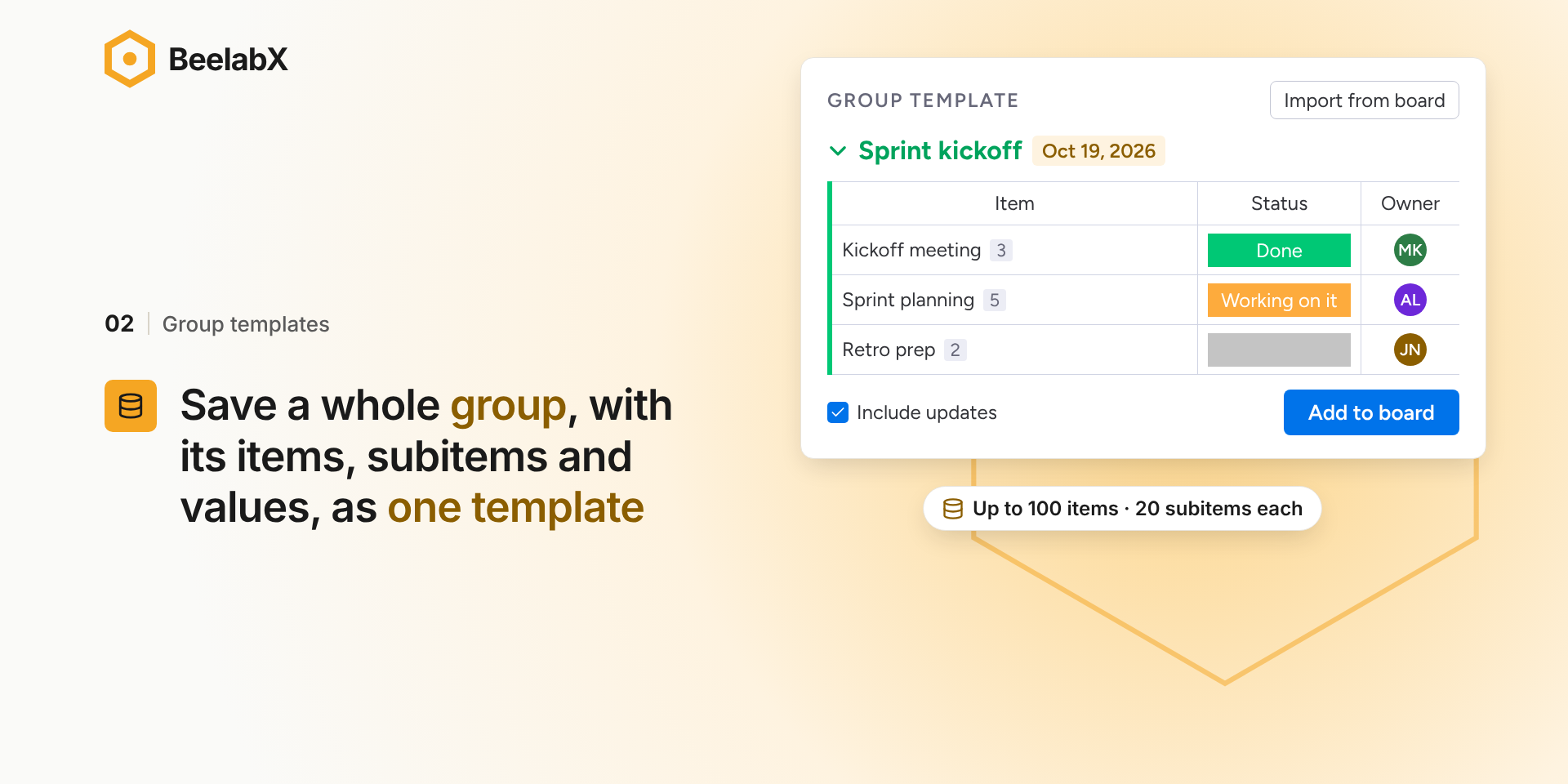
Group templates (new): save a whole group with its items, their subitems and their updates. Recreate it on any board whenever a new project, client or sprint starts. You can build one from scratch or import an existing group from your board.
Templates keep your team on the same process for every project. When you change a template, everyone on your account gets the new version right away. Templates can be personal or shared with your whole account, and each one shows who created it and when it was last updated.
📌 Templates that fill themselves in (new)
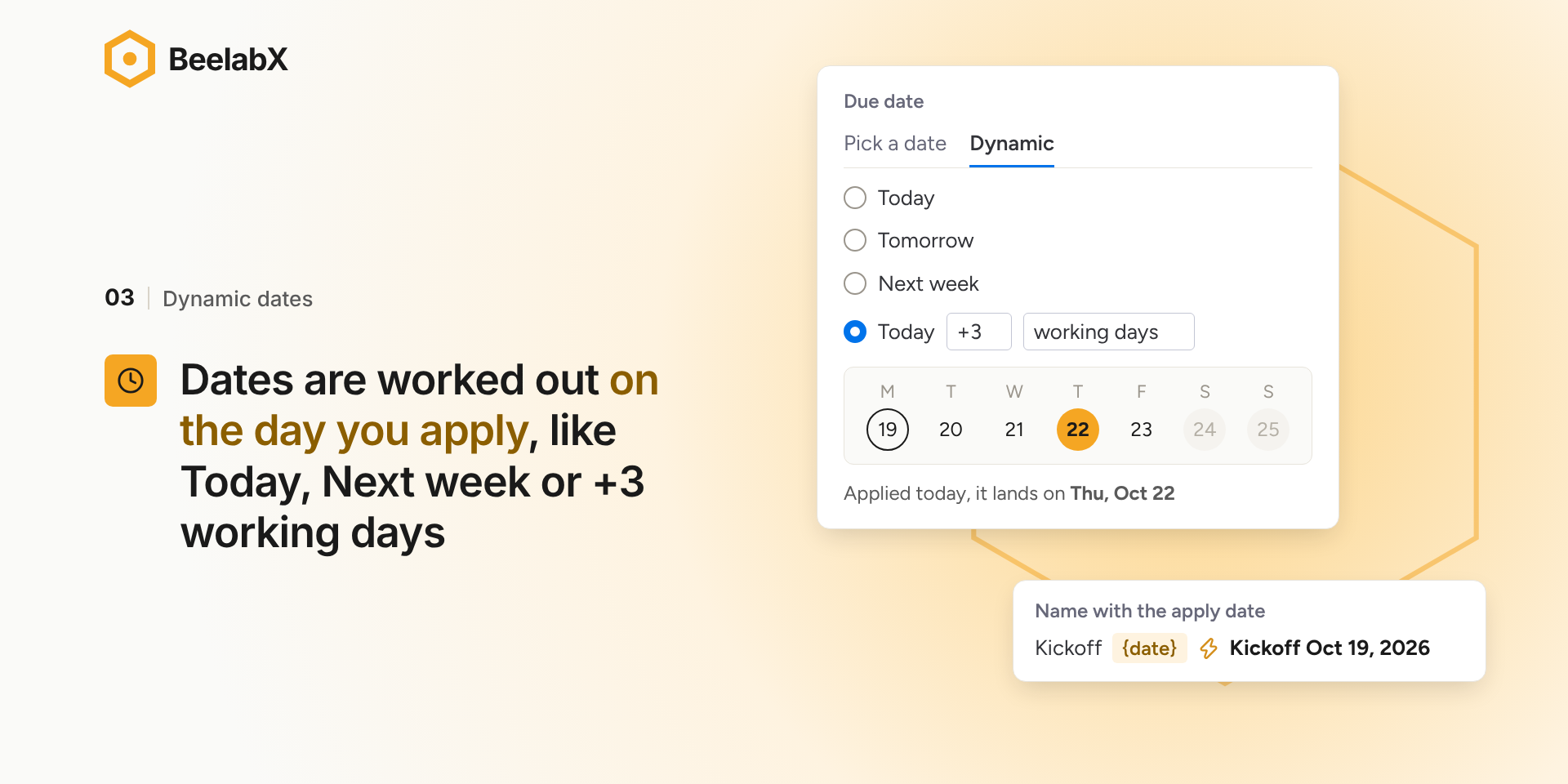
Dynamic dates: set dates relative to the day the template is applied, such as Today, Next week, Next month, or “+3 working days”. Deadlines are always current.
Dynamic timelines: set each end of a timeline relative to the apply date or to its start, counted in days or working days.
Dynamic names: add values like the apply date to item and subitem names, for example “Onboarding – Oct 21, 2026”.
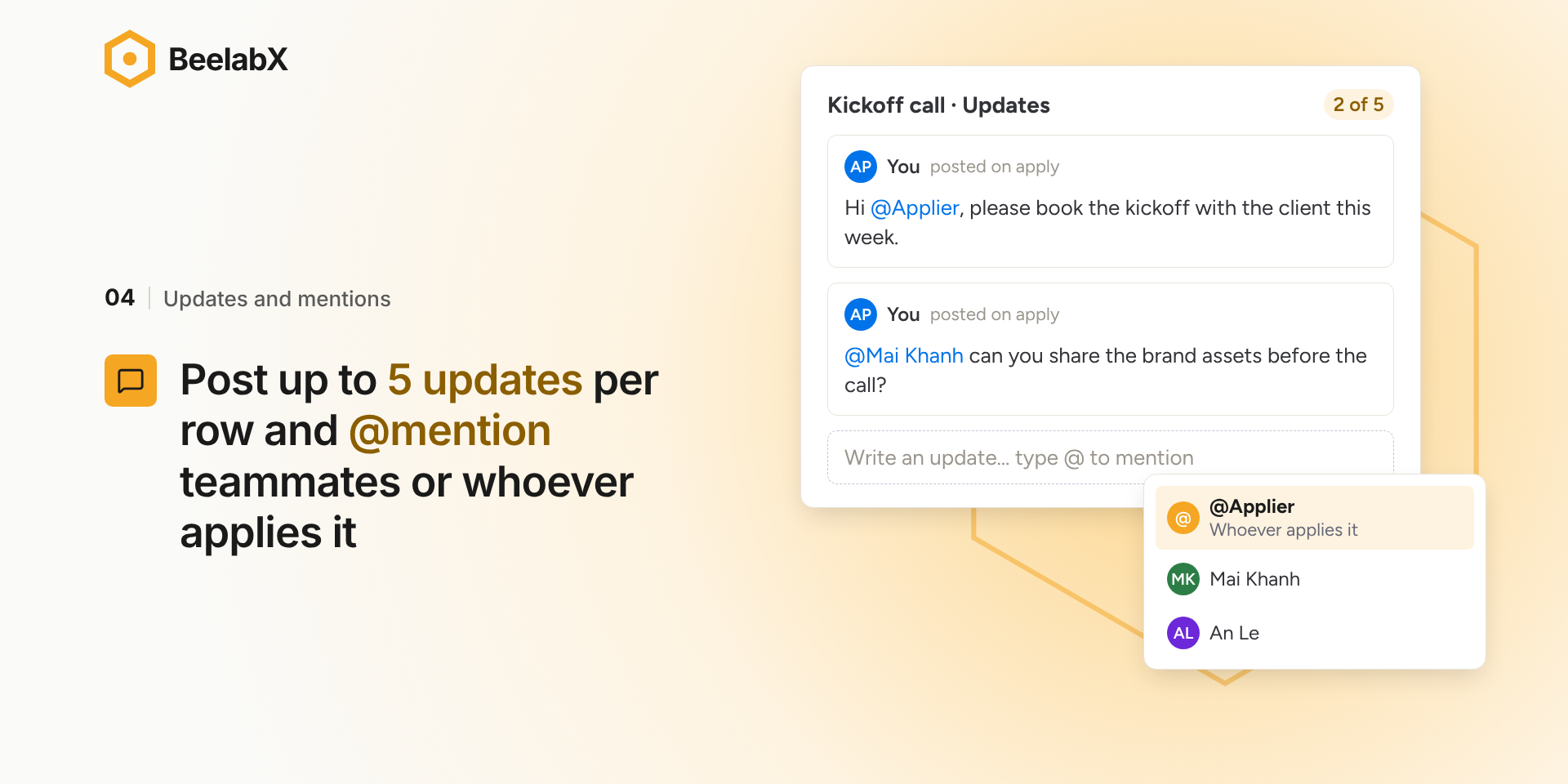
Updates with @mentions: add updates to your template items and subitems. Mention teammates so they get notified as soon as the template is deployed.
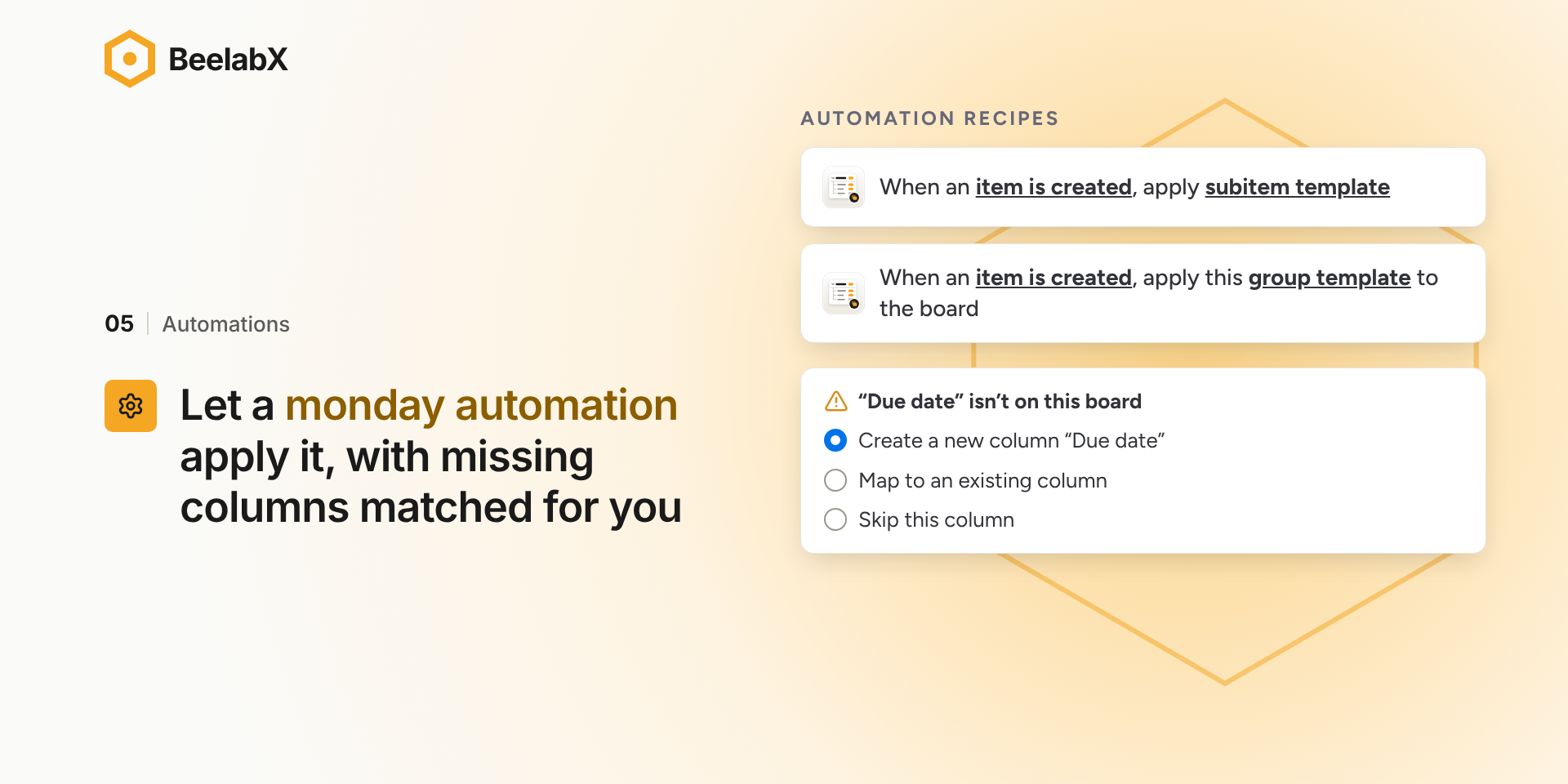
📌 Automations
“When status changes to X, deploy subitem template A”
“When a person is assigned, deploy subitem template B”
“When an item is created in group X, deploy subitem template C”
New: “When X happens, create a group from group template D”
Easy to get started
A guided tour walks you through creating your first subitem or group template, right from the item view.
{
  "id": 10000172,
  "marketplace_developer_id": 10000044,
  "app_id": 10047973,
  "app_type": "app",
  "security_info": {},
  "gallery_assets": [
    {
      "url": "https://cdn.monday.com/marketplace/10000172/10000172_2026_9_21_8_33_47_9vdr0jp.mp4",
      "type": "video"
    },
    {
      "url": "https://cdn.monday.com/marketplace/10000172/10000172_2026_9_21_8_34_7_tsmyfnl.png",
      "type": "image"
    },
    {
      "url": "https://cdn.monday.com/marketplace/10000172/10000172_2026_9_21_8_34_14_siv8k2n.png",
      "type": "image"
    },
    {
      "url": "https://cdn.monday.com/marketplace/10000172/10000172_2026_9_21_8_34_22_ad404ki.png",
      "type": "image"
    },
    {
      "url": "https://cdn.monday.com/marketplace/10000172/10000172_2026_9_21_8_34_33_8pim01nl.png",
      "type": "image"
    },
    {
      "url": "https://cdn.monday.com/marketplace/10000172/10000172_2026_9_21_8_34_44_myo73ef.png",
      "type": "image"
    }
  ],
  "description": "<p><strong>Subitems Pro Templates</strong> lets you save the way your team works and reuse it on any board. You can save a list of subitems, or a whole group with its items and subitems, and deploy it in one click.</p><p><br></p><p><strong>📌 Two kinds of templates</strong></p><ul><li><strong>Subitem templates:</strong> save a list of tasks with their properties and deploy them as subitems of any item, on any board.</li><li><strong>Group templates (new):</strong> save a whole group with its items, their subitems and their updates. Recreate it on any board whenever a new project, client or sprint starts. You can build one from scratch or import an existing group from your board.</li></ul><p>Templates keep your team on the same process for every project. When you change a template, everyone on your account gets the new version right away. Templates can be personal or shared with your whole account, and each one shows who created it and when it was last updated.</p><p><br></p><p><strong>📌 Templates that fill themselves in (new)</strong></p><ul><li><strong>Dynamic dates:</strong> set dates relative to the day the template is applied, such as Today, Next week, Next month, or “+3 working days”. Deadlines are always current.</li><li><strong>Dynamic timelines:</strong> set each end of a timeline relative to the apply date or to its start, counted in days or working days.</li><li><strong>Dynamic names:</strong> add values like the apply date to item and subitem names, for example “Onboarding – Oct 21, 2026”.</li><li><strong>Updates with @mentions:</strong> add updates to your template items and subitems. Mention teammates so they get notified as soon as the template is deployed.</li></ul><p><br></p><p><strong>📌 Automations</strong></p><ul><li>“When status changes to X, deploy subitem template A”</li><li>“When a person is assigned, deploy subitem template B”</li><li>“When an item is created in group X, deploy subitem template C”</li><li><strong>New:</strong> “When X happens, create a group from group template D”</li></ul><p><br></p><p><strong>Easy to get started</strong></p><p>A guided tour walks you through creating your first subitem or group template, right from the item view.</p><p><br></p><p>Read all about this app <a href=\"https://view.monday.com/4209455163-60fb00f812d08294e32ae129a9c612f7?r=use1\" rel=\"noopener noreferrer\" target=\"_blank\">here</a></p>",
  "short_description": "Save subitems and groups as templates, apply everywhere.",
  "thumbnail_url": "https://dapulse-res.cloudinary.com/image/upload/v1677079615/monday-apps-marketplace/sub%20items%20pro%20templates/large-SPT_card_image.png",
  "logo_url": "https://cdn.monday.com/marketplace/10000172/10000172_2026_9_21_8_33_27_vizmkk8.png",
  "feedback_url": "http://www.beelabxapps.com/submit",
  "privacy_policy_url": "https://www.beelabxapps.com/privacy-policy",
  "featured": false,
  "name": "Subitem Pro Templates",
  "how_to_use_url": "https://docs.beelabxapps.com/docs/apps/subitem-pro-templates/user-guide",
  "external_pricing_url": null,
  "keywords": "Process,Tool,Productivity,Reoccurring ,Recurring ,Task ,Steps ,Default ,Subitem ,Template ",
  "compliance_answers": [],
  "created_at": "2023-02-22T15:35:41.000Z",
  "updated_at": "2026-11-01T08:01:10.000Z",
  "automation_app_id": null,
  "marketplace_category_ids": [
    6,
    5
  ],
  "pinned_for_categories_ids": [],
  "featured_for_categories_ids": [],
  "pricing_data": "Free plan available",
  "label": null,
  "app_values": [
    "Built for scalability"
  ],
  "security": false,
  "display_in_template_store": false,
  "acquisition_source": "No touch",
  "is_connector": false,
  "show_connections": false,
  "terms_of_service_url": "https://www.beelabxapps.com/terms-of-service",
  "available_for_tiers": [],
  "available_for_products": [],
  "google_analytics_tag_id": null,
  "is_solution": false,
  "cta_override": null,
  "app_scope_str": "boards:read,boards:write,notifications:write,users:read,updates:read,updates:write,me:read,teams:read,account:read",
  "app_client_id": "90c8d0a9b90b1892a25435c48f17b7f3",
  "app_color": {
    "hsl": {
      "h": 198.125,
      "s": 0,
      "l": 1,
      "a": 1
    },
    "hex": "#ffffff",
    "rgb": {
      "r": 255,
      "g": 255,
      "b": 255,
      "a": 1
    },
    "hsv": {
      "h": 198.125,
      "s": 0,
      "v": 1,
      "a": 1
    },
    "oldHue": 198.125,
    "source": "hsv"
  },
  "plans": [
    {
      "id": "10047973-1-free",
      "appPlanId": "free",
      "name": "Free",
      "versionId": 1,
      "isTrial": false,
      "prices": {
        "type": "standard",
        "monthly": 0,
        "yearly": 0
      },
      "versionState": "live",
      "appId": 10047973,
      "description": "Free plan allows to use up to 10 templates monthly",
      "extraData": {
        "bullets": [
          "Apply up to 10 templates monthly",
          "Each template with unlimited number of subitems"
        ],
        "monthlyFee": 0,
        "yearlyFee": 0
      },
      "isFree": true,
      "isRecommended": false,
      "currency": "USD"
    },
    {
      "id": "10047973-1-silver",
      "appPlanId": "silver",
      "name": "Silver",
      "versionId": 1,
      "isTrial": false,
      "prices": {
        "type": "standard",
        "monthly": 39,
        "yearly": 29
      },
      "versionState": "live",
      "appId": 10047973,
      "description": "Silver plan allows to use up to 100 templates monthly",
      "extraData": {
        "bullets": [
          "Apply up to 100 templates monthly",
          "Each template with unlimited number of subitems"
        ],
        "monthlyFee": 39,
        "yearlyFee": 29
      },
      "isFree": false,
      "isRecommended": false,
      "currency": "USD"
    },
    {
      "id": "10047973-1-gold",
      "appPlanId": "gold",
      "name": "Gold",
      "versionId": 1,
      "isTrial": false,
      "prices": {
        "type": "standard",
        "monthly": 79,
        "yearly": 59
      },
      "versionState": "live",
      "appId": 10047973,
      "description": "Gold plan allows to use up to 500 templates monthly",
      "extraData": {
        "bullets": [
          "Apply up to 500 templates monthly",
          "Each template with unlimited number of subitems"
        ],
        "monthlyFee": 79,
        "yearlyFee": 59
      },
      "isFree": false,
      "isRecommended": true,
      "currency": "USD"
    },
    {
      "id": "10047973-1-platinum",
      "appPlanId": "platinum",
      "name": "Platinum",
      "versionId": 1,
      "isTrial": false,
      "prices": {
        "type": "standard",
        "monthly": 99,
        "yearly": 79
      },
      "versionState": "live",
      "appId": 10047973,
      "description": "Platinum plan allows to use up to 1000 templates monthly",
      "extraData": {
        "bullets": [
          "Apply up to 500 templates monthly",
          "Each template with unlimited number of subitems"
        ],
        "monthlyFee": 99,
        "yearlyFee": 79
      },
      "isFree": false,
      "isRecommended": false,
      "currency": "USD"
    },
    {
      "id": "10047973-1-diamond",
      "appPlanId": "diamond",
      "name": "Diamond",
      "versionId": 1,
      "isTrial": false,
      "prices": {
        "type": "standard",
        "monthly": 149,
        "yearly": 119
      },
      "versionState": "live",
      "appId": 10047973,
      "description": "Diamond plan allows to use unlimited templates monthly",
      "extraData": {
        "bullets": [
          "Apply unlimited templates monthly",
          "Each template with unlimited number of subitems"
        ],
        "monthlyFee": 149,
        "yearlyFee": 119
      },
      "isFree": false,
      "isRecommended": false,
      "currency": "USD"
    },
    {
      "id": "10047973-2-silver",
      "appPlanId": "silver",
      "name": "Silver",
      "versionId": 2,
      "isTrial": false,
      "prices": {
        "type": "standard",
        "monthly": 39,
        "yearly": 29
      },
      "versionState": "live",
      "appId": 10047973,
      "description": "Silver plan allows to use up to 100 templates monthly",
      "extraData": {
        "bullets": [
          "Apply up to 100 templates monthly",
          "Each template with unlimited number of subitems"
        ],
        "monthlyFee": 39,
        "yearlyFee": 29
      },
      "isFree": false,
      "isRecommended": false,
      "currency": "USD"
    },
    {
      "id": "10047973-2-gold",
      "appPlanId": "gold",
      "name": "Gold",
      "versionId": 2,
      "isTrial": false,
      "prices": {
        "type": "standard",
        "monthly": 79,
        "yearly": 59
      },
      "versionState": "live",
      "appId": 10047973,
      "description": "Gold plan allows to use up to 500 templates monthly",
      "extraData": {
        "bullets": [
          "Apply up to 500 templates monthly",
          "Each template with unlimited number of subitems"
        ],
        "monthlyFee": 79,
        "yearlyFee": 59
      },
      "isFree": false,
      "isRecommended": false,
      "currency": "USD"
    },
    {
      "id": "10047973-2-platinum",
      "appPlanId": "platinum",
      "name": "Platinum",
      "versionId": 2,
      "isTrial": false,
      "prices": {
        "type": "standard",
        "monthly": 99,
        "yearly": 79
      },
      "versionState": "live",
      "appId": 10047973,
      "description": "Platinum plan allows to use up to 1000 templates monthly",
      "extraData": {
        "bullets": [
          "Apply up to 1000 templates monthly",
          "Each template with unlimited number of subitems"
        ],
        "monthlyFee": 99,
        "yearlyFee": 79
      },
      "isFree": false,
      "isRecommended": true,
      "currency": "USD"
    },
    {
      "id": "10047973-2-diamond",
      "appPlanId": "diamond",
      "name": "Diamond",
      "versionId": 2,
      "isTrial": true,
      "prices": {
        "type": "standard",
        "monthly": 149,
        "yearly": 119
      },
      "versionState": "live",
      "appId": 10047973,
      "description": "Diamond plan allows to use unlimited templates monthly",
      "extraData": {
        "bullets": [
          "Apply unlimited templates monthly",
          "Each template with unlimited number of subitems"
        ],
        "monthlyFee": 149,
        "yearlyFee": 119
      },
      "isFree": false,
      "isRecommended": false,
      "currency": "USD"
    },
    {
      "id": "10047973-3-lite",
      "appPlanId": "lite",
      "name": "Lite",
      "versionId": 3,
      "isTrial": false,
      "prices": {
        "type": "standard",
        "monthly": 6,
        "yearly": 5
      },
      "versionState": "live",
      "appId": 10047973,
      "description": "Allow 30 applies a month, with unlimited templates creation",
      "extraData": {
        "bullets": [
          "Subitem templates",
          "Group templates",
          "Dynamic Date, Timeline, Person columns",
          "Create Updates with mentions in templates"
        ],
        "monthlyFee": 6,
        "yearlyFee": 5
      },
      "isFree": false,
      "isRecommended": false,
      "currency": "USD"
    },
    {
      "id": "10047973-3-starter",
      "appPlanId": "starter",
      "name": "Starter",
      "versionId": 3,
      "isTrial": false,
      "prices": {
        "type": "standard",
        "monthly": 15,
        "yearly": 12
      },
      "versionState": "live",
      "appId": 10047973,
      "description": "Allow 100 applies a month, with unlimited templates creation",
      "extraData": {
        "bullets": [
          "Subitem template",
          "Group template",
          "Dynamic Date, Timeline, Person column",
          "Create Updates with mentions in templates"
        ],
        "monthlyFee": 15,
        "yearlyFee": 12
      },
      "isFree": false,
      "isRecommended": false,
      "currency": "USD"
    },
    {
      "id": "10047973-3-growth",
      "appPlanId": "growth",
      "name": "Growth",
      "versionId": 3,
      "isTrial": true,
      "prices": {
        "type": "standard",
        "monthly": 31,
        "yearly": 25
      },
      "versionState": "live",
      "appId": 10047973,
      "description": "Allow 350 applies a month, with unlimited templates creation",
      "extraData": {
        "bullets": [
          "Subitem templates",
          "Group templates",
          "Dynamic Date, Timeline, Person column",
          "Create Updates with mentions in templates",
          "Store Files in templates"
        ],
        "monthlyFee": 31,
        "yearlyFee": 25
      },
      "isFree": false,
      "isRecommended": false,
      "currency": "USD"
    },
    {
      "id": "10047973-3-scale",
      "appPlanId": "scale",
      "name": "Scale",
      "versionId": 3,
      "isTrial": false,
      "prices": {
        "type": "standard",
        "monthly": 53,
        "yearly": 42
      },
      "versionState": "live",
      "appId": 10047973,
      "description": "Allow 700 applies a month, with unlimited templates creation",
      "extraData": {
        "bullets": [
          "Subitem Templates",
          "Group Templates",
          "Dynamic Date, Timeline, Person column",
          "Create Updates with mentions in templates",
          "Store Files in templates"
        ],
        "monthlyFee": 53,
        "yearlyFee": 42
      },
      "isFree": false,
      "isRecommended": false,
      "currency": "USD"
    },
    {
      "id": "10047973-3-unlimited",
      "appPlanId": "unlimited",
      "name": "Unlimited",
      "versionId": 3,
      "isTrial": false,
      "prices": {
        "type": "standard",
        "monthly": 65,
        "yearly": 52
      },
      "versionState": "live",
      "appId": 10047973,
      "description": "Allow unlimited applies a month, with unlimited templates creation",
      "extraData": {
        "bullets": [
          "Subitem templates",
          "Group templates",
          "Dynamic Date, Timeline, Person column",
          "Create Updates with mentions in templates",
          "Store Files in templates"
        ],
        "monthlyFee": 65,
        "yearlyFee": 52
      },
      "isFree": false,
      "isRecommended": false,
      "currency": "USD"
    }
  ],
  "app_live_version": {
    "updated_at": "2026-10-29T05:10:27.527Z",
    "id": 19419240
  },
  "pricing_model": null,
  "monetization": {
    "monetizationType": "monday",
    "hasFreePlan": false,
    "hasPaidPlan": true,
    "hasTrialPlan": true
  },
  "badges_data": {
    "security": false,
    "app_values": [
      "Built for scalability"
    ],
    "pricing_data": "Free plan available",
    "acquisition_source": "No touch",
    "display_in_template_store": false
  },
  "data": {
    "is_solution": false,
    "cta_override": null,
    "is_connector": false,
    "show_connections": false,
    "available_for_tiers": [],
    "terms_of_service_url": "https://www.beelabxapps.com/terms-of-service",
    "available_for_products": [],
    "google_analytics_tag_id": null
  },
  "display": null,
  "installsDelta": {
    "totalInstalls": 5740,
    "sevenDays": -3,
    "thirtyDays": -7,
    "ninetyDays": -7
  }
}