Auto generate increment numbers with prefix or suffix format
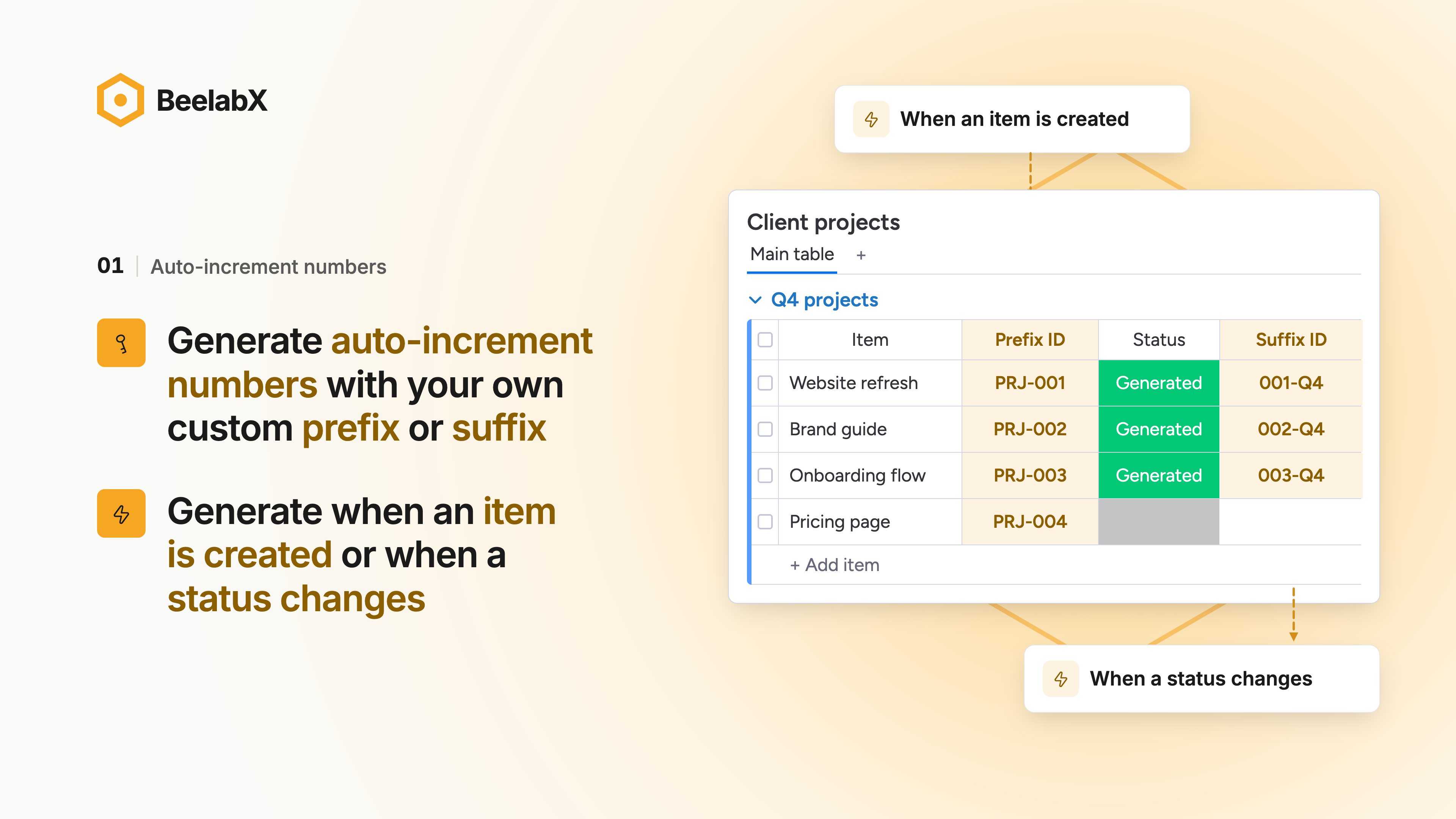
Auto-Increment Number automatically gives every item on your board a unique, sequential ID. Use it for invoice numbers, ticket references, order numbers or asset tags, and stop typing and tracking them by hand.
📌 How it works
• From the column: open AIN from any column’s menu, choose the Auto-increment Number Column Extension, build your ID format and save.
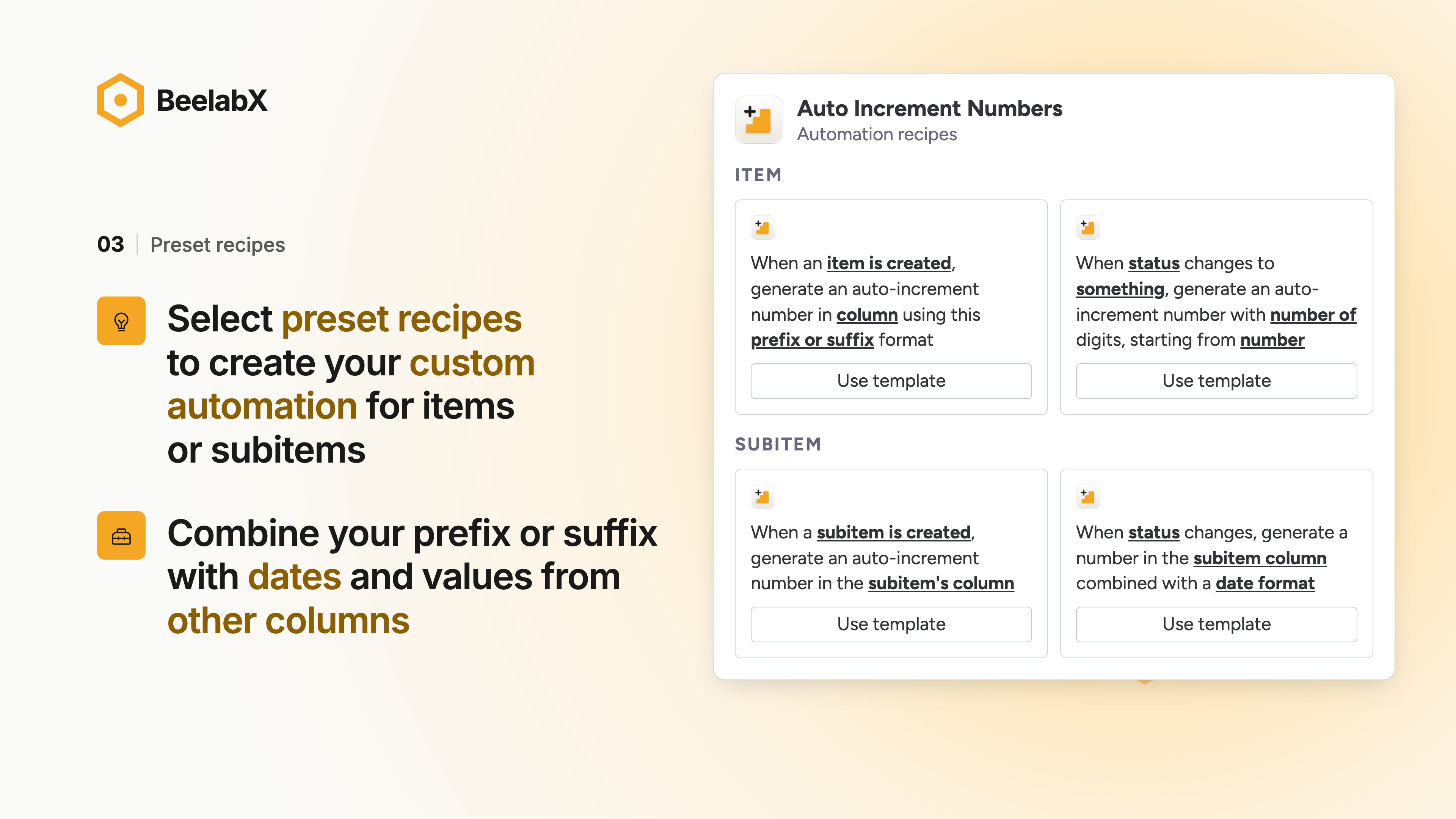
• Automation templates: pick a ready-made AIN template from monday’s Automation Center and fill in the details.
• Automation blocks: add AIN’s actions to your own custom automations in monday’s automation builder.
Build the exact ID format you need
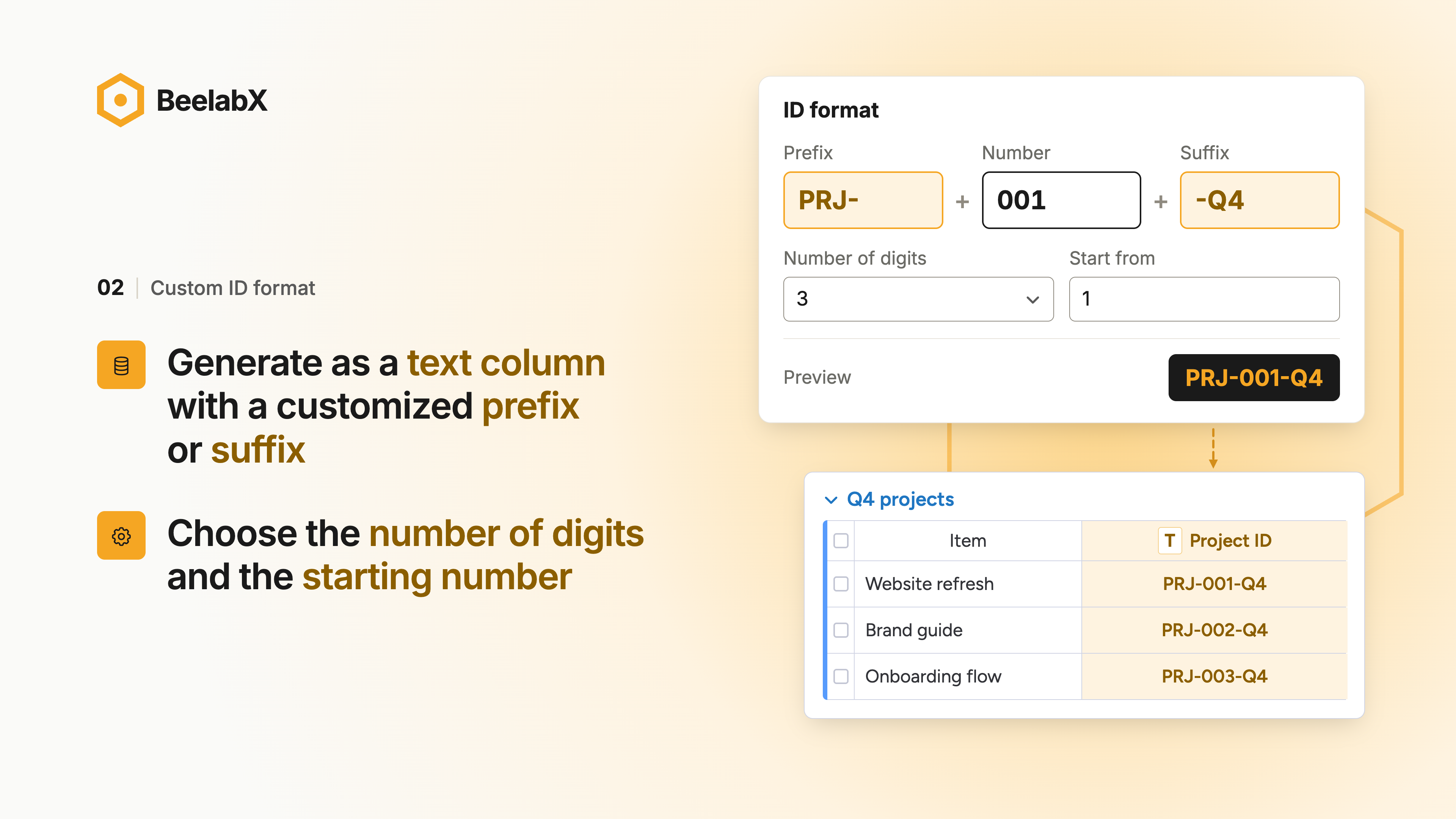
• Text: add prefixes, suffixes and separators (INV-, -US, /)
• Counter: set the number of digits and the starting number (0001, 1000…)
• Date: use the creation date or any date column, in dozens of formats (2026, 2026-10, 14/10/26)
• Column: pull in values from other columns or the item name (client, department, project)
Combine the parts in any order. A live preview shows your next IDs before you save, so there’s no guesswork.
Choose when IDs are generated
• When an item or subitem is created
• When a specific column changes
• When a status changes to a label you pick (e.g. assign an invoice number only when Status = Approved)
Built for real workflows
• Works on both items and subitems
• Up to 3 automations per column
• Option to skip items that already have an ID
• Reset or adjust the counter at any time
• No duplicate numbers, even when many items are created at once
Perfect for
• Finance: invoices, purchase orders, quotes
• Operations: orders, shipments, work orders
• IT & Support: tickets and requests
• HR: employee and candidate IDs
• Asset management: inventory and equipment tags
• Project management: project and task codes
Stop numbering by hand. Install AIN and get clean, consistent IDs on every board.
{
"id": 10000104,
"marketplace_developer_id": 10000044,
"app_id": 10032082,
"app_type": "app",
"security_info": {},
"gallery_assets": [
{
"url": "https://cdn.monday.com/marketplace/10000104/10000104_2026_9_14_8_44_28_hk7wrf5.png",
"type": "image"
},
{
"url": "https://cdn.monday.com/marketplace/10000104/10000104_2026_9_14_8_44_32_w2cd2zf.png",
"type": "image"
},
{
"url": "https://cdn.monday.com/marketplace/10000104/10000104_2026_9_14_8_44_36_y78ib49.png",
"type": "image"
},
{
"url": "https://cdn.monday.com/marketplace/10000104/10000104_2026_9_14_8_56_16_sfbp5yz.mp4",
"type": "video"
}
],
"description": "<p><strong>Auto-Increment Number</strong> automatically gives every item on your board a unique, sequential ID. Use it for invoice numbers, ticket references, order numbers or asset tags, and stop typing and tracking them by hand.</p><p><br></p><p><br></p><p><strong>📌 How it works</strong></p><p><strong>• From the column:</strong> open AIN from any column’s menu, choose the <em>Auto-increment Number Column Extension</em>, build your ID format and save.</p><p>• <strong>Automation templates:</strong> pick a ready-made AIN template from monday’s Automation Center and fill in the details.</p><p>• <strong>Automation blocks:</strong> add AIN’s actions to your own custom automations in monday’s automation builder.</p><p><br></p><p><strong>Build the exact ID format you need</strong></p><p>• Text: add prefixes, suffixes and separators (INV-, -US, /)</p><p>• Counter: set the number of digits and the starting number (0001, 1000…)</p><p>• Date: use the creation date or any date column, in dozens of formats (2026, 2026-10, 14/10/26)</p><p>• Column: pull in values from other columns or the item name (client, department, project)</p><p>Combine the parts in any order. A live preview shows your next IDs before you save, so there’s no guesswork.</p><p><br></p><p><strong>Choose when IDs are generated</strong></p><p>• When an item or subitem is created</p><p>• When a specific column changes</p><p>• When a status changes to a label you pick (e.g. assign an invoice number only when Status = Approved)</p><p><br></p><p><strong>Built for real workflows</strong></p><p>• Works on both items and subitems</p><p>• Up to 3 automations per column</p><p>• Option to skip items that already have an ID</p><p>• Reset or adjust the counter at any time</p><p>• No duplicate numbers, even when many items are created at once</p><p><br></p><p><strong>Perfect for</strong></p><p>• Finance: invoices, purchase orders, quotes</p><p>• Operations: orders, shipments, work orders</p><p>• IT & Support: tickets and requests</p><p>• HR: employee and candidate IDs</p><p>• Asset management: inventory and equipment tags</p><p>• Project management: project and task codes</p><p>Stop numbering by hand. Install AIN and get clean, consistent IDs on every board.</p><p><br></p><p><strong><em>Learn more </em></strong><a href=\"https://www.beelabxapps.com/apps/auto-increment-numbers\" rel=\"noopener noreferrer\" target=\"_blank\"><strong><em>here</em></strong></a></p>",
"short_description": "Auto generate increment numbers with prefix or suffix format",
"thumbnail_url": "https://dapulse-res.cloudinary.com/image/upload/v1661695981/monday-apps-marketplace/Auto%20Increment%20Numbers/AIN_card_image.png",
"logo_url": "https://cdn.monday.com/marketplace/10000104/10000104_2026_9_14_8_35_58_8w2u6ac.png",
"feedback_url": "http://www.beelabxapps.com/submit",
"privacy_policy_url": "https://www.beelabxapps.com/privacy-policy",
"featured": false,
"name": "Auto-Increment Numbers",
"how_to_use_url": "https://docs.beelabxapps.com/docs/apps/auto-increment-numbers/user-guide",
"external_pricing_url": "https://www.beelabxapps.com/apps/auto-increment-numbers",
"keywords": "Auto Generate ID, Auto-Increment Numbers,Auto Numbering,auto,numbers,id,generator",
"compliance_answers": [],
"created_at": "2022-08-28T14:18:47.000Z",
"updated_at": "2026-11-01T07:58:45.000Z",
"automation_app_id": null,
"marketplace_category_ids": [
8,
6,
5
],
"pinned_for_categories_ids": [],
"featured_for_categories_ids": [],
"pricing_data": "14 days trial",
"label": null,
"app_values": [
"Everyday tasks"
],
"security": false,
"display_in_template_store": false,
"acquisition_source": "Existing legacy",
"is_connector": false,
"show_connections": false,
"terms_of_service_url": "https://www.beelabxapps.com/terms-of-service",
"available_for_tiers": [],
"available_for_products": [],
"google_analytics_tag_id": null,
"is_solution": false,
"cta_override": null,
"app_scope_str": "boards:read,boards:write,webhooks:write,users:read,notifications:write,account:read",
"app_client_id": "cdce2451dd820396d9b2fa8b27c52adc",
"app_color": {
"hsl": {
"h": 198.125,
"s": 0,
"l": 1,
"a": 1
},
"hex": "#ffffff",
"rgb": {
"r": 255,
"g": 255,
"b": 255,
"a": 1
},
"hsv": {
"h": 198.125,
"s": 0,
"v": 1,
"a": 1
},
"oldHue": 198.125,
"source": "hsv"
},
"plans": [
{
"id": "10032082-1-10032082_standard_monthly",
"appPlanId": "10032082_standard_monthly",
"name": "Standard",
"versionId": 1,
"isTrial": true,
"prices": {
"type": "standard",
"monthly": 6,
"yearly": 5
},
"versionState": "live",
"appId": 10032082,
"description": "For small teams with essential features.",
"extraData": {
"bullets": [
"Includes up to 10,000 operations per month",
"Full access to core app features",
"Real‑time data syncing"
],
"monthlyFee": 6,
"yearlyFee": 5
},
"isFree": false,
"isRecommended": false,
"currency": "USD"
},
{
"id": "10032082-1-10032082_pro_monthly",
"appPlanId": "10032082_pro_monthly",
"name": "Pro",
"versionId": 1,
"isTrial": false,
"prices": {
"type": "standard",
"monthly": 12,
"yearly": 9
},
"versionState": "live",
"appId": 10032082,
"description": "For growing teams needing more capacity and features.",
"extraData": {
"bullets": [
"Includes up to 100,000 operations per month",
"Full access to core app features",
"Real‑time data syncing",
"Priority email and in‑app support"
],
"monthlyFee": 12,
"yearlyFee": 9
},
"isFree": false,
"isRecommended": false,
"currency": "USD"
},
{
"id": "10032082-2-standard",
"appPlanId": "standard",
"name": "Standard",
"versionId": 2,
"isTrial": false,
"prices": {
"type": "standard",
"monthly": 6,
"yearly": 5
},
"versionState": "live",
"appId": 10032082,
"description": "For small teams with essential features.",
"extraData": {
"bullets": [
"Includes up to 10,000 operations per month",
"Full access to core app features",
"Real‑time data syncing"
],
"monthlyFee": 6,
"yearlyFee": 5
},
"isFree": false,
"isRecommended": false,
"currency": "USD"
},
{
"id": "10032082-2-pro",
"appPlanId": "pro",
"name": "Pro",
"versionId": 2,
"isTrial": true,
"prices": {
"type": "standard",
"monthly": 12,
"yearly": 9
},
"versionState": "live",
"appId": 10032082,
"description": "For growing teams needing more capacity and features.",
"extraData": {
"bullets": [
"Includes up to 100,000 operations per month",
"Full access to core app features",
"Real‑time data syncing",
"Priority email and in‑app support"
],
"monthlyFee": 12,
"yearlyFee": 9
},
"isFree": false,
"isRecommended": false,
"currency": "USD"
}
],
"app_live_version": {
"updated_at": "2026-10-29T05:08:17.208Z",
"id": 19419208
},
"pricing_model": null,
"monetization": {
"monetizationType": "monday",
"hasFreePlan": false,
"hasPaidPlan": true,
"hasTrialPlan": true
},
"badges_data": {
"security": false,
"app_values": [
"Everyday tasks"
],
"pricing_data": "14 days trial",
"acquisition_source": "Existing legacy",
"display_in_template_store": false
},
"data": {
"is_solution": false,
"cta_override": null,
"is_connector": false,
"show_connections": false,
"available_for_tiers": [],
"terms_of_service_url": "https://www.beelabxapps.com/terms-of-service",
"available_for_products": [],
"google_analytics_tag_id": null
},
"display": null,
"installsDelta": {
"totalInstalls": 1148,
"sevenDays": 2,
"thirtyDays": 2,
"ninetyDays": 4
}
}