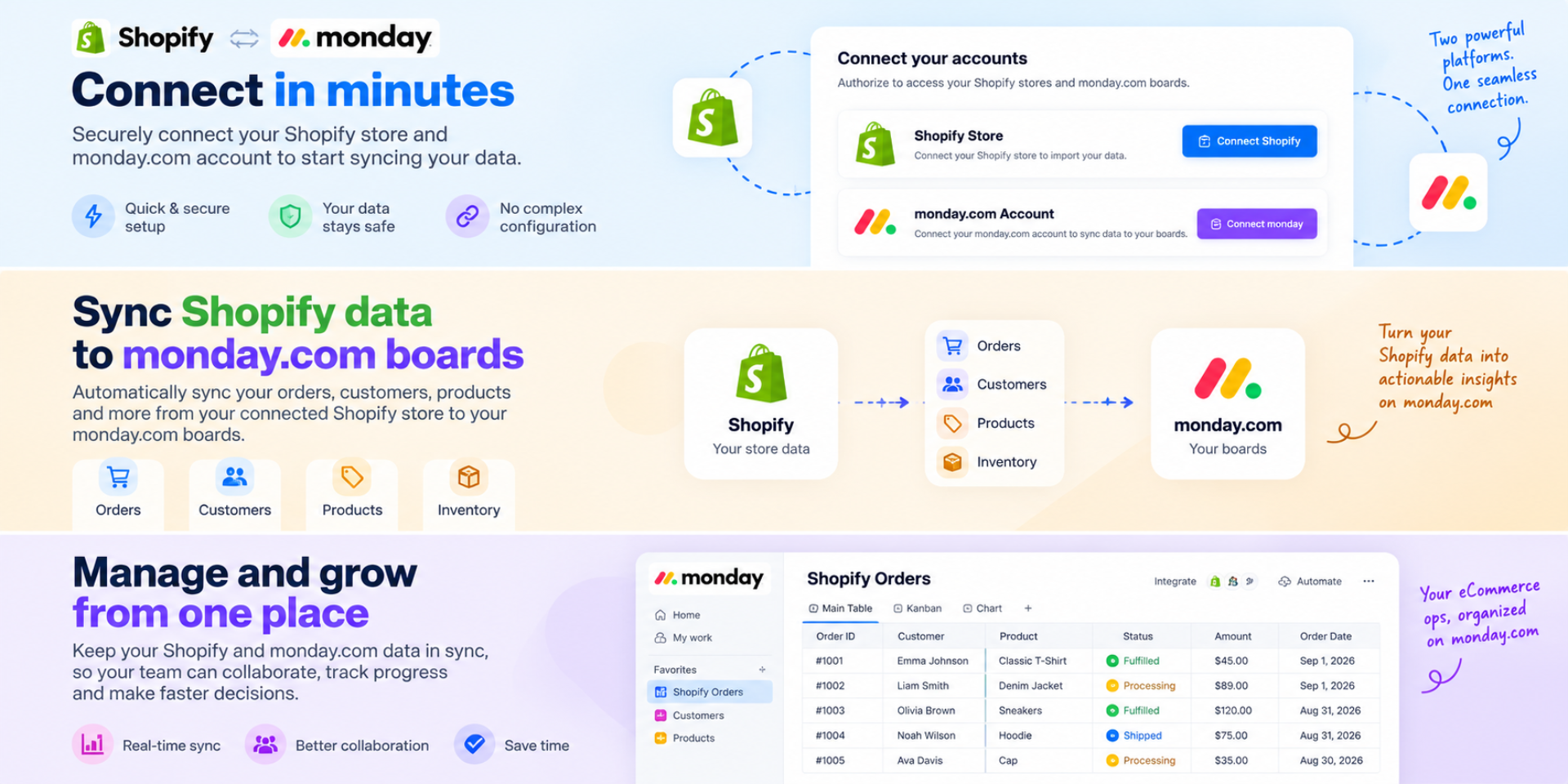
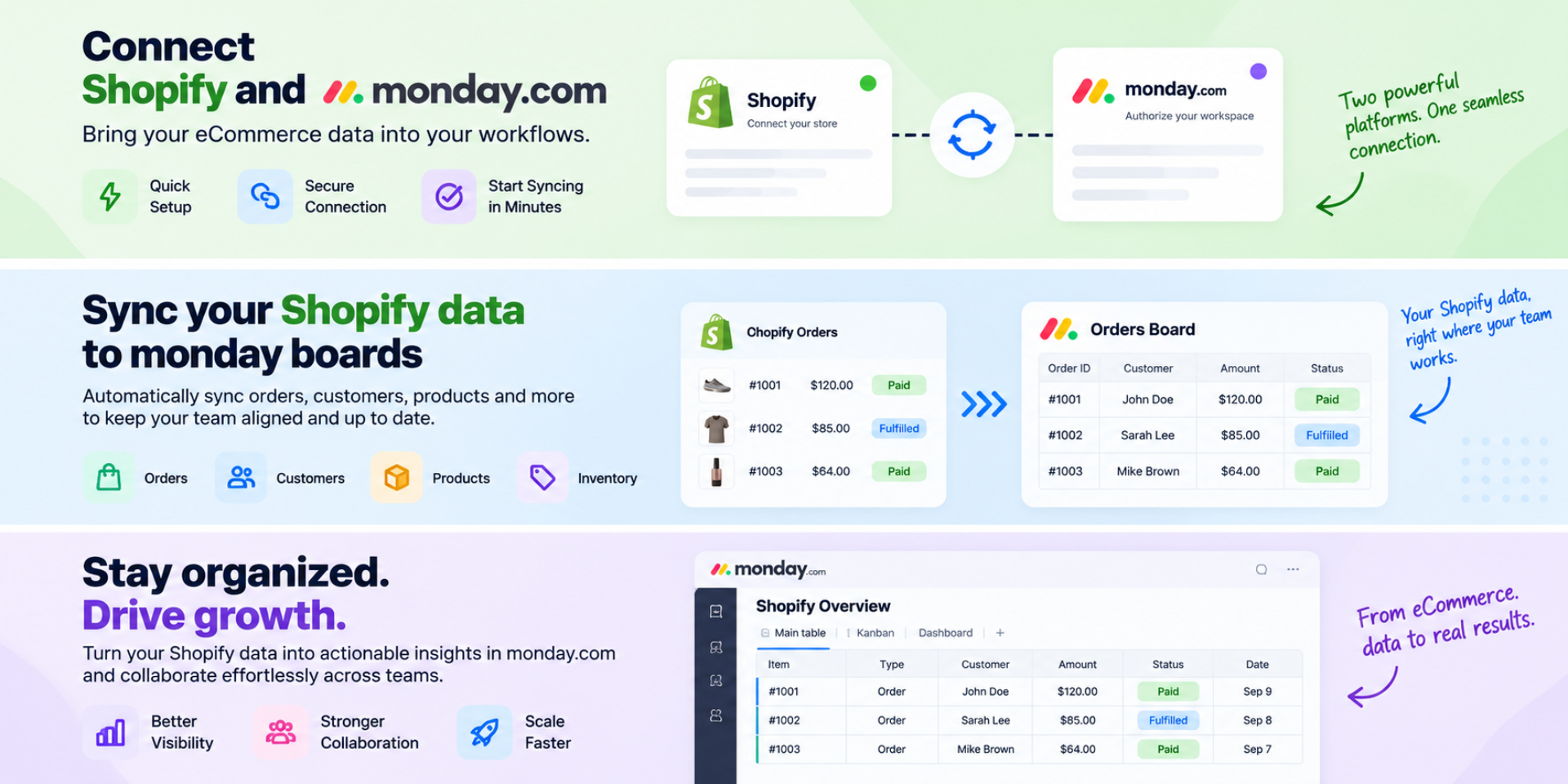
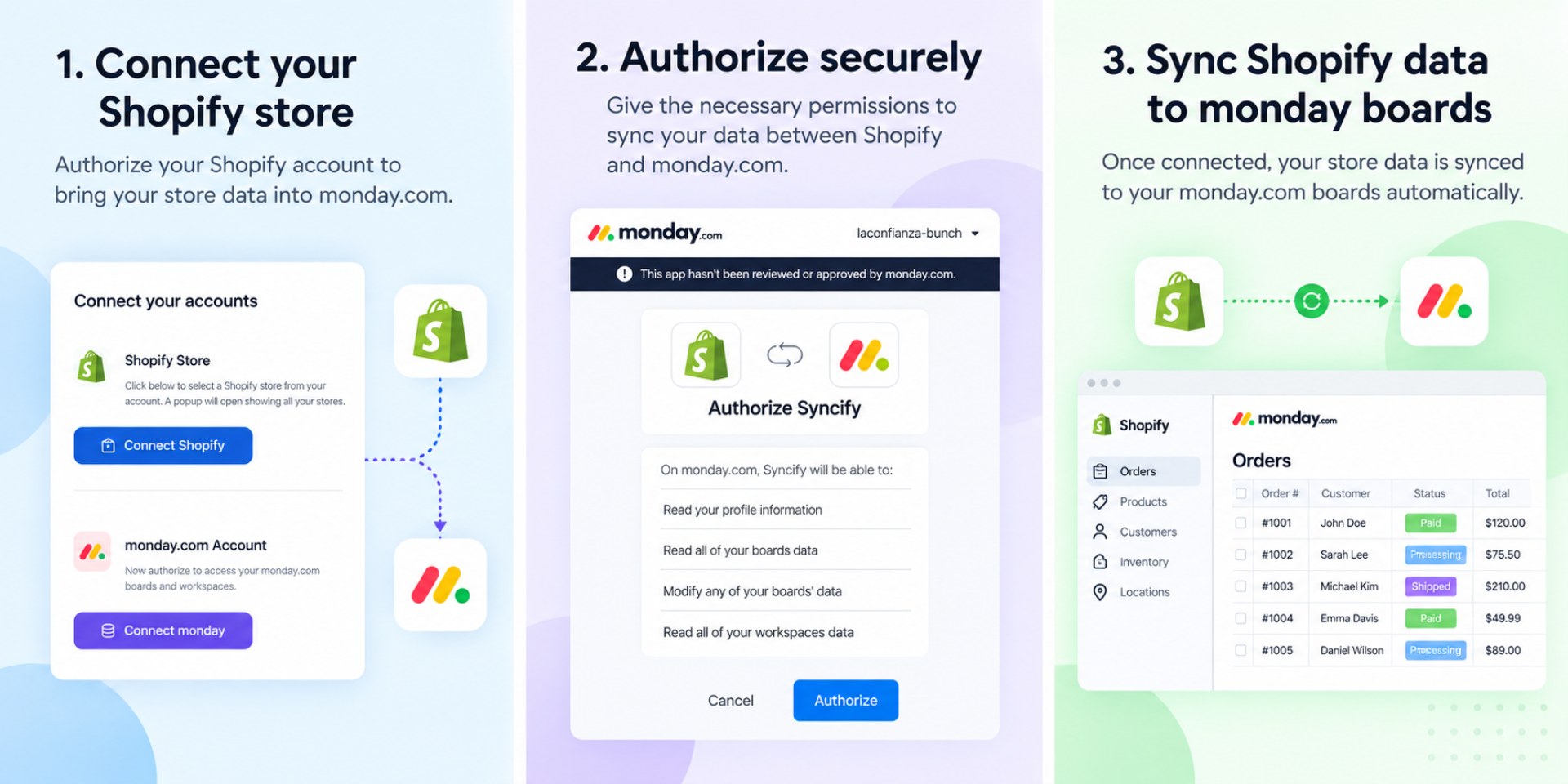
Syncs Shopify data with monday CRM in the selected workspace
Syncify — Unified Shopify Commerce Operations for monday CRM
Syncify transforms monday CRM into a centralized workspace for businesses managing one or multiple Shopify stores.
Unlike traditional Shopify integrations that create a separate monday board for each store, Syncify uses a unified, object-based architecture. Data from all connected Shopify stores can be consolidated into shared monday boards—for example, all Orders in one Orders board, all Inventory in one Inventory board, all Refunds in one Refunds board, and similarly for other commerce objects.
This gives teams a single cross-store view of their business without switching between multiple boards or Shopify stores.
What You Can Do with Syncify
Manage Multiple Shopify Stores from One Workspace
Connect multiple Shopify stores and manage their commerce data from a centralized monday workspace. Teams can filter, group, search, automate, and report across stores while still retaining store-level visibility.
Centralize Order Management
Bring orders from all connected Shopify stores into a single Orders board. Teams can track orders by customer, store, status, fulfillment, payment status, and other business attributes.
Get a Unified Inventory View
Consolidate inventory across stores into one Inventory board. Operations teams can monitor stock levels, identify low-stock products, compare inventory across stores, and trigger workflows based on inventory changes.
Improve Customer Service
Give sales and customer success teams visibility into Shopify customer and order activity directly within monday CRM. Teams can quickly review purchase history, orders, refunds, and other commerce activity when responding to customers.
Automate Commerce Workflows
Use monday automations with synchronized Shopify data to create internal workflows—for example, assigning follow-up tasks, notifying teams about specific order or inventory conditions, or routing exceptions to the right team.
Identify Sales Opportunities
Use Shopify purchase history to identify repeat customers, high-value customers, inactive customers, and potential upsell or cross-sell opportunities.
Track Refunds and Exceptions
Centralize refunds from multiple Shopify stores in one workspace so finance, operations, and customer-facing teams can monitor refund activity and manage follow-ups.
Connect Commerce with CRM
Bring commerce activity into monday CRM so sales, operations, and customer success teams can work from the same workspace instead of operating across disconnected systems.
Security & Compliance
The app developer did not provide the security and compliance information for this app.
Reviews
No reviews yet.
Historical data
Installation history
We have data for December 28, 2024 onwards only. Collected sometime after 00:00 UTC daily.
Total number of installs
Change in total number of installs in last 1 day(s)
Compares the number of installs on each date with 1 days previously:
Max
Min
Current
Change in total number of installs in last 7 day(s)
Compares the number of installs on each date with 7 days previously:
Max
Min
Current
Change in total number of installs in last 30 day(s)
Compares the number of installs on each date with 30 days previously:
Max
Min
Current
Change in total number of installs in last 90 day(s)
Compares the number of installs on each date with 90 days previously:
Max
Min
Current
Change in total number of installs in last 180 day(s)
Compares the number of installs on each date with 180 days previously:
Max
Min
Current
Ratings history
Categories history
Each of the following is a yes/no answer, so the graphs show 1 for yes, and 0 for no.
{
  "id": 10001302,
  "marketplace_developer_id": 100000287,
  "app_id": 11214165,
  "app_type": "app",
  "security_info": {},
  "gallery_assets": [
    {
      "url": "https://cdn.monday.com/marketplace/10001302/10001302_2026_10_12_11_21_49_o4ds9ye.png",
      "type": "image"
    },
    {
      "url": "https://cdn.monday.com/marketplace/10001302/10001302_2026_10_12_11_21_53_0bqr3mk.png",
      "type": "image"
    },
    {
      "url": "https://cdn.monday.com/marketplace/10001302/10001302_2026_10_12_11_21_57_1ebxydjh.png",
      "type": "image"
    }
  ],
  "description": "<p><strong>Syncify — Unified Shopify Commerce Operations for monday CRM</strong></p><p>Syncify transforms monday CRM into a centralized workspace for businesses managing one or multiple Shopify stores.</p><p>Unlike traditional Shopify integrations that create a separate monday board for each store, Syncify uses a <strong>unified, object-based architecture</strong>. Data from all connected Shopify stores can be consolidated into shared monday boards—for example, all Orders in one Orders board, all Inventory in one Inventory board, all Refunds in one Refunds board, and similarly for other commerce objects.</p><p><br></p><p>This gives teams a single cross-store view of their business without switching between multiple boards or Shopify stores.</p><p><strong>What You Can Do with Syncify</strong></p><p><strong>Manage Multiple Shopify Stores from One Workspace</strong></p><p>Connect multiple Shopify stores and manage their commerce data from a centralized monday workspace. Teams can filter, group, search, automate, and report across stores while still retaining store-level visibility.</p><p><strong>Centralize Order Management</strong></p><p>Bring orders from all connected Shopify stores into a single Orders board. Teams can track orders by customer, store, status, fulfillment, payment status, and other business attributes.</p><p><strong>Get a Unified Inventory View</strong></p><p>Consolidate inventory across stores into one Inventory board. Operations teams can monitor stock levels, identify low-stock products, compare inventory across stores, and trigger workflows based on inventory changes.</p><p><strong>Improve Customer Service</strong></p><p>Give sales and customer success teams visibility into Shopify customer and order activity directly within monday CRM. Teams can quickly review purchase history, orders, refunds, and other commerce activity when responding to customers.</p><p><strong>Automate Commerce Workflows</strong></p><p>Use monday automations with synchronized Shopify data to create internal workflows—for example, assigning follow-up tasks, notifying teams about specific order or inventory conditions, or routing exceptions to the right team.</p><p><strong>Identify Sales Opportunities</strong></p><p>Use Shopify purchase history to identify repeat customers, high-value customers, inactive customers, and potential upsell or cross-sell opportunities.</p><p><strong>Track Refunds and Exceptions</strong></p><p>Centralize refunds from multiple Shopify stores in one workspace so finance, operations, and customer-facing teams can monitor refund activity and manage follow-ups.</p><p><strong>Connect Commerce with CRM</strong></p><p>Bring commerce activity into monday CRM so sales, operations, and customer success teams can work from the same workspace instead of operating across disconnected systems.</p><p><br></p><p><br></p>",
  "short_description": "Syncs Shopify data with monday CRM in the selected workspace",
  "thumbnail_url": "https://cdn.monday.com/marketplace/10001302/10001302_2026_10_12_11_21_20_c4hu3o4.png",
  "logo_url": "https://cdn.monday.com/marketplace/10001302/10001302_2026_10_12_11_21_1_jnwg7uqh.png",
  "feedback_url": "dk@laconfianzatech.com",
  "privacy_policy_url": "https://getsyncify.in/monday-crm/privacy-policy",
  "featured": false,
  "name": "Syncify",
  "how_to_use_url": "https://getsyncify.in/monday-crm/how-it-works",
  "external_pricing_url": null,
  "keywords": "Shopify,monday CRM,E-commerce,Order Sync,Customer Sync,Product Sync,Inventory Sync,Automation,Integration,Order Sync",
  "compliance_answers": [],
  "created_at": "2026-11-12T11:20:42.000Z",
  "updated_at": "2026-11-12T11:22:16.000Z",
  "automation_app_id": null,
  "marketplace_category_ids": [],
  "pinned_for_categories_ids": [],
  "featured_for_categories_ids": [],
  "pricing_data": "Free plan available",
  "label": null,
  "app_values": [
    "Centralize your work on monday.com"
  ],
  "security": false,
  "display_in_template_store": false,
  "acquisition_source": "No touch",
  "is_connector": false,
  "show_connections": false,
  "terms_of_service_url": "https://getsyncify.in/monday-crm/terms-of-service",
  "available_for_tiers": [],
  "available_for_products": [],
  "google_analytics_tag_id": null,
  "is_solution": false,
  "cta_override": null,
  "app_scope_str": "me:read,boards:read,boards:write,workspaces:read",
  "app_client_id": "9460de4bdec15aff36b772fdd06d7d0e",
  "app_color": {
    "hsl": {
      "h": 206,
      "s": 0.3464865414136557,
      "l": 0.58057482,
      "a": 1
    },
    "hex": "#6f99b9",
    "rgb": {
      "r": 111,
      "g": 153,
      "b": 185,
      "a": 1
    },
    "hsv": {
      "h": 206,
      "s": 0.4004,
      "v": 0.7259,
      "a": 1
    },
    "oldHue": 206,
    "source": "hsv"
  },
  "plans": null,
  "app_live_version": {
    "updated_at": "2026-11-10T10:09:41.227Z",
    "id": 19883320
  },
  "pricing_model": null,
  "monetization": {
    "monetizationType": "none",
    "hasFreePlan": false,
    "hasPaidPlan": false,
    "hasTrialPlan": false
  },
  "badges_data": {
    "security": false,
    "app_values": [
      "Centralize your work on monday.com"
    ],
    "pricing_data": "Free plan available",
    "acquisition_source": "No touch",
    "display_in_template_store": false
  },
  "data": {
    "is_solution": false,
    "cta_override": null,
    "is_connector": false,
    "show_connections": false,
    "available_for_tiers": [],
    "terms_of_service_url": "https://getsyncify.in/monday-crm/terms-of-service",
    "available_for_products": [],
    "google_analytics_tag_id": null
  },
  "display": null,
  "installsDelta": {
    "totalInstalls": 12
  }
}