App metadata ID: 10001205 • App ID: 11367966 • Listing updated: June 23, 2026 View app data JSON {
"id": 10001205,
"marketplace_developer_id": 100000171,
"app_id": 11367966,
"app_type": "app",
"security_info": {},
"gallery_assets": [
{
"url": "https://cdn.monday.com/marketplace/10001205/10001205_2026_5_2_12_54_26_ezqw9mw.png",
"type": "image"
},
{
"url": "https://cdn.monday.com/marketplace/10001205/10001205_2026_5_2_12_54_35_yslvcrl.png",
"type": "image"
},
{
"url": "https://cdn.monday.com/marketplace/10001205/10001205_2026_5_2_12_54_45_tg03d1t.png",
"type": "image"
},
{
"url": "https://cdn.monday.com/marketplace/10001205/10001205_2026_5_2_12_54_54_ihlaivk.png",
"type": "image"
},
{
"url": "https://cdn.monday.com/marketplace/10001205/10001205_2026_5_2_12_55_4_8eusznc.png",
"type": "image"
},
{
"url": "https://cdn.monday.com/marketplace/10001205/10001205_2026_5_2_12_55_58_t48ro3o.mp4",
"type": "video"
}
],
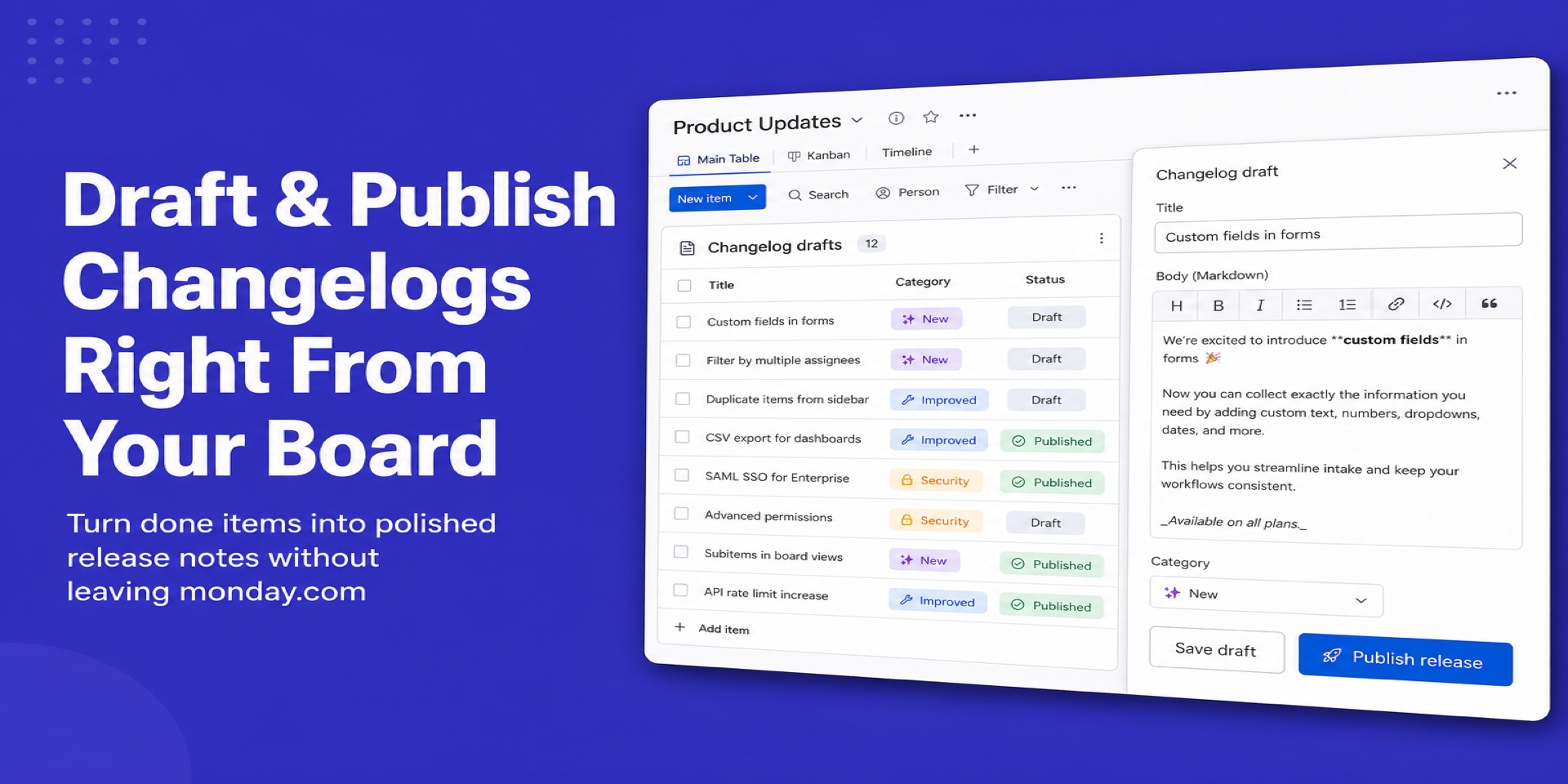
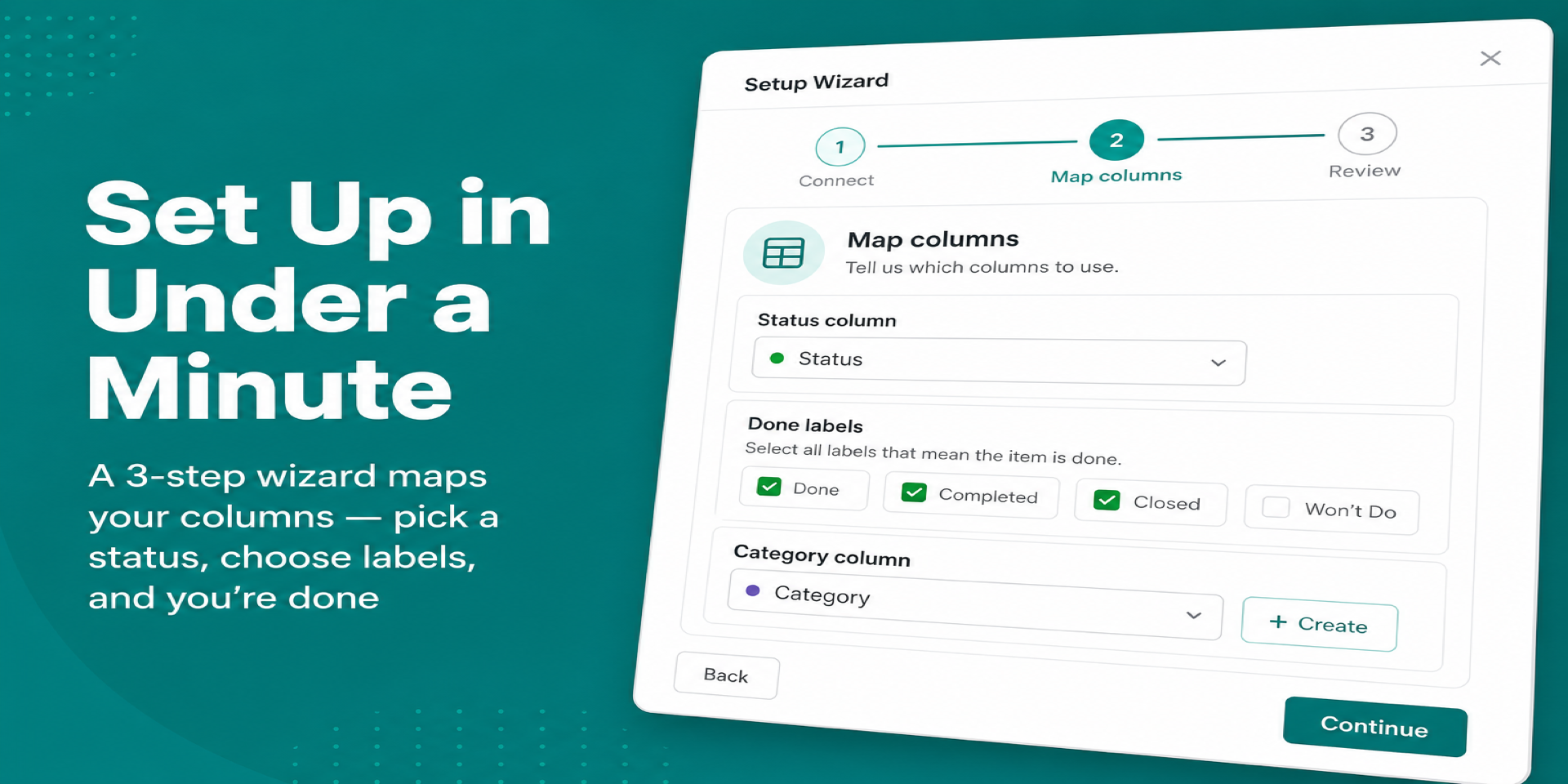
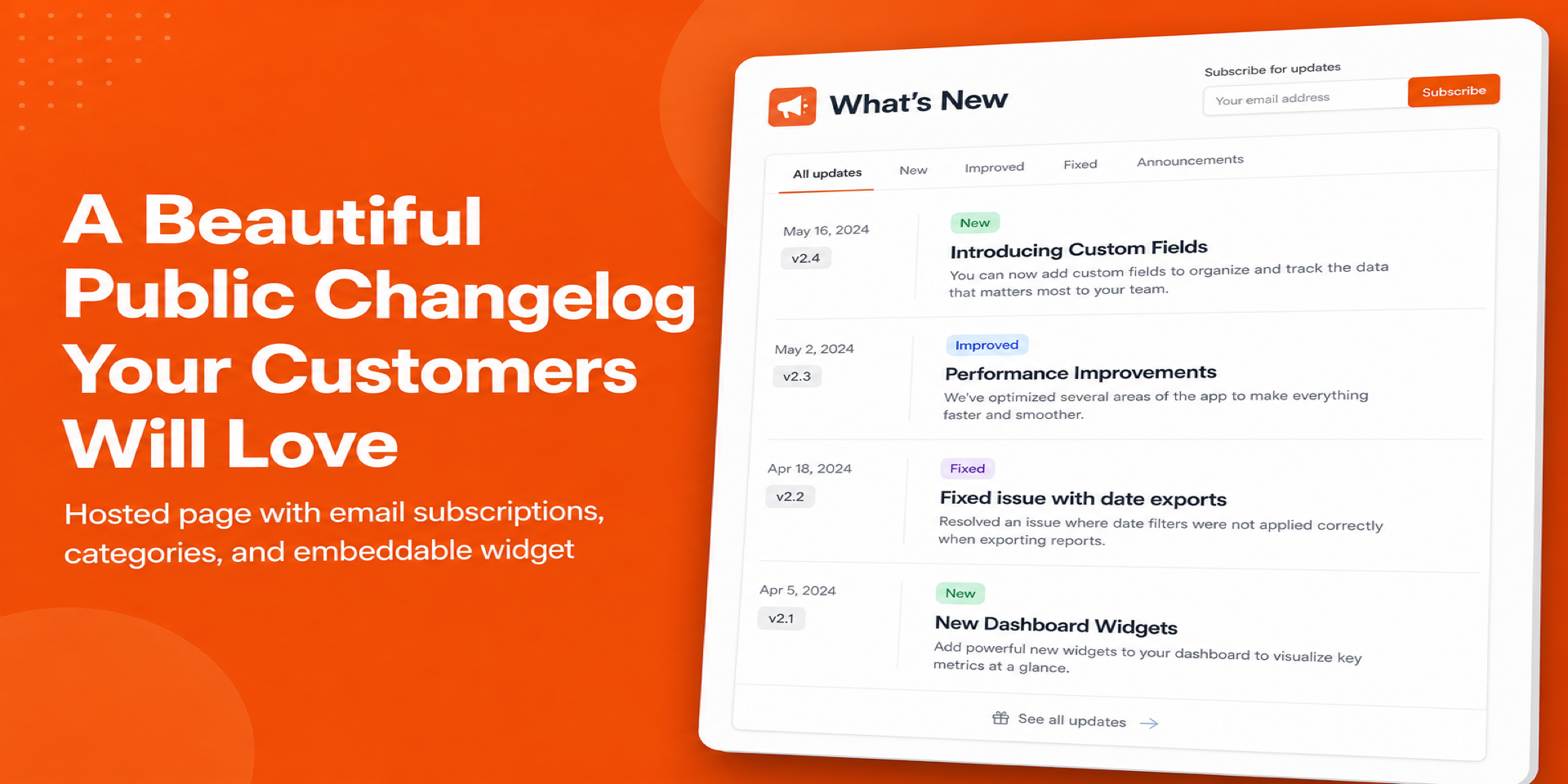
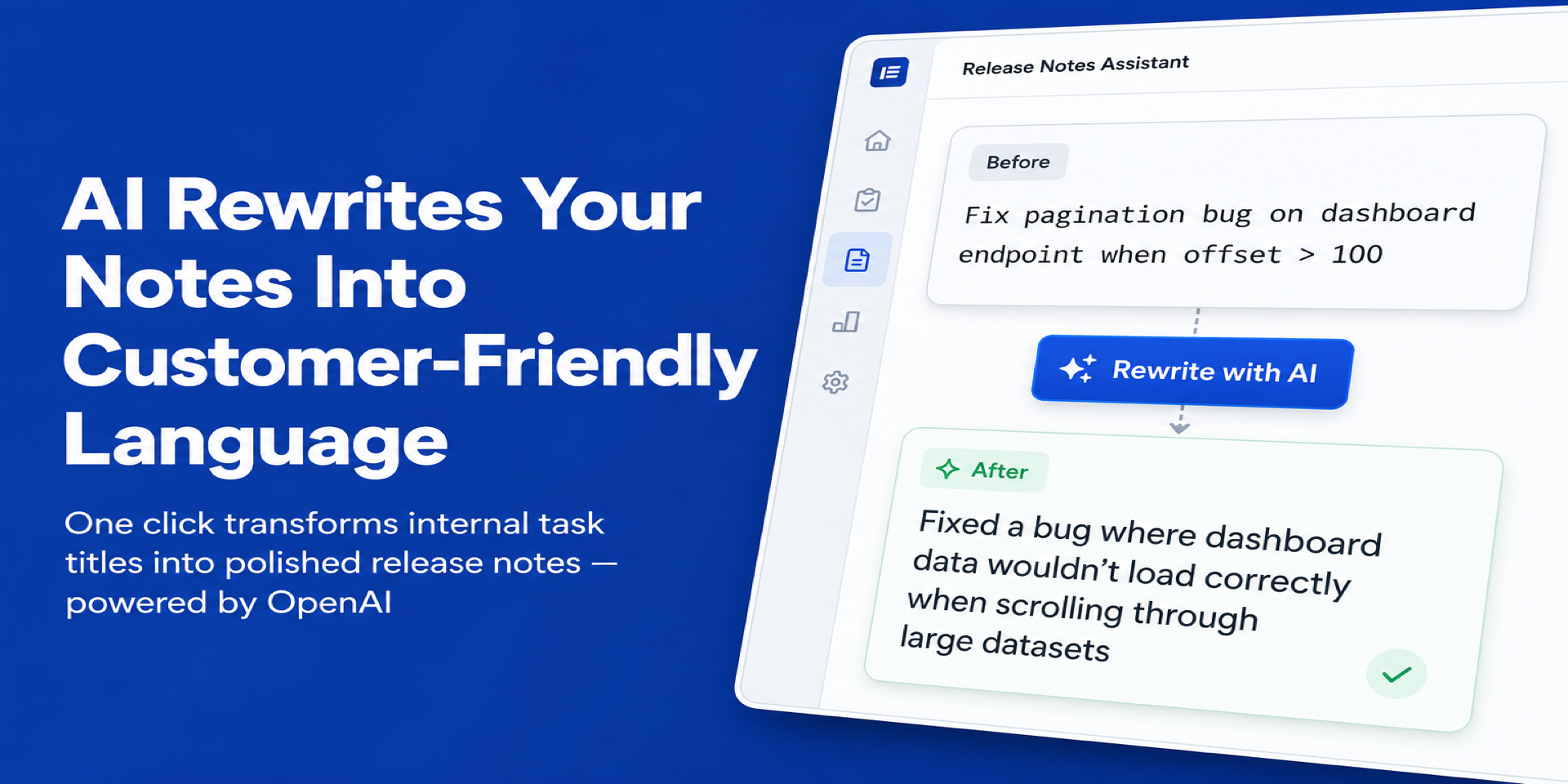
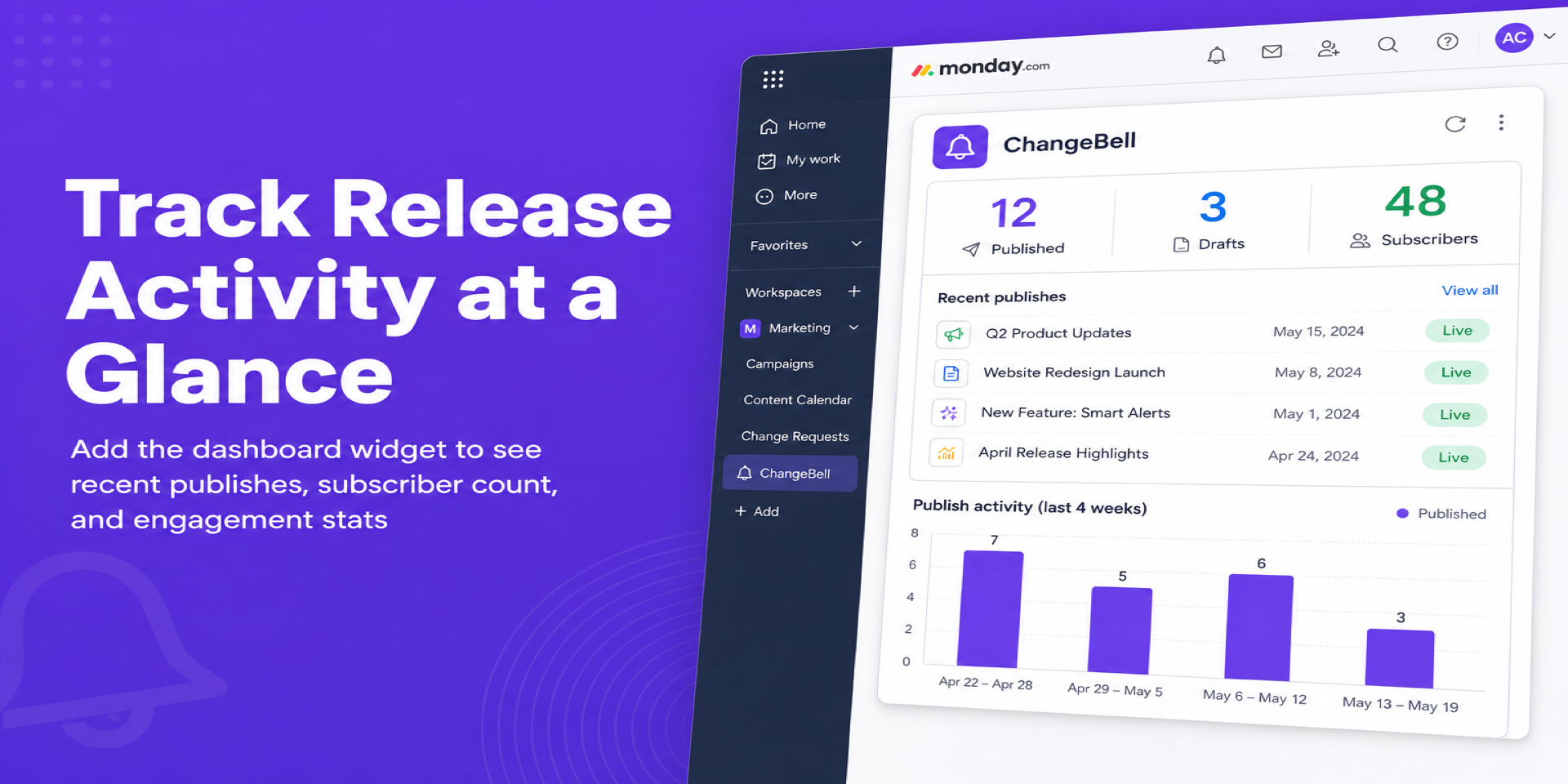
"description": "<p><strong>ChangeBell turns your </strong><a href=\"http://monday.com/\" rel=\"noopener noreferrer\" target=\"_blank\"><strong>monday.com</strong></a><strong> board into a beautiful, public changelog</strong> — no extra tools needed.</p><p>When your team moves items to \"Done\" (or any status you choose), ChangeBell drafts a changelog entry automatically. Edit the copy, optionally let AI rewrite it for a polished tone, then publish with one click.</p><p><strong>Key features:</strong></p><ul><li><strong>Board View</strong> — A changelog editor that lives right inside your <a href=\"http://monday.com/\" rel=\"noopener noreferrer\" target=\"_blank\">monday.com</a> board. See done items, draft entries, and publish directly.</li><li><strong>Dashboard Widget</strong> — Track release activity at a glance with recent publishes and engagement stats.</li><li><strong>Public Changelog Page</strong> — Every account gets a hosted page (e.g. <a href=\"http://changebell.com/p/your-product\" rel=\"noopener noreferrer\" target=\"_blank\"><em>changebell.com/p/your-product</em></a>) you can share with customers or embed on your site.</li><li><strong>AI Rewriting</strong> — One-click rewrite turns internal task titles into customer-friendly release notes, powered by <em>OpenAI GPT-4o-mini</em>.</li><li><strong>Settings & Branding</strong> — Customize your page name, URL slug, brand color, SEO metadata, and toggle subscriber opt-in or reactions.</li></ul><p><strong>How it works:</strong></p><ol><li>Install ChangeBell and open the board view on any board.</li><li>Pick which status column and label trigger drafts (e.g. Status = \"Done\").</li><li>Done items appear as draft entries. Edit, rewrite with AI, then hit <strong>Publish</strong>.</li><li>Your public changelog page updates instantly.</li></ol><p>ChangeBell is built on monday-code with enterprise-grade security: OAuth tokens encrypted at rest with AES-256-GCM, all data stored in Supabase with row-level security, and strict input validation on every endpoint.</p><p><em>Perfect for product teams, SaaS companies, and agencies who want to keep customers informed without leaving </em><a href=\"http://monday.com/\" rel=\"noopener noreferrer\" target=\"_blank\"><em>monday.com</em></a><em>.</em></p><p><br></p><p><a href=\"https://devloggic.com/changebell/docs\" rel=\"noopener noreferrer\" target=\"_blank\"><em>Learn more</em></a></p>",
"short_description": "Publish changelogs from your monday.com board activity.",
"thumbnail_url": "https://cdn.monday.com/marketplace/10001205/10001205_2026_5_2_12_53_7_my01kpu.png",
"logo_url": "https://cdn.monday.com/marketplace/10001205/10001205_2026_5_2_12_52_32_bcilprs.png",
"feedback_url": "support@devloggic.com",
"privacy_policy_url": "https://devloggic.com/changebell/privacy",
"featured": false,
"name": "ChangeBell",
"how_to_use_url": "https://devloggic.com/changebell/docs",
"external_pricing_url": null,
"keywords": "changelog,release notes,product updates,announcements,public page,customer communication,AI rewriting,board view,dashboard widget,SaaS",
"compliance_answers": [],
"created_at": "2026-06-02T12:46:58.000Z",
"updated_at": "2026-06-23T13:56:33.000Z",
"automation_app_id": null,
"marketplace_category_ids": [
9,
6,
4
],
"pinned_for_categories_ids": [],
"featured_for_categories_ids": [],
"pricing_data": "Free plan available + 14 days trial",
"label": null,
"app_values": [
"Centralize your work on monday.com"
],
"security": false,
"display_in_template_store": false,
"acquisition_source": "No touch",
"is_connector": false,
"show_connections": false,
"terms_of_service_url": "https://devloggic.com/changebell/terms",
"available_for_tiers": [],
"available_for_products": [],
"google_analytics_tag_id": null,
"is_solution": false,
"cta_override": null,
"app_scope_str": "me:read,boards:read,webhooks:write,boards:write",
"app_client_id": "8838d0a18a05a5c29baebf4aea68151c",
"app_color": "#77BD1C",
"plans": [
{
"id": "11367966-1-free",
"appPlanId": "free",
"name": "Free",
"versionId": 1,
"isTrial": false,
"prices": {
"type": "standard",
"monthly": 0,
"yearly": 0
},
"versionState": "live",
"appId": 11367966,
"description": "Publish a public changelog from your monday.com board — 5 entries, 5 AI rewrites, RSS, embed widget, email digests, and reactions.",
"extraData": {
"bullets": [
"5 published entries",
"5 AI rewrites",
"Public changelog page with reactions",
"RSS & embed widget",
"Email digests"
],
"monthlyFee": 0,
"yearlyFee": 0
},
"isFree": true,
"isRecommended": false,
"currency": "USD"
},
{
"id": "11367966-1-pro",
"appPlanId": "pro",
"name": "Pro",
"versionId": 1,
"isTrial": true,
"prices": {
"type": "standard",
"monthly": 29,
"yearly": 24
},
"versionState": "live",
"appId": 11367966,
"description": "Everything unlimited. AI rewriting, analytics, scheduled releases, custom branding, and the Changebell badge removed. One flat price, unlimited seats.",
"extraData": {
"bullets": [
"Unlimited entries",
"AI rewriting",
"Custom branding & logo (Badge removed)",
"Email digests",
"Scheduled releases"
],
"monthlyFee": 29,
"yearlyFee": 24
},
"isFree": false,
"isRecommended": true,
"currency": "USD"
}
],
"app_live_version": {
"updated_at": "2026-05-29T13:55:21.228Z",
"id": 15015469
},
"pricing_model": null,
"monetization": {
"monetizationType": "monday",
"hasFreePlan": true,
"hasPaidPlan": true,
"hasTrialPlan": true
},
"badges_data": {
"security": false,
"app_values": [
"Centralize your work on monday.com"
],
"pricing_data": "Free plan available + 14 days trial",
"acquisition_source": "No touch",
"display_in_template_store": false
},
"data": {
"is_solution": false,
"cta_override": null,
"is_connector": false,
"show_connections": false,
"available_for_tiers": [],
"terms_of_service_url": "https://devloggic.com/changebell/terms",
"available_for_products": [],
"google_analytics_tag_id": null
},
"display": null,
"installsDelta": {
"totalInstalls": 4,
"sevenDays": 0,
"thirtyDays": 0,
"ninetyDays": 1
}
}