
Sync Updates to Connected Boards
45 installs, since May 31, 2026. 7 installs/month. App updated September 11, 2026. Listing updated October 13, 2026.
Sync updates to connected items, Subitem/Mirror Automations
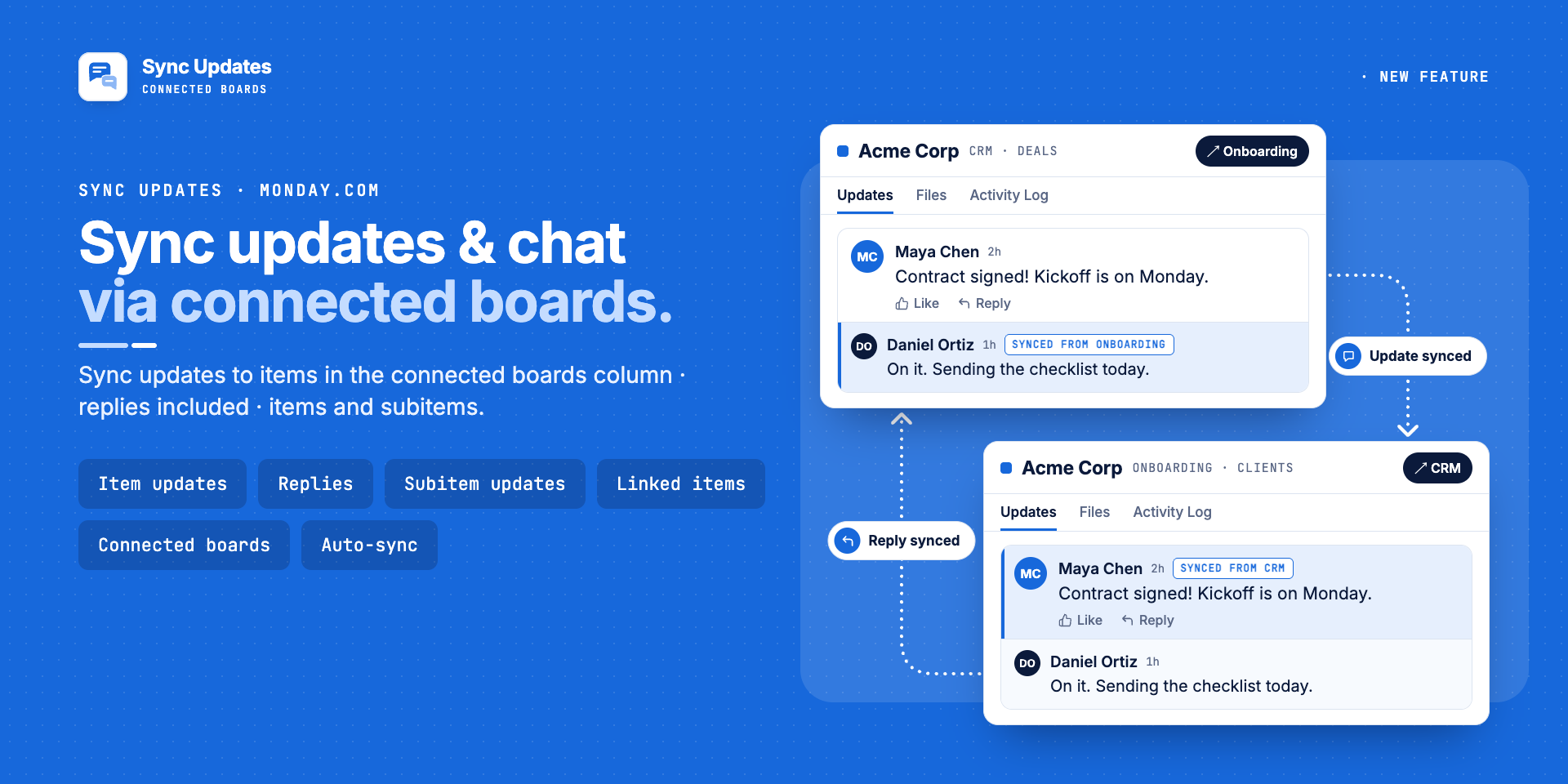
Sync updates and comments between connected items on different boards.
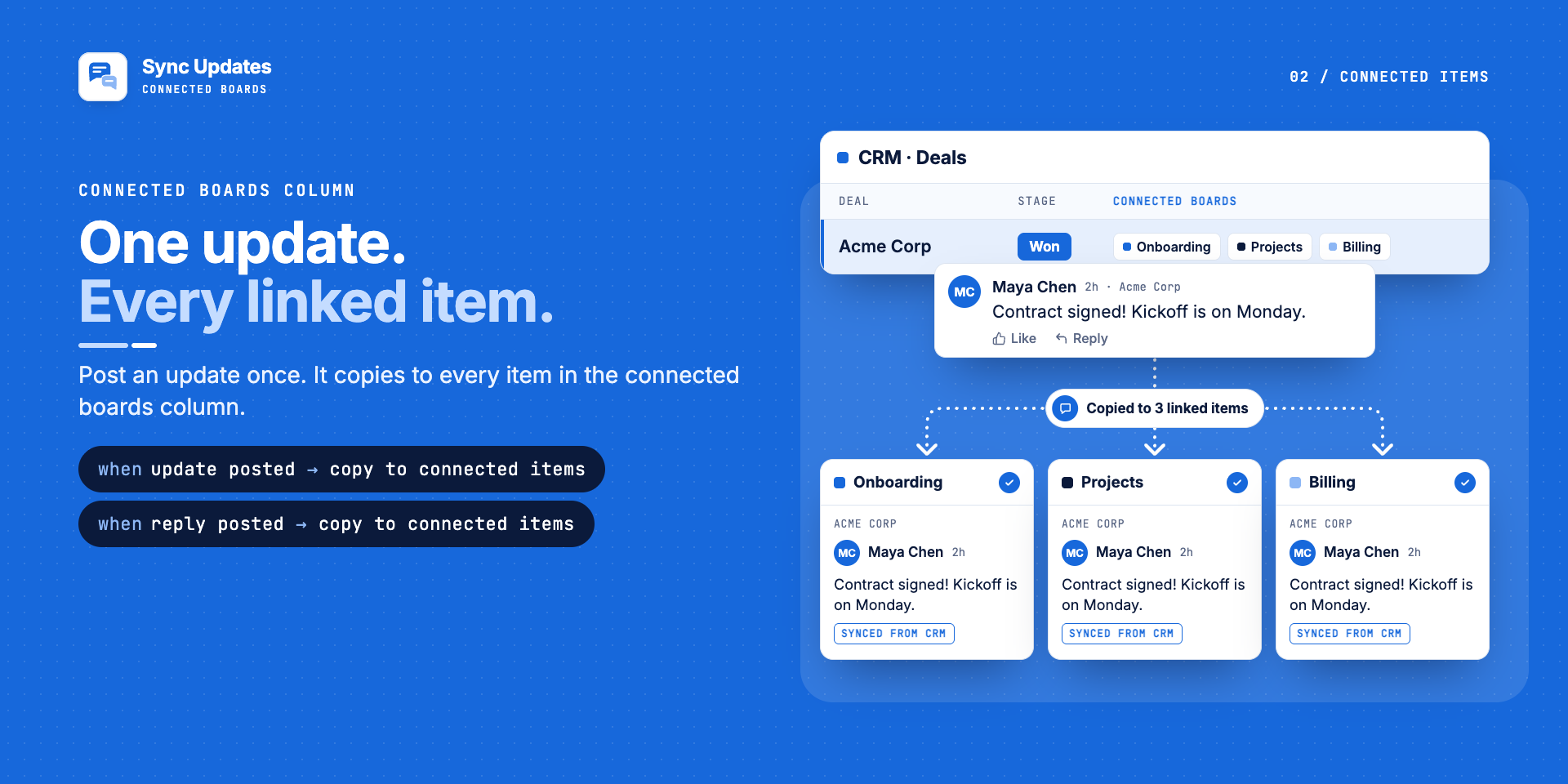
When someone posts an update or reply on an item, it shows up on every linked item in the Connect Boards column, in real time.
No more copy-pasting comments. No more switching boards to follow a conversation. Every team sees the same thread.
— Why teams use it —
Your sales team comments on the CRM board. Your delivery team comments on the project board. The client item is linked, but the conversation is split in two. Master Automations keeps updates in sync across connected boards, so everyone stays on the same page.
— What syncs —
✅ Updates (comments) posted on an item (real-time sync)
✅ Replies to those updates
✅ Subitem updates, synced to items in the subitem Connect Boards column
✅ Every linked item, across as many boards as you connect
✅ Synced updates are posted by the original author, not by a bot or admin account
Set up in 3 steps -
1. Link your items with a Connect Boards column
2. Pick the "sync updates" automation template
3. Done. New updates sync automatically in real-time
— Plus 30 automations for subitems/items monday doesn't have—
The app also includes automations for the hard parts:
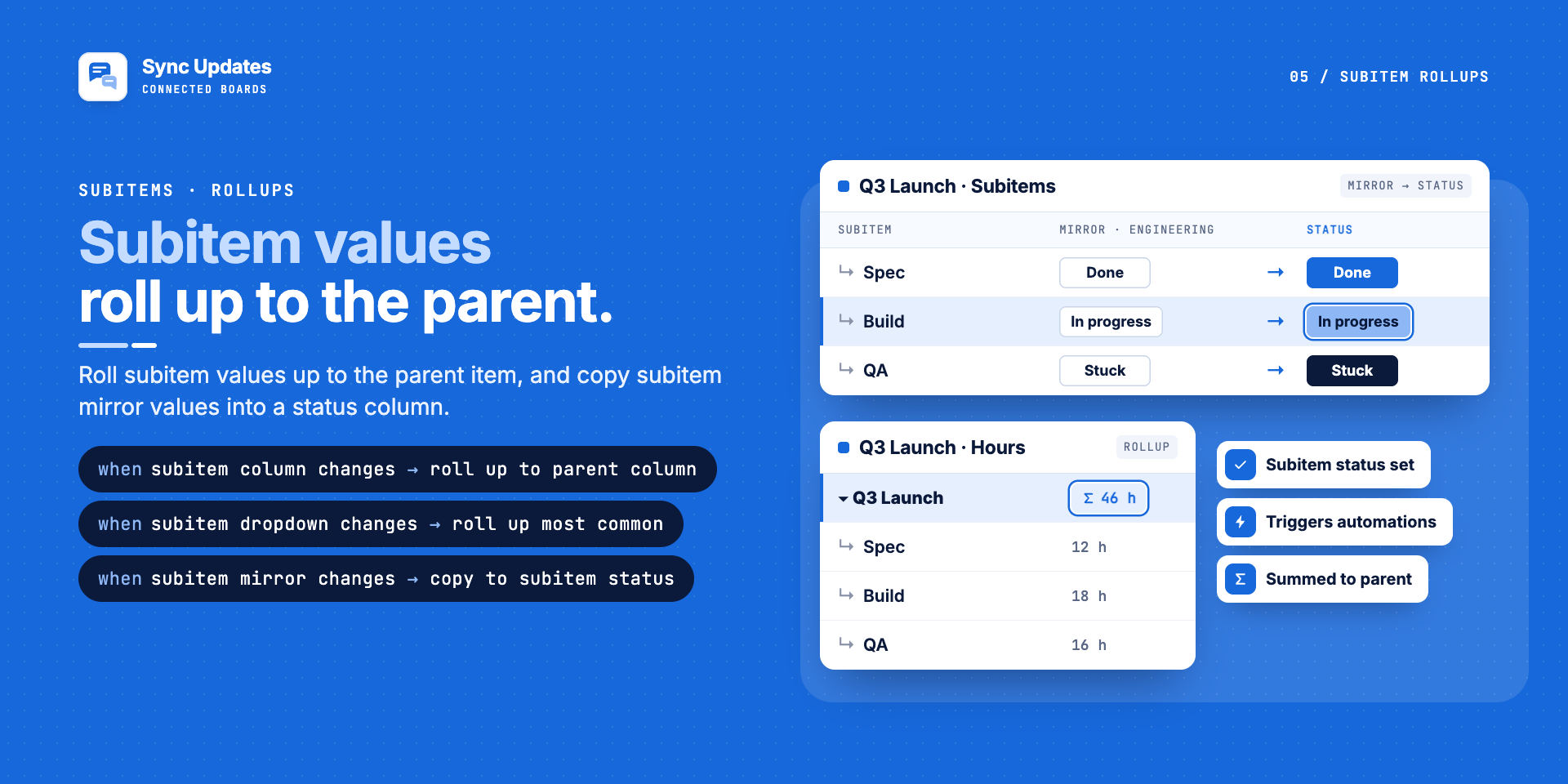
- Mirror columns: trigger automations when a mirror column changes
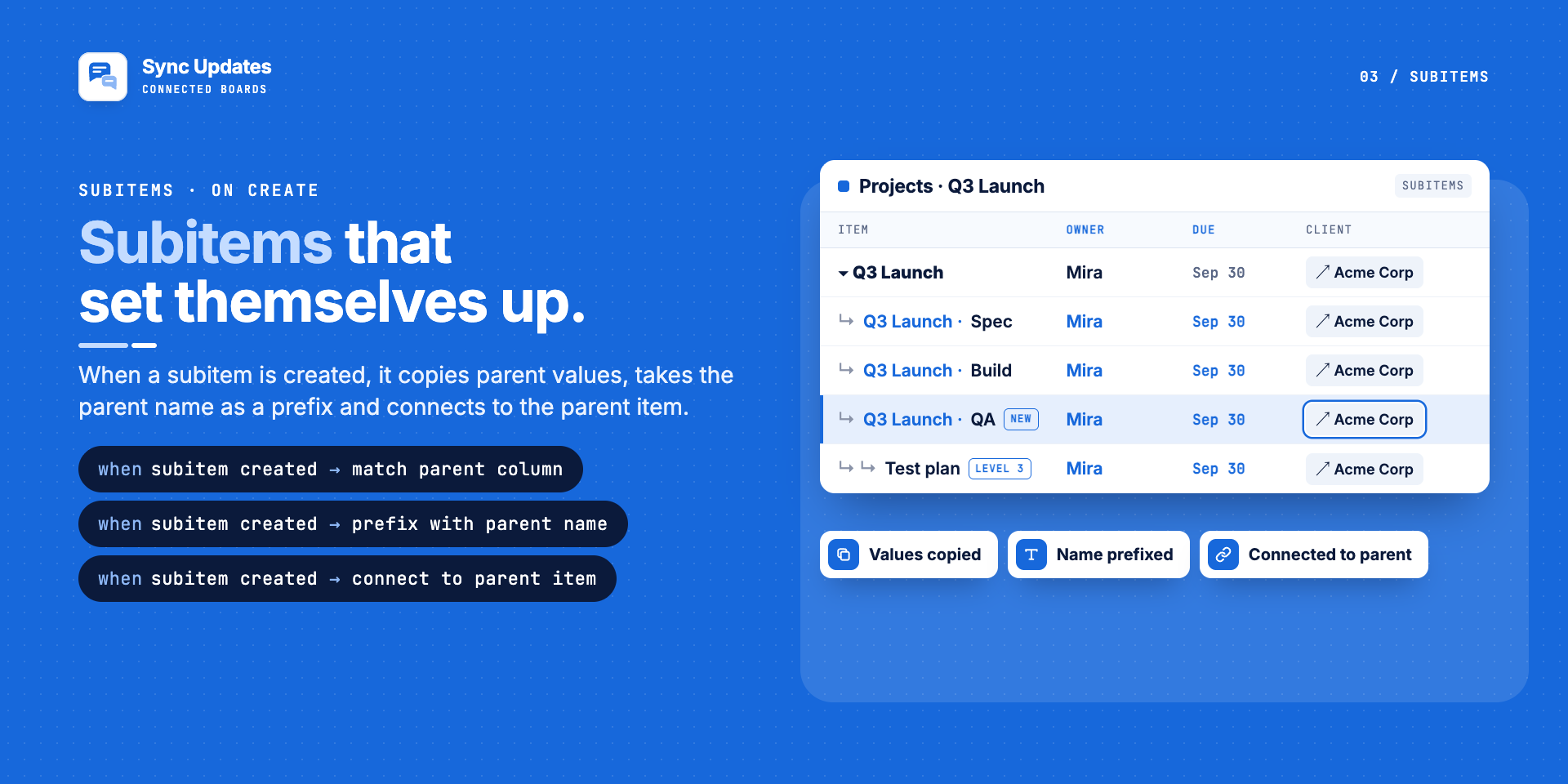
- Subitems: copy parent values to new subitems, sync values to sibling subitems
- Rollups: roll subitem values up to the parent (sum, count, most common)
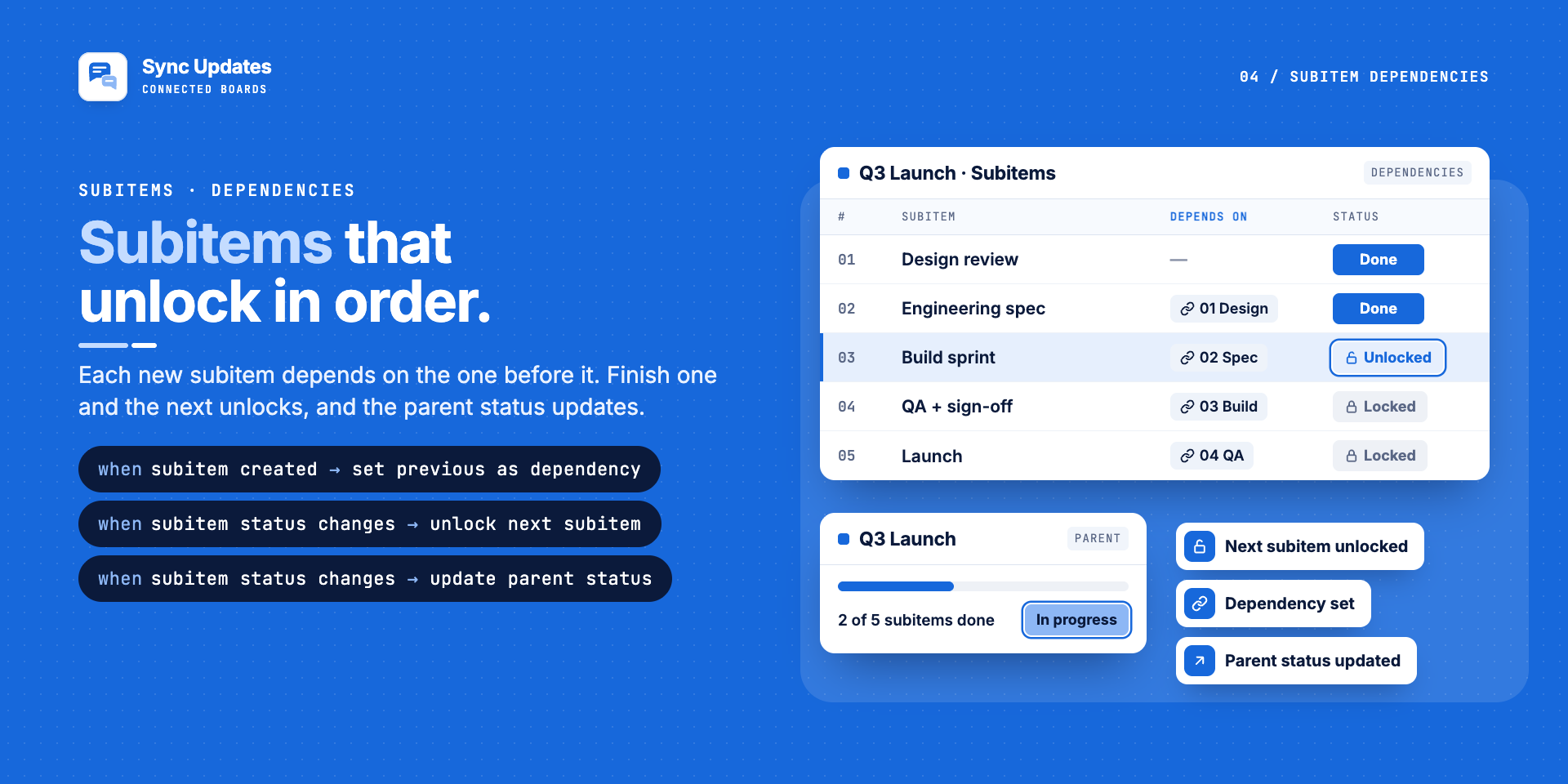
- Dependencies: unlock the next subitem when one is done
- Multi-level boards: auto-create level 2 and level 3 subitems
- Connected boards: create linked items and sync column values across boards
- Status actions: set dates, move or convert subitems with one status change
Real humans, quick answers, No AI intervention:
- Book a meeting: <60 min response/availability
- Email us if you need anything
- Setup guide with step-by-step instructions
- Feature requests: we ship fast
Security & Compliance
The app developer did not provide the security and compliance information for this app.
Reviews
RL: Very helpful in connecting the subitems to their parent item via by automating the connects boards column.
MH: This app works great! But what is even more impressive is the customer service that comes with it. Arnav has not only solved every problem I have brought to him, he has created new functionaility for me, and he has always responded quickly.
Historical data
Installation history
We have data for December 28, 2024 onwards only. Collected sometime after 00:00 UTC daily.
Total number of installs
Change in total number of installs in last 1 day(s)
Compares the number of installs on each date with 1 days previously:
Change in total number of installs in last 7 day(s)
Compares the number of installs on each date with 7 days previously:
Change in total number of installs in last 30 day(s)
Compares the number of installs on each date with 30 days previously:
Change in total number of installs in last 90 day(s)
Compares the number of installs on each date with 90 days previously:
Change in total number of installs in last 180 day(s)
Compares the number of installs on each date with 180 days previously:
Ratings history
Categories history
Each of the following is a yes/no answer, so the graphs show 1 for yes, and 0 for no.
In "Featured" category?
In "Editor's choice" category?
In "Trending this week" category?
App metadata
ID: 10001204 • App ID: 11115397 • Listing updated: October 13, 2026{
"id": 10001204,
"marketplace_developer_id": 100000034,
"app_id": 11115397,
"app_type": "app",
"security_info": {},
"gallery_assets": [
{
"url": "https://cdn.monday.com/marketplace/10001204/10001204_2026_9_9_12_50_50_ilioxqmk.png",
"type": "image"
},
{
"url": "https://cdn.monday.com/marketplace/10001204/10001204_2026_9_9_12_50_58_7r861hp.png",
"type": "image"
},
{
"url": "https://cdn.monday.com/marketplace/10001204/10001204_2026_9_9_12_51_5_4h8xqmh.png",
"type": "image"
},
{
"url": "https://cdn.monday.com/marketplace/10001204/10001204_2026_9_9_12_51_16_xysg00p.png",
"type": "image"
},
{
"url": "https://cdn.monday.com/marketplace/10001204/10001204_2026_9_9_12_51_21_snyxea1.png",
"type": "image"
}
],
"description": "<p>Sync updates and comments between connected items on different boards. </p><p><br></p><p><strong><em>When someone posts an update or reply on an item, it shows up on every linked item in the Connect Boards column, in real time.</em></strong></p><p><br></p><p>No more copy-pasting comments. No more switching boards to follow a conversation. Every team sees the same thread.</p><p><br></p><p><strong>— <em>Why teams use it </em>—</strong></p><p>Your sales team comments on the CRM board. Your delivery team comments on the project board. The client item is linked, but the conversation is split in two. Master Automations keeps updates in sync across connected boards, so everyone stays on the same page.</p><p><br></p><p><strong>— <em>What syncs </em>—</strong></p><p>✅ <strong>Updates (comments) posted on an item </strong>(real-time sync)</p><p>✅ Replies to those updates</p><p>✅ <strong>Subitem updates</strong>, synced to items in the subitem Connect Boards column</p><p>✅ Every linked item, across as many boards as you connect</p><p>✅ <strong>Synced updates are posted by the original author</strong>, not by a bot or admin account</p><p><br></p><p><strong>Set up in 3 steps -</strong></p><p>1. Link your items with a Connect Boards column</p><p>2. Pick the \"sync updates\" automation template</p><p>3. Done. New updates sync automatically in real-time</p><p><br></p><p><strong>— Plus 30 automations for subitems/items monday doesn't have—</strong></p><p>The app also includes automations for the hard parts:</p><p>- Mirror columns: trigger automations when a mirror column changes</p><p>- Subitems: copy parent values to new subitems, sync values to sibling subitems</p><p>- Rollups: roll subitem values up to the parent (sum, count, most common)</p><p>- Dependencies: unlock the next subitem when one is done</p><p>- Multi-level boards: auto-create level 2 and level 3 subitems</p><p>- Connected boards: create linked items and sync column values across boards</p><p>- Status actions: set dates, move or convert subitems with one status change</p><p><br></p><p><strong>Real humans, quick answers, No AI intervention:</strong></p><ul><li><a href=\"https://calendly.com/fortimus-support\" rel=\"noopener noreferrer\" target=\"_blank\">Book a meeting</a>: <60 min response/availability</li><li><a href=\"mailto:support@fortimus.co\" rel=\"noopener noreferrer\" target=\"_blank\">Email us</a> if you need anything</li><li><a href=\"https://fortimus.co/help-docs/master-automations\" rel=\"noopener noreferrer\" target=\"_blank\">Setup guide</a> with step-by-step instructions</li><li><a href=\"mailto:support@fortimus.co\" rel=\"noopener noreferrer\" target=\"_blank\">Feature requests</a>: we ship fast</li></ul>",
"short_description": "Sync updates to connected items, Subitem/Mirror Automations",
"thumbnail_url": "https://cdn.monday.com/marketplace/10001204/10001204_2026_4_31_13_38_21_rj82dvu.png",
"logo_url": "https://cdn.monday.com/marketplace/10001204/10001204_2026_9_9_12_38_9_e8s84w4.png",
"feedback_url": "support@fortimus.co",
"privacy_policy_url": "https://fortimus.co/privacy",
"featured": false,
"name": "Sync Updates to Connected Boards",
"how_to_use_url": "https://fortimus.co/help-docs/master-automations",
"external_pricing_url": null,
"keywords": "sync updates,sync comments,copy updates,updates across boards,sync conversations,share updates,mirror updates,subitem automations,subitem automations,connect board automations",
"compliance_answers": [],
"created_at": "2026-05-31T13:34:25.000Z",
"updated_at": "2026-10-13T11:28:35.000Z",
"automation_app_id": null,
"marketplace_category_ids": [
10000001,
8,
4
],
"pinned_for_categories_ids": [],
"featured_for_categories_ids": [],
"pricing_data": null,
"label": null,
"app_values": [
"Work from everywhere"
],
"security": false,
"display_in_template_store": false,
"acquisition_source": "No touch",
"is_connector": false,
"show_connections": null,
"terms_of_service_url": "https://fortimus.co/terms",
"available_for_tiers": [],
"available_for_products": [],
"google_analytics_tag_id": "G-QNZ2NECLB7",
"is_solution": false,
"cta_override": null,
"app_scope_str": "me:read,boards:read,boards:write,users:read,teams:read,webhooks:write,webhooks:read,updates:read,updates:write",
"app_client_id": "46442bc5594388f5b38627c8ecfbd53b",
"app_color": {
"hsl": {
"h": 221.25,
"s": 0.6857142857142856,
"l": 0.13725490196078433,
"a": 1
},
"hex": "#0b1a3b",
"rgb": {
"r": 11,
"g": 26,
"b": 59,
"a": 1
},
"hsv": {
"h": 221.25,
"s": 0.8135593220338982,
"v": 0.23137254901960785,
"a": 1
},
"oldHue": 37.499999999999865,
"source": "hex"
},
"plans": [
{
"id": "11115397-1-plan_50_actions",
"appPlanId": "plan_50_actions",
"name": "Starter",
"versionId": 1,
"isTrial": false,
"prices": {
"type": "standard",
"monthly": 0,
"yearly": 0
},
"versionState": "live",
"appId": 11115397,
"description": "The free plan to get started with Master Automations. Perfect for teams trying it out. Up to 50 monthly actions.",
"extraData": {
"bullets": [
"50 actions / month",
"One price for your whole organisation — no per-seat fees.",
"Email Support"
],
"monthlyFee": 0,
"yearlyFee": 0
},
"isFree": true,
"isRecommended": false,
"currency": "USD"
},
{
"id": "11115397-1-plan_1000_actions",
"appPlanId": "plan_1000_actions",
"name": "Basic",
"versionId": 1,
"isTrial": false,
"prices": {
"type": "standard",
"monthly": 24,
"yearly": 17
},
"versionState": "live",
"appId": 11115397,
"description": "Great for small teams who want to keep things simple but effective. Up to 1,000 monthly actions.",
"extraData": {
"bullets": [
"1000 actions / month",
"One price for your whole organisation — no per-seat fees.",
"Access to all automations",
"Email support"
],
"monthlyFee": 24,
"yearlyFee": 17
},
"isFree": false,
"isRecommended": false,
"currency": "USD"
},
{
"id": "11115397-1-plan_4000_actions",
"appPlanId": "plan_4000_actions",
"name": "Standard",
"versionId": 1,
"isTrial": false,
"prices": {
"type": "standard",
"monthly": 48,
"yearly": 34
},
"versionState": "live",
"appId": 11115397,
"description": "Ideal for growing teams looking to streamline their everyday workflows. Up to 4,000 monthly actions.",
"extraData": {
"bullets": [
"4000 actions / month",
"One price for your whole organisation — no per-seat fees.",
"Access to all automations",
"Email + On-call support"
],
"monthlyFee": 48,
"yearlyFee": 34
},
"isFree": false,
"isRecommended": false,
"currency": "USD"
},
{
"id": "11115397-1-plan_10000_actions",
"appPlanId": "plan_10000_actions",
"name": "Pro",
"versionId": 1,
"isTrial": false,
"prices": {
"type": "standard",
"monthly": 70,
"yearly": 49
},
"versionState": "live",
"appId": 11115397,
"description": "Built for busy teams automating across multiple boards. Up to 10,000 monthly actions.",
"extraData": {
"bullets": [
"10,000 actions / month",
"One price for your whole organisation — no per-seat fees.",
"Access to all automations + custom automations on request",
"Priority Email + Call support"
],
"monthlyFee": 70,
"yearlyFee": 49
},
"isFree": false,
"isRecommended": false,
"currency": "USD"
},
{
"id": "11115397-1-plan_25000_actions",
"appPlanId": "plan_25000_actions",
"name": "Business",
"versionId": 1,
"isTrial": false,
"prices": {
"type": "standard",
"monthly": 97,
"yearly": 68
},
"versionState": "live",
"appId": 11115397,
"description": "Designed for larger teams managing complex, high-volume workflows. Up to 25,000 monthly actions.",
"extraData": {
"bullets": [
"25,000 actions / month",
"One price for your whole organisation — no per-seat fees.",
"Access to all automations + custom automations on request",
"Dedicated Support Rep, Priority Email + Call Support"
],
"monthlyFee": 97,
"yearlyFee": 68
},
"isFree": false,
"isRecommended": false,
"currency": "USD"
},
{
"id": "11115397-1-plan_unlimited_actions",
"appPlanId": "plan_unlimited_actions",
"name": "Enterprise",
"versionId": 1,
"isTrial": false,
"prices": {
"type": "standard",
"monthly": 125,
"yearly": 88
},
"versionState": "live",
"appId": 11115397,
"description": "For enterprise organisations that rely on Master Automations at scale. Unlimited monthly actions.",
"extraData": {
"bullets": [
"Unlimited actions / month",
"One price for your whole organisation — no per-seat fees.",
"Access to all automations + custom automations on request",
"Dedicated Support Rep, Priority Email + Call Support"
],
"monthlyFee": 125,
"yearlyFee": 88
},
"isFree": false,
"isRecommended": false,
"currency": "USD"
},
{
"id": "11115397-2-plan_50_actions",
"appPlanId": "plan_50_actions",
"name": "Starter",
"versionId": 2,
"isTrial": false,
"prices": {
"type": "standard",
"monthly": 0,
"yearly": 0
},
"versionState": "live",
"appId": 11115397,
"description": "The free plan to get started with Master Automations. Perfect for teams trying it out. Up to 50 monthly actions.",
"extraData": {
"bullets": [
"50 actions / month",
"One price for your whole organisation — no per-seat fees.",
"Email Support"
],
"monthlyFee": 0,
"yearlyFee": 0
},
"isFree": true,
"isRecommended": false,
"currency": "USD"
},
{
"id": "11115397-2-plan_1000_actions",
"appPlanId": "plan_1000_actions",
"name": "Basic",
"versionId": 2,
"isTrial": false,
"prices": {
"type": "standard",
"monthly": 24,
"yearly": 17
},
"versionState": "live",
"appId": 11115397,
"description": "Great for small teams who want to keep things simple but effective. Up to 1,000 monthly actions.",
"extraData": {
"bullets": [
"1000 actions / month",
"One price for your whole organisation — no per-seat fees.",
"Access to all automations",
"Email support"
],
"monthlyFee": 24,
"yearlyFee": 17
},
"isFree": false,
"isRecommended": false,
"currency": "USD"
},
{
"id": "11115397-2-plan_4000_actions",
"appPlanId": "plan_4000_actions",
"name": "Standard",
"versionId": 2,
"isTrial": false,
"prices": {
"type": "standard",
"monthly": 48,
"yearly": 34
},
"versionState": "live",
"appId": 11115397,
"description": "Ideal for growing teams looking to streamline their everyday workflows. Up to 4,000 monthly actions.",
"extraData": {
"bullets": [
"4000 actions / month",
"One price for your whole organisation — no per-seat fees.",
"Access to all automations",
"Email + On-call support"
],
"monthlyFee": 48,
"yearlyFee": 34
},
"isFree": false,
"isRecommended": false,
"currency": "USD"
},
{
"id": "11115397-2-plan_10000_actions",
"appPlanId": "plan_10000_actions",
"name": "Pro",
"versionId": 2,
"isTrial": false,
"prices": {
"type": "standard",
"monthly": 70,
"yearly": 49
},
"versionState": "live",
"appId": 11115397,
"description": "Built for busy teams automating across multiple boards. Up to 10,000 monthly actions.",
"extraData": {
"bullets": [
"10,000 actions / month",
"One price for your whole organisation — no per-seat fees.",
"Access to all automations + custom automations on request",
"Priority Email + Call support"
],
"monthlyFee": 70,
"yearlyFee": 49
},
"isFree": false,
"isRecommended": false,
"currency": "USD"
},
{
"id": "11115397-2-plan_25000_actions",
"appPlanId": "plan_25000_actions",
"name": "Business",
"versionId": 2,
"isTrial": false,
"prices": {
"type": "standard",
"monthly": 97,
"yearly": 68
},
"versionState": "live",
"appId": 11115397,
"description": "Designed for larger teams managing complex, high-volume workflows. Up to 25,000 monthly actions.",
"extraData": {
"bullets": [
"25,000 actions / month",
"One price for your whole organisation — no per-seat fees.",
"Access to all automations + custom automations on request",
"Dedicated Support Rep, Priority Email + Call Support"
],
"monthlyFee": 97,
"yearlyFee": 68
},
"isFree": false,
"isRecommended": false,
"currency": "USD"
},
{
"id": "11115397-2-plan_unlimited_actions",
"appPlanId": "plan_unlimited_actions",
"name": "Enterprise",
"versionId": 2,
"isTrial": false,
"prices": {
"type": "standard",
"monthly": 145,
"yearly": 110
},
"versionState": "live",
"appId": 11115397,
"description": "For enterprise organisations that rely on Master Automations at scale. Unlimited monthly actions.",
"extraData": {
"bullets": [
"Unlimited actions / month",
"One price for your whole organisation — no per-seat fees.",
"Access to all automations + custom automations on request",
"Dedicated Support Rep, Priority Email + Call Support"
],
"monthlyFee": 145,
"yearlyFee": 110
},
"isFree": false,
"isRecommended": false,
"currency": "USD"
},
{
"id": "11115397-3-plan_50_actions",
"appPlanId": "plan_50_actions",
"name": "Starter",
"versionId": 3,
"isTrial": false,
"prices": {
"type": "standard",
"monthly": 0,
"yearly": 0
},
"versionState": "live",
"appId": 11115397,
"description": "The free plan to get started with Master Automations. Perfect for teams trying it out. Up to 50 monthly actions.",
"extraData": {
"bullets": [
"50 actions / month",
"One price for your whole organisation — no per-seat fees.",
"Email Support"
],
"monthlyFee": 0,
"yearlyFee": 0
},
"isFree": true,
"isRecommended": false,
"currency": "USD"
},
{
"id": "11115397-3-plan_1000_actions",
"appPlanId": "plan_1000_actions",
"name": "Basic",
"versionId": 3,
"isTrial": false,
"prices": {
"type": "standard",
"monthly": 42,
"yearly": 31
},
"versionState": "live",
"appId": 11115397,
"description": "Great for small teams who want to keep things simple but effective. Up to 1,000 monthly actions.",
"extraData": {
"bullets": [
"1000 actions / month",
"One price for your whole organisation — no per-seat fees.",
"Access to all automations",
"Email support"
],
"monthlyFee": 42,
"yearlyFee": 31
},
"isFree": false,
"isRecommended": false,
"currency": "USD"
},
{
"id": "11115397-3-plan_4000_actions",
"appPlanId": "plan_4000_actions",
"name": "Standard",
"versionId": 3,
"isTrial": false,
"prices": {
"type": "standard",
"monthly": 80,
"yearly": 59
},
"versionState": "live",
"appId": 11115397,
"description": "Ideal for growing teams looking to streamline their everyday workflows. Up to 4,000 monthly actions.",
"extraData": {
"bullets": [
"4000 actions / month",
"One price for your whole organisation — no per-seat fees.",
"Access to all automations",
"Email + On-call support"
],
"monthlyFee": 80,
"yearlyFee": 59
},
"isFree": false,
"isRecommended": false,
"currency": "USD"
},
{
"id": "11115397-3-plan_10000_actions",
"appPlanId": "plan_10000_actions",
"name": "Pro",
"versionId": 3,
"isTrial": false,
"prices": {
"type": "standard",
"monthly": 134,
"yearly": 99
},
"versionState": "live",
"appId": 11115397,
"description": "Built for busy teams automating across multiple boards. Up to 10,000 monthly actions.",
"extraData": {
"bullets": [
"10,000 actions / month",
"One price for your whole organisation — no per-seat fees.",
"Access to all automations + custom automations on request",
"Priority Email + Call support"
],
"monthlyFee": 134,
"yearlyFee": 99
},
"isFree": false,
"isRecommended": false,
"currency": "USD"
},
{
"id": "11115397-3-plan_25000_actions",
"appPlanId": "plan_25000_actions",
"name": "Business",
"versionId": 3,
"isTrial": false,
"prices": {
"type": "standard",
"monthly": 242,
"yearly": 179
},
"versionState": "live",
"appId": 11115397,
"description": "Designed for larger teams managing complex, high-volume workflows. Up to 25,000 monthly actions.",
"extraData": {
"bullets": [
"25,000 actions / month",
"One price for your whole organisation — no per-seat fees.",
"Access to all automations + custom automations on request",
"Dedicated Support Rep, Priority Email + Call Support"
],
"monthlyFee": 242,
"yearlyFee": 179
},
"isFree": false,
"isRecommended": false,
"currency": "USD"
},
{
"id": "11115397-3-plan_unlimited_actions",
"appPlanId": "plan_unlimited_actions",
"name": "Enterprise",
"versionId": 3,
"isTrial": false,
"prices": {
"type": "standard",
"monthly": 296,
"yearly": 219
},
"versionState": "live",
"appId": 11115397,
"description": "For enterprise organisations that rely on Master Automations at scale. Unlimited monthly actions.",
"extraData": {
"bullets": [
"Unlimited actions / month",
"One price for your whole organisation — no per-seat fees.",
"Access to all automations + custom automations on request",
"Dedicated Support Rep, Priority Email + Call Support"
],
"monthlyFee": 296,
"yearlyFee": 219
},
"isFree": false,
"isRecommended": false,
"currency": "USD"
},
{
"id": "11115397-4-plan_50_actions",
"appPlanId": "plan_50_actions",
"name": "Starter",
"versionId": 4,
"isTrial": false,
"prices": {
"type": "standard",
"monthly": 0,
"yearly": 0
},
"versionState": "live",
"appId": 11115397,
"description": "The free plan to get started with Master Automations. Perfect for teams trying it out. Up to 50 monthly actions.",
"extraData": {
"bullets": [
"50 actions / month",
"One price for your whole organisation — no per-seat fees.",
"Email Support"
],
"monthlyFee": 0,
"yearlyFee": 0
},
"isFree": true,
"isRecommended": false,
"currency": "USD"
},
{
"id": "11115397-4-plan_1000_actions",
"appPlanId": "plan_1000_actions",
"name": "Basic",
"versionId": 4,
"isTrial": false,
"prices": {
"type": "standard",
"monthly": 42,
"yearly": 31
},
"versionState": "live",
"appId": 11115397,
"description": "Great for small teams who want to keep things simple but effective. Up to 1,000 monthly actions.",
"extraData": {
"bullets": [
"1000 actions / month",
"One price for your whole organisation — no per-seat fees.",
"Access to all automations",
"Email support",
"Upgrade to Pro plan for update automations →"
],
"monthlyFee": 42,
"yearlyFee": 31
},
"isFree": false,
"isRecommended": false,
"currency": "USD"
},
{
"id": "11115397-4-plan_4000_actions",
"appPlanId": "plan_4000_actions",
"name": "Standard",
"versionId": 4,
"isTrial": false,
"prices": {
"type": "standard",
"monthly": 80,
"yearly": 59
},
"versionState": "live",
"appId": 11115397,
"description": "Ideal for growing teams looking to streamline their everyday workflows. Up to 4,000 monthly actions.",
"extraData": {
"bullets": [
"4000 actions / month",
"One price for your whole organisation — no per-seat fees.",
"Access to all automations",
"Email + On-call support",
"Upgrade to Pro plan for update automations →"
],
"monthlyFee": 80,
"yearlyFee": 59
},
"isFree": false,
"isRecommended": false,
"currency": "USD"
},
{
"id": "11115397-4-plan_10000_actions",
"appPlanId": "plan_10000_actions",
"name": "Pro",
"versionId": 4,
"isTrial": false,
"prices": {
"type": "standard",
"monthly": 134,
"yearly": 99
},
"versionState": "live",
"appId": 11115397,
"description": "Built for busy teams automating across multiple boards. Up to 10,000 monthly actions.",
"extraData": {
"bullets": [
"10,000 actions / month",
"One price for your whole organisation — no per-seat fees.",
"Up to 1,000 synced updates across connected items/month",
"Priority Email + Call support"
],
"monthlyFee": 134,
"yearlyFee": 99
},
"isFree": false,
"isRecommended": false,
"currency": "USD"
},
{
"id": "11115397-4-plan_25000_actions",
"appPlanId": "plan_25000_actions",
"name": "Business",
"versionId": 4,
"isTrial": false,
"prices": {
"type": "standard",
"monthly": 242,
"yearly": 179
},
"versionState": "live",
"appId": 11115397,
"description": "Designed for larger teams managing complex, high-volume workflows. Up to 25,000 monthly actions.",
"extraData": {
"bullets": [
"25,000 actions / month",
"One price for your whole organisation — no per-seat fees.",
"Up to 2,000 synced updates across connected item/ month",
"Access to all automations + custom automations on request",
"Dedicated Support Rep, Priority Email + Call Support"
],
"monthlyFee": 242,
"yearlyFee": 179
},
"isFree": false,
"isRecommended": false,
"currency": "USD"
},
{
"id": "11115397-4-plan_unlimited_actions",
"appPlanId": "plan_unlimited_actions",
"name": "Enterprise",
"versionId": 4,
"isTrial": false,
"prices": {
"type": "standard",
"monthly": 296,
"yearly": 219
},
"versionState": "live",
"appId": 11115397,
"description": "For enterprise organisations that rely on Master Automations at scale. Unlimited monthly actions.",
"extraData": {
"bullets": [
"Unlimited actions / month",
"One price for your whole organisation — no per-seat fees.",
"Unlimited synced updates across connected items/month",
"Access to all automations + custom automations on request",
"Dedicated Support Rep, Priority Email + Call Support"
],
"monthlyFee": 296,
"yearlyFee": 219
},
"isFree": false,
"isRecommended": false,
"currency": "USD"
}
],
"app_live_version": {
"updated_at": "2026-09-11T14:40:31.546Z",
"id": 17828866
},
"pricing_model": null,
"monetization": {
"monetizationType": "monday",
"hasFreePlan": true,
"hasPaidPlan": true,
"hasTrialPlan": false
},
"badges_data": {
"security": false,
"app_values": [
"Work from everywhere"
],
"acquisition_source": "No touch",
"display_in_template_store": false
},
"data": {
"is_solution": false,
"cta_override": null,
"is_connector": false,
"available_for_tiers": [],
"terms_of_service_url": "https://fortimus.co/terms",
"available_for_products": [],
"google_analytics_tag_id": "G-QNZ2NECLB7"
},
"display": null,
"installsDelta": {
"totalInstalls": 45,
"sevenDays": 1,
"thirtyDays": 4,
"ninetyDays": 22
}
}