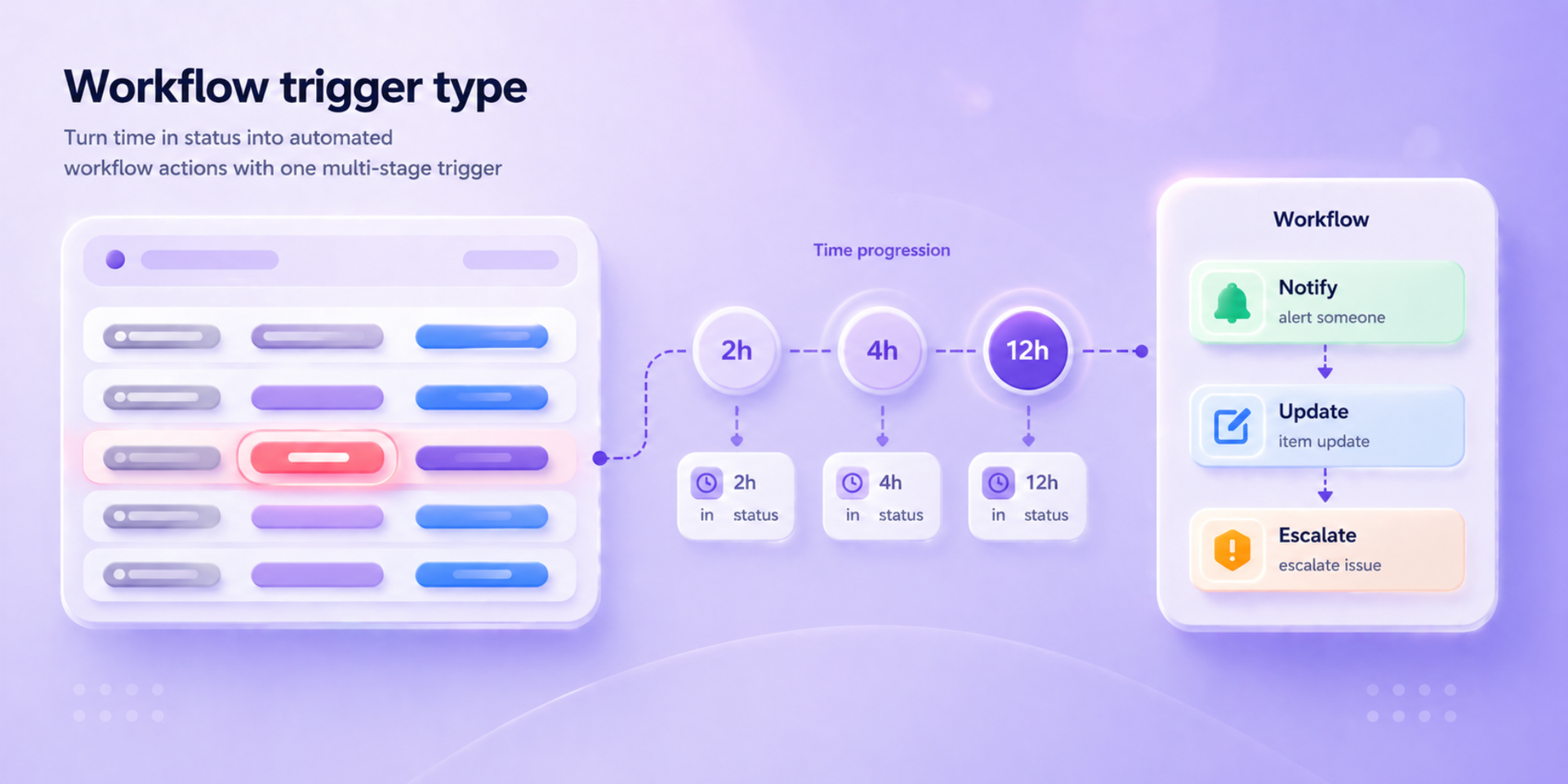
Trigger automations based on actual time in status.
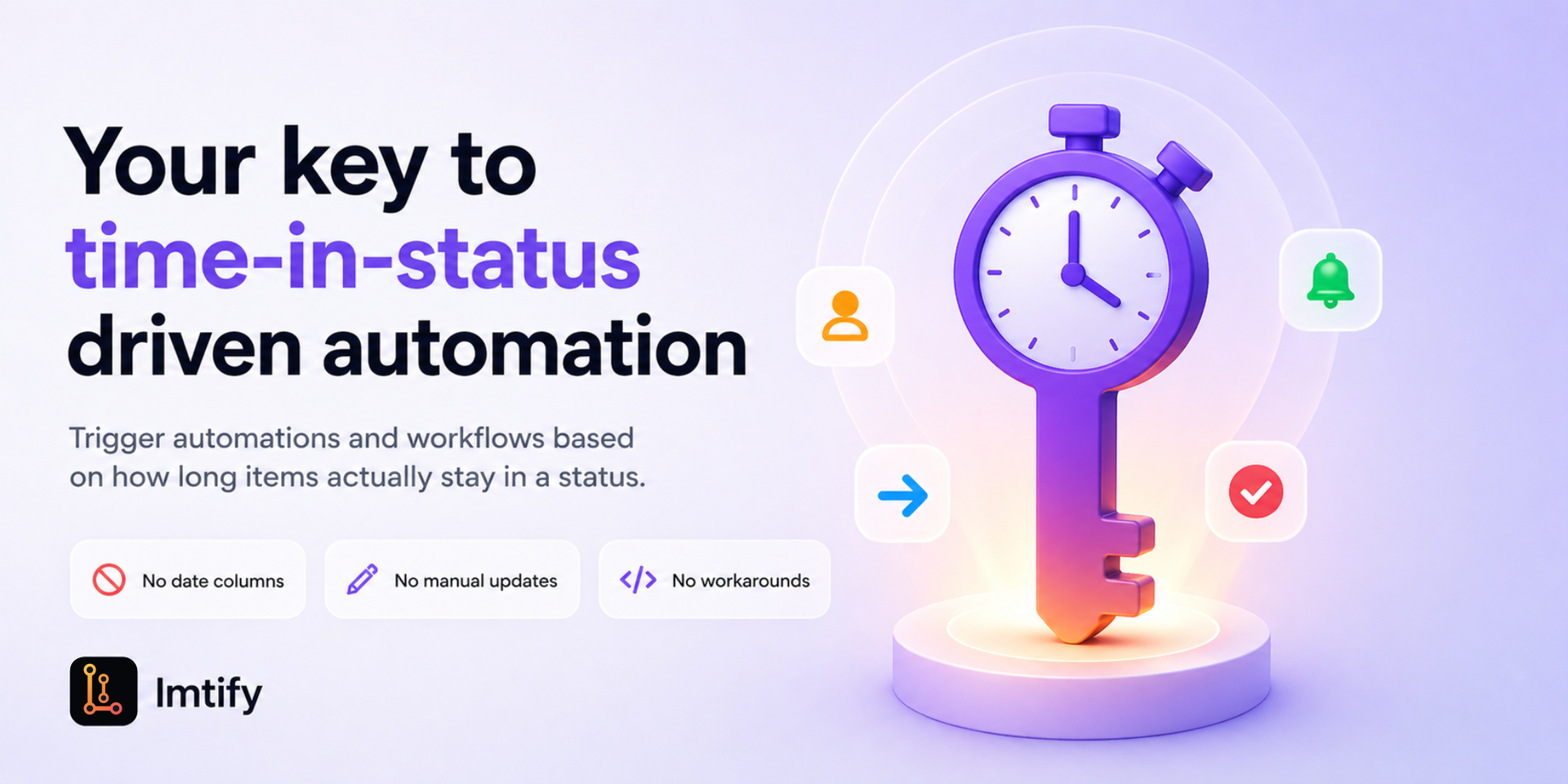
TICK - Your key to time-in-status driven automation.
Trigger automations and workflows based on how long tasks actually stay in a status, with no date columns, manual updates, or workarounds. Designed to feel like a native platform experience. No additional automation limits. Usage follows your monday.com plan.
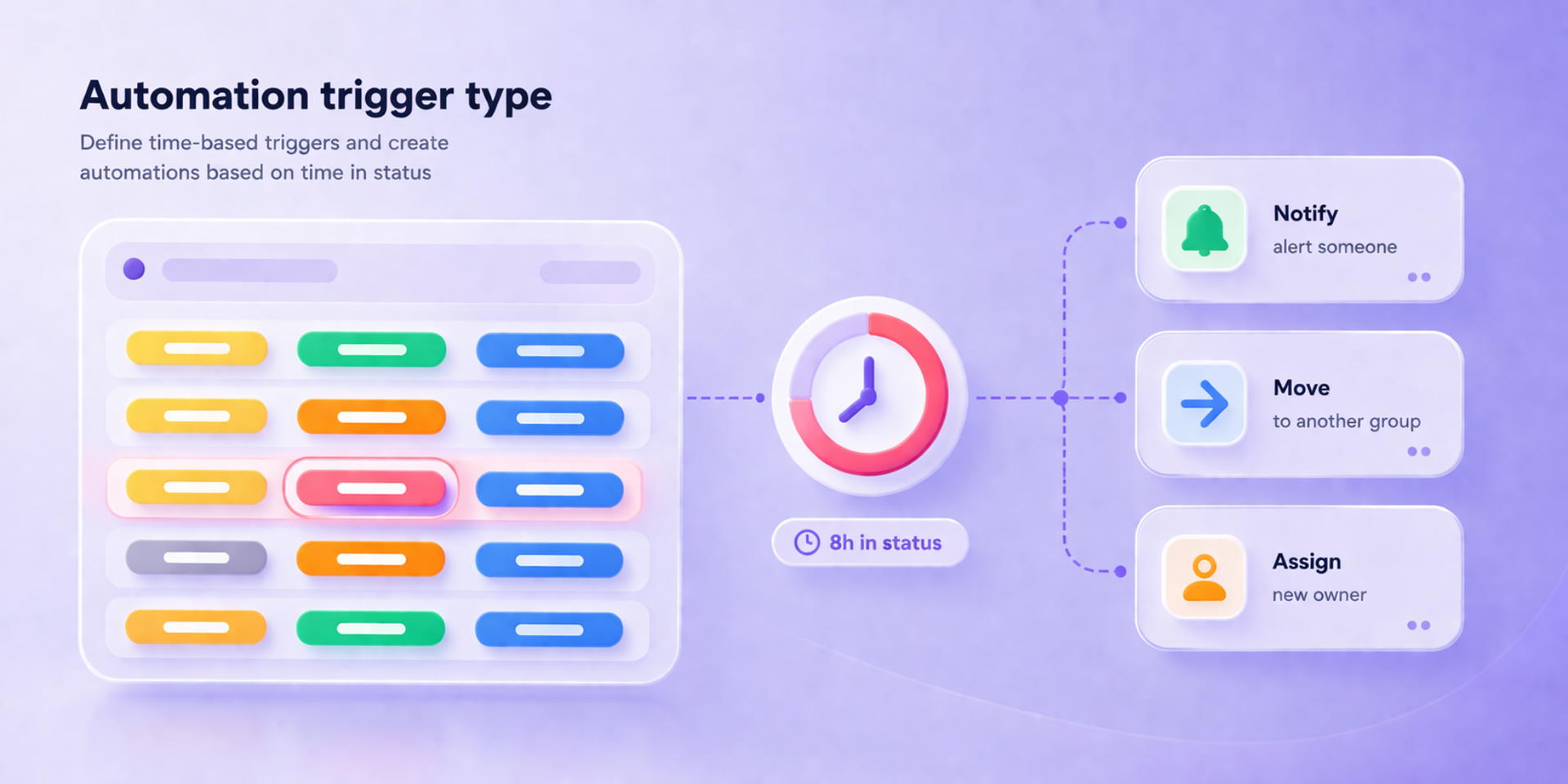
⏱️ At its core, TICK introduces a new type of trigger based on time in status.
As soon as a task enters a status, the clock starts ticking. Tasks already in the status are also included, so tracking starts immediately without missing anything.
Based on configurable time stages, the trigger runs over time, enabling actions to be triggered at each stage as time progresses, with execution within minutes once conditions are met.
Built for fast escalation workflows, TICK supports up to 2 weeks of continuous tracking.
⚡Use TICK to detect stuck tasks, notify the right people, escalate delays, move items, update statuses, assign owners, or trigger the next step in your workflow.
Whether you manage operations, support, delivery, approvals, or internal processes, TICK helps you respond the moment work stays too long where it should not.
Build simple reminders or advanced multi-stage workflows where actions evolve over time, with step-by-step responses.
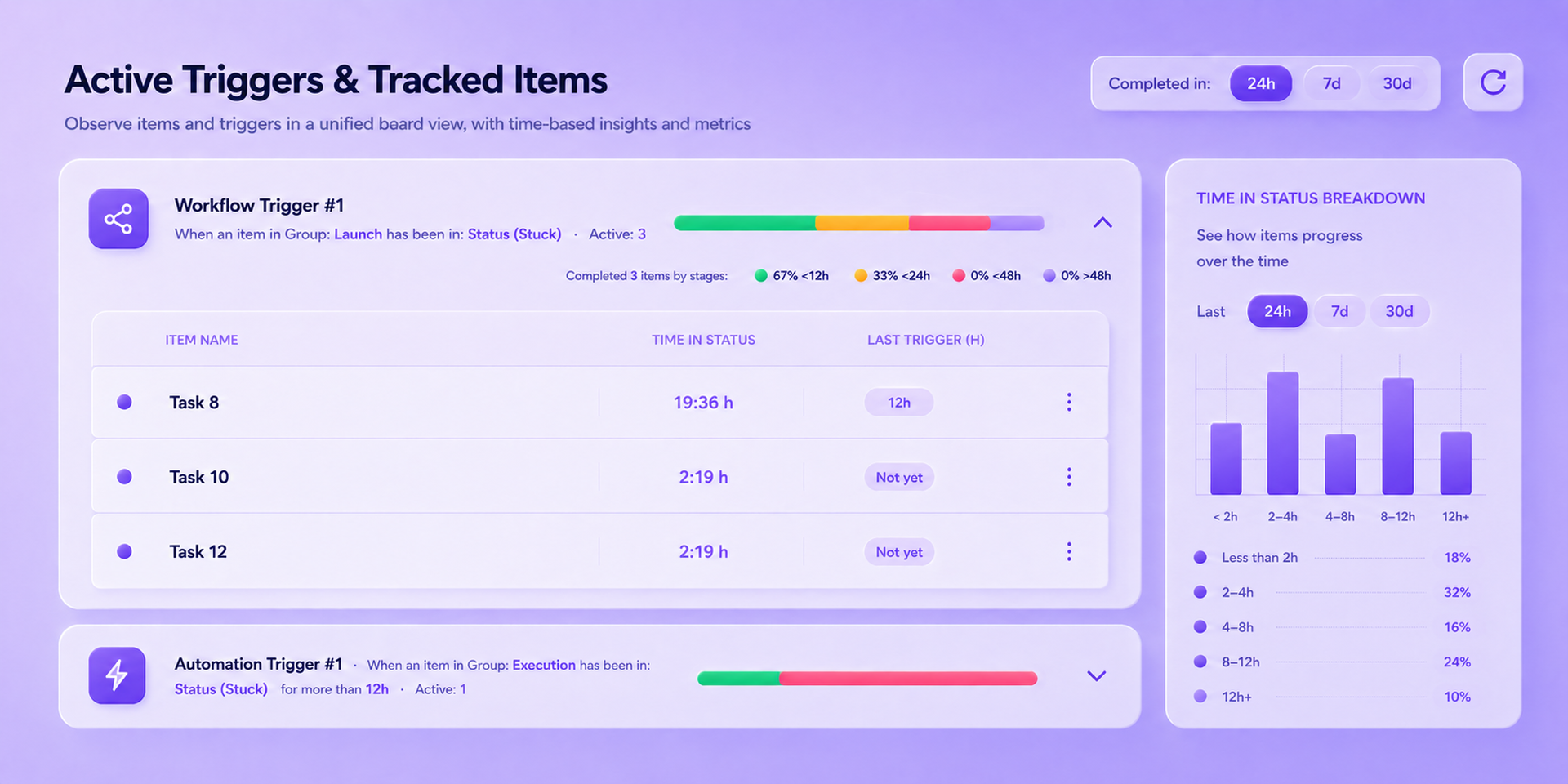
📊 TICK also provides a tracking view of your board, giving you clear visibility into tasks and their time in status.
View each task’s details, stay on top of delays, and understand how work progresses over time.
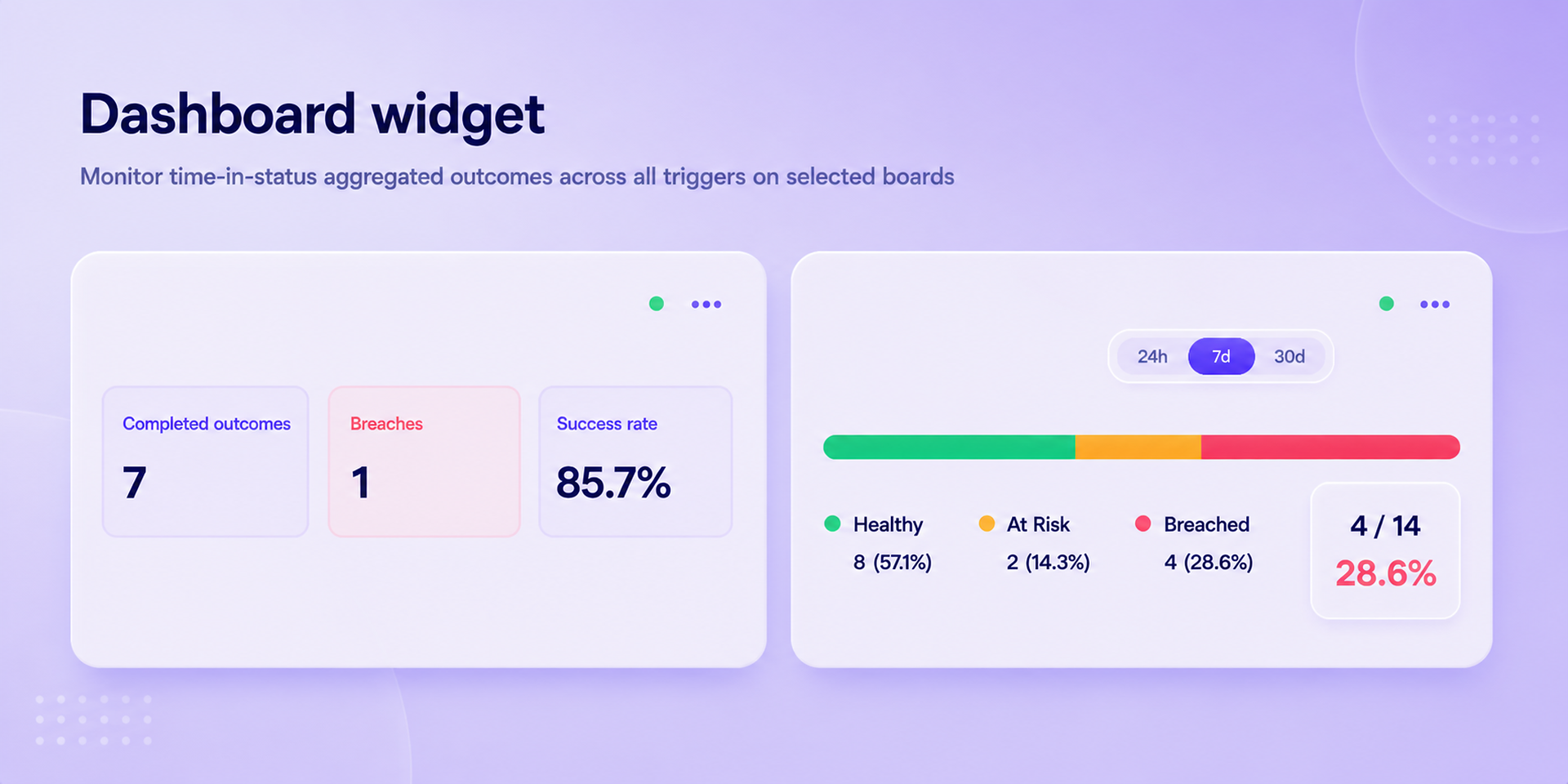
For a higher-level view, add the dashboard widget to monitor outcomes across all triggers on selected boards.
See completed outcomes summarized as Healthy, At Risk, or Breached over 24-hour, 7-day, and 30-day windows.
Time in status can be tracked based on either continuous wall-clock time or configured working hours.
🤖Additional control and visibility are available via Sidekick AI skills.
Does the developer periodically perform penetration testing?
Not answered
Does the developer have a dedicated security and privacy point of contact for such issues or questions?
Not answered
Does the app restrict redirects and forwards only to approved destinations, or show a warning when redirecting to potentially untrusted content?
Yes
The app restricts redirects and forwards to approved destinations only.
Does the app protect against mass parameter assignment attacks?
Yes
API handlers do not bind incoming request bodies directly to database records. Each endpoint reads only the expected fields, validates them, and writes updates using explicit, server-controlled field lists. Sensitive attributes (tokens, roles, installation identity) are set by the server from verified session context, not from client-supplied parameters.
Does the app perform encoding and sanitization on all user supplied parameters to protect against Cross-Site Scripting?
Yes
Yes. User input is escaped when displayed, validated on the server, and the app does not render user data as HTML. A Content-Security-Policy adds extra protection against script injection.
Does the developer protect all state-changing actions against Cross-Site Request Forgery (CSRF)?
Yes
Yes. State-changing requests require authenticated session proof, so actions cannot be triggered from another site using the user’s browser alone.
Does the developer have mechanisms to notify monday.com in case of a security breach?
Yes
Yes
Does this developer have a process for installing application-level updates and security patches for the service (such as software packages and databases)?
Yes
Yes. We keep the service up to date through regular dependency updates and controlled application releases. The app runs on AWS managed services, which receive platform security patches from AWS. Critical security fixes are prioritized and deployed as soon as practicable.
Compliance
Is the app certified with the information security standard ISO/IEC 27001:2022?
Not answered
Is the app compliant with the Health Insurance Portability and Accountability Act (HIPAA)?
Not answered
Is the app certified with System and Organization Controls (SOC 2 or SOC 3)?
Not answered
Is the app compliant with the General Data Protection Regulation (GDPR)?
Not answered
Data
Does the app send any data outside of monday.com? If yes, indicate whether the data is customer-submitted (e.g., board names, item names, doc content) or non-customer-submitted (e.g., account ID, board ID, user ID).
Yes
Yes. The app processes and stores data on the developer’s infrastructure (AWS) to provide the service. It also calls the monday.com API as required for the integration. Customer-submitted data (limited): Automation/trigger configuration chosen by the user (board, columns, filters, timing, working hours) Labels/metadata needed to run triggers (e.g. status/group/team filter names) We do not store full document content, and item names are fetched from monday.com for display only (not persisted on our servers) Non-customer-submitted data: Account ID, app/installation ID, board ID, item ID, user ID (as identifiers) auth tokens (encrypted) Subscription/recipe/integration IDs, webhook event metadata, audit/security logs We do not store user email/name from monday.com webhooks.
Where does the app store logs data?
aws
AWS managed services
Where does the app store the app data?
DB
AWS managed services
Does the developer ensure application logs do not contain secrets or personally-identifiable information (PII)?
Yes
Yes. Logs are designed not to include secrets or unnecessary PII. Auth tokens raw request bodies are not written to logs. User email/name from monday.com webhooks are stripped before processing. Audit logs store only allowlisted configuration and security events, not full customer content. Where a monday.com user ID is needed for audit reference, it is stored as a hashed reference and encrypted, not in plain text.
Is customer data segregated from the data of other customers (for example logically or physically)?
Yes
Yes. Customer data is logically segregated. Each monday.com account has its own tenant scope; data is stored and accessed by installation ID, so one customer cannot access another’s data. All customers share the same AWS infrastructure, but records are separated at the application and database level.
Privacy
Does the developer enforce multi-factor authentication on employees access to systems which may process customer data?
Yes
Yes
Does the developer protect access to customer data based on the principle of least privilege?
Yes
Yes. Access to customer data follows least privilege at both the application and AWS layers. Each service component runs under its own role with permissions limited to the specific resources it needs.
Reviews
No reviews yet.
Historical data
Installation history
We have data for December 28, 2024 onwards only. Collected sometime after 00:00 UTC daily.
Total number of installs
Change in total number of installs in last 1 day(s)
Compares the number of installs on each date with 1 days previously:
Max
Min
Current
Change in total number of installs in last 7 day(s)
Compares the number of installs on each date with 7 days previously:
Max
Min
Current
Change in total number of installs in last 30 day(s)
Compares the number of installs on each date with 30 days previously:
Max
Min
Current
Change in total number of installs in last 90 day(s)
Compares the number of installs on each date with 90 days previously:
Max
Min
Current
Change in total number of installs in last 180 day(s)
Compares the number of installs on each date with 180 days previously:
Max
Min
Current
Ratings history
Categories history
Each of the following is a yes/no answer, so the graphs show 1 for yes, and 0 for no.
{
  "id": 10001199,
  "marketplace_developer_id": 100000229,
  "app_id": 11115673,
  "app_type": "app",
  "security_info": {},
  "gallery_assets": [
    {
      "url": "https://cdn.monday.com/marketplace/10001199/10001199_2026_4_26_13_18_14_17m5vrm.png",
      "type": "image"
    },
    {
      "url": "https://cdn.monday.com/marketplace/10001199/10001199_2026_4_26_13_18_23_7o54byk.png",
      "type": "image"
    },
    {
      "url": "https://cdn.monday.com/marketplace/10001199/10001199_2026_4_26_13_18_32_pq36c1w.png",
      "type": "image"
    },
    {
      "url": "https://cdn.monday.com/marketplace/10001199/10001199_2026_4_26_13_18_41_r8w5jny.png",
      "type": "image"
    },
    {
      "url": "https://cdn.monday.com/marketplace/10001199/10001199_2026_4_26_13_18_53_wqamk5y.png",
      "type": "image"
    },
    {
      "url": "https://cdn.monday.com/marketplace/10001199/10001199_2026_4_26_13_19_47_vev2ibij.mp4",
      "type": "video"
    }
  ],
  "description": "<p><strong>TICK - Your key to time-in-status driven automation.</strong></p><p>Trigger automations and workflows based on how long tasks actually stay in a <strong>status</strong>, with no date columns, manual updates, or workarounds. <em>Designed to feel like a native platform experience. </em><strong>No additional automation limits.</strong> Usage follows your monday.com plan.</p><p><br></p><p>⏱️ At its core, TICK introduces a new type of trigger based on <strong>time in status</strong>.</p><p>As soon as a task enters a <strong>status</strong>, the clock starts ticking. Tasks already in the status are also included, so tracking starts immediately without missing anything.</p><p>Based on <strong>configurable time stages</strong>, the trigger runs over time, enabling actions to be triggered at each stage as time progresses, with <strong>execution within minutes once conditions are met</strong>.</p><p>Built for fast escalation workflows, TICK supports <strong>up to 2 weeks of continuous tracking</strong>.</p><p><br></p><p>⚡Use TICK to detect stuck tasks, notify the right people, escalate delays, move items, update statuses, assign owners, or trigger the next step in your workflow.</p><p>Whether you manage <strong>operations, support, delivery, approvals, or internal processes</strong>, TICK helps you respond the moment work stays too long where it should not.</p><p>Build simple reminders or advanced <strong>multi-stage workflows</strong> where actions evolve over time, with <em>step-by-step responses</em>.</p><p><br></p><p>📊 TICK also provides a <strong>tracking view of your board</strong>, giving you clear visibility into tasks and their <strong>time in status</strong>.</p><p>View each task’s details, stay on top of delays, and understand how work progresses over time.</p><p>For a higher-level view, add the <strong>dashboard widget</strong> to monitor outcomes across all triggers on selected boards.</p><p>See completed outcomes summarized as <strong>Healthy, At Risk, or Breached</strong> over <strong>24-hour, 7-day, and 30-day windows</strong>.</p><p>Time in status can be tracked based on either <strong>continuous wall-clock time</strong> or <strong>configured working hours</strong>.</p><p><br></p><p>🤖Additional control and visibility are available via <strong>Sidekick AI skills</strong>.</p><p><br></p><p><u>Got questions?</u> 📅 <a href=\"https://calendly.com/tick-lmtify/30min\" rel=\"noopener noreferrer\" target=\"_blank\">Book a demo call</a></p>",
  "short_description": "Trigger automations based on actual time in status.",
  "thumbnail_url": "https://cdn.monday.com/marketplace/10001199/10001199_2026_4_26_13_15_56_ir5bogx.png",
  "logo_url": "https://cdn.monday.com/marketplace/10001199/10001199_2026_4_26_13_15_14_xs4it51f.png",
  "feedback_url": "info@lmtify.com",
  "privacy_policy_url": "https://tick.lmtify.com/privacy",
  "featured": false,
  "name": "TICK",
  "how_to_use_url": "https://tick.lmtify.com/faq",
  "external_pricing_url": null,
  "keywords": "time in status,delay tracking,task monitoring,automation,workflow,status tracking,escalation,process automation,productivity,SLA",
  "compliance_answers": [
    {
      "questionId": 19,
      "shortAnswer": true,
      "detailedAnswer": "Yes. The app processes and stores data on the developer’s infrastructure (AWS) to provide the service. It also calls the monday.com API as required for the integration.\nCustomer-submitted data (limited):\n\nAutomation/trigger configuration chosen by the user (board, columns, filters, timing, working hours)\nLabels/metadata needed to run triggers (e.g. status/group/team filter names)\nWe do not store full document content, and item names are fetched from monday.com for display only (not persisted on our servers)\nNon-customer-submitted data:\n\nAccount ID, app/installation ID, board ID, item ID, user ID (as identifiers)\nauth tokens (encrypted)\nSubscription/recipe/integration IDs, webhook event metadata, audit/security logs\nWe do not store user email/name from monday.com webhooks."
    },
    {
      "questionId": 18,
      "detailedAnswer": "AWS managed services",
      "logHostingProvider": "aws"
    },
    {
      "questionId": 17,
      "detailedAnswer": "AWS managed services",
      "dataHostingProvider": "DB"
    },
    {
      "questionId": 10,
      "shortAnswer": true,
      "detailedAnswer": "The app restricts redirects and forwards to approved destinations only. "
    },
    {
      "questionId": 9,
      "shortAnswer": true,
      "detailedAnswer": "API handlers do not bind incoming request bodies directly to database records. Each endpoint reads only the expected fields, validates them, and writes updates using explicit, server-controlled field lists. Sensitive attributes (tokens, roles, installation identity) are set by the server from verified session context, not from client-supplied parameters."
    },
    {
      "questionId": 8,
      "shortAnswer": true,
      "detailedAnswer": "Yes. Logs are designed not to include secrets or unnecessary PII. Auth tokens raw request bodies are not written to logs. User email/name from monday.com webhooks are stripped before processing. Audit logs store only allowlisted configuration and security events, not full customer content. Where a monday.com user ID is needed for audit reference, it is stored as a hashed reference and encrypted, not in plain text."
    },
    {
      "questionId": 7,
      "shortAnswer": true,
      "detailedAnswer": "Yes"
    },
    {
      "questionId": 6,
      "shortAnswer": true,
      "detailedAnswer": "Yes. Access to customer data follows least privilege at both the application and AWS layers. Each service component runs under its own role with permissions limited to the specific resources it needs."
    },
    {
      "questionId": 5,
      "shortAnswer": true,
      "detailedAnswer": "Yes. User input is escaped when displayed, validated on the server, and the app does not render user data as HTML. A Content-Security-Policy adds extra protection against script injection.\n\n"
    },
    {
      "questionId": 4,
      "shortAnswer": true,
      "detailedAnswer": "Yes. State-changing requests require authenticated session proof, so actions cannot be triggered from another site using the user’s browser alone."
    },
    {
      "questionId": 3,
      "shortAnswer": true,
      "detailedAnswer": "Yes"
    },
    {
      "questionId": 2,
      "shortAnswer": true,
      "detailedAnswer": "Yes. We keep the service up to date through regular dependency updates and controlled application releases. The app runs on AWS managed services, which receive platform security patches from AWS. Critical security fixes are prioritized and deployed as soon as practicable."
    },
    {
      "questionId": 1,
      "shortAnswer": true,
      "detailedAnswer": "Yes. Customer data is logically segregated. Each monday.com account has its own tenant scope; data is stored and accessed by installation ID, so one customer cannot access another’s data. All customers share the same AWS infrastructure, but records are separated at the application and database level."
    }
  ],
  "created_at": "2026-05-26T13:06:43.000Z",
  "updated_at": "2026-09-10T09:00:04.000Z",
  "automation_app_id": null,
  "marketplace_category_ids": [
    10000001,
    9,
    6
  ],
  "pinned_for_categories_ids": [],
  "featured_for_categories_ids": [],
  "pricing_data": "14 days trial",
  "label": null,
  "app_values": [
    "Perfect for automations"
  ],
  "security": false,
  "display_in_template_store": false,
  "acquisition_source": "No touch",
  "is_connector": false,
  "show_connections": null,
  "terms_of_service_url": "https://tick.lmtify.com/terms",
  "available_for_tiers": [],
  "available_for_products": [],
  "google_analytics_tag_id": null,
  "is_solution": false,
  "cta_override": null,
  "app_scope_str": "boards:read,webhooks:write,webhooks:read,tags:read,teams:read,me:read,users:read,account:read",
  "app_client_id": "f57f3d3860992a97f25232e77cd26cba",
  "app_color": {
    "hsl": {
      "h": 47.76470588235294,
      "s": 0,
      "l": 1,
      "a": 1
    },
    "hex": "#ffffff",
    "rgb": {
      "r": 255,
      "g": 255,
      "b": 255,
      "a": 1
    },
    "hsv": {
      "h": 47.76470588235294,
      "s": 0,
      "v": 1,
      "a": 1
    },
    "oldHue": 47.76470588235294,
    "source": "hsv"
  },
  "plans": [
    {
      "id": "11115673-1-standard",
      "appPlanId": "standard",
      "name": "Standard",
      "versionId": 1,
      "isTrial": false,
      "prices": {
        "type": "standard",
        "monthly": 12,
        "yearly": 9
      },
      "versionState": "live",
      "appId": 11115673,
      "description": "Best for simple time-based automations",
      "extraData": {
        "bullets": [
          "Single-stage automation triggers",
          " Up to 24h time in status tracking",
          "Up to 10 active triggers/20 tasks tracked simultaneously per trigger ",
          "Time-in-status insights with essential metrics",
          "Email support"
        ],
        "monthlyFee": 12,
        "yearlyFee": 9
      },
      "isFree": false,
      "isRecommended": false,
      "currency": "USD"
    },
    {
      "id": "11115673-1-pro",
      "appPlanId": "pro",
      "name": "Pro",
      "versionId": 1,
      "isTrial": true,
      "prices": {
        "type": "standard",
        "monthly": 24,
        "yearly": 19
      },
      "versionState": "live",
      "appId": 11115673,
      "description": "Best for multi-stage workflows, targeted tracking, and deeper insights",
      "extraData": {
        "bullets": [
          "Single-stage automation triggers and Multi-stage (up to 4) workflow triggers",
          "Up to 48h time in status tracking",
          "Up to 20 active triggers/50 tasks tracked simultaneously per trigger",
          "Advanced time-in-status insights and full stage breakdown",
          "Priority email support"
        ],
        "monthlyFee": 24,
        "yearlyFee": 19
      },
      "isFree": false,
      "isRecommended": true,
      "currency": "USD"
    },
    {
      "id": "11115673-1-advanced",
      "appPlanId": "advanced",
      "name": "Advanced",
      "versionId": 1,
      "isTrial": false,
      "prices": {
        "type": "standard",
        "monthly": 48,
        "yearly": 39
      },
      "versionState": "live",
      "appId": 11115673,
      "description": "Best for high-volume multi-stage workflows and larger-scale tracking needs",
      "extraData": {
        "bullets": [
          "Single-stage automation triggers and Multi-stage (up to 4) workflow triggers",
          "Up to 72h time in status tracking",
          "Up to 40 active triggers/50 tasks tracked simultaneously per trigger",
          "Advanced time-in-status insights and full stage breakdown",
          "Priority support with 1:1 assistance and power  user access with direct input into product features"
        ],
        "monthlyFee": 48,
        "yearlyFee": 39
      },
      "isFree": false,
      "isRecommended": false,
      "currency": "USD"
    },
    {
      "id": "11115673-2-standard",
      "appPlanId": "standard",
      "name": "Standard",
      "versionId": 2,
      "isTrial": false,
      "prices": {
        "type": "standard",
        "monthly": 12,
        "yearly": 9
      },
      "versionState": "live",
      "appId": 11115673,
      "description": "Best for simple time-based automations",
      "extraData": {
        "bullets": [
          "Single-stage automation triggers",
          " Up to 72h time in status tracking",
          "Up to 10 active triggers/50 tasks tracked simultaneously per trigger ",
          "Time-in-status insights with essential metrics",
          "Email support"
        ],
        "monthlyFee": 12,
        "yearlyFee": 9
      },
      "isFree": false,
      "isRecommended": false,
      "currency": "USD"
    },
    {
      "id": "11115673-2-pro",
      "appPlanId": "pro",
      "name": "Pro",
      "versionId": 2,
      "isTrial": true,
      "prices": {
        "type": "standard",
        "monthly": 24,
        "yearly": 19
      },
      "versionState": "live",
      "appId": 11115673,
      "description": "Best for multi-stage workflows, targeted tracking, and deeper insights",
      "extraData": {
        "bullets": [
          "Single-stage automation triggers and Multi-stage (up to 4) workflow triggers",
          "Up to 1 week time in status tracking",
          "Up to 20 active triggers/100 tasks tracked simultaneously per trigger",
          "Advanced time-in-status insights and full stage breakdown",
          "Priority email support"
        ],
        "monthlyFee": 24,
        "yearlyFee": 19
      },
      "isFree": false,
      "isRecommended": true,
      "currency": "USD"
    },
    {
      "id": "11115673-2-advanced",
      "appPlanId": "advanced",
      "name": "Advanced",
      "versionId": 2,
      "isTrial": false,
      "prices": {
        "type": "standard",
        "monthly": 48,
        "yearly": 39
      },
      "versionState": "live",
      "appId": 11115673,
      "description": "Best for high-volume multi-stage workflows and larger-scale tracking needs",
      "extraData": {
        "bullets": [
          "Single-stage automation triggers and Multi-stage (up to 4) workflow triggers",
          "Up to 2 weeks time in status tracking",
          "Up to 40 active triggers/100 tasks tracked simultaneously per trigger",
          "Advanced time-in-status insights and full stage breakdown",
          "Priority support with 1:1 assistance and power  user access with direct input into product features"
        ],
        "monthlyFee": 48,
        "yearlyFee": 39
      },
      "isFree": false,
      "isRecommended": false,
      "currency": "USD"
    }
  ],
  "app_live_version": {
    "updated_at": "2026-10-06T00:34:18.820Z",
    "id": 18566151
  },
  "pricing_model": null,
  "monetization": {
    "monetizationType": "monday",
    "hasFreePlan": false,
    "hasPaidPlan": true,
    "hasTrialPlan": true
  },
  "badges_data": {
    "security": false,
    "app_values": [
      "Perfect for automations"
    ],
    "pricing_data": "14 days trial",
    "acquisition_source": "No touch",
    "display_in_template_store": false
  },
  "data": {
    "is_solution": false,
    "cta_override": null,
    "is_connector": false,
    "available_for_tiers": [],
    "terms_of_service_url": "https://tick.lmtify.com/terms",
    "available_for_products": [],
    "google_analytics_tag_id": null
  },
  "display": null,
  "installsDelta": {
    "totalInstalls": 15,
    "sevenDays": 0,
    "thirtyDays": 3,
    "ninetyDays": 4
  }
}