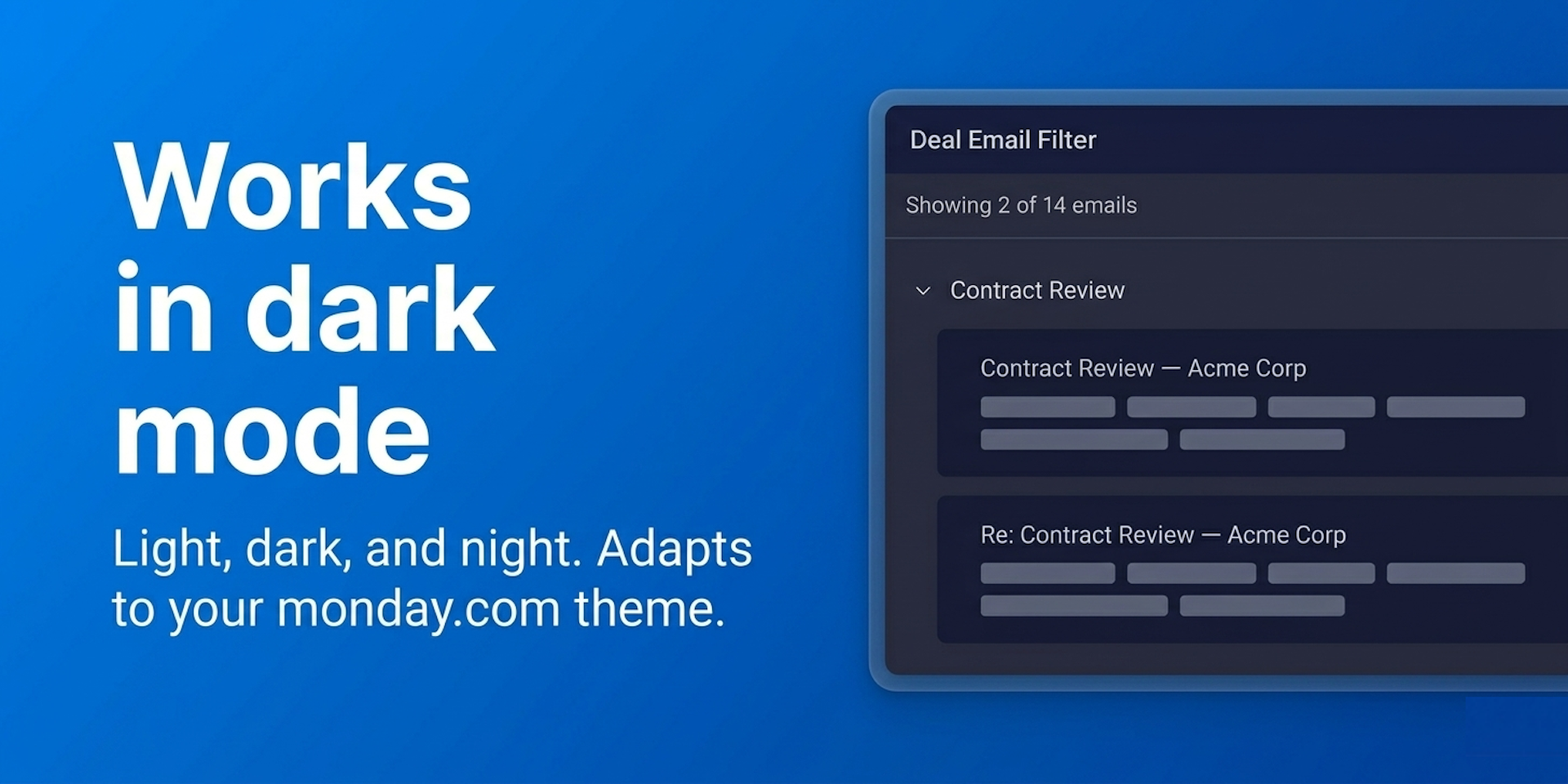
Any monday.com CRM team where one contact sits on several deals
🛡️ Security: your data does not leave monday.com. The app reads your emails to filter them, writes nothing back to your boards, and uses no third-party servers and no tracking.
🚀 Try it free: install, open a deal, and the emails are already filtered. Free for 14 days, no automatic charge, cancel anytime.
🔌 Compatibility: works only with monday.com CRM, on the Emails & Activities tab of any item.
Does the developer periodically perform penetration testing?
Not answered
Does the developer have a dedicated security and privacy point of contact for such issues or questions?
Yes
Security and privacy questions are answered at support@nichcraft.com, the contact published in our privacy policy and terms of service on nichcraft.com
Does the app restrict redirects and forwards only to approved destinations, or show a warning when redirecting to potentially untrusted content?
Yes
The app never sends users to a URL it builds from data. Its only built-in link is our own help page opened in a new tab from the Help menu or as a fallback if plan selection fails to open. Email content is cleaned with DOMPurify before display, so any links inside an email are the sender's own and open through the normal browser, not an app redirect.
Does the app protect against mass parameter assignment attacks?
Not answered
Does the app perform encoding and sanitization on all user supplied parameters to protect against Cross-Site Scripting?
Yes
Everything the app saves to monday.storage is run through DOMPurify in strip mode (all HTML tags and attributes removed) before it is written, across both storage areas. Email HTML is also sanitized with DOMPurify before it is shown.
Does the developer protect all state-changing actions against Cross-Site Request Forgery (CSRF)?
Yes
The app has no server, no cookies, and no cookie-based login, so there is nothing for a CSRF attack to target. Every action runs through the monday.com SDK, authorized by monday.com's session token rather than an automatic cookie.
Does the developer have mechanisms to notify monday.com in case of a security breach?
Not answered
Does this developer have a process for installing application-level updates and security patches for the service (such as software packages and databases)?
Yes
Dependencies are locked to exact versions via a committed lockfile, and the test suite and linter are run manually before any update is released. Releases are deployed as a draft version and then promoted to live. There is no server or database to patch.
Compliance
Is the app certified with the information security standard ISO/IEC 27001:2022?
Not answered
Is the app compliant with the Health Insurance Portability and Accountability Act (HIPAA)?
Not answered
Is the app certified with System and Organization Controls (SOC 2 or SOC 3)?
Not answered
Is the app compliant with the General Data Protection Regulation (GDPR)?
Not answered
Data
Does the app send any data outside of monday.com? If yes, indicate whether the data is customer-submitted (e.g., board names, item names, doc content) or non-customer-submitted (e.g., account ID, board ID, user ID).
No
The app sends no customer data outside monday.com. It runs in the browser and talks only to monday.com's own API and storage; there is no separate server, no analytics, and no third-party tracking. Email content is only ever read into the browser, never sent anywhere else. (The Help link opens our static help page, which collects no data.)
Where does the app store logs data?
other
There are no server-side logs; the app runs entirely in the browser with no backend. The only logging is browser-console messages (fixed status text plus monday.com error objects) for diagnostics; nothing is sent to a remote logging service, and no email content, names, addresses, or tokens are logged.
Where does the app store the app data?
monday
Per-user settings are tagged with the user's monday.com ID; one account-wide entry records which deal an email belongs to (deal IDs, names, and timestamps only, never email content).
Does the developer ensure application logs do not contain secrets or personally-identifiable information (PII)?
Yes
There is no server-side log store. The app's only logs are browser-console diagnostics (fixed status text and monday.com error objects); no email content, addresses, or secrets are logged. The session token is read client-side (for the view-only gate) but is never logged.
Is customer data segregated from the data of other customers (for example logically or physically)?
Yes
The app has no data store of its own; it saves only to monday.storage, which monday.com keeps separated per account as part of its platform, so one customer's data is never mixed with another's. Within an account, each user's settings are tagged with their monday.com ID.
Privacy
Does the developer enforce multi-factor authentication on employees access to systems which may process customer data?
Not answered
Does the developer protect access to customer data based on the principle of least privilege?
Yes
The app asks for read-only access only (boards:read, me:read, updates:read) and never requests write access. boards:read powers the deal-email timeline query and me:read scopes each user's saved filters to their own user ID. Customer data stays in the customer's own monday.com storage, with no standing access on our side.
Reviews
No reviews yet.
Historical data
Installation history
We have data for December 28, 2024 onwards only. Collected sometime after 00:00 UTC daily.
Total number of installs
Change in total number of installs in last 1 day(s)
Compares the number of installs on each date with 1 days previously:
Max
Min
Current
Change in total number of installs in last 7 day(s)
Compares the number of installs on each date with 7 days previously:
Max
Min
Current
Change in total number of installs in last 30 day(s)
Compares the number of installs on each date with 30 days previously:
Max
Min
Current
Change in total number of installs in last 90 day(s)
Compares the number of installs on each date with 90 days previously:
Max
Min
Current
Change in total number of installs in last 180 day(s)
Compares the number of installs on each date with 180 days previously:
Max
Min
Current
Ratings history
Categories history
Each of the following is a yes/no answer, so the graphs show 1 for yes, and 0 for no.
{
"id": 10001178,
"marketplace_developer_id": 100000210,
"app_id": 10871128,
"app_type": "app",
"security_info": {},
"gallery_assets": [
{
"url": "https://cdn.monday.com/marketplace/10001178/10001178_2026_4_14_8_13_7_4qartw8l.png",
"type": "image"
},
{
"url": "https://cdn.monday.com/marketplace/10001178/10001178_2026_4_14_8_13_10_e1tesmk.png",
"type": "image"
},
{
"url": "https://cdn.monday.com/marketplace/10001178/10001178_2026_4_14_8_13_14_1ck3gks.png",
"type": "image"
},
{
"url": "https://cdn.monday.com/marketplace/10001178/10001178_2026_4_14_8_13_19_sfyzq6y.png",
"type": "image"
},
{
"url": "https://cdn.monday.com/marketplace/10001178/10001178_2026_4_14_8_13_22_n6u797a.png",
"type": "image"
},
{
"url": "https://cdn.monday.com/marketplace/10001178/10001178_2026_4_14_8_14_13_qmgg9g3.mp4",
"type": "video"
}
],
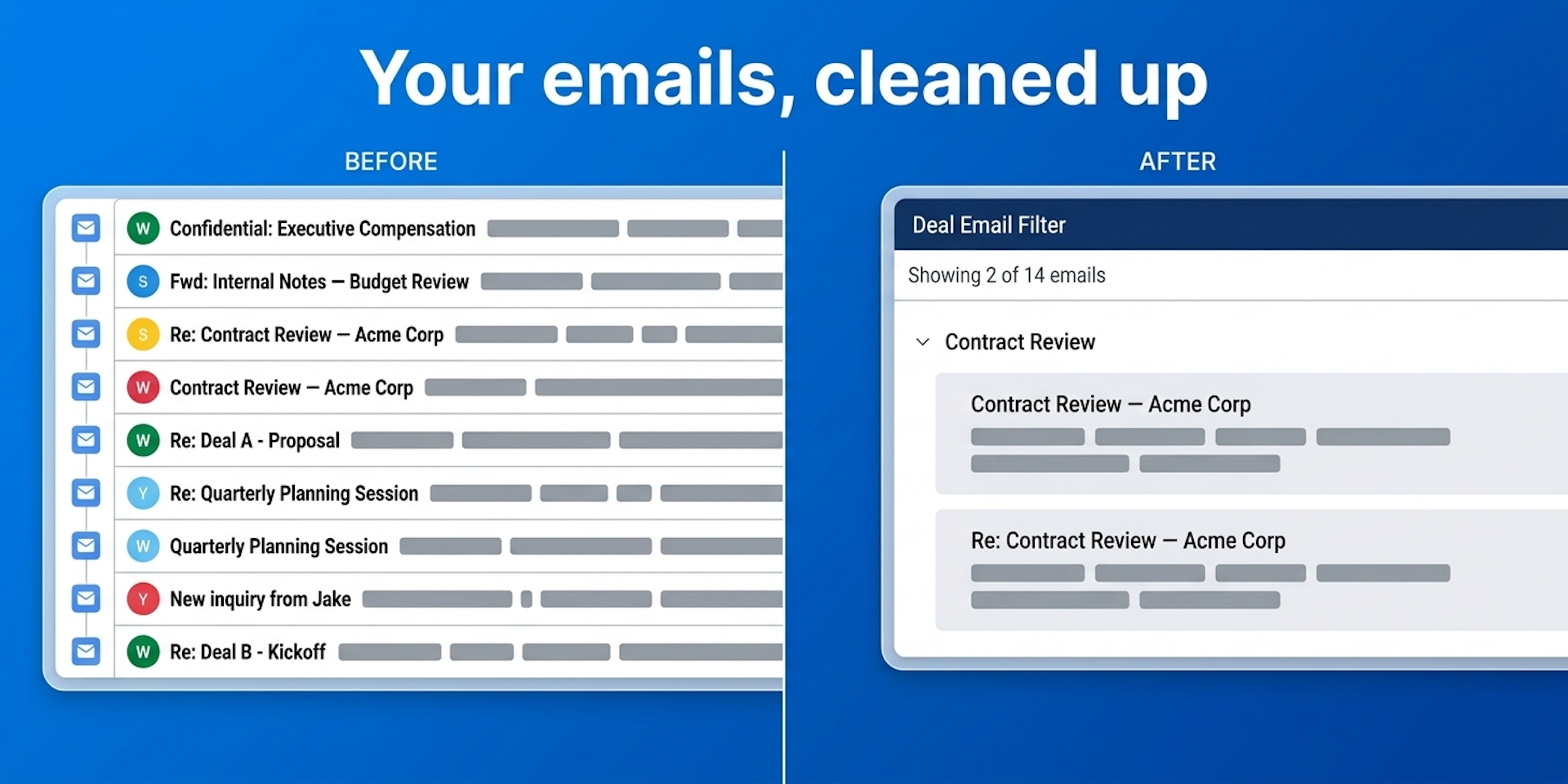
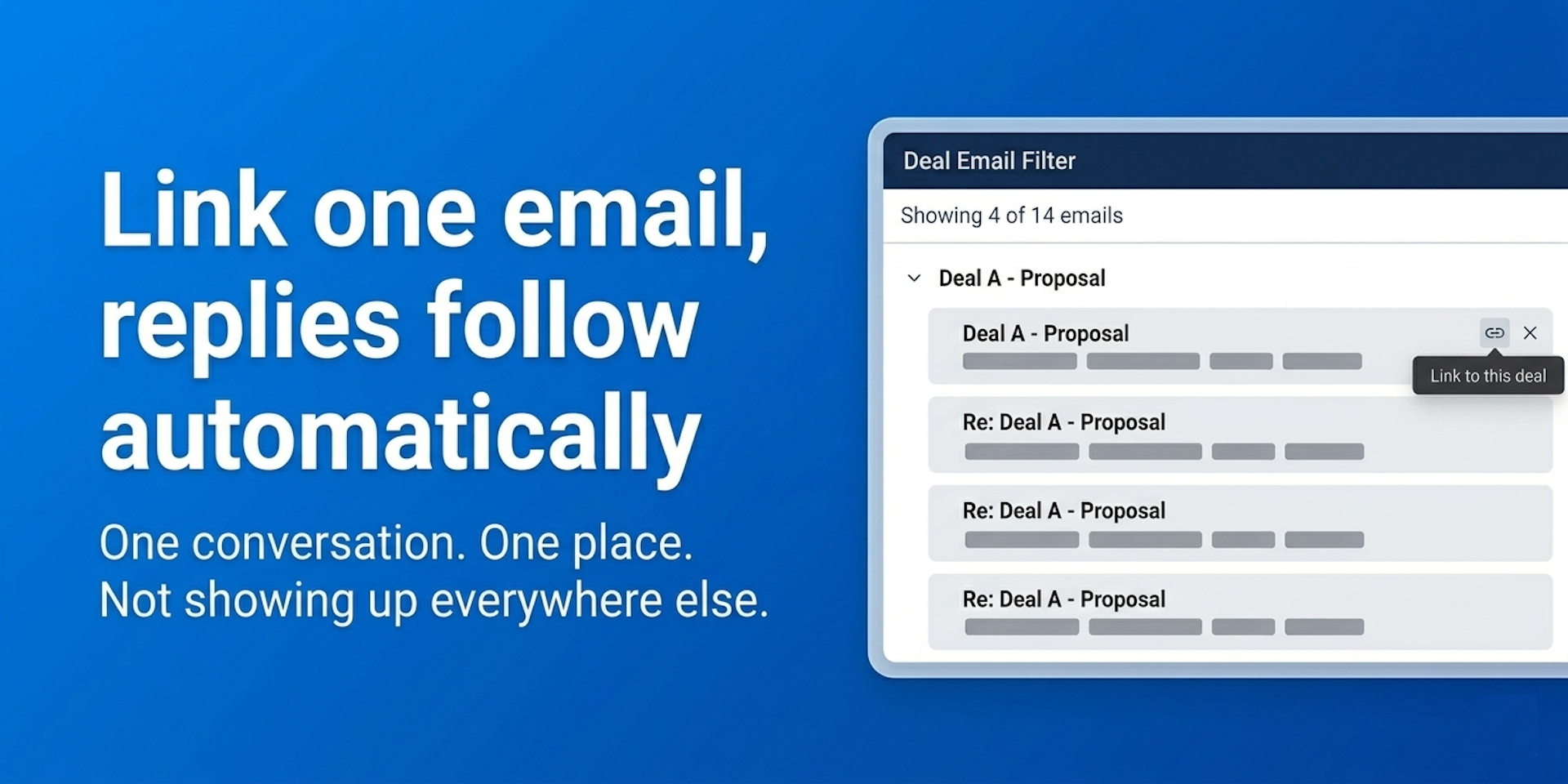
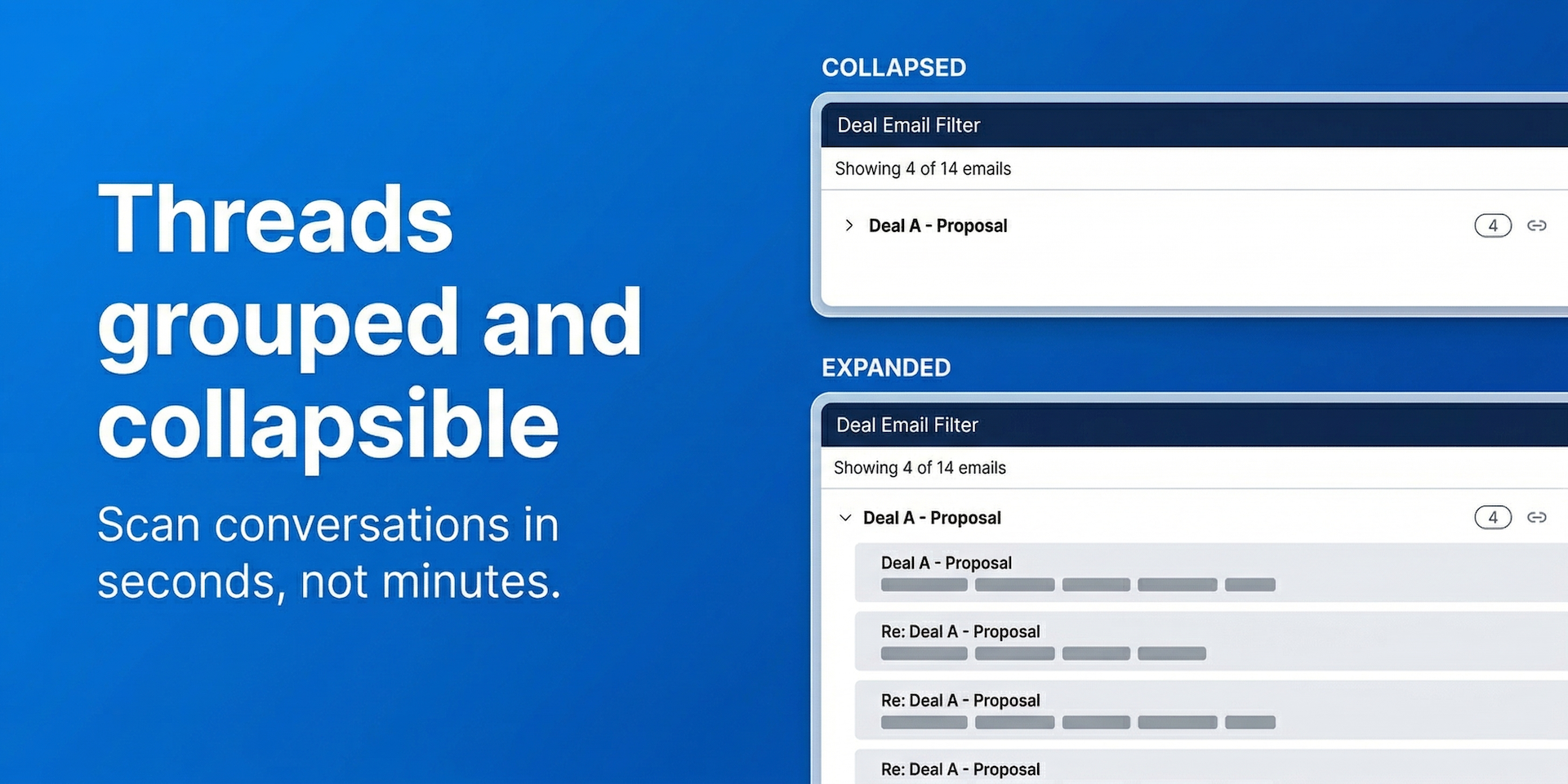
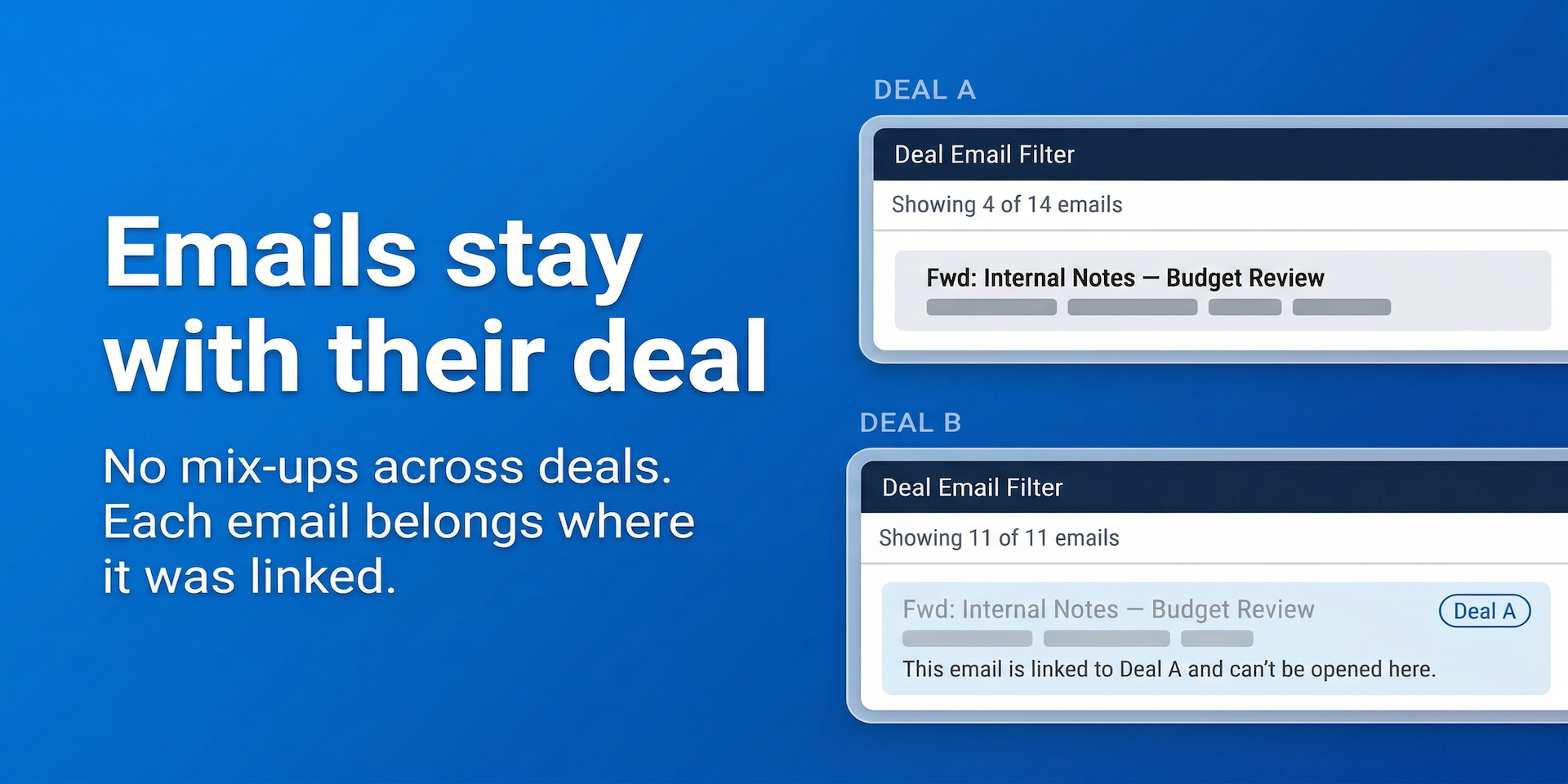
"description": "<p>If a contact sits on more than one deal in monday.com CRM, every email from that contact shows up on EVERY deal they are linked to.</p><p><br></p><p><strong><u>Deal Email Filter fixes that.</u></strong> Open a deal and you see only THIS deal's emails. Nothing from the others.</p><p><br></p><p>You finally get a clean email view for every deal.</p><p><br></p><p><strong><u>What you can do</u></strong></p><p>✅ See ONLY THIS DEAL'S EMAILS, automatically. No setup, no rules to configure</p><p>✅ Emails from BEFORE the deal was created are hidden by default</p><p>✅ LINK or HIDE any email with one click</p><p>✅ Link one email and the whole reply thread follows it</p><p>✅ Grouped, collapsible threads keep a long history scannable</p><p><br></p><p><strong><u>Key features</u></strong></p><p>⚡ Zero configuration. Open a deal and it is already filtered</p><p>⚡ Works alongside your existing Gmail or Outlook sync in monday.com CRM</p><p>⚡ Filter is automatic on every deal. Manual pinning available for exceptions</p><p>⚡ Built for the 5-second scan before a call. Open, read, go</p><p>⚡ Lightweight, loads instantly, themed for light, dark, and night mode</p><p><br></p><p><strong><u>Who it is for</u></strong></p><ul><li>Sales reps who scan a deal's emails before a call</li><li>CRM admins whose reps stopped trusting Emails & Activities</li><li>Any monday.com CRM team where one contact sits on several deals</li></ul><p><br></p><p><strong>🛡️ Security:</strong> your data does not leave monday.com. The app reads your emails to filter them, writes nothing back to your boards, and uses no third-party servers and no tracking.</p><p><br></p><p><strong>🚀 Try it free:</strong> install, open a deal, and the emails are already filtered. Free for 14 days, no automatic charge, cancel anytime.</p><p><br></p><p><strong>🔌 Compatibility:</strong> works only with monday.com CRM, on the Emails & Activities tab of any item.</p><p><br></p><p><strong>💬 Quick answers</strong></p><ul><li><a href=\"https://calendar.app.google/Gj5vPrdDWpUqNJ897\" rel=\"noopener noreferrer\" target=\"_blank\">Book a meeting</a> – live one-on-one help</li><li><a href=\"mailto:support@nichcraft.com\" rel=\"noopener noreferrer\" target=\"_blank\">Email support</a> – you will hear back within a day, usually faster</li><li><a href=\"https://nichcraft.com/apps/deal-email-filter/help\" rel=\"noopener noreferrer\" target=\"_blank\">Step-by-step help page</a> – a quick guide</li><li><a href=\"mailto:support@nichcraft.com\" rel=\"noopener noreferrer\" target=\"_blank\">Feature requests</a> – tell me what you would love to see next</li></ul>",
"short_description": "See ONLY THIS DEAL'S EMAILS in Emails & Activities",
"thumbnail_url": "https://cdn.monday.com/marketplace/10001178/10001178_2026_4_14_8_12_51_w03e99m.png",
"logo_url": "https://cdn.monday.com/marketplace/10001178/10001178_2026_4_14_8_12_46_qlk4ye5.png",
"feedback_url": "support@nichcraft.com",
"privacy_policy_url": "https://nichcraft.com/privacy",
"featured": false,
"name": "Deal Email Filter",
"how_to_use_url": "https://nichcraft.com/monday-apps/deal-email-filter/help",
"external_pricing_url": null,
"keywords": "Emails & Activities,wrong emails on deal,deal email,email filter,CRM email,gmail,outlook,emails on every deal,same contact multiple deals,deal specific emails",
"compliance_answers": [
{
"questionId": 19,
"shortAnswer": false,
"detailedAnswer": "The app sends no customer data outside monday.com. It runs in the browser and talks only to monday.com's own API and storage; there is no separate server, no analytics, and no third-party tracking. Email content is only ever read into the browser, never sent anywhere else. (The Help link opens our static help page, which collects no data.)"
},
{
"questionId": 18,
"detailedAnswer": "There are no server-side logs; the app runs entirely in the browser with no backend. The only logging is browser-console messages (fixed status text plus monday.com error objects) for diagnostics; nothing is sent to a remote logging service, and no email content, names, addresses, or tokens are logged.",
"logHostingProvider": "other"
},
{
"questionId": 17,
"detailedAnswer": "Per-user settings are tagged with the user's monday.com ID; one account-wide entry records which deal an email belongs to (deal IDs, names, and timestamps only, never email content).",
"dataHostingProvider": "monday"
},
{
"questionId": 14,
"shortAnswer": true,
"detailedAnswer": "Security and privacy questions are answered at support@nichcraft.com, the contact published in our privacy policy and terms of service on nichcraft.com"
},
{
"questionId": 10,
"shortAnswer": true,
"detailedAnswer": "The app never sends users to a URL it builds from data. Its only built-in link is our own help page opened in a new tab from the Help menu or as a fallback if plan selection fails to open. Email content is cleaned with DOMPurify before display, so any links inside an email are the sender's own and open through the normal browser, not an app redirect."
},
{
"questionId": 8,
"shortAnswer": true,
"detailedAnswer": "There is no server-side log store. The app's only logs are browser-console diagnostics (fixed status text and monday.com error objects); no email content, addresses, or secrets are logged. The session token is read client-side (for the view-only gate) but is never logged."
},
{
"questionId": 6,
"shortAnswer": true,
"detailedAnswer": "The app asks for read-only access only (boards:read, me:read, updates:read) and never requests write access. boards:read powers the deal-email timeline query and me:read scopes each user's saved filters to their own user ID. Customer data stays in the customer's own monday.com storage, with no standing access on our side."
},
{
"questionId": 5,
"shortAnswer": true,
"detailedAnswer": "Everything the app saves to monday.storage is run through DOMPurify in strip mode (all HTML tags and attributes removed) before it is written, across both storage areas. Email HTML is also sanitized with DOMPurify before it is shown."
},
{
"questionId": 4,
"shortAnswer": true,
"detailedAnswer": "The app has no server, no cookies, and no cookie-based login, so there is nothing for a CSRF attack to target. Every action runs through the monday.com SDK, authorized by monday.com's session token rather than an automatic cookie."
},
{
"questionId": 2,
"shortAnswer": true,
"detailedAnswer": "Dependencies are locked to exact versions via a committed lockfile, and the test suite and linter are run manually before any update is released. Releases are deployed as a draft version and then promoted to live. There is no server or database to patch."
},
{
"questionId": 1,
"shortAnswer": true,
"detailedAnswer": "The app has no data store of its own; it saves only to monday.storage, which monday.com keeps separated per account as part of its platform, so one customer's data is never mixed with another's. Within an account, each user's settings are tagged with their monday.com ID."
}
],
"created_at": "2026-05-14T08:11:32.000Z",
"updated_at": "2026-09-06T08:46:36.000Z",
"automation_app_id": null,
"marketplace_category_ids": [
8,
6,
4
],
"pinned_for_categories_ids": [],
"featured_for_categories_ids": [],
"pricing_data": null,
"label": null,
"app_values": [
"Everyday tasks"
],
"security": true,
"display_in_template_store": false,
"acquisition_source": "No touch",
"is_connector": false,
"show_connections": null,
"terms_of_service_url": "https://nichcraft.com/terms",
"available_for_tiers": [],
"available_for_products": [],
"google_analytics_tag_id": "G-KRPZS7SV58",
"is_solution": false,
"cta_override": null,
"app_scope_str": "me:read,boards:read,updates:read",
"app_client_id": "5c35b1d631405400858d9b27e7caf4d3",
"app_color": {
"hsl": {
"h": 214.1052631578947,
"s": 0.811965811965812,
"l": 0.5411764705882353,
"a": 1
},
"hex": "#2b7de9",
"rgb": {
"r": 43,
"g": 125,
"b": 233,
"a": 1
},
"hsv": {
"h": 214.1052631578947,
"s": 0.8154506437768241,
"v": 0.9137254901960784,
"a": 1
},
"oldHue": 215.27272727272725,
"source": "hex"
},
"plans": [
{
"id": "10871128-1-DEFAULT",
"appPlanId": "DEFAULT",
"name": "default",
"versionId": 1,
"isTrial": true,
"prices": {
"type": "bucket_based",
"buckets": {
"3": {
"monthly": 15,
"yearly": 12
},
"5": {
"monthly": 25,
"yearly": 21
},
"10": {
"monthly": 50,
"yearly": 41
},
"15": {
"monthly": 74,
"yearly": 60
},
"20": {
"monthly": 98,
"yearly": 80
},
"25": {
"monthly": 120,
"yearly": 98
},
"30": {
"monthly": 143,
"yearly": 117
},
"35": {
"monthly": 165,
"yearly": 135
},
"40": {
"monthly": 188,
"yearly": 154
},
"45": {
"monthly": 210,
"yearly": 172
},
"50": {
"monthly": 233,
"yearly": 191
},
"55": {
"monthly": 255,
"yearly": 209
},
"60": {
"monthly": 277,
"yearly": 227
},
"65": {
"monthly": 299,
"yearly": 245
},
"70": {
"monthly": 321,
"yearly": 263
},
"75": {
"monthly": 343,
"yearly": 281
},
"80": {
"monthly": 365,
"yearly": 299
},
"85": {
"monthly": 387,
"yearly": 317
},
"90": {
"monthly": 409,
"yearly": 335
},
"95": {
"monthly": 431,
"yearly": 353
},
"100": {
"monthly": 453,
"yearly": 371
},
"110": {
"monthly": 495,
"yearly": 406
},
"120": {
"monthly": 538,
"yearly": 441
},
"130": {
"monthly": 580,
"yearly": 476
},
"140": {
"monthly": 623,
"yearly": 510
},
"150": {
"monthly": 665,
"yearly": 545
},
"160": {
"monthly": 708,
"yearly": 580
},
"170": {
"monthly": 750,
"yearly": 615
},
"180": {
"monthly": 793,
"yearly": 650
},
"190": {
"monthly": 835,
"yearly": 685
},
"200": {
"monthly": 878,
"yearly": 720
},
"225": {
"monthly": 984,
"yearly": 807
},
"250": {
"monthly": 1090,
"yearly": 894
},
"275": {
"monthly": 1193,
"yearly": 978
},
"300": {
"monthly": 1295,
"yearly": 1062
},
"350": {
"monthly": 1500,
"yearly": 1230
},
"400": {
"monthly": 1705,
"yearly": 1398
},
"450": {
"monthly": 1910,
"yearly": 1566
},
"500": {
"monthly": 2115,
"yearly": 1734
},
"550": {
"monthly": 2308,
"yearly": 1892
},
"600": {
"monthly": 2500,
"yearly": 2050
},
"650": {
"monthly": 2693,
"yearly": 2208
},
"700": {
"monthly": 2885,
"yearly": 2366
},
"750": {
"monthly": 3078,
"yearly": 2524
},
"800": {
"monthly": 3270,
"yearly": 2681
},
"850": {
"monthly": 3463,
"yearly": 2839
},
"900": {
"monthly": 3655,
"yearly": 2997
},
"950": {
"monthly": 3848,
"yearly": 3155
},
"1000": {
"monthly": 4040,
"yearly": 3313
},
"1100": {
"monthly": 4400,
"yearly": 3608
},
"1200": {
"monthly": 4760,
"yearly": 3903
},
"1300": {
"monthly": 5120,
"yearly": 4198
},
"1400": {
"monthly": 5480,
"yearly": 4494
},
"1500": {
"monthly": 5840,
"yearly": 4789
},
"1600": {
"monthly": 6200,
"yearly": 5084
},
"1700": {
"monthly": 6560,
"yearly": 5379
},
"1800": {
"monthly": 6920,
"yearly": 5674
},
"1900": {
"monthly": 7280,
"yearly": 5970
},
"2000": {
"monthly": 7640,
"yearly": 6265
},
"2250": {
"monthly": 8540,
"yearly": 7003
},
"2500": {
"monthly": 9440,
"yearly": 7741
},
"2750": {
"monthly": 10340,
"yearly": 8479
},
"3000": {
"monthly": 11240,
"yearly": 9217
},
"3250": {
"monthly": 12140,
"yearly": 9955
},
"3500": {
"monthly": 13040,
"yearly": 10693
},
"3750": {
"monthly": 13940,
"yearly": 11431
},
"4000": {
"monthly": 14840,
"yearly": 12169
},
"4250": {
"monthly": 15740,
"yearly": 12907
},
"4500": {
"monthly": 16640,
"yearly": 13645
},
"4750": {
"monthly": 17540,
"yearly": 14383
},
"5000": {
"monthly": 18440,
"yearly": 15121
},
"6000": {
"monthly": 21690,
"yearly": 17786
},
"7000": {
"monthly": 24940,
"yearly": 20451
},
"8000": {
"monthly": 28190,
"yearly": 23116
},
"9000": {
"monthly": 31440,
"yearly": 25781
},
"10000": {
"monthly": 34690,
"yearly": 28446
},
"12500": {
"monthly": 40940,
"yearly": 33571
},
"15000": {
"monthly": 47190,
"yearly": 38696
},
"17500": {
"monthly": 53440,
"yearly": 43821
},
"20000": {
"monthly": 59690,
"yearly": 48946
},
"25000": {
"monthly": 68440,
"yearly": 56121
},
"30000": {
"monthly": 77190,
"yearly": 63296
},
"35000": {
"monthly": 77440,
"yearly": 63501
},
"40000": {
"monthly": 77690,
"yearly": 63706
},
"45000": {
"monthly": 77940,
"yearly": 63911
},
"50000": {
"monthly": 78190,
"yearly": 64116
},
"60000": {
"monthly": 78690,
"yearly": 64526
},
"70000": {
"monthly": 79190,
"yearly": 64936
},
"80000": {
"monthly": 79690,
"yearly": 65346
},
"90000": {
"monthly": 80190,
"yearly": 65756
},
"100000": {
"monthly": 80690,
"yearly": 66166
},
"1000000": {
"monthly": 80690,
"yearly": 66166
}
}
},
"versionState": "live",
"appId": 10871128,
"description": "Stop seeing emails from other deals on every deal. The Emails & Activities tab is filtered to this deal automatically.",
"extraData": {
"bullets": [
"Hides emails from before the deal opened",
"Link or hide any email with one click",
"Link one email and the whole thread follows",
"Link an email to one deal and it disappears from the others"
],
"monthlyFee": null,
"yearlyFee": null
},
"isFree": false,
"isRecommended": false,
"currency": "USD"
},
{
"id": "10871128-2-team",
"appPlanId": "team",
"name": "Team",
"versionId": 2,
"isTrial": true,
"prices": {
"type": "standard",
"monthly": 29,
"yearly": 24
},
"versionState": "live",
"appId": 10871128,
"description": "Open a deal and see only its emails, automatically. One price for your whole team, no per-seat fees.",
"extraData": {
"bullets": [
"Hides emails from before the deal opened",
"Link or hide any email with one click",
"Link one email and the whole thread follows",
"Link an email to one deal and it disappears from the others"
],
"monthlyFee": 29,
"yearlyFee": 24
},
"isFree": false,
"isRecommended": false,
"currency": "USD"
}
],
"app_live_version": {
"updated_at": "2026-05-12T08:31:44.247Z",
"id": 14567904
},
"pricing_model": null,
"monetization": {
"monetizationType": "monday",
"hasFreePlan": false,
"hasPaidPlan": true,
"hasTrialPlan": true
},
"badges_data": {
"security": true,
"app_values": [
"Everyday tasks"
],
"acquisition_source": "No touch",
"display_in_template_store": false
},
"data": {
"is_solution": false,
"cta_override": null,
"is_connector": false,
"available_for_tiers": [],
"terms_of_service_url": "https://nichcraft.com/terms",
"available_for_products": [],
"google_analytics_tag_id": "G-KRPZS7SV58"
},
"display": null,
"installsDelta": {
"totalInstalls": 4,
"sevenDays": 0,
"thirtyDays": 0,
"ninetyDays": 0
}
}