Track and calculate sales commissions on any board Stop chasing spreadsheets. Calculate sales commissions inside monday.com — automatically.
Commission Tracker is a no-code commission engine for sales teams that already live in monday.com . Set up your rules once, map your existing board columns, and let the app do the math — no exports, no formulas, no Excel.
BUILT FOR sales managers, RevOps, and finance teams who pay reps on percentage, fixed, or tiered structures, need to split commissions between team members, and want real-time visibility without leaving monday.com .
KEY FEATURES
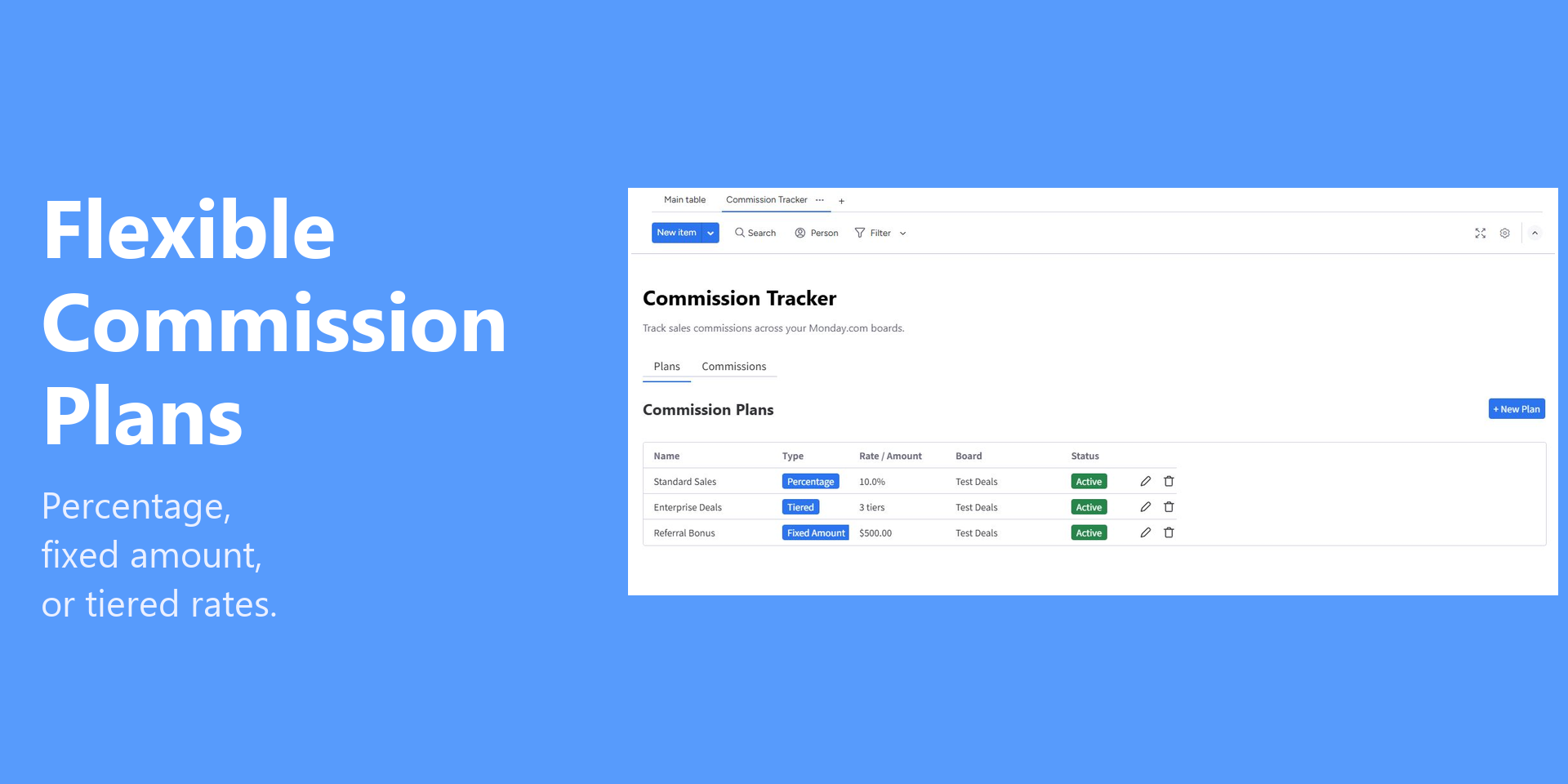
• Flexible Commission Plans — percentage, flat fee, or tiered rates with custom thresholds
• Works with ANY board — not just CRM. Map your deal value, status, and rep columns
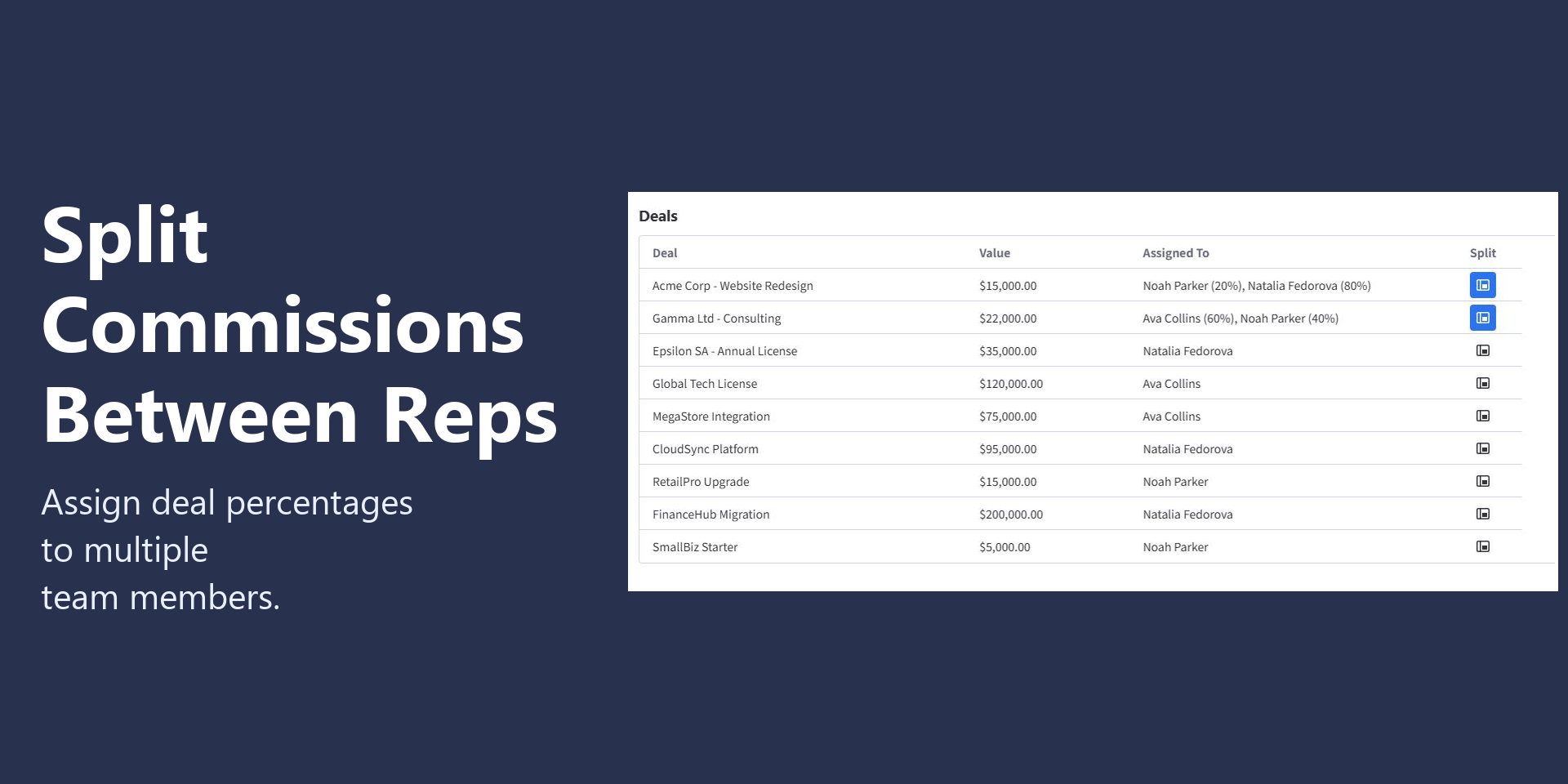
• Split Commissions — divide a deal between multiple reps with custom percentages
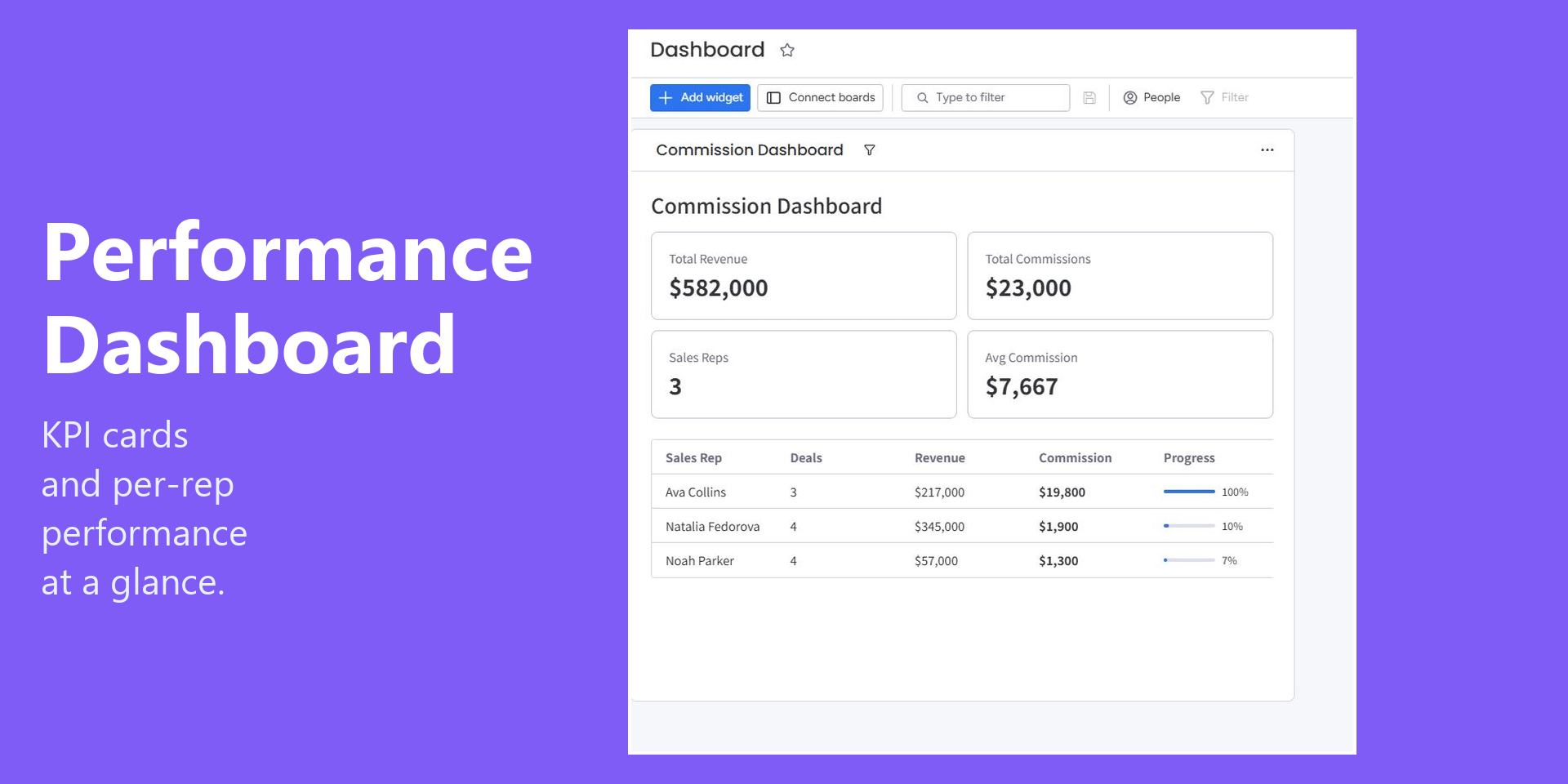
• Dashboard Widget — total revenue, commissions, per-rep leaderboard, with date filters
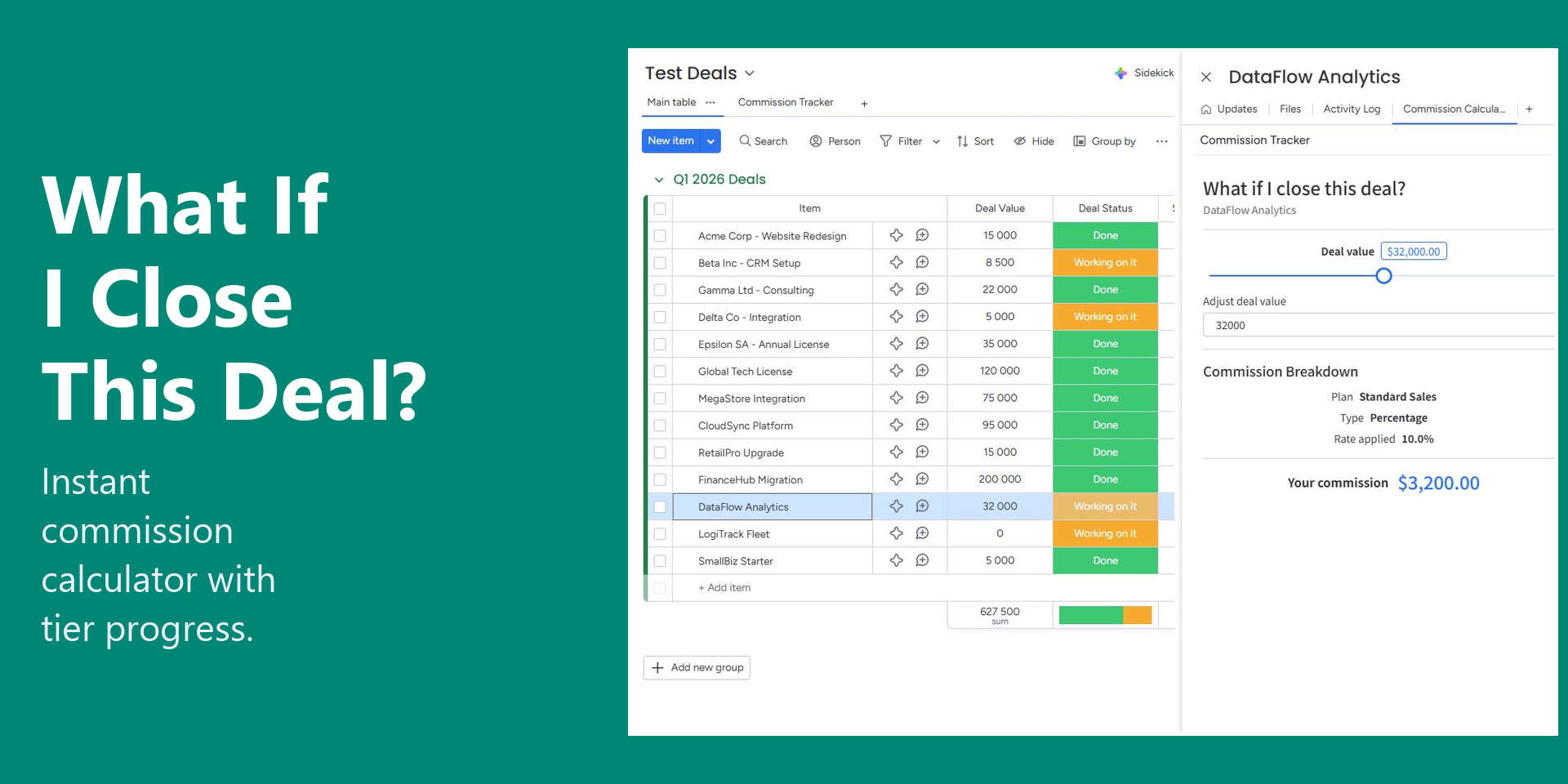
• Item View Calculator — "What if I close this deal?" projection inside any item
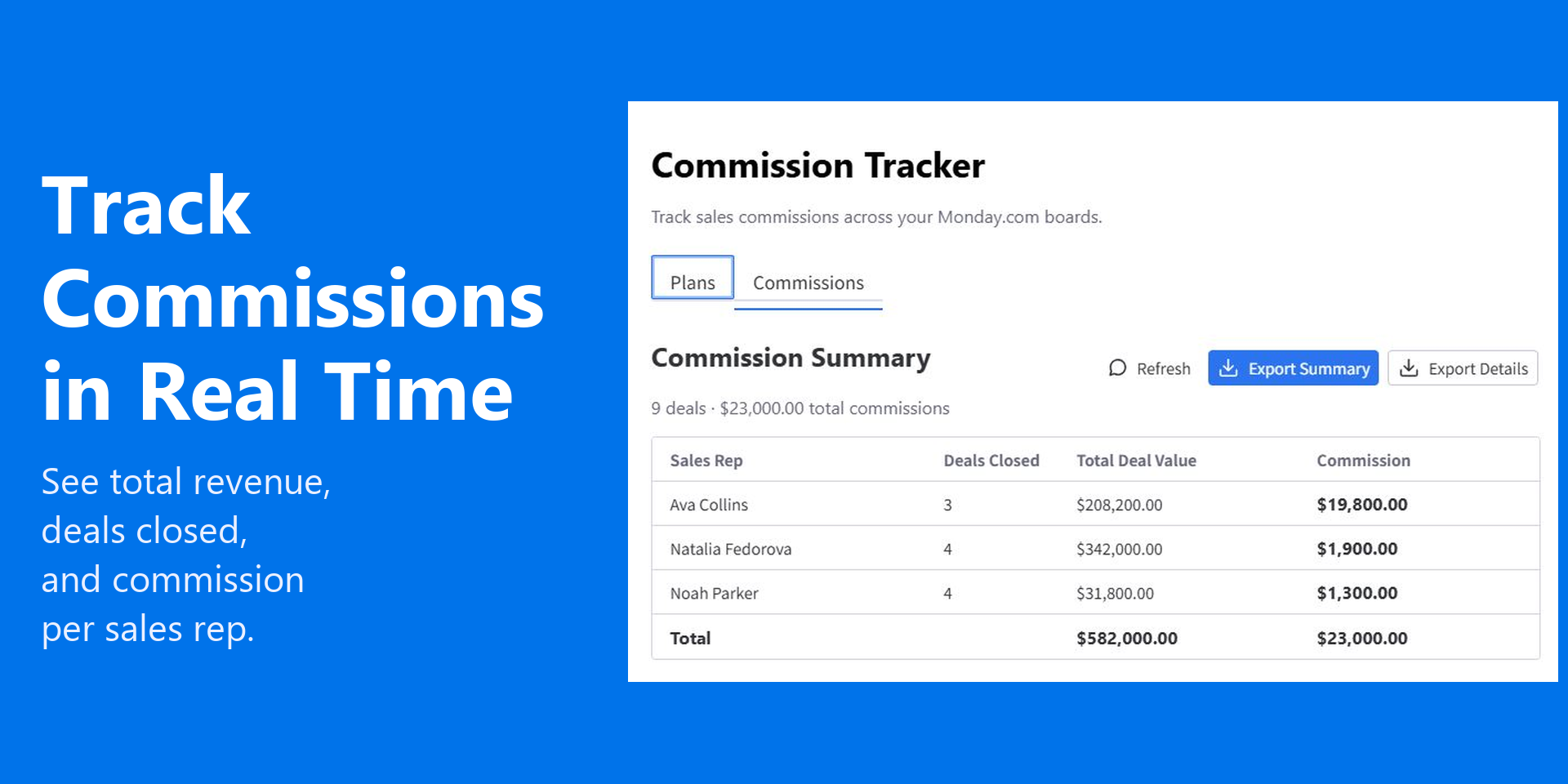
• CSV Export — summary and detailed reports for payroll
• Plan Assignment — assign different plans to different reps
• View-only safe — viewers see numbers but can't edit plan rules
USE CASES
• SaaS teams tracking MRR commissions with tiered accelerators
• Real estate agencies splitting deals between listing and selling agents
• Recruiting agencies paying placement fees on hire
• Agencies and consultancies tracking project-based commissions
PRICING
Free — $0 for small teams (1 plan, 3 reps)
Starter — $10/seat/mo (5 plans, 15 reps, CSV export, splits)
Pro — $29/seat/mo (unlimited plans and reps, tiered rates, dashboard)
Billing handled entirely through monday.com Monetization.
Questions? Email fedorova.apps@gmail.com — we reply within 24 hours.
Setup guide: https://nataliafedorovabi.github.io/nfapps-legal/how-to-use.html
App metadata ID: 10001154 • App ID: 11048179 • Listing updated: May 4, 2026 View app data JSON {
"id": 10001154,
"marketplace_developer_id": 100000208,
"app_id": 11048179,
"app_type": "app",
"security_info": {},
"gallery_assets": [
{
"url": "https://cdn.monday.com/marketplace/10001154/10001154_2026_3_29_14_25_47_x8wi2gq.png",
"type": "image"
},
{
"url": "https://cdn.monday.com/marketplace/10001154/10001154_2026_3_29_14_25_53_9s6xcr5.png",
"type": "image"
},
{
"url": "https://cdn.monday.com/marketplace/10001154/10001154_2026_3_29_14_26_1_frqtjof.png",
"type": "image"
},
{
"url": "https://cdn.monday.com/marketplace/10001154/10001154_2026_3_29_14_26_9_g907n5e.png",
"type": "image"
},
{
"url": "https://cdn.monday.com/marketplace/10001154/10001154_2026_3_29_14_26_16_803llxl.png",
"type": "image"
}
],
"description": "<p>Stop chasing spreadsheets. Calculate sales commissions inside <a href=\"http://monday.com/\" rel=\"noopener noreferrer\" target=\"_blank\">monday.com</a> — automatically.</p><p>Commission Tracker is a no-code commission engine for sales teams that already live in <a href=\"http://monday.com/\" rel=\"noopener noreferrer\" target=\"_blank\">monday.com</a>. Set up your rules once, map your existing board columns, and let the app do the math — no exports, no formulas, no Excel.</p><p>BUILT FOR sales managers, RevOps, and finance teams who pay reps on percentage, fixed, or tiered structures, need to split commissions between team members, and want real-time visibility without leaving <a href=\"http://monday.com/\" rel=\"noopener noreferrer\" target=\"_blank\">monday.com</a>.</p><p>KEY FEATURES</p><p>• Flexible Commission Plans — percentage, flat fee, or tiered rates with custom thresholds</p><p>• Works with ANY board — not just CRM. Map your deal value, status, and rep columns</p><p>• Split Commissions — divide a deal between multiple reps with custom percentages</p><p>• Dashboard Widget — total revenue, commissions, per-rep leaderboard, with date filters</p><p>• Item View Calculator — \"What if I close this deal?\" projection inside any item</p><p>• CSV Export — summary and detailed reports for payroll</p><p>• Plan Assignment — assign different plans to different reps</p><p>• View-only safe — viewers see numbers but can't edit plan rules</p><p>USE CASES</p><p>• SaaS teams tracking MRR commissions with tiered accelerators</p><p>• Real estate agencies splitting deals between listing and selling agents</p><p>• Recruiting agencies paying placement fees on hire</p><p>• Agencies and consultancies tracking project-based commissions</p><p>PRICING</p><p>Free — $0 for small teams (1 plan, 3 reps)</p><p>Starter — $10/seat/mo (5 plans, 15 reps, CSV export, splits)</p><p>Pro — $29/seat/mo (unlimited plans and reps, tiered rates, dashboard)</p><p>Billing handled entirely through <a href=\"http://monday.com/\" rel=\"noopener noreferrer\" target=\"_blank\">monday.com</a> Monetization.</p><p>Questions? Email <a href=\"mailto:fedorova.apps@gmail.com\" rel=\"noopener noreferrer\" target=\"_blank\">fedorova.apps@gmail.com</a> — we reply within 24 hours.</p><p>Setup guide: <a href=\"https://nataliafedorovabi.github.io/nfapps-legal/how-to-use.html\" rel=\"noopener noreferrer\" target=\"_blank\">https://nataliafedorovabi.github.io/nfapps-legal/how-to-use.html</a></p>",
"short_description": "Track and calculate sales commissions on any board",
"thumbnail_url": "https://cdn.monday.com/marketplace/10001154/10001154_2026_3_29_14_24_52_oq0urcs.png",
"logo_url": "https://cdn.monday.com/marketplace/10001154/10001154_2026_3_29_14_24_32_cs0bhau.png",
"feedback_url": "fedorova.apps@gmail.com",
"privacy_policy_url": "https://nataliafedorovabi.github.io/nfapps-legal/privacy-policy.html",
"featured": false,
"name": "Commission Tracker",
"how_to_use_url": "https://nataliafedorovabi.github.io/nfapps-legal/how-to-use.html",
"external_pricing_url": null,
"keywords": "commission,sales,compensation,tracking,incentive,revenue,deals,CRM,payout,calculator",
"compliance_answers": [],
"created_at": "2026-04-29T14:24:12.000Z",
"updated_at": "2026-05-04T13:27:06.000Z",
"automation_app_id": null,
"marketplace_category_ids": [
10000007,
9,
4
],
"pinned_for_categories_ids": [],
"featured_for_categories_ids": [],
"pricing_data": "Free plan available",
"label": null,
"app_values": [
"Everyday tasks"
],
"security": false,
"display_in_template_store": false,
"acquisition_source": "No touch",
"is_connector": false,
"show_connections": null,
"terms_of_service_url": "https://nataliafedorovabi.github.io/nfapps-legal/terms-of-service.html",
"available_for_tiers": [],
"available_for_products": [],
"google_analytics_tag_id": null,
"is_solution": false,
"cta_override": null,
"app_scope_str": "me:read,boards:read,users:read",
"app_client_id": "ab3060a7f3ef7bc1566f68a72a4ad1ce",
"app_color": "#00c875",
"plans": [
{
"id": "11048179-1-free",
"appPlanId": "free",
"name": "Free",
"versionId": 1,
"isTrial": false,
"prices": {
"type": "standard",
"monthly": 0,
"yearly": 0
},
"versionState": "live",
"appId": 11048179,
"description": "Basic commission calculator for small teams",
"extraData": {
"bullets": [
"1 commission plan",
"Basic calculator"
],
"monthlyFee": 0,
"yearlyFee": 0
},
"isFree": true,
"isRecommended": false,
"currency": "USD"
},
{
"id": "11048179-1-pro",
"appPlanId": "pro",
"name": "Pro",
"versionId": 1,
"isTrial": false,
"prices": {
"type": "standard",
"monthly": 29,
"yearly": 23
},
"versionState": "live",
"appId": 11048179,
"description": "Unlimited access with advanced features for large teams",
"extraData": {
"bullets": [
"Unlimited plans",
"Tiered rates",
"Dashboard",
"Priority support"
],
"monthlyFee": 29,
"yearlyFee": 23
},
"isFree": false,
"isRecommended": false,
"currency": "USD"
},
{
"id": "11048179-1-starter",
"appPlanId": "starter",
"name": "Starter",
"versionId": 1,
"isTrial": false,
"prices": {
"type": "standard",
"monthly": 10,
"yearly": 8
},
"versionState": "live",
"appId": 11048179,
"description": "For growing sales teams with multiple commission plans",
"extraData": {
"bullets": [
"5 commission plans",
"CSV export",
"Split commissions"
],
"monthlyFee": 10,
"yearlyFee": 8
},
"isFree": false,
"isRecommended": false,
"currency": "USD"
}
],
"app_live_version": {
"updated_at": "2026-05-05T07:53:05.559Z",
"id": 14185801
},
"pricing_model": null,
"monetization": {
"monetizationType": "monday",
"hasFreePlan": true,
"hasPaidPlan": true,
"hasTrialPlan": false
},
"badges_data": {
"security": false,
"app_values": [
"Everyday tasks"
],
"pricing_data": "Free plan available",
"acquisition_source": "No touch",
"display_in_template_store": false
},
"data": {
"is_solution": false,
"cta_override": null,
"is_connector": false,
"available_for_tiers": [],
"terms_of_service_url": "https://nataliafedorovabi.github.io/nfapps-legal/terms-of-service.html",
"available_for_products": [],
"google_analytics_tag_id": null
},
"display": null,
"installsDelta": {
"totalInstalls": 24,
"sevenDays": 1,
"thirtyDays": 3,
"ninetyDays": 14
}
}