Send group emails to contacts directly from monday
Send group emails directly from monday CRM — no exports, no copy-paste.
If you’ve ever tried emailing a group of contacts from monday CRM, you’ve probably run into this:
→ Emails are sent individually
→ No way to include all recipients in one message
→ Teams export reports or copy emails manually. It works… but it slows everything down.
Mail Groups fixes that.
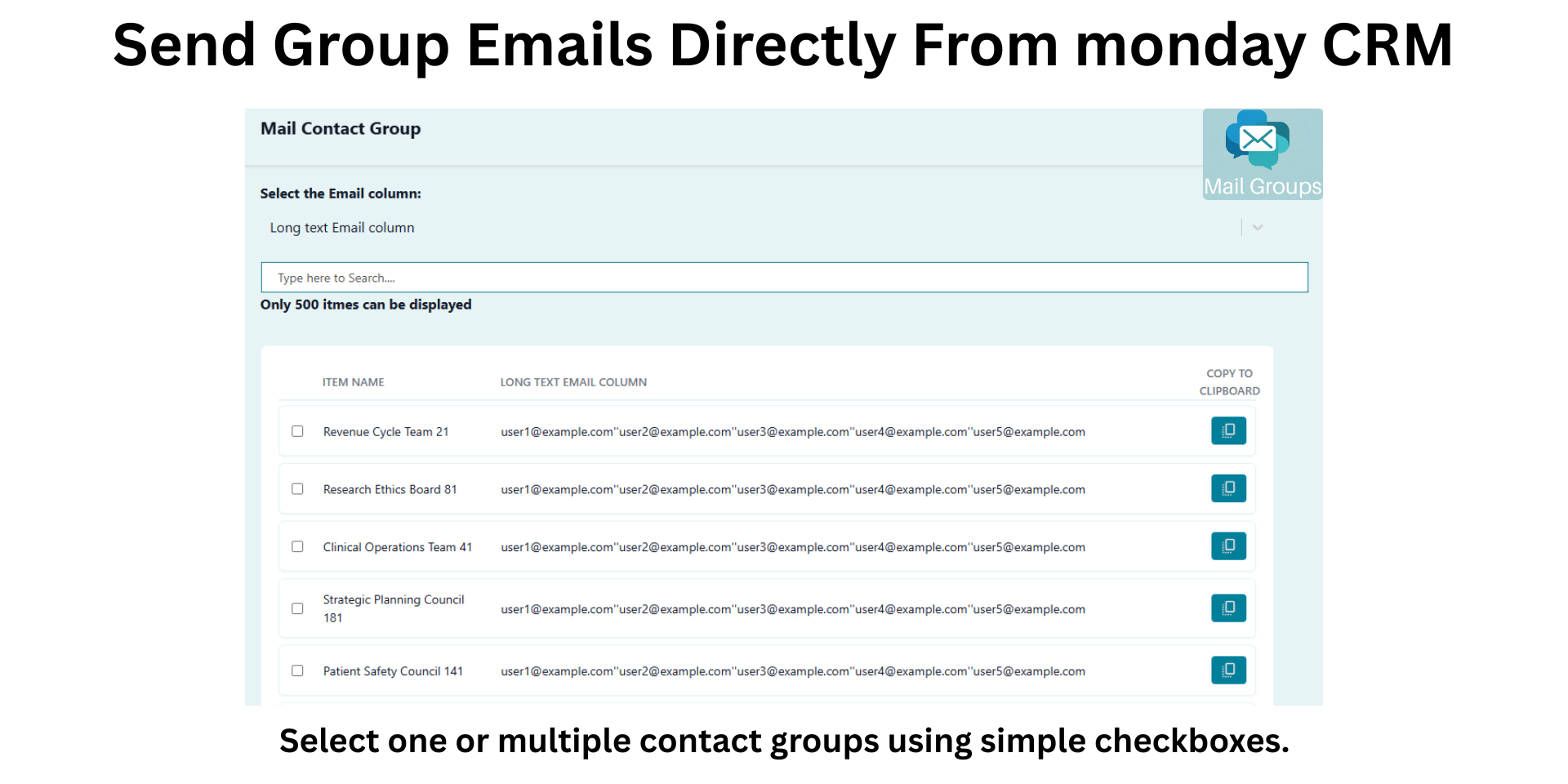
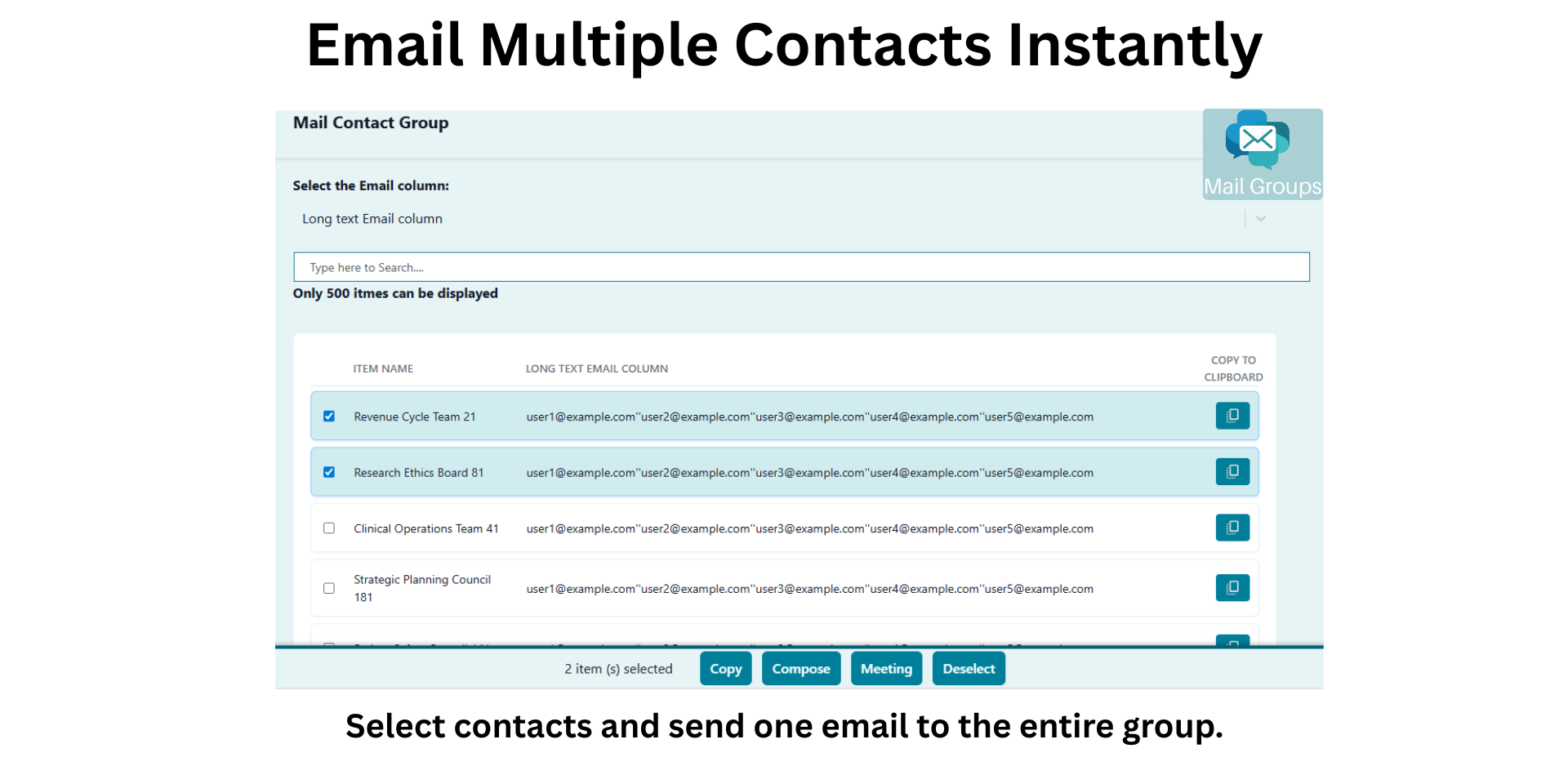
Select contacts directly from your monday board and send one email to the entire group — without leaving monday. No downloads. No switching tools. No manual steps.
What You Can Do
• Send one email to multiple contacts as a group
• Search contacts instantly by name, email, or group
• Select contacts across filtered results
• Copy email lists to clipboard in one click
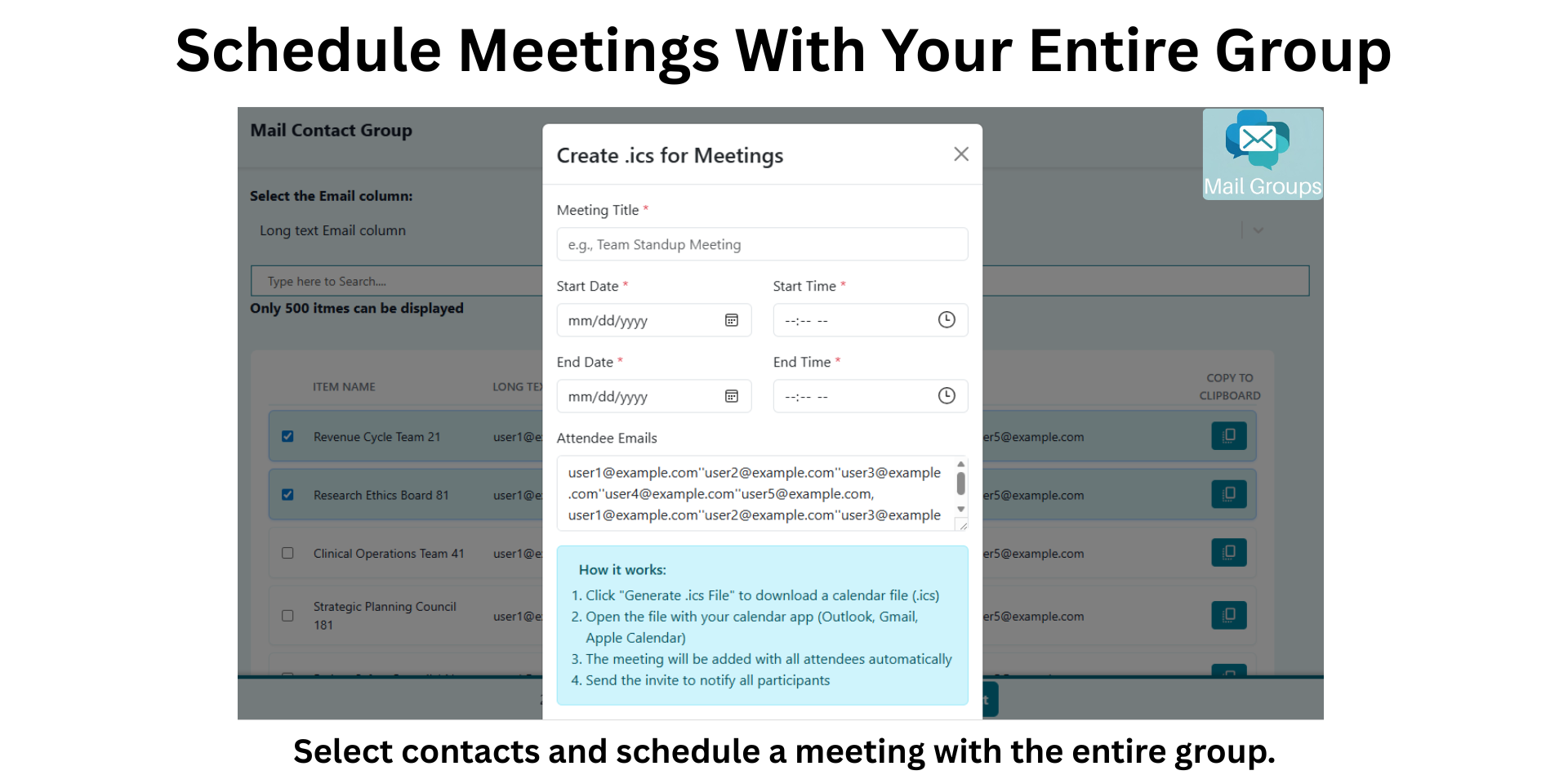
• Generate meeting invitations (.ics) for selected contacts
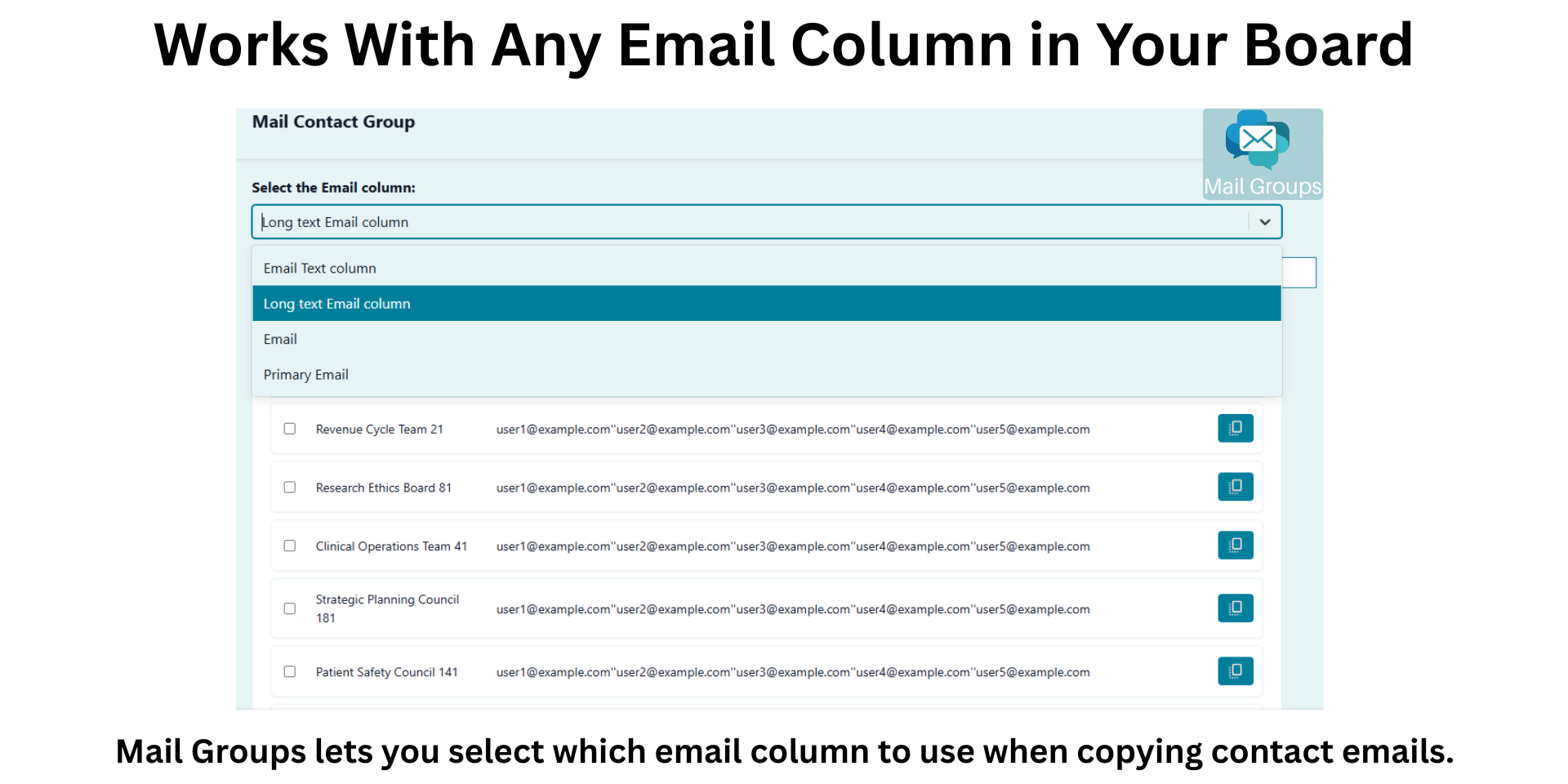
• Works with multiple email column types (Email, Text, Long Text, Mirror)
• Matches monday Light, Dark, and Night themes automatically
Why Teams Use Mail Groups
⚡ Eliminate manual export and copy-paste workflows
⚡ Communicate with stakeholders in a single thread
⚡ Save time during outreach and coordination
⚡ Keep all communication workflows inside monday
How It Works
Add Mail Groups as a board view
Select your email column
Choose contacts
Send or copy emails instantly
Built for Teams Managing
• Client relationships
• Partner networks
• Stakeholder communications
• Event outreach and coordination
Seamless monday Experience
Mail Groups is designed to feel native to monday — fast, simple, and aligned with your existing workflows.
🔐 Privacy & Security
Mail Groups uses the monday SDK and API to access data securely. No data is stored outside of monday.com.
Security & Compliance
The app developer did not provide the security and compliance information for this app.
Reviews
No reviews yet.
Historical data
Installation history
We have data for December 28, 2024 onwards only. Collected sometime after 00:00 UTC daily.
Total number of installs
Change in total number of installs in last 1 day(s)
Compares the number of installs on each date with 1 days previously:
Max
Min
Current
Change in total number of installs in last 7 day(s)
Compares the number of installs on each date with 7 days previously:
Max
Min
Current
Change in total number of installs in last 30 day(s)
Compares the number of installs on each date with 30 days previously:
Max
Min
Current
Change in total number of installs in last 90 day(s)
Compares the number of installs on each date with 90 days previously:
Max
Min
Current
Change in total number of installs in last 180 day(s)
Compares the number of installs on each date with 180 days previously:
Max
Min
Current
Ratings history
Categories history
Each of the following is a yes/no answer, so the graphs show 1 for yes, and 0 for no.
{
"id": 10001138,
"marketplace_developer_id": 100000207,
"app_id": 10902376,
"app_type": "app",
"security_info": {},
"gallery_assets": [
{
"url": "https://cdn.monday.com/marketplace/10001138/10001138_2026_3_15_12_59_17_ae0kdof.png",
"type": "image"
},
{
"url": "https://cdn.monday.com/marketplace/10001138/10001138_2026_3_15_12_59_24_rtaxq8j.png",
"type": "image"
},
{
"url": "https://cdn.monday.com/marketplace/10001138/10001138_2026_3_15_12_59_31_p3d1bap.png",
"type": "image"
},
{
"url": "https://cdn.monday.com/marketplace/10001138/10001138_2026_3_15_12_59_38_omblcu.png",
"type": "image"
},
{
"url": "https://cdn.monday.com/marketplace/10001138/10001138_2026_3_15_13_0_1_r4r05is.mp4",
"type": "video"
}
],
"description": "<p><strong>Send group emails directly from monday CRM — no exports, no copy-paste.</strong></p><p>If you’ve ever tried emailing a group of contacts from monday CRM, you’ve probably run into this:</p><p>→ Emails are sent individually</p><p>→ No way to include all recipients in one message</p><p>→ Teams export reports or copy emails manually. It works… but it slows everything down.</p><p><strong>Mail Groups fixes that.</strong></p><p>Select contacts directly from your monday board and send one email to the entire group — without leaving monday. No downloads. No switching tools. No manual steps.</p><p><strong>What You Can Do</strong></p><p><strong>• </strong>Send one email to multiple contacts as a group</p><p>• Search contacts instantly by name, email, or group</p><p>• Select contacts across filtered results</p><p>• Copy email lists to clipboard in one click</p><p>• Generate meeting invitations (.ics) for selected contacts</p><p>• Works with multiple email column types (Email, Text, Long Text, Mirror)</p><p>• Matches monday Light, Dark, and Night themes automatically</p><p><strong>Why Teams Use Mail Groups</strong></p><p>⚡ Eliminate manual export and copy-paste workflows</p><p>⚡ Communicate with stakeholders in a single thread</p><p>⚡ Save time during outreach and coordination</p><p>⚡ Keep all communication workflows inside monday</p><p><strong>How It Works</strong></p><p>Add Mail Groups as a board view</p><p>Select your email column</p><p>Choose contacts</p><p>Send or copy emails instantly</p><p><strong>Built for Teams Managing</strong></p><p>• Client relationships</p><p>• Partner networks</p><p>• Stakeholder communications</p><p>• Event outreach and coordination</p><p><strong>Seamless monday Experience</strong></p><p>Mail Groups is designed to feel native to monday — fast, simple, and aligned with your existing workflows.</p><p>🔐<strong> Privacy & Security</strong></p><p>Mail Groups uses the monday SDK and API to access data securely. No data is stored outside of <a href=\"http://monday.com/\" rel=\"noopener noreferrer\" target=\"_blank\">monday.com</a>.</p>",
"short_description": "Send group emails to contacts directly from monday",
"thumbnail_url": "https://cdn.monday.com/marketplace/10001138/10001138_2026_3_15_12_58_48_5refbda.png",
"logo_url": "https://cdn.monday.com/marketplace/10001138/10001138_2026_3_15_12_58_28_av58fo3.png",
"feedback_url": "support@tdeos.com",
"privacy_policy_url": "https://tdeos.com/privacy",
"featured": false,
"name": "Mail Groups",
"how_to_use_url": "https://tdeos.com/mail-groups-user-guide",
"external_pricing_url": null,
"keywords": "email,group mail,bulk email,crm,contacts,distribution list,mail,email list,outreach,contact management",
"compliance_answers": [],
"created_at": "2026-04-15T12:56:25.000Z",
"updated_at": "2026-04-15T13:01:01.000Z",
"automation_app_id": null,
"marketplace_category_ids": [
8,
6,
4
],
"pinned_for_categories_ids": [],
"featured_for_categories_ids": [],
"pricing_data": "Free",
"label": null,
"app_values": [
"Everyday tasks"
],
"security": false,
"display_in_template_store": false,
"acquisition_source": "No touch",
"is_connector": false,
"show_connections": null,
"terms_of_service_url": "https://tdeos.com/terms",
"available_for_tiers": [],
"available_for_products": [],
"google_analytics_tag_id": null,
"is_solution": false,
"cta_override": null,
"app_scope_str": "me:read,boards:read,workspaces:read,users:read,account:read",
"app_client_id": "9bbf89d854d9ee9c770840287b17137f",
"app_color": {
"hsl": {
"h": 178.23529411764707,
"s": 0.6890465332319907,
"l": 0.48465212999999996,
"a": 1
},
"hex": "#26d1cc",
"rgb": {
"r": 38,
"g": 209,
"b": 204,
"a": 1
},
"hsv": {
"h": 178.23529411764707,
"s": 0.8159000000000001,
"v": 0.8186,
"a": 1
},
"oldHue": 178.23529411764707,
"source": "hsv"
},
"plans": null,
"app_live_version": {
"updated_at": "2026-03-25T12:47:07.432Z",
"id": 13644928
},
"pricing_model": null,
"monetization": {
"monetizationType": "none",
"hasFreePlan": false,
"hasPaidPlan": false,
"hasTrialPlan": false
},
"badges_data": {
"security": false,
"app_values": [
"Everyday tasks"
],
"pricing_data": "Free",
"acquisition_source": "No touch",
"display_in_template_store": false
},
"data": {
"is_solution": false,
"cta_override": null,
"is_connector": false,
"available_for_tiers": [],
"terms_of_service_url": "https://tdeos.com/terms",
"available_for_products": [],
"google_analytics_tag_id": null
},
"display": null,
"installsDelta": {
"totalInstalls": 19,
"sevenDays": 0,
"thirtyDays": 0,
"ninetyDays": 5
}
}