Easily export items and subitems to PDF in monday.com
From Board to Briefing: Professional PDFs in One Click
Unlock your monday.com data. Stop wrestling with screenshots and scattered information. With Export Items & Subitems to PDF, you can instantly convert complex board data into polished, professional, and shareable documents. Experience a seamless workflow from data to decision-making.
Why You'll Love This App
📄 Total Layout Control
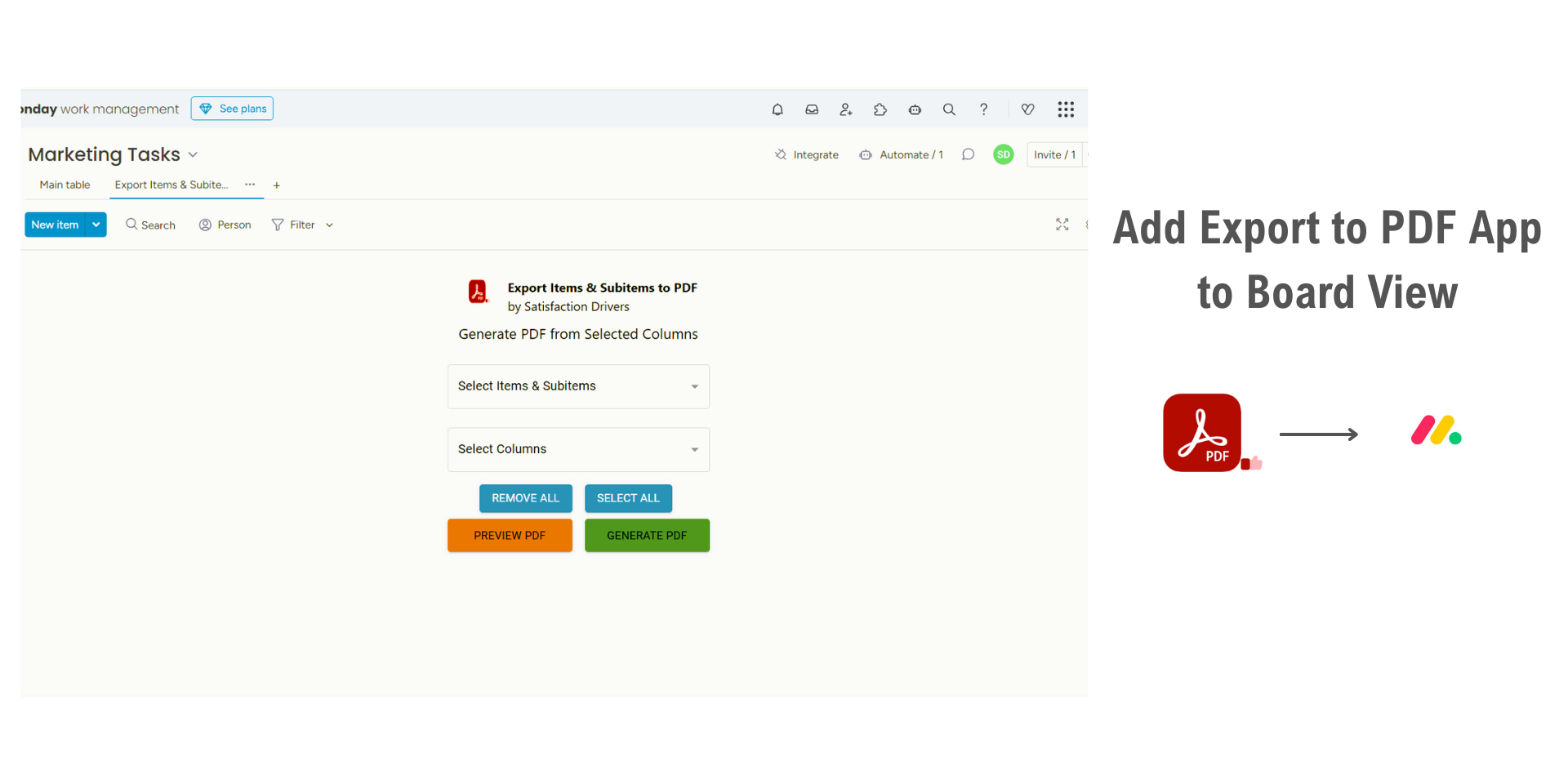
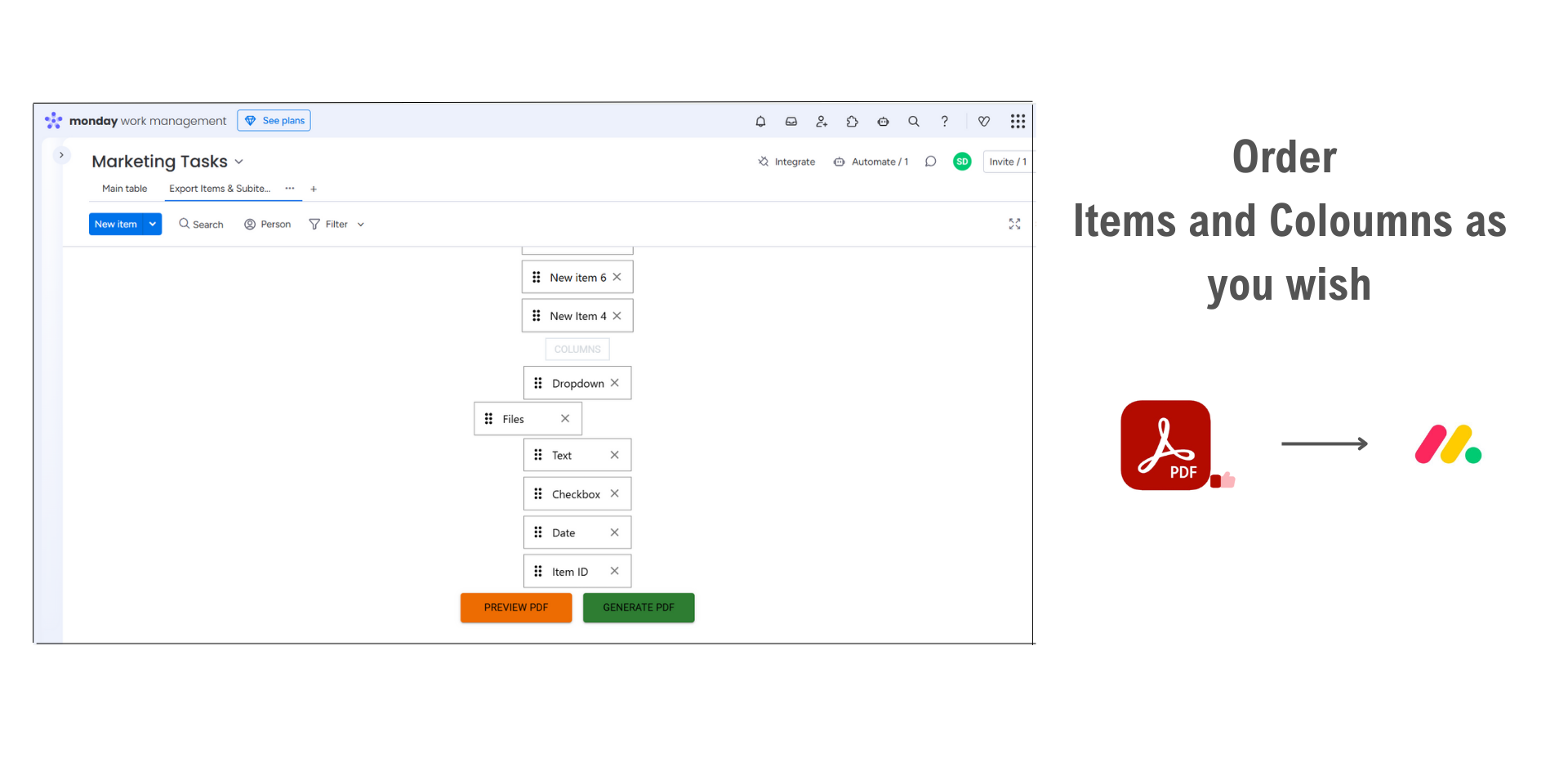
Don't settle for a rigid export. You have full command over your document's structure. Select the exact items and columns you need, then drag and drop them into your preferred order. This customizability ensures your final PDF is perfectly tailored for its audience.
🔄 Consolidate Items & Subitems
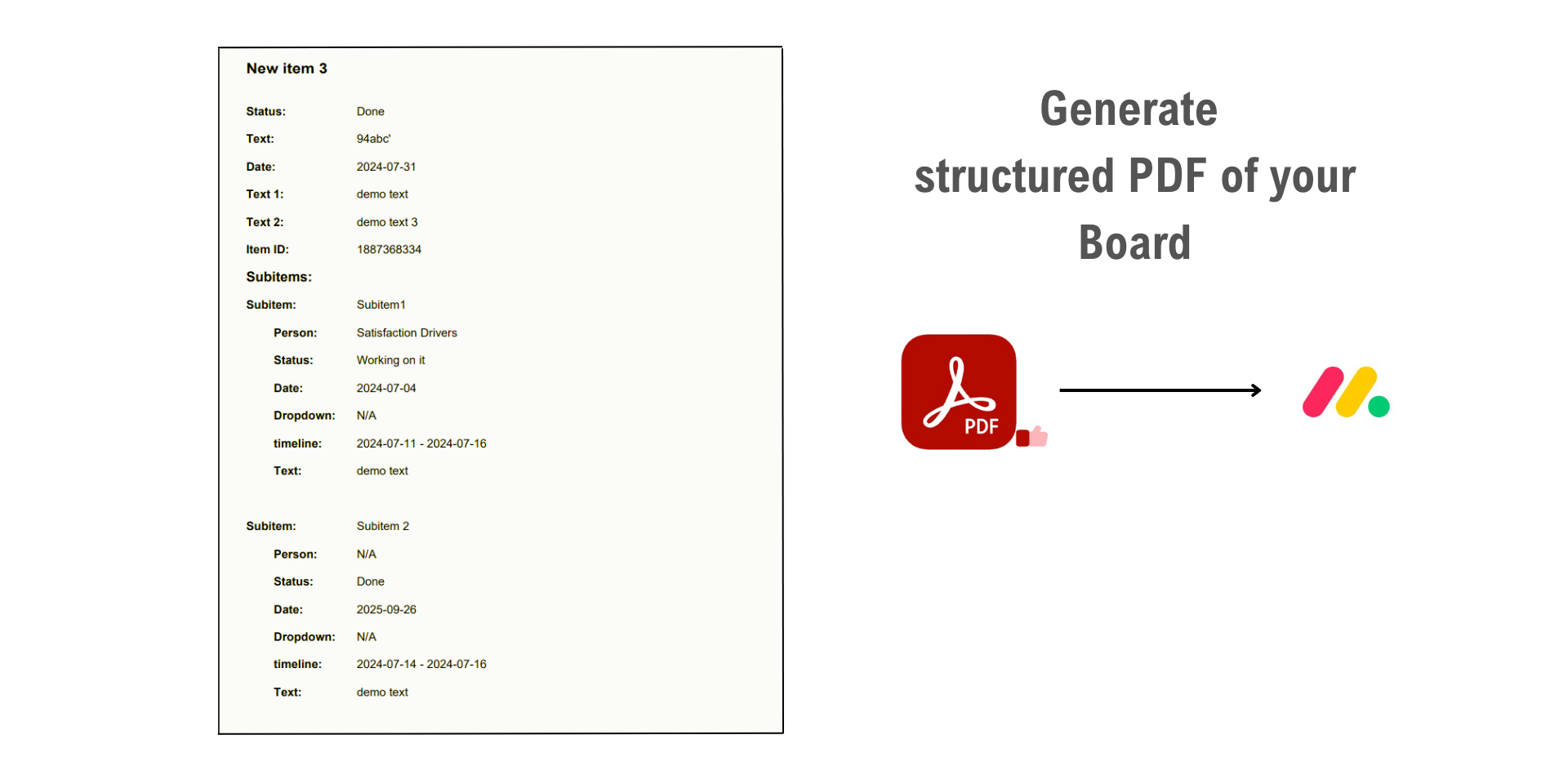
Go beyond surface-level data. Our app allows you to select parent items and automatically pull in all of their associated subitems. This is perfect for creating detailed task lists, progress reports, and comprehensive project summaries without missing any details.
🔍 Preview Before You Publish
Generate with confidence. Before you download, our integrated modal viewer lets you preview the complete PDF. You can scroll through every page, ensuring the layout is perfect and all your files are included, guaranteeing a flawless document every time.
🚀 Transformative Use Cases:
Comprehensive Project Archives: Combine board data and all attached project files (like specs, mockups, and receipts) into a single, official PDF record.
Rich Client Reporting: Send clients one professional document that includes progress data from your board alongside the actual deliverable files.
Detailed Task Handovers: Export an item and all its subtasks, including any instruction documents or images attached, for a new team member.
Financial Snapshots: Select specific items and columns to create summaries for invoicing, automatically including any attached PDF receipts from a Files column.
Meeting Agendas & Summaries: Generate a pre-read document from a board moments before a meeting and download it for distribution.
🔒 Full GDPR and CCPA Compliance
Your data is fully protected. Neither we nor any third parties have access to your monday.com board information through this app.
💬 We’re Here for You!
Got a question or need assistance? Reach out through our support form . We promise to resolve any issues within 6 hours.
Security & Compliance
Security
Does the developer periodically perform penetration testing?
Not answered
Does the developer have a dedicated security and privacy point of contact for such issues or questions?
Yes
Yes. We have a dedicated security and privacy point of contact for inquiries and incident-related communications. Security & Privacy Contact: Serena Hagen (Data Protection Officer) serena@<satisfactiondrivers.com>. Please remove "<" & ">" before sending email.
Does the app restrict redirects and forwards only to approved destinations, or show a warning when redirecting to potentially untrusted content?
Yes
Yes, redirect behavior is restricted. The app does not implement user-controlled redirects or forwarding to arbitrary external destinations. Any external navigation is limited to approved monday.com resources and Satisfaction Drivers support resources and is presented as explicit user actions rather than automatic redirects. The PDF generation and preview functionality operate entirely within the monday.com embedded experience. We do not introduce external redirect paths beyond what is required for standard monday.com integration workflows.
Does the app protect against mass parameter assignment attacks?
Yes
Yes. We protect against mass parameter assignment by accepting only explicitly allowlisted parameters and rejecting unexpected or unsupported fields. Server-side validation is enforced for all requests. Because the app operates as an embedded monday.com integration, additional controls are also enforced by the hosting platform. Export configuration, selected columns, item mappings, and PDF generation parameters are validated before processing.
Does the app perform encoding and sanitization on all user supplied parameters to protect against Cross-Site Scripting?
Yes
Yes. The app treats all user-supplied input as untrusted and applies validation, sanitization, and context-aware output encoding to protect against Cross-Site Scripting (XSS). We do not render raw user input as executable HTML or JavaScript. Any board content, item names, subitems, comments, or attached file metadata included in generated PDFs is sanitized prior to rendering and export. Because the app operates within monday.com, additional browser isolation protections are also provided by the embedding environment.
Does the developer protect all state-changing actions against Cross-Site Request Forgery (CSRF)?
Yes
Yes. All state-changing actions are protected against CSRF using standard protections appropriate to the request flow, including anti-CSRF tokens, SameSite cookie protections where applicable, authentication validation, and request integrity checks such as Origin and Referer verification. As the app operates entirely within monday.com, certain authentication and session protections are additionally enforced by monday.com infrastructure.
Does the developer have mechanisms to notify monday.com in case of a security breach?
Yes
Yes. We maintain an incident response and escalation process that includes notification procedures for security events impacting the app, customer data, or the monday.com platform. If a relevant security incident occurs, we will promptly notify monday.com through the appropriate channels and provide available details regarding scope, impact, containment, mitigation, and remediation progress. Internal logging and investigation procedures are maintained to support timely response and resolution.
Does this developer have a process for installing application-level updates and security patches for the service (such as software packages and databases)?
Yes
Yes. We maintain a documented process for managing application updates and security patches across dependencies, infrastructure, and supporting services. Security advisories are monitored continuously, patches are prioritized based on severity and exposure, and updates are deployed through controlled testing and release procedures. Critical security updates are expedited, and deployment workflows include validation and rollback mechanisms where appropriate.
Compliance
Is the app certified with the information security standard ISO/IEC 27001:2022?
Not answered
Is the app compliant with the Health Insurance Portability and Accountability Act (HIPAA)?
Not answered
Is the app certified with System and Organization Controls (SOC 2 or SOC 3)?
Not answered
Is the app compliant with the General Data Protection Regulation (GDPR)?
Yes
Yes. We operate the app in a GDPR-aligned manner and apply privacy-by-design principles. The app is designed to minimize data processing and only processes customer board information necessary to generate requested PDF exports and support export-related functionality within monday.com. We implement appropriate access controls, data minimization practices, and incident response procedures consistent with GDPR expectations. Customer data is processed solely for document generation purposes and is not used for unrelated processing activities. We also maintain a dedicated privacy contact, Serena Hagen (Data Protection Officer, Serena@<satisfactiondrivers.com>), for GDPR and privacy-related inquiries.
Data
Does the app send any data outside of monday.com? If yes, indicate whether the data is customer-submitted (e.g., board names, item names, doc content) or non-customer-submitted (e.g., account ID, board ID, user ID).
Yes
Yes The app processes limited customer-submitted data necessary to generate PDF exports from monday.com boards. This may include item names, subitems, selected columns, status values, dates, attached files, uploaded documents, comments, and related board content selected by the user for export. The app may also process limited non-customer-submitted identifiers required for operational functionality, such as board IDs, item IDs, account IDs, and export configuration metadata. We do not use customer data for analytics, profiling, or third-party sharing, and exported data is processed solely to generate the requested PDF documents.
Where does the app store logs data?
monday
We are using logging services provided by monday.com.
Where does the app store the app data?
monday
We are using storage services provided by monday.com. Any temporary export configuration settings, PDF generation metadata, or operational data required for the export workflow is stored within monday.com infrastructure.
Does the developer ensure application logs do not contain secrets or personally-identifiable information (PII)?
Yes
Yes. We intentionally minimize logging and avoid storing sensitive information, including credentials, access tokens, exported document contents, attached file contents, or personally identifiable information (PII), within application logs wherever possible. Logs are restricted to operational and technical events required for monitoring, export reliability, troubleshooting, and audit purposes. We also do not use third-party session replay or screen capture tools that record user screens, keystrokes, or exported board content.
Is customer data segregated from the data of other customers (for example logically or physically)?
Yes
Yes. Customer data is logically segregated through monday.com account boundaries and application-level access controls to prevent unauthorized cross-customer access. Exported board content and generated PDFs are processed only within the context of the authenticated customer workspace, reducing the risk of cross-customer data exposure.
Privacy
Does the developer enforce multi-factor authentication on employees access to systems which may process customer data?
Yes
Yes. We require multi-factor authentication (MFA) for employee access to systems that may process customer data, including cloud infrastructure, administrative tooling, and source control systems. Access is additionally governed through least-privilege principles. For monday.com customer environments, authentication and account-level MFA settings are administered by the customer within monday.com.
Does the developer protect access to customer data based on the principle of least privilege?
Yes
Yes. We enforce least-privilege access controls for employee and system access to operational and support environments. Access is limited to authorized personnel and granted only when necessary for support, maintenance, or security purposes. The app only accesses board data, item data, subitems, and attached files necessary to generate requested PDF exports. Additionally, we do not use session replay or screen-recording tools that capture customer board content or user activity.
Reviews
No reviews yet.
Historical data
Installation history
We have data for December 28, 2024 onwards only. Collected sometime after 00:00 UTC daily.
Total number of installs
Change in total number of installs in last 1 day(s)
Compares the number of installs on each date with 1 days previously:
Max
Min
Current
Change in total number of installs in last 7 day(s)
Compares the number of installs on each date with 7 days previously:
Max
Min
Current
Change in total number of installs in last 30 day(s)
Compares the number of installs on each date with 30 days previously:
Max
Min
Current
Change in total number of installs in last 90 day(s)
Compares the number of installs on each date with 90 days previously:
Max
Min
Current
Change in total number of installs in last 180 day(s)
Compares the number of installs on each date with 180 days previously:
Max
Min
Current
Ratings history
Categories history
Each of the following is a yes/no answer, so the graphs show 1 for yes, and 0 for no.