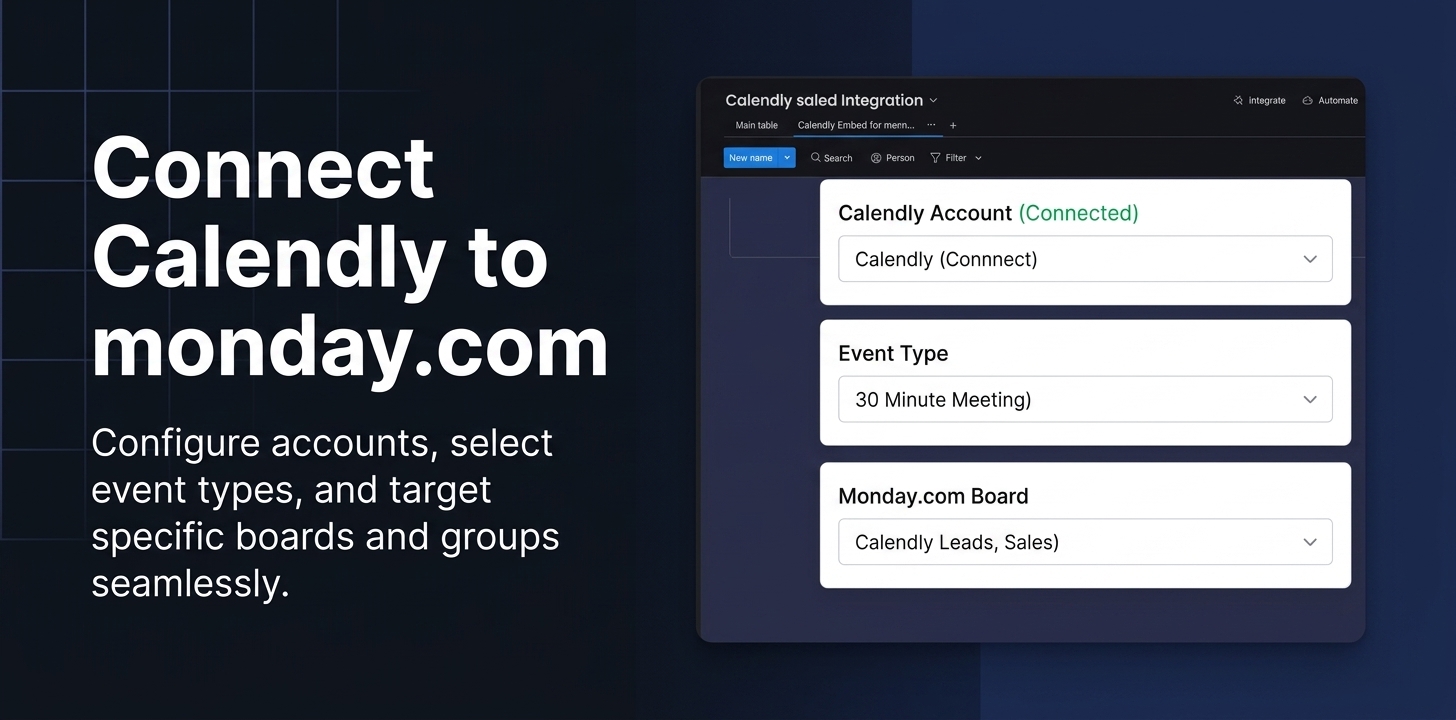
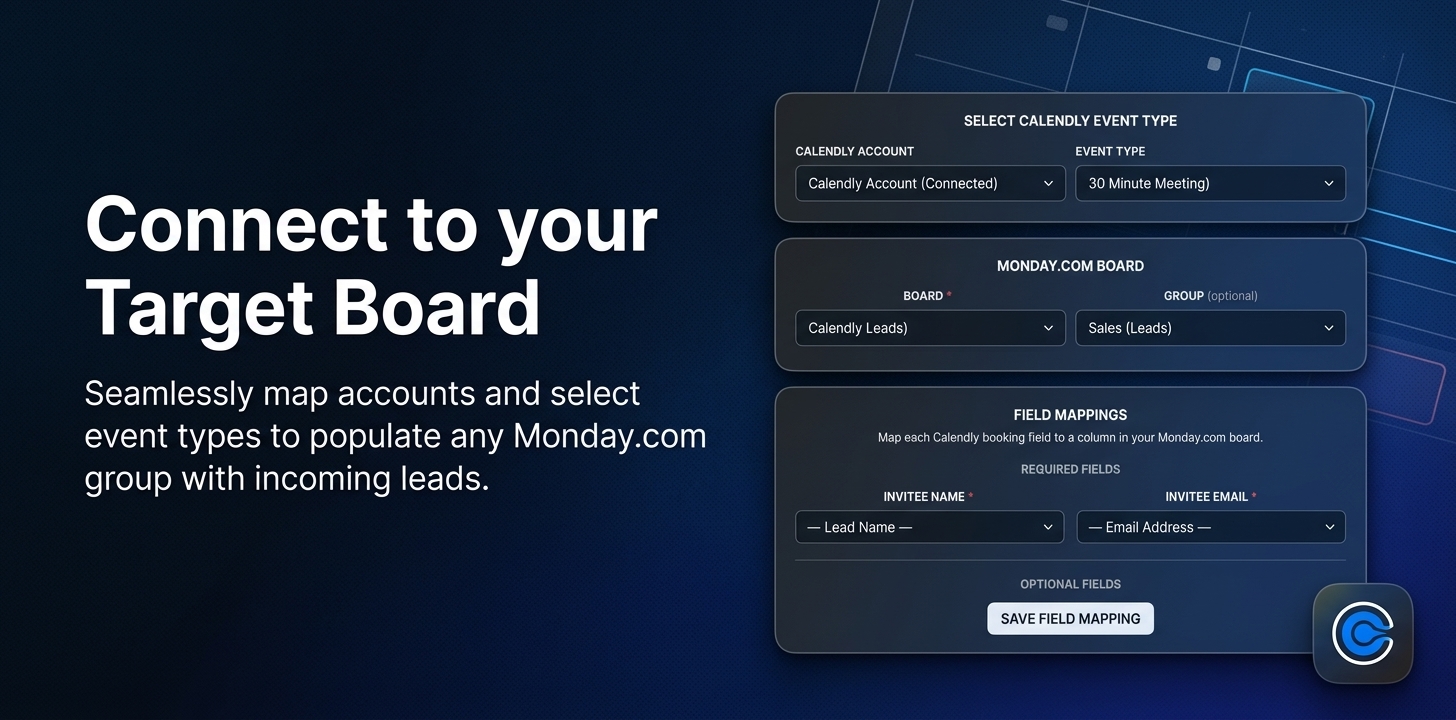
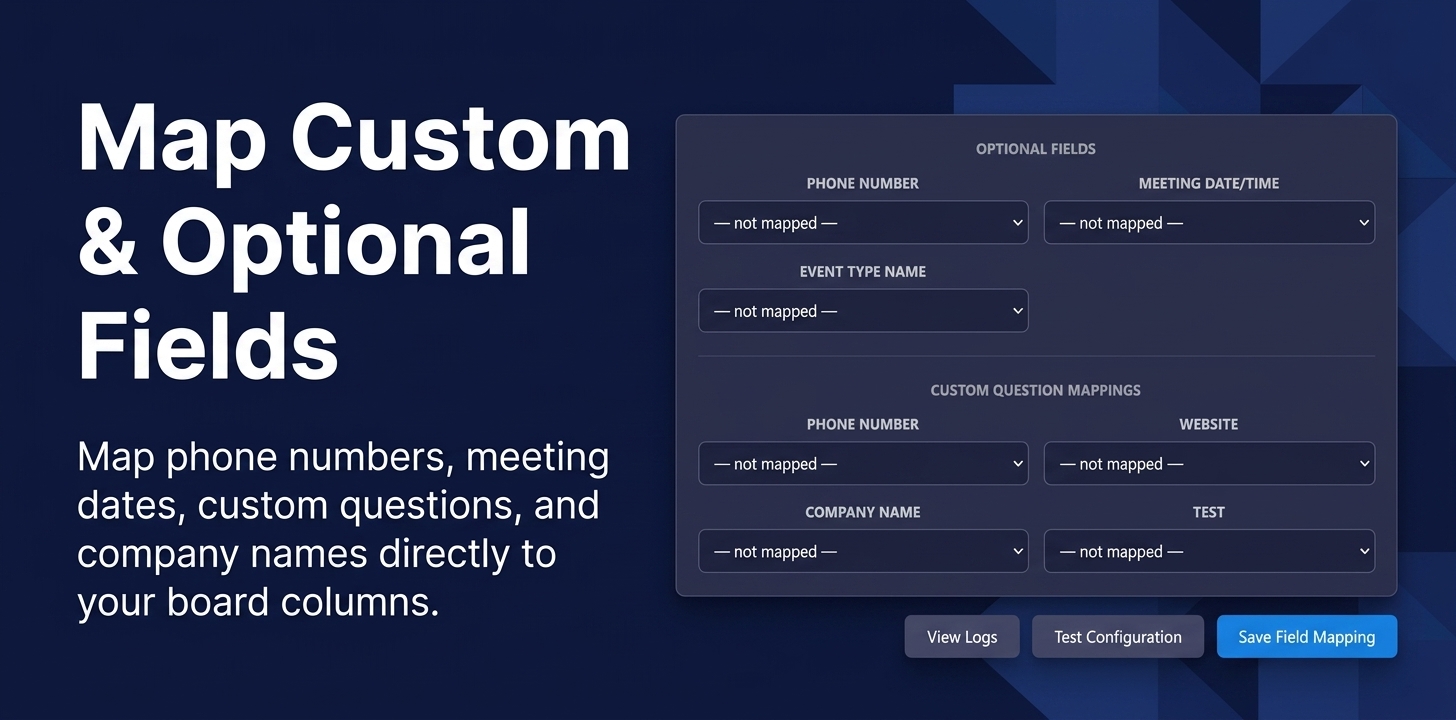
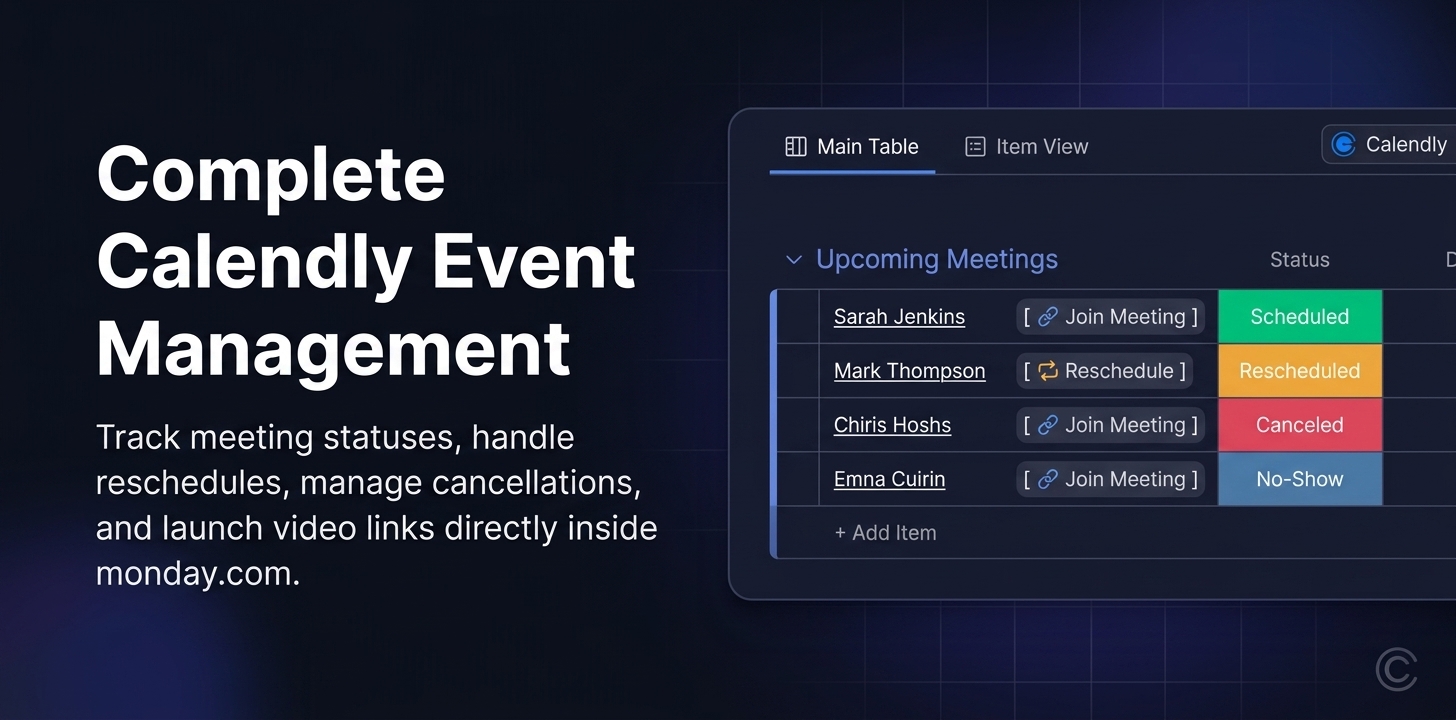
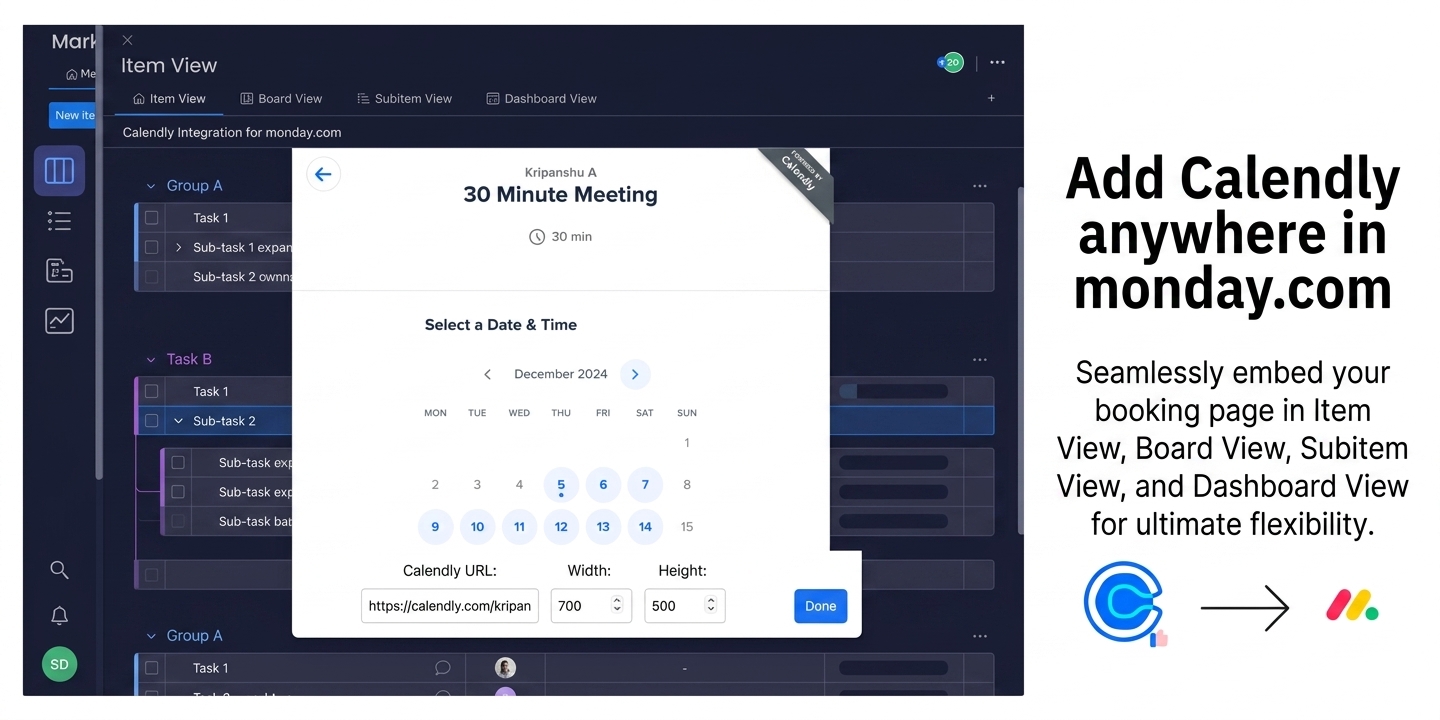
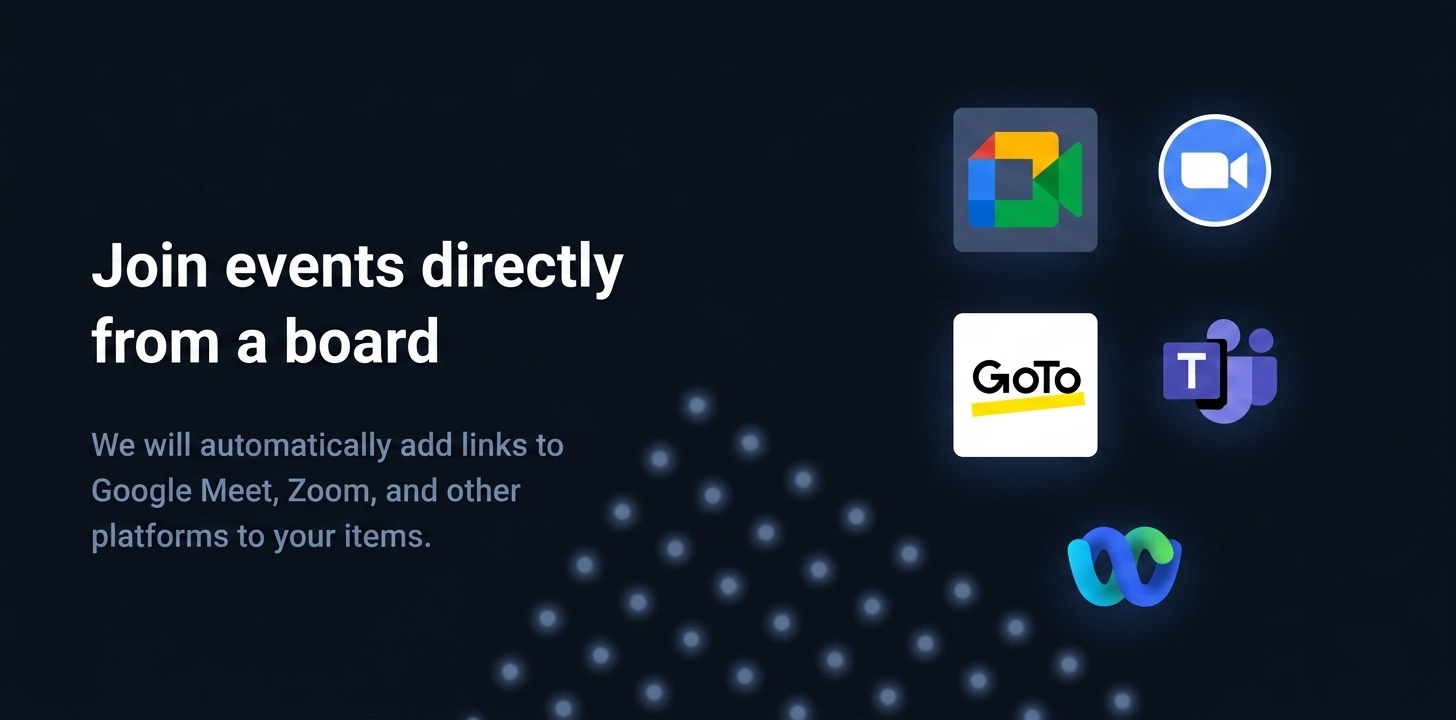
Connect Calendly with monday.com to manage calendar scheduling, appointments, meeting bookings, and lead capture in one central workspace. Embed Calendly directly inside your monday.com boards and automatically sync every new booking into your automated team workflows—eliminating manual data entry and preventing missed appointments.
Why You'll Love This App:
🔄 Calendly Integration & Calendar Sync: Connect your Calendly account directly to monday.com for real-time background booking synchronization.
🎨 Embedded Calendar Views: Embed Calendly directly into your monday.com Board, Item, Subitem, and Dashboard views—no platform switching required.
📅 Automatic Calendar Booking Sync: Automatically convert new Calendly meeting bookings into structured board items with real-time lead capture.
⚙️ Calendar-to-CRM Workflow: Automatically log inbound leads, client meetings, consultations, and recruiting candidate bookings straight into your calendar, sales pipeline and CRM boards.
🚀 Use Cases:
Sales Pipeline: Capture inbound leads from Calendly bookings automatically.
Client & Meeting Calendar Scheduling: Automatically organize client appointments, consultation bookings, meeting dates, and follow-up outcomes on your monday calendar boards.
Recruiting & HR Interview Scheduling: Track candidate interview bookings, meeting dates, and applicant contact details with seamless calendar scheduling sync.
Workflow & Meeting Automation: Eliminate manual copy-pasting between Calendly calendar scheduling tools and monday.com to streamline all team booking workflows.
🔒 Full GDPR and CCPA Compliance — Your data is fully protected. Neither we nor any third parties have access to your information through this app.
💬 We’re Here for You!
Got a question or need assistance? Reach out through our support form. We promise to resolve any issues within 6 hours.
Need a quick demo or have questions, book a call with Serena here
Security & Compliance
Security
Does the developer periodically perform penetration testing?
Not answered
Does the developer have a dedicated security and privacy point of contact for such issues or questions?
Yes
Yes. We have a dedicated security and privacy point of contact for inquiries and incident-related communications. Security & Privacy Contact: Serena Hagen (Data Protection Officer) serena@<satisfactiondrivers.com>. Please remove "<" & ">" before sending email.
Does the app restrict redirects and forwards only to approved destinations, or show a warning when redirecting to potentially untrusted content?
Yes
Yes, redirect behavior is restricted. The app does not implement user-controlled redirects or forwarding to arbitrary external destinations. Any external navigation is limited to approved Calendly and Satisfaction Drivers resources and is presented as explicit user actions rather than automatic redirects. For the Calendly integration specifically, authentication and scheduling flows are handled through Calendly authentication systems and are outside our direct control. We do not introduce additional redirect paths beyond what is required for the embedded Calendly experience.
Does the app protect against mass parameter assignment attacks?
Yes
Yes. We protect against mass parameter assignment by accepting only explicitly allowlisted parameters and rejecting unexpected or unsupported fields. Server-side validation is enforced for all requests. Because the app operates as an embedded monday.com integration, additional controls are also enforced by the hosting platform. For Calendly-related actions, scheduling permissions and authorization enforcement are primarily handled through Calendly access controls.
Does the app perform encoding and sanitization on all user supplied parameters to protect against Cross-Site Scripting?
Yes
Yes. The app treats all user-supplied input as untrusted and applies validation, sanitization, and context-aware output encoding to protect against Cross-Site Scripting (XSS). We do not render raw user input as executable HTML or JavaScript. Because the app embeds Calendly content and synchronizes booking data, some rendering and browser isolation protections are additionally managed by Calendly and the embedding environment.
Does the developer protect all state-changing actions against Cross-Site Request Forgery (CSRF)?
Yes
Yes. All state-changing actions are protected against CSRF using standard protections appropriate to the request flow, including anti-CSRF tokens, SameSite cookie protections where applicable, authentication validation, and request integrity checks such as Origin and Referer verification. As the app operates within monday.com and integrates with Calendly, certain authentication and session protections are additionally enforced by monday.com and Calendly authentication systems.
Does the developer have mechanisms to notify monday.com in case of a security breach?
Yes
Yes. We maintain an incident response and escalation process that includes notification procedures for security events impacting the app, customer data, or the monday.com platform. If a relevant security incident occurs, we will promptly notify monday.com through the appropriate channels and provide available details regarding scope, impact, containment, mitigation, and remediation progress. Internal logging and investigation procedures are maintained to support timely response and resolution.
Does this developer have a process for installing application-level updates and security patches for the service (such as software packages and databases)?
Yes
Yes. We maintain a documented process for managing application updates and security patches across dependencies, infrastructure, and supporting services. Security advisories are monitored continuously, patches are prioritized based on severity and exposure, and updates are deployed through controlled testing and release procedures. Critical security updates are expedited, and deployment workflows include validation and rollback mechanisms where appropriate.
Compliance
Is the app certified with the information security standard ISO/IEC 27001:2022?
Not answered
Is the app compliant with the Health Insurance Portability and Accountability Act (HIPAA)?
Not answered
Is the app certified with System and Organization Controls (SOC 2 or SOC 3)?
Not answered
Is the app compliant with the General Data Protection Regulation (GDPR)?
Yes
Yes. We operate the app in a GDPR-aligned manner and apply privacy-by-design principles. The app is designed to minimize data processing and only processes customer booking information necessary to provide synchronization and lead management functionality within monday.com. Access to Calendly booking data remains governed by the customer’s Calendly authentication and sharing permissions. We implement appropriate access controls, data minimization practices, and incident response procedures consistent with GDPR expectations. We also maintain a dedicated privacy contact, Serena Hagen (Data Protection Officer, Serena@<satisfactiondrivers.com>), for GDPR and privacy-related inquiries.
Data
Does the app send any data outside of monday.com? If yes, indicate whether the data is customer-submitted (e.g., board names, item names, doc content) or non-customer-submitted (e.g., account ID, board ID, user ID).
Yes
Yes The app transmits limited data necessary to enable Calendly embedding and automatic synchronization of bookings into monday.com boards. This may include customer-submitted content such as attendee names, email addresses, phone numbers, meeting dates, event types, and scheduling metadata, along with limited non-customer-submitted identifiers required for integration functionality. Booking synchronization, authentication, scheduling operations, and event handling are managed through Calendly systems. We do not store or persist customer booking data on our own servers beyond what is required for the app’s operational functionality and synchronization workflows.
Where does the app store logs data?
monday
We are using logging services provided by monday.com.
Where does the app store the app data?
monday
We are using storage services provided by monday.com. Any minimal configuration, sync settings, column mappings, or operational metadata required for embedding and synchronization is stored within monday.com infrastructure.
Does the developer ensure application logs do not contain secrets or personally-identifiable information (PII)?
Yes
Yes. We intentionally minimize logging and avoid storing sensitive information, including credentials, access tokens, customer booking details, or personally identifiable information (PII), within application logs wherever possible. Logs are restricted to operational and technical events required for monitoring, synchronization reliability, troubleshooting, and audit purposes. We also do not use third-party session replay or screen capture tools that record user screens, keystrokes, or booking content.
Is customer data segregated from the data of other customers (for example logically or physically)?
Yes
Yes. Customer data is logically segregated through monday.com account boundaries, Calendly account permissions, and application-level access controls to prevent unauthorized cross-customer access. Additionally, we do not maintain persistent copies of customer booking content within our own infrastructure beyond operational synchronization requirements, reducing the risk of cross-customer data exposure outside the monday.com and Calendly environments.
Privacy
Does the developer enforce multi-factor authentication on employees access to systems which may process customer data?
Yes
Yes. We require multi-factor authentication (MFA) for employee access to systems that may process customer data, including cloud infrastructure, administrative tooling, and source control systems. Access is additionally governed through least-privilege principles. For Calendly scheduling environments and booking data, MFA enforcement depends on the customer’s Calendly authentication configuration and is administered by the customer’s Calendly account administrator.
Does the developer protect access to customer data based on the principle of least privilege?
Yes
Yes. We enforce least-privilege access controls for employee and system access to operational and support environments. Access is limited to authorized personnel and granted only when necessary for support, maintenance, or security purposes. We do not store or persist customer booking information beyond what is operationally required for synchronization functionality. Access to Calendly booking data remains protected through the customer’s Calendly authentication and sharing permissions. Additionally, we do not use session replay or screen-recording tools that capture booking details or user activity.
Reviews
No reviews yet.
Historical data
Installation history
We have data for December 28, 2024 onwards only. Collected sometime after 00:00 UTC daily.
Total number of installs
Change in total number of installs in last 1 day(s)
Compares the number of installs on each date with 1 days previously:
Max
Min
Current
Change in total number of installs in last 7 day(s)
Compares the number of installs on each date with 7 days previously:
Max
Min
Current
Change in total number of installs in last 30 day(s)
Compares the number of installs on each date with 30 days previously:
Max
Min
Current
Change in total number of installs in last 90 day(s)
Compares the number of installs on each date with 90 days previously:
Max
Min
Current
Change in total number of installs in last 180 day(s)
Compares the number of installs on each date with 180 days previously:
Max
Min
Current
Ratings history
Categories history
Each of the following is a yes/no answer, so the graphs show 1 for yes, and 0 for no.
{
"id": 10000807,
"marketplace_developer_id": 100000026,
"app_id": 10165487,
"app_type": "app",
"security_info": null,
"gallery_assets": [
{
"url": "https://cdn.monday.com/marketplace/10000807/10000807_2026_8_6_14_23_13_7g5zasp.jpeg",
"type": "image"
},
{
"url": "https://cdn.monday.com/marketplace/10000807/10000807_2026_8_6_14_23_27_c4uzgry.jpeg",
"type": "image"
},
{
"url": "https://cdn.monday.com/marketplace/10000807/10000807_2026_8_6_14_23_47_o8zwlz1.jpeg",
"type": "image"
},
{
"url": "https://cdn.monday.com/marketplace/10000807/10000807_2026_8_6_14_24_32_2v9gahoj.jpeg",
"type": "image"
},
{
"url": "https://cdn.monday.com/marketplace/10000807/10000807_2026_8_6_14_24_43_oh1krrxi.jpeg",
"type": "image"
},
{
"url": "https://cdn.monday.com/marketplace/10000807/10000807_2026_8_6_14_24_53_6w3y7atj.jpeg",
"type": "image"
}
],
"description": "<p><strong>Connect Calendly with monday.com to manage calendar scheduling, appointments, meeting bookings, and lead capture in one central workspace. </strong>Embed Calendly directly inside your monday.com boards and automatically sync every new booking into your automated team workflows—eliminating manual data entry and preventing missed appointments.</p><p><br></p><p><strong>Why You'll Love This App:</strong></p><p><strong>🔄 Calendly Integration & Calendar Sync:</strong> Connect your Calendly account directly to monday.com for real-time background booking synchronization.</p><p><br></p><p>🎨 <strong>Embedded Calendar Views:</strong> Embed Calendly directly into your monday.com Board, Item, Subitem, and Dashboard views—no platform switching required.</p><p><br></p><p>📅 <strong>Automatic Calendar Booking Sync:</strong> Automatically convert new Calendly meeting bookings into structured board items with real-time lead capture.</p><p><br></p><p>⚙️ <strong>Calendar-to-CRM Workflow:</strong> Automatically log inbound leads, client meetings, consultations, and recruiting candidate bookings straight into your calendar, sales pipeline and CRM boards.</p><p><br></p><p>🚀 <strong>Use Cases:</strong></p><ul><li><strong>Sales Pipeline:</strong> Capture inbound leads from Calendly bookings automatically.</li><li><strong>Client & Meeting Calendar Scheduling:</strong> Automatically organize client appointments, consultation bookings, meeting dates, and follow-up outcomes on your monday calendar boards.</li><li><strong>Recruiting & HR Interview Scheduling:</strong> Track candidate interview bookings, meeting dates, and applicant contact details with seamless calendar scheduling sync.</li><li><strong>Workflow & Meeting Automation:</strong> Eliminate manual copy-pasting between Calendly calendar scheduling tools and monday.com to streamline all team booking workflows.</li></ul><p><br></p><p>🔒 <strong>Full GDPR and CCPA Compliance</strong> — Your data is fully protected. Neither we nor any third parties have access to your information through this app.</p><p><br></p><p>💬 <strong>We’re Here for You!</strong></p><p><strong>Got a question or need assistance? Reach out through our </strong><a href=\"https://satisfactiondrivers.com/contact-us/\" rel=\"noopener noreferrer\" target=\"_blank\">support form</a>. We promise to resolve any issues within 6 hours.</p><p><br></p><p>Need a quick demo or have questions, book a call with Serena <a href=\"https://cal.com/serena-satisfaction-drivers/demo\" rel=\"noopener noreferrer\" target=\"_blank\">here</a></p>",
"short_description": "Calendly scheduling, calendar sync & booking integration",
"thumbnail_url": "https://cdn.monday.com/marketplace/10000807/10000807_2025_4_14_18_48_58_hvot95j.png",
"logo_url": "https://cdn.monday.com/marketplace/10000807/10000807_2025_4_14_18_47_52_7sou1w2.png",
"feedback_url": "hello@satisfactiondrivers.com",
"privacy_policy_url": "https://satisfactiondrivers.com/privacy",
"featured": null,
"name": "Calendly Calendar Scheduling",
"how_to_use_url": "https://satisfactiondrivers.com/calendly-documentation",
"external_pricing_url": null,
"keywords": "Calendly,Calendar,sync,scheduling,appointments,meetings,booking,calendar integration,outlook,google calendar",
"compliance_answers": [
{
"questionId": 19,
"shortAnswer": true,
"detailedAnswer": "Yes\n\nThe app transmits limited data necessary to enable Calendly embedding and automatic synchronization of bookings into monday.com boards. This may include customer-submitted content such as attendee names, email addresses, phone numbers, meeting dates, event types, and scheduling metadata, along with limited non-customer-submitted identifiers required for integration functionality.\n\nBooking synchronization, authentication, scheduling operations, and event handling are managed through Calendly systems. We do not store or persist customer booking data on our own servers beyond what is required for the app’s operational functionality and synchronization workflows."
},
{
"questionId": 18,
"detailedAnswer": "We are using logging services provided by monday.com.",
"logHostingProvider": "monday"
},
{
"questionId": 17,
"detailedAnswer": "We are using storage services provided by monday.com. Any minimal configuration, sync settings, column mappings, or operational metadata required for embedding and synchronization is stored within monday.com infrastructure.",
"dataHostingProvider": "monday"
},
{
"questionId": 14,
"shortAnswer": true,
"detailedAnswer": "Yes. We have a dedicated security and privacy point of contact for inquiries and incident-related communications.\n\nSecurity & Privacy Contact: Serena Hagen (Data Protection Officer) serena@<satisfactiondrivers.com>. Please remove \"<\" & \">\" before sending email."
},
{
"questionId": 11,
"shortAnswer": true,
"detailedAnswer": "Yes. We operate the app in a GDPR-aligned manner and apply privacy-by-design principles. The app is designed to minimize data processing and only processes customer booking information necessary to provide synchronization and lead management functionality within monday.com.\nAccess to Calendly booking data remains governed by the customer’s Calendly authentication and sharing permissions. We implement appropriate access controls, data minimization practices, and incident response procedures consistent with GDPR expectations.\nWe also maintain a dedicated privacy contact, Serena Hagen (Data Protection Officer, Serena@<satisfactiondrivers.com>), for GDPR and privacy-related inquiries."
},
{
"questionId": 10,
"shortAnswer": true,
"detailedAnswer": "Yes, redirect behavior is restricted. The app does not implement user-controlled redirects or forwarding to arbitrary external destinations. Any external navigation is limited to approved Calendly and Satisfaction Drivers resources and is presented as explicit user actions rather than automatic redirects.\n\nFor the Calendly integration specifically, authentication and scheduling flows are handled through Calendly authentication systems and are outside our direct control. We do not introduce additional redirect paths beyond what is required for the embedded Calendly experience."
},
{
"questionId": 9,
"shortAnswer": true,
"detailedAnswer": "Yes. We protect against mass parameter assignment by accepting only explicitly allowlisted parameters and rejecting unexpected or unsupported fields. Server-side validation is enforced for all requests.\n\nBecause the app operates as an embedded monday.com integration, additional controls are also enforced by the hosting platform. For Calendly-related actions, scheduling permissions and authorization enforcement are primarily handled through Calendly access controls."
},
{
"questionId": 8,
"shortAnswer": true,
"detailedAnswer": "Yes. We intentionally minimize logging and avoid storing sensitive information, including credentials, access tokens, customer booking details, or personally identifiable information (PII), within application logs wherever possible.\n\nLogs are restricted to operational and technical events required for monitoring, synchronization reliability, troubleshooting, and audit purposes. We also do not use third-party session replay or screen capture tools that record user screens, keystrokes, or booking content."
},
{
"questionId": 7,
"shortAnswer": true,
"detailedAnswer": "Yes. We require multi-factor authentication (MFA) for employee access to systems that may process customer data, including cloud infrastructure, administrative tooling, and source control systems. Access is additionally governed through least-privilege principles.\n\nFor Calendly scheduling environments and booking data, MFA enforcement depends on the customer’s Calendly authentication configuration and is administered by the customer’s Calendly account administrator."
},
{
"questionId": 6,
"shortAnswer": true,
"detailedAnswer": "Yes. We enforce least-privilege access controls for employee and system access to operational and support environments. Access is limited to authorized personnel and granted only when necessary for support, maintenance, or security purposes.\n\nWe do not store or persist customer booking information beyond what is operationally required for synchronization functionality. Access to Calendly booking data remains protected through the customer’s Calendly authentication and sharing permissions. Additionally, we do not use session replay or screen-recording tools that capture booking details or user activity."
},
{
"questionId": 5,
"shortAnswer": true,
"detailedAnswer": "Yes. The app treats all user-supplied input as untrusted and applies validation, sanitization, and context-aware output encoding to protect against Cross-Site Scripting (XSS). We do not render raw user input as executable HTML or JavaScript.\n\nBecause the app embeds Calendly content and synchronizes booking data, some rendering and browser isolation protections are additionally managed by Calendly and the embedding environment."
},
{
"questionId": 4,
"shortAnswer": true,
"detailedAnswer": "Yes. All state-changing actions are protected against CSRF using standard protections appropriate to the request flow, including anti-CSRF tokens, SameSite cookie protections where applicable, authentication validation, and request integrity checks such as Origin and Referer verification.\n\nAs the app operates within monday.com and integrates with Calendly, certain authentication and session protections are additionally enforced by monday.com and Calendly authentication systems."
},
{
"questionId": 3,
"shortAnswer": true,
"detailedAnswer": "Yes. We maintain an incident response and escalation process that includes notification procedures for security events impacting the app, customer data, or the monday.com platform.\n\nIf a relevant security incident occurs, we will promptly notify monday.com through the appropriate channels and provide available details regarding scope, impact, containment, mitigation, and remediation progress. Internal logging and investigation procedures are maintained to support timely response and resolution."
},
{
"questionId": 2,
"shortAnswer": true,
"detailedAnswer": "Yes. We maintain a documented process for managing application updates and security patches across dependencies, infrastructure, and supporting services. Security advisories are monitored continuously, patches are prioritized based on severity and exposure, and updates are deployed through controlled testing and release procedures.\nCritical security updates are expedited, and deployment workflows include validation and rollback mechanisms where appropriate."
},
{
"questionId": 1,
"shortAnswer": true,
"detailedAnswer": "Yes. Customer data is logically segregated through monday.com account boundaries, Calendly account permissions, and application-level access controls to prevent unauthorized cross-customer access.\n\nAdditionally, we do not maintain persistent copies of customer booking content within our own infrastructure beyond operational synchronization requirements, reducing the risk of cross-customer data exposure outside the monday.com and Calendly environments."
}
],
"created_at": "2025-05-14T18:40:01.000Z",
"updated_at": "2026-10-18T07:33:07.000Z",
"automation_app_id": null,
"marketplace_category_ids": [
7,
6,
4
],
"pinned_for_categories_ids": [],
"featured_for_categories_ids": [],
"pricing_data": "14 days trial",
"label": null,
"app_values": [
"Popular with CRM users"
],
"security": false,
"display_in_template_store": null,
"acquisition_source": "No touch",
"is_connector": null,
"show_connections": null,
"terms_of_service_url": "https://satisfactiondrivers.com/terms-and-conditions",
"available_for_tiers": null,
"available_for_products": null,
"google_analytics_tag_id": null,
"is_solution": null,
"cta_override": null,
"app_scope_str": "boards:read,me:read,boards:write,account:read,workspaces:write",
"app_client_id": "8f4df81060a5c5941f59a7ad7204e36d",
"app_color": {
"hsl": {
"h": 0,
"s": 0,
"l": 1,
"a": 1
},
"hex": "#ffffff",
"rgb": {
"r": 255,
"g": 255,
"b": 255,
"a": 1
},
"hsv": {
"h": 0,
"s": 0,
"v": 1,
"a": 1
},
"oldHue": 0,
"source": "hsv"
},
"plans": [
{
"id": "10165487-1-CD_Plan",
"appPlanId": "CD_Plan",
"name": "Unlimited",
"versionId": 1,
"isTrial": true,
"prices": {
"type": "standard",
"monthly": 6,
"yearly": 4
},
"versionState": "live",
"appId": 10165487,
"description": "Get unlimited access with our app",
"extraData": {
"bullets": [],
"monthlyFee": 6,
"yearlyFee": 4
},
"isFree": false,
"isRecommended": false,
"currency": "USD"
},
{
"id": "10165487-2-1",
"appPlanId": "1",
"name": "Pro",
"versionId": 2,
"isTrial": true,
"prices": {
"type": "standard",
"monthly": 6,
"yearly": 4
},
"versionState": "live",
"appId": 10165487,
"description": "Seamlessly manage your Calendly events within monday.com",
"extraData": {
"bullets": [
"Unlimited seats",
"Priority support",
"Possibility to accommodate enhancement requests for free of charge"
],
"monthlyFee": 6,
"yearlyFee": 4
},
"isFree": false,
"isRecommended": false,
"currency": "USD"
},
{
"id": "10165487-3-1",
"appPlanId": "1",
"name": "Pro",
"versionId": 3,
"isTrial": true,
"prices": {
"type": "standard",
"monthly": 9,
"yearly": 8
},
"versionState": "live",
"appId": 10165487,
"description": "Seamlessly manage your Calendly events within monday.com",
"extraData": {
"bullets": [
"Unlimited seats",
"Priority support",
"Possibility to accommodate enhancement requests for free of charge"
],
"monthlyFee": 9,
"yearlyFee": 8
},
"isFree": false,
"isRecommended": false,
"currency": "USD"
},
{
"id": "10165487-4-1",
"appPlanId": "1",
"name": "Pro",
"versionId": 4,
"isTrial": true,
"prices": {
"type": "standard",
"monthly": 10,
"yearly": 8
},
"versionState": "live",
"appId": 10165487,
"description": "Seamlessly manage your Calendly events within monday.com",
"extraData": {
"bullets": [
"Unlimited seats",
"Priority support",
"Possibility to accommodate enhancement requests for free of charge"
],
"monthlyFee": 10,
"yearlyFee": 8
},
"isFree": false,
"isRecommended": false,
"currency": "USD"
}
],
"app_live_version": {
"updated_at": "2026-10-26T17:22:32.460Z",
"id": 19307787
},
"pricing_model": null,
"monetization": {
"monetizationType": "monday",
"hasFreePlan": false,
"hasPaidPlan": true,
"hasTrialPlan": true
},
"badges_data": {
"security": false,
"app_values": [
"Popular with CRM users"
],
"pricing_data": "14 days trial",
"acquisition_source": "No touch"
},
"data": {
"terms_of_service_url": "https://satisfactiondrivers.com/terms-and-conditions"
},
"display": null,
"installsDelta": {
"totalInstalls": 153,
"sevenDays": 1,
"thirtyDays": 6,
"ninetyDays": 14
}
}