Turn Word files into monday docs, one or many at a time
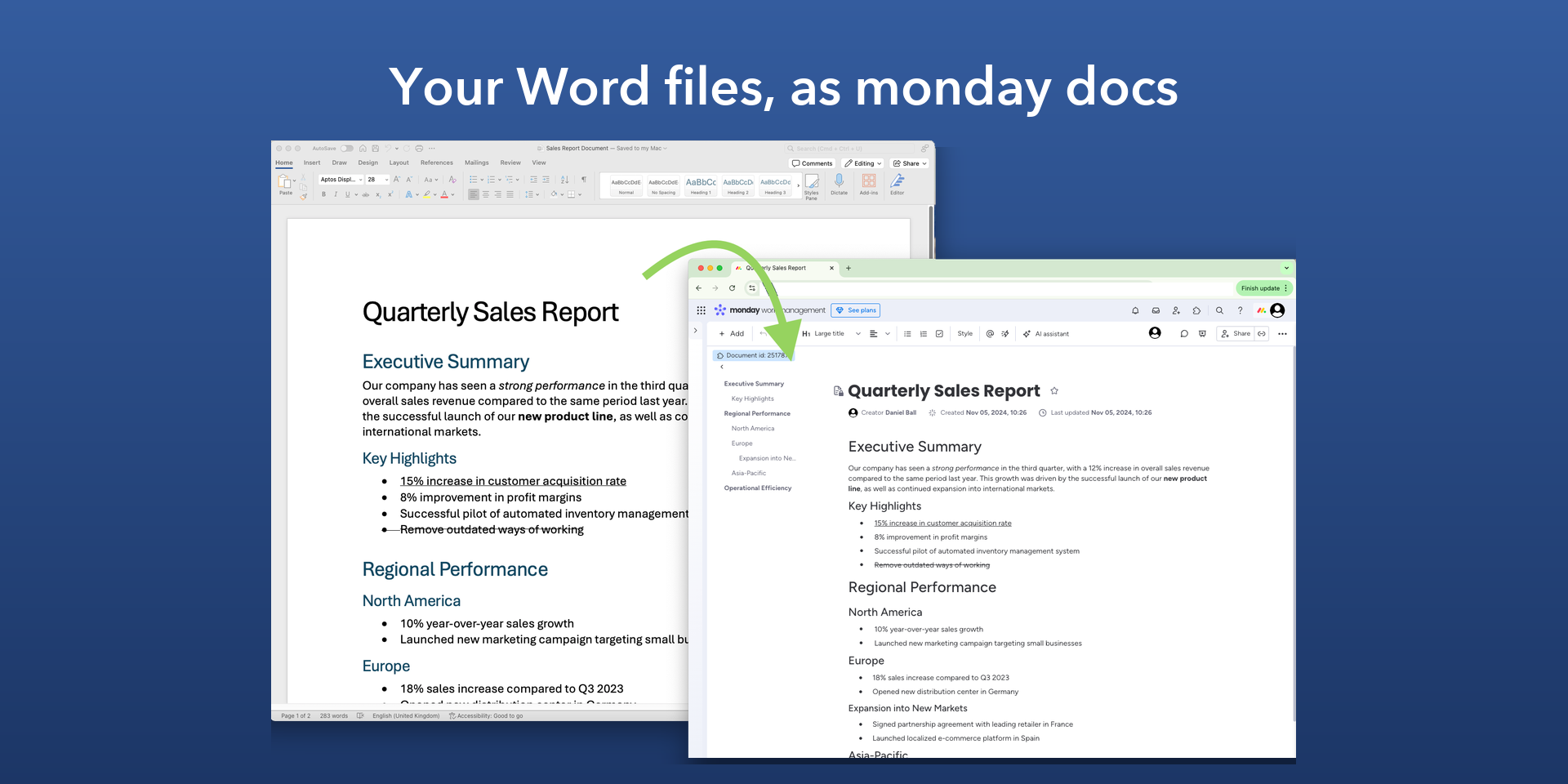
Turn your Word files into monday docs, with their headings, lists, tables, links and formatting.
Import into a new doc. Open Word Import under Workspace apps, choose a Word file, and get a new doc named after it.
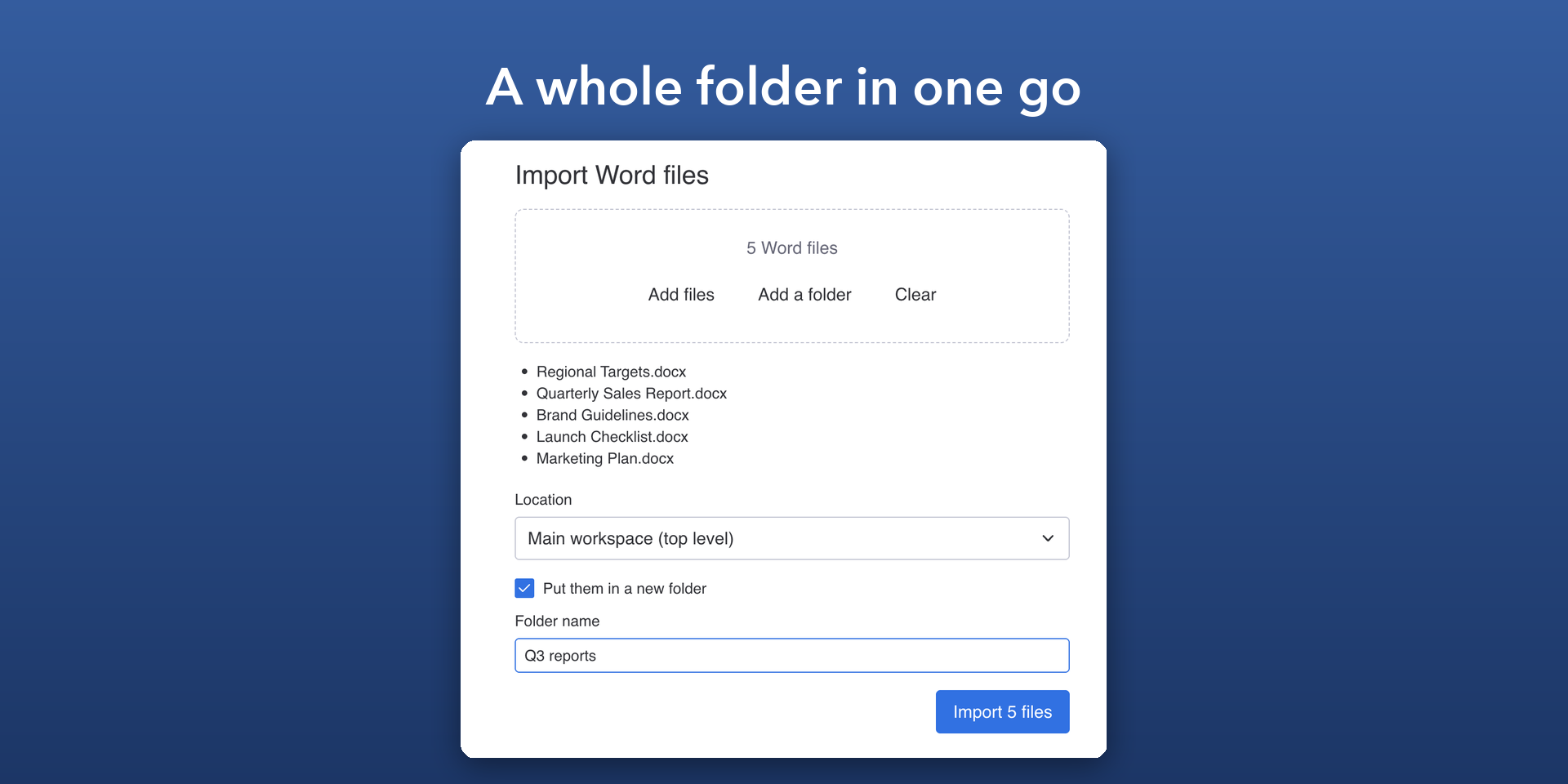
Import many files at once. Choose several Word files or a whole folder, and each becomes a doc, together in a new folder.
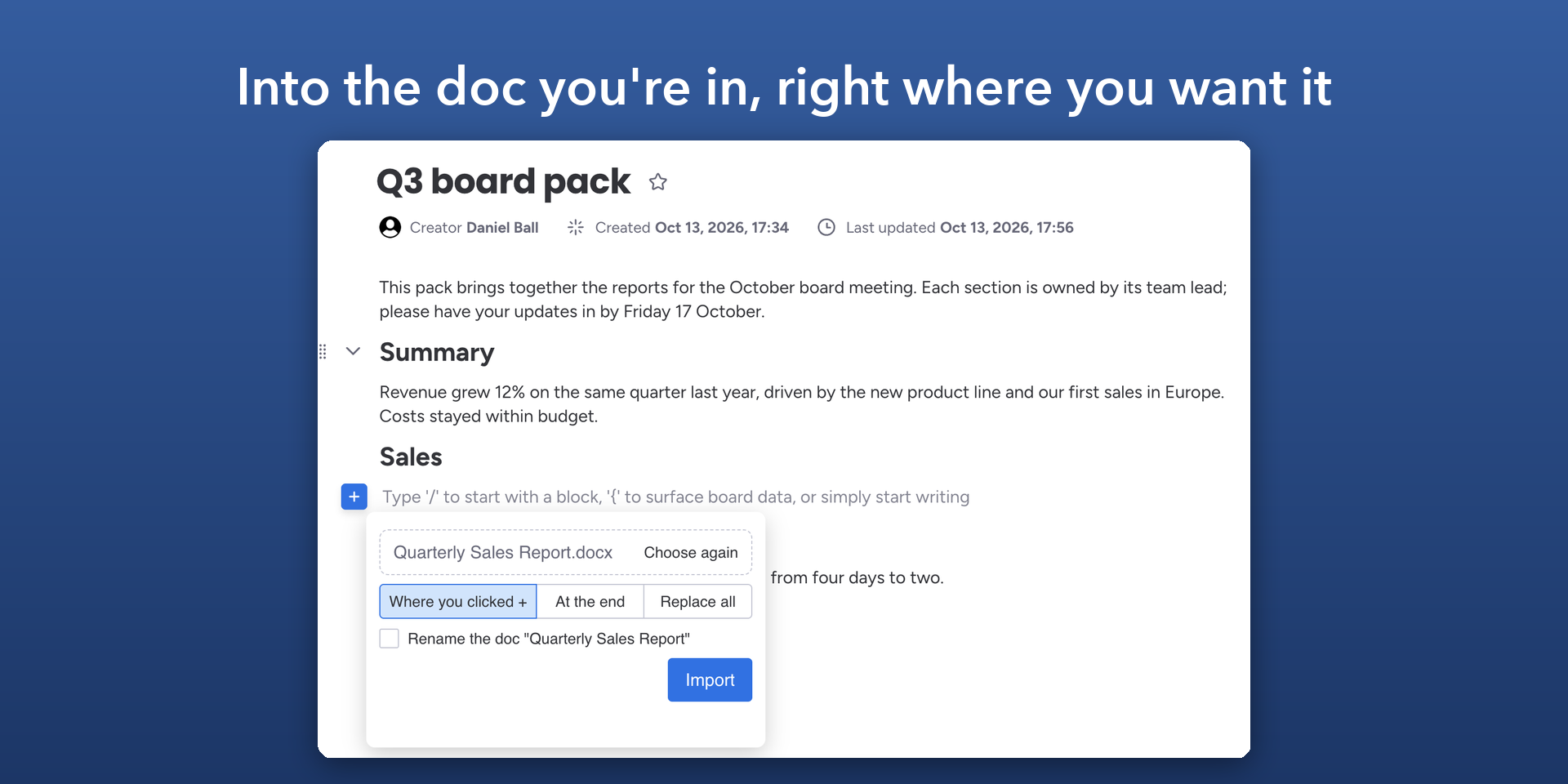
Import into the doc you're in. In any doc, click + and choose Word Import. Put the file where you clicked, at the end or in place of what's there.
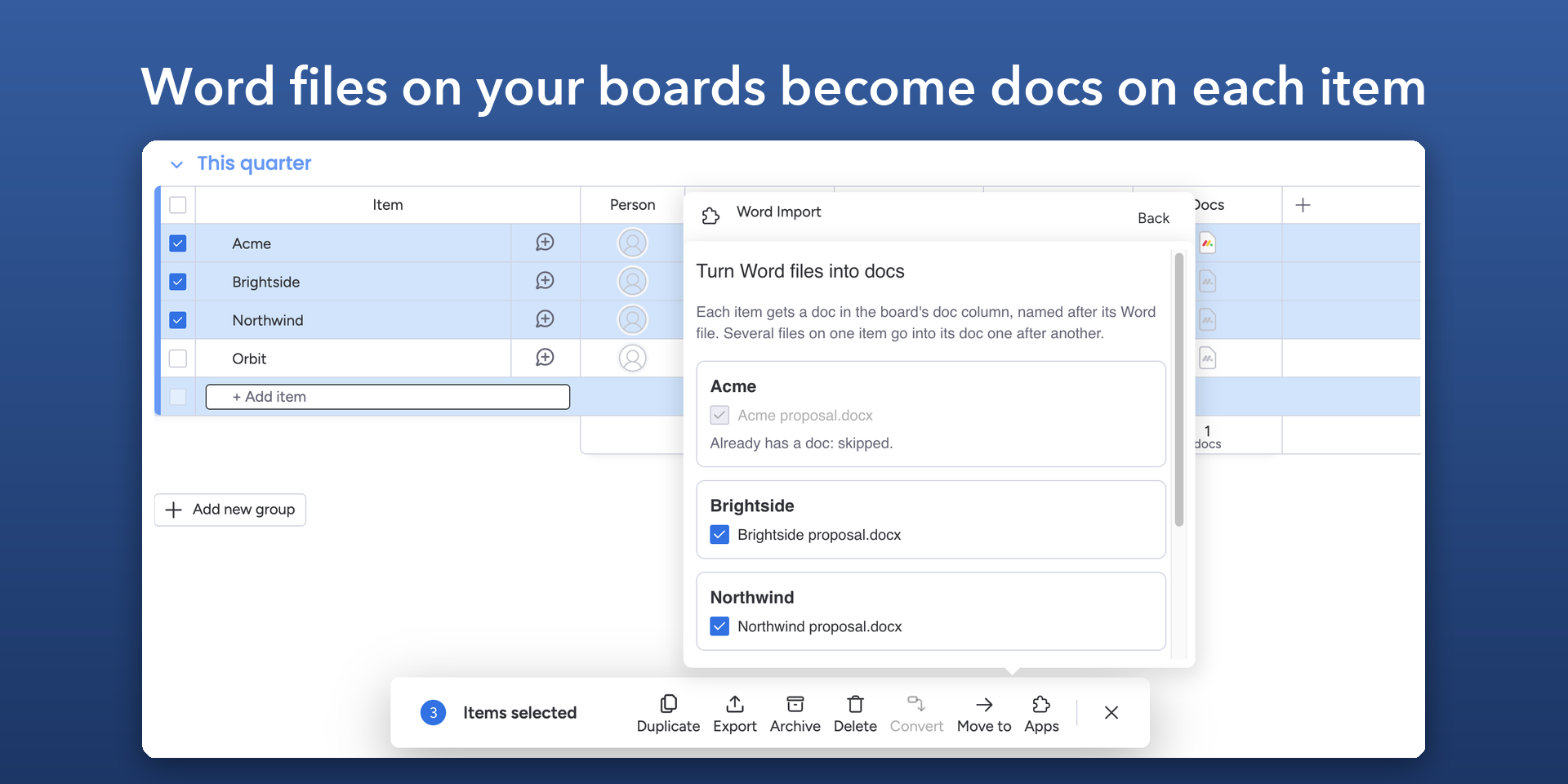
Import from your boards. Word files in a board's Files column become a doc on each item, in the board's Doc column. Pick items, a whole group or one item from its menu.
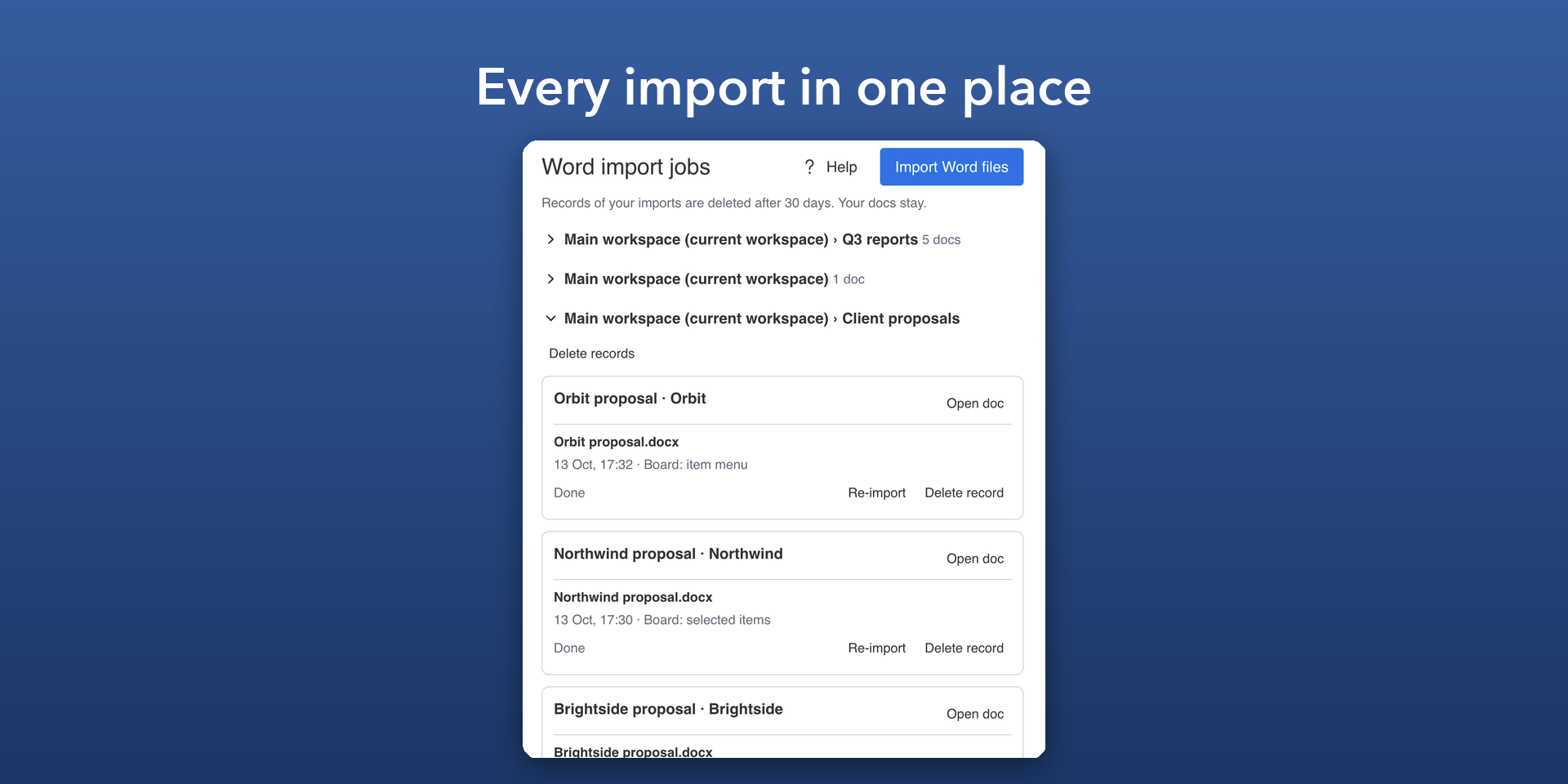
monday sends you a notification when your import is done. The Word import jobs page lists every import, so you can open the doc, import a newer version of the file or tidy up.
What's imported
Headings, titles, quotes and code
Bold, italic, underline, strikethrough, text colours and highlights
Bulleted, numbered and checklists, with their indentation
Tables, including merged cells and header rows
Links
Footnotes, text boxes and equations
Security & Compliance
The app developer did not provide the security and compliance information for this app.
Reviews
No reviews yet.
Historical data
Installation history
We have data for December 28, 2024 onwards only. Collected sometime after 00:00 UTC daily.
Total number of installs
Change in total number of installs in last 1 day(s)
Compares the number of installs on each date with 1 days previously:
Max
Min
Current
Change in total number of installs in last 7 day(s)
Compares the number of installs on each date with 7 days previously:
Max
Min
Current
Change in total number of installs in last 30 day(s)
Compares the number of installs on each date with 30 days previously:
Max
Min
Current
Change in total number of installs in last 90 day(s)
Compares the number of installs on each date with 90 days previously:
Max
Min
Current
Change in total number of installs in last 180 day(s)
Compares the number of installs on each date with 180 days previously:
Max
Min
Current
Ratings history
Categories history
Each of the following is a yes/no answer, so the graphs show 1 for yes, and 0 for no.
{
  "id": 10000675,
  "marketplace_developer_id": 10000280,
  "app_id": 10219562,
  "app_type": "app",
  "security_info": null,
  "gallery_assets": [
    {
      "url": "https://cdn.monday.com/marketplace/10000675/10000675_2026_9_13_17_28_24_zdqkk3lh.png",
      "type": "image"
    },
    {
      "url": "https://cdn.monday.com/marketplace/10000675/10000675_2026_9_13_17_28_28_eouc10h.png",
      "type": "image"
    },
    {
      "url": "https://cdn.monday.com/marketplace/10000675/10000675_2026_9_13_17_28_33_eipafsy.png",
      "type": "image"
    },
    {
      "url": "https://cdn.monday.com/marketplace/10000675/10000675_2026_9_13_17_28_38_3bcdmic.png",
      "type": "image"
    },
    {
      "url": "https://cdn.monday.com/marketplace/10000675/10000675_2026_9_13_17_28_43_ecrciz3.png",
      "type": "image"
    }
  ],
  "description": "<p>Turn your Word files into monday docs, with their headings, lists, tables, links and formatting.</p><p><br></p><p><strong>Import into a new doc.</strong> Open Word Import under Workspace apps, choose a Word file, and get a new doc named after it.</p><p><br></p><p><strong>Import many files at once.</strong> Choose several Word files or a whole folder, and each becomes a doc, together in a new folder.</p><p><br></p><p><strong>Import into the doc you're in.</strong> In any doc, click + and choose Word Import. Put the file where you clicked, at the end or in place of what's there.</p><p><br></p><p><strong>Import from your boards.</strong> Word files in a board's Files column become a doc on each item, in the board's Doc column. Pick items, a whole group or one item from its menu.</p><p><br></p><p>monday sends you a notification when your import is done. The Word import jobs page lists every import, so you can open the doc, import a newer version of the file or tidy up.</p><p><br></p><p><strong>What's imported</strong></p><ul><li>Headings, titles, quotes and code</li><li>Bold, italic, underline, strikethrough, text colours and highlights</li><li>Bulleted, numbered and checklists, with their indentation</li><li>Tables, including merged cells and header rows</li><li>Links</li><li>Footnotes, text boxes and equations</li></ul>",
  "short_description": "Turn Word files into monday docs, one or many at a time",
  "thumbnail_url": "https://cdn.monday.com/marketplace/10000675/10000675_2024_10_28_16_5_16_eil17ub.png",
  "logo_url": "https://cdn.monday.com/marketplace/10000675/10000675_2026_9_13_17_29_28_qodik0x.png",
  "feedback_url": "info@westsmith.co.uk",
  "privacy_policy_url": "https://www.westsmith.co.uk/products/word-import-for-monday/privacy-policy",
  "featured": null,
  "name": "Word Import",
  "how_to_use_url": "https://westsmith-open.github.io/word-import-for-monday/How%20to%20use%20Word%20Import.pdf",
  "external_pricing_url": null,
  "keywords": " \nWorkdocs,word,docx,microsoft word,import,convert,documents,workdocs,bulk import,bulk import",
  "compliance_answers": [],
  "created_at": "2024-11-28T15:49:08.000Z",
  "updated_at": "2026-10-18T07:03:48.000Z",
  "automation_app_id": null,
  "marketplace_category_ids": [
    10,
    7,
    6
  ],
  "pinned_for_categories_ids": [],
  "featured_for_categories_ids": [],
  "pricing_data": "14 days trial",
  "label": null,
  "app_values": [
    "Centralize your work on monday.com"
  ],
  "security": null,
  "display_in_template_store": null,
  "acquisition_source": "No touch",
  "is_connector": null,
  "show_connections": null,
  "terms_of_service_url": "https://www.westsmith.co.uk/products/word-import-for-monday/terms-of-service",
  "available_for_tiers": null,
  "available_for_products": null,
  "google_analytics_tag_id": "469824636",
  "is_solution": null,
  "cta_override": null,
  "app_scope_str": "docs:write,docs:read,notifications:write,boards:read,boards:write,assets:read,workspaces:read,workspaces:write,me:read",
  "app_client_id": "084113fa62d8a74db3644f1cc4722deb",
  "app_color": {
    "hsl": {
      "h": 75.31914893617021,
      "s": 0,
      "l": 1,
      "a": 1
    },
    "hex": "#ffffff",
    "rgb": {
      "r": 255,
      "g": 255,
      "b": 255,
      "a": 1
    },
    "hsv": {
      "h": 75.31914893617021,
      "s": 0,
      "v": 1,
      "a": 1
    },
    "oldHue": 75.31914893617021,
    "source": "rgb"
  },
  "plans": [
    {
      "id": "10219562-1-2_seats",
      "appPlanId": "2_seats",
      "name": "Up to 2 seats",
      "versionId": 1,
      "isTrial": false,
      "prices": {
        "type": "seat_based",
        "monthly": 0,
        "yearly": 0,
        "maxSeats": 2
      },
      "versionState": "live",
      "appId": 10219562,
      "description": "Use the app without any limitations for up to 2 team members in your account",
      "extraData": {
        "bullets": [
          " Unlimited MS Word file imports"
        ],
        "monthlyFee": 0,
        "yearlyFee": 0,
        "maxSeats": 2
      },
      "isFree": true,
      "isRecommended": false,
      "currency": "USD"
    },
    {
      "id": "10219562-1-5_seats",
      "appPlanId": "5_seats",
      "name": "Up to 5 seats",
      "versionId": 1,
      "isTrial": false,
      "prices": {
        "type": "seat_based",
        "monthly": 7,
        "yearly": 6,
        "maxSeats": 5
      },
      "versionState": "live",
      "appId": 10219562,
      "description": "Use the app without any limitations for up to 5 team members in your account",
      "extraData": {
        "bullets": [
          "Unlimited MS Word file imports"
        ],
        "monthlyFee": 7,
        "yearlyFee": 6,
        "maxSeats": 5
      },
      "isFree": false,
      "isRecommended": false,
      "currency": "USD"
    },
    {
      "id": "10219562-1-10_seats",
      "appPlanId": "10_seats",
      "name": "Up to 10 seats",
      "versionId": 1,
      "isTrial": false,
      "prices": {
        "type": "seat_based",
        "monthly": 15,
        "yearly": 12,
        "maxSeats": 10
      },
      "versionState": "live",
      "appId": 10219562,
      "description": "Use the app without any limitations for up to 10 team members in your account",
      "extraData": {
        "bullets": [
          "Unlimited MS Word file imports"
        ],
        "monthlyFee": 15,
        "yearlyFee": 12,
        "maxSeats": 10
      },
      "isFree": false,
      "isRecommended": false,
      "currency": "USD"
    },
    {
      "id": "10219562-1-20_seats",
      "appPlanId": "20_seats",
      "name": "Up to 20 seats",
      "versionId": 1,
      "isTrial": false,
      "prices": {
        "type": "seat_based",
        "monthly": 30,
        "yearly": 24,
        "maxSeats": 20
      },
      "versionState": "live",
      "appId": 10219562,
      "description": "Use the app without any limitations for up to 20 team members in your account",
      "extraData": {
        "bullets": [
          "Unlimited MS Word file imports"
        ],
        "monthlyFee": 30,
        "yearlyFee": 24,
        "maxSeats": 20
      },
      "isFree": false,
      "isRecommended": false,
      "currency": "USD"
    },
    {
      "id": "10219562-1-50_seats",
      "appPlanId": "50_seats",
      "name": "Up to 50 seats",
      "versionId": 1,
      "isTrial": false,
      "prices": {
        "type": "seat_based",
        "monthly": 60,
        "yearly": 48,
        "maxSeats": 50
      },
      "versionState": "live",
      "appId": 10219562,
      "description": "Use the app without any limitations for up to 50 team members in your account",
      "extraData": {
        "bullets": [
          "Unlimited MS Word file imports"
        ],
        "monthlyFee": 60,
        "yearlyFee": 48,
        "maxSeats": 50
      },
      "isFree": false,
      "isRecommended": false,
      "currency": "USD"
    },
    {
      "id": "10219562-1-100_seats",
      "appPlanId": "100_seats",
      "name": "Up to 100 seats",
      "versionId": 1,
      "isTrial": false,
      "prices": {
        "type": "seat_based",
        "monthly": 90,
        "yearly": 72,
        "maxSeats": 100
      },
      "versionState": "live",
      "appId": 10219562,
      "description": "Use the app without any limitations for up to 100 team members in your account",
      "extraData": {
        "bullets": [
          "Unlimited MS Word file imports"
        ],
        "monthlyFee": 90,
        "yearlyFee": 72,
        "maxSeats": 100
      },
      "isFree": false,
      "isRecommended": false,
      "currency": "USD"
    },
    {
      "id": "10219562-1-200_seats",
      "appPlanId": "200_seats",
      "name": "Up to 200 seats",
      "versionId": 1,
      "isTrial": false,
      "prices": {
        "type": "seat_based",
        "monthly": 150,
        "yearly": 120,
        "maxSeats": 200
      },
      "versionState": "live",
      "appId": 10219562,
      "description": "Use the app without any limitations for up to 200 team members in your account",
      "extraData": {
        "bullets": [
          "Unlimited MS Word file imports"
        ],
        "monthlyFee": 150,
        "yearlyFee": 120,
        "maxSeats": 200
      },
      "isFree": false,
      "isRecommended": false,
      "currency": "USD"
    },
    {
      "id": "10219562-1-unlimited",
      "appPlanId": "unlimited",
      "name": "Unlimited",
      "versionId": 1,
      "isTrial": true,
      "prices": {
        "type": "seat_based",
        "monthly": 225,
        "yearly": 180,
        "maxSeats": 1000000
      },
      "versionState": "live",
      "appId": 10219562,
      "description": "Use the app without any limitations and with unlimited team members in your account.",
      "extraData": {
        "bullets": [
          "Unlimited MS Word file imports"
        ],
        "monthlyFee": 225,
        "yearlyFee": 180,
        "maxSeats": 1000000
      },
      "isFree": false,
      "isRecommended": false,
      "currency": "USD"
    }
  ],
  "app_live_version": {
    "updated_at": "2026-10-21T18:28:16.122Z",
    "id": 19153363
  },
  "pricing_model": null,
  "monetization": {
    "monetizationType": "monday",
    "hasFreePlan": true,
    "hasPaidPlan": true,
    "hasTrialPlan": true
  },
  "badges_data": {
    "app_values": [
      "Centralize your work on monday.com"
    ],
    "pricing_data": "14 days trial",
    "acquisition_source": "No touch"
  },
  "data": {
    "terms_of_service_url": "https://www.westsmith.co.uk/products/word-import-for-monday/terms-of-service",
    "google_analytics_tag_id": "469824636"
  },
  "display": null,
  "installsDelta": {
    "totalInstalls": 137,
    "sevenDays": 0,
    "thirtyDays": 3,
    "ninetyDays": 12
  }
}