Calculate Like in Excel, Auto-Fill Templates & Export to PDF
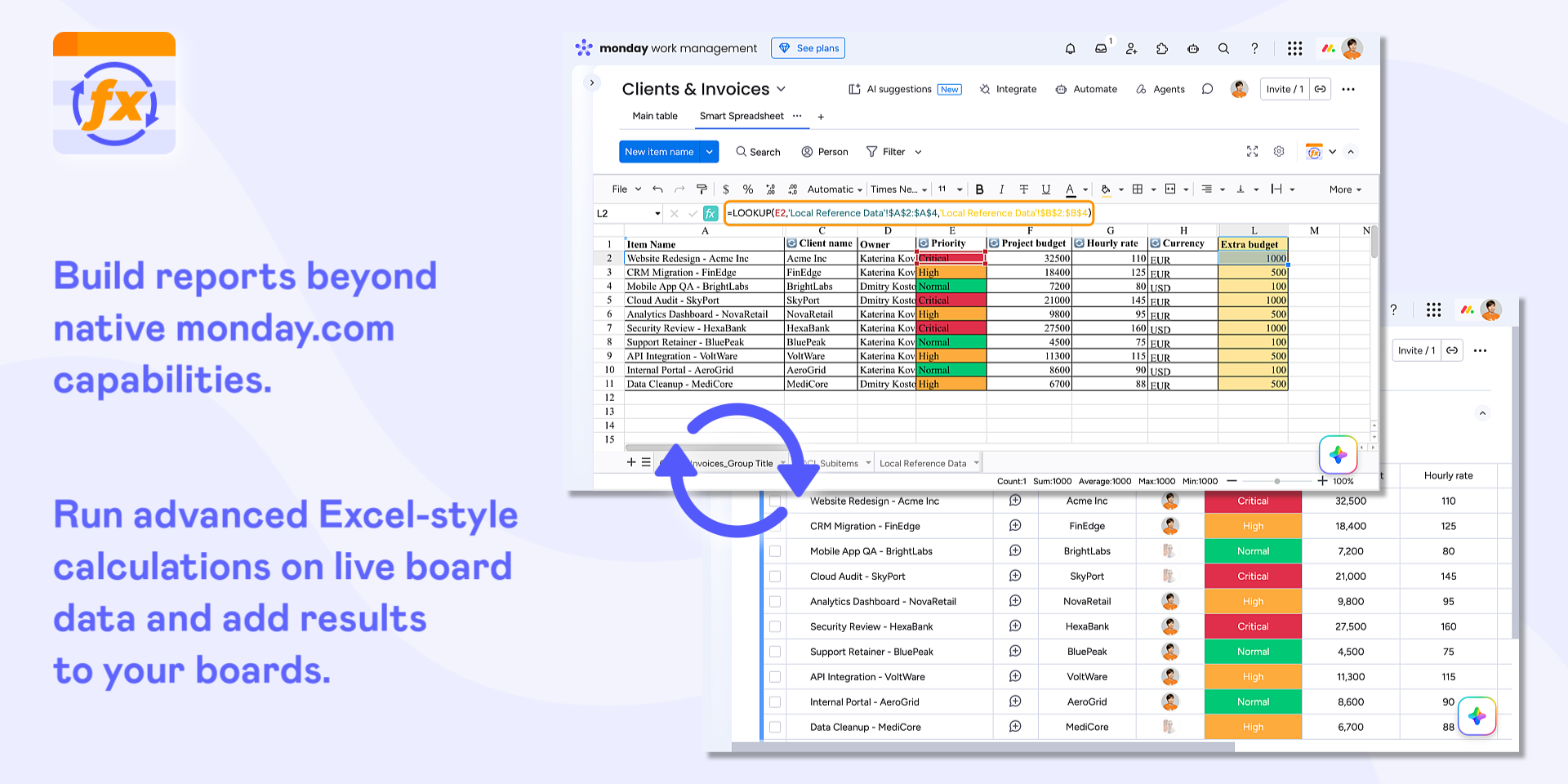
📊 Build Advanced Reports on Live monday.com Data
Calculate Metrics Beyond Native monday.com Formulas. Use complex Excel-style formulas and calculations to analyze live monday.com data, with results added back to your board.
Build Advanced Reports Your Way. Use filters, pivot tables, charts, and conditional formatting to analyze and visualize live board data.
Keep Spreadsheets and Boards in Sync. Work with connected board data in spreadsheets and keep changes synchronized across both.
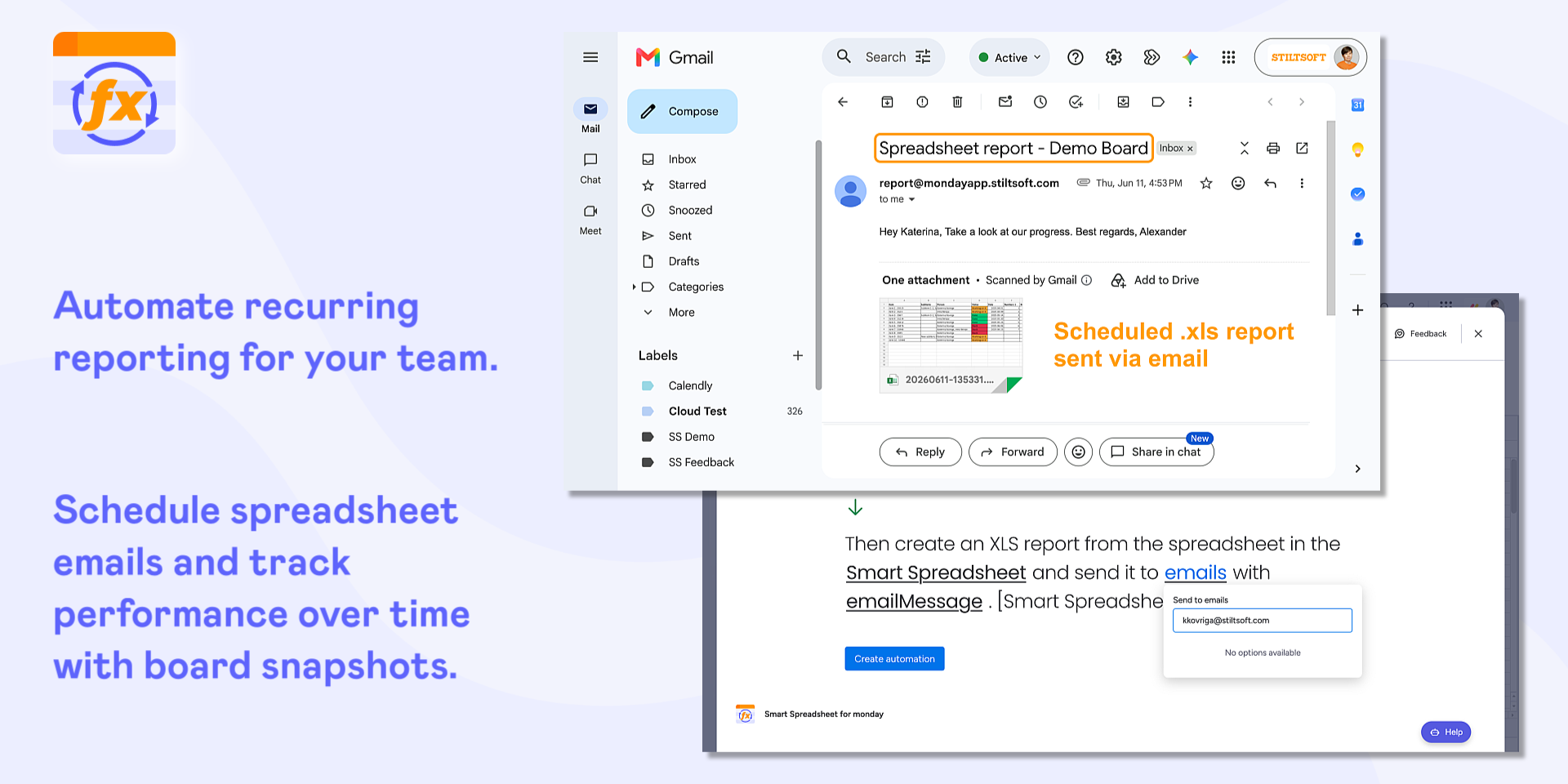
Track Performance Over Time. Create board snapshots for historical comparisons and trend analysis.
📝 Bring Excel & Google Sheets Workflows into monday.com
Import Excel Files and Connect Google Sheets. Bring existing spreadsheets into monday.com for calculations, analysis, and reporting.
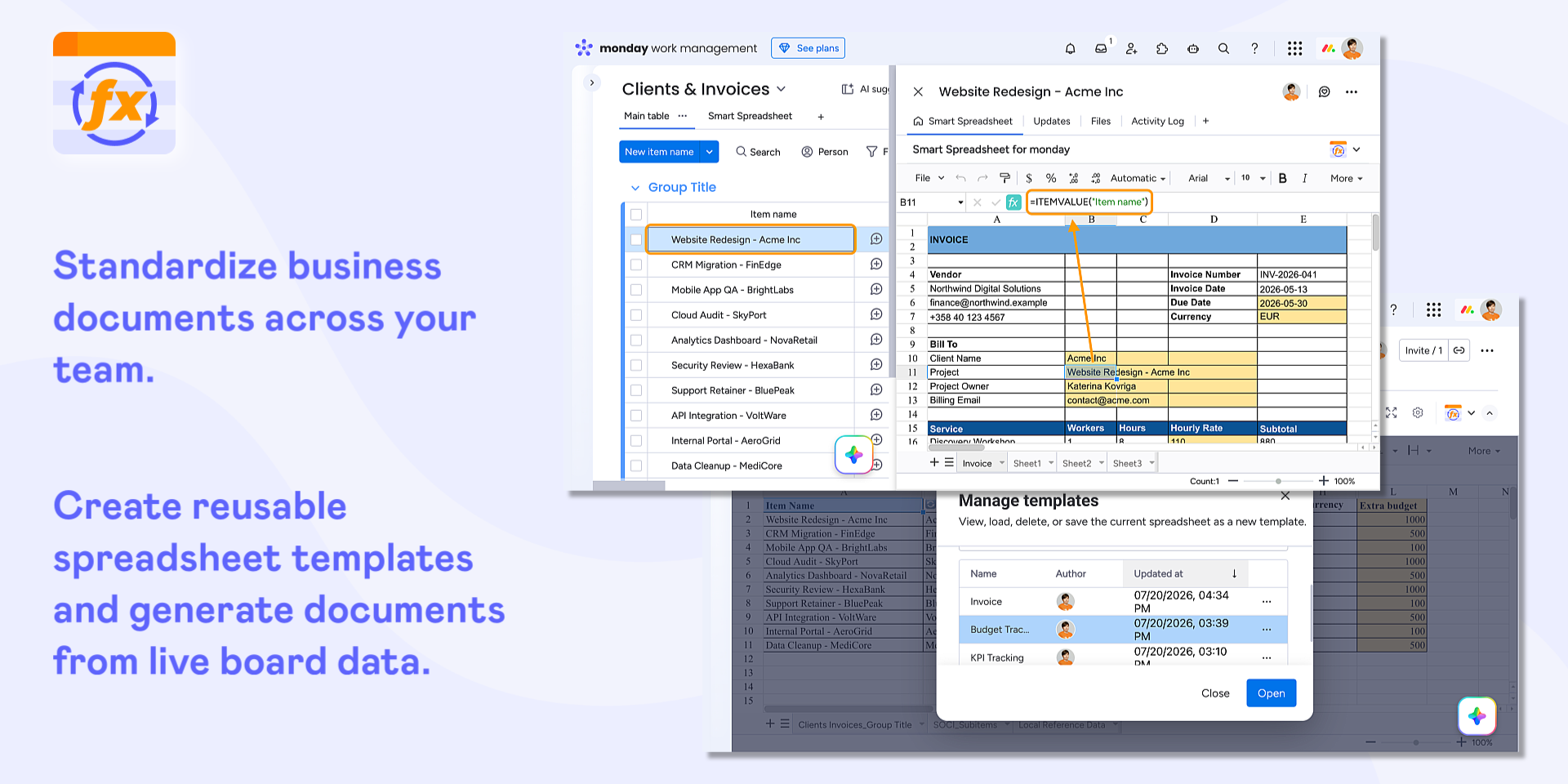
Create Spreadsheet Templates. Use predefined layouts, formatting, formulas, and reports that can be shared across your team.
Generate Business Documents. Automatically populate invoices, purchase orders, quotes, and other business documents from live board data and share them with clients in PDFs.
Share Reports Automatically. Schedule spreadsheet reports to be sent by email.
🆕 Work with Google Sheets & Google Drive Files in monday.com
Blend Google Sheets Data with monday Boards. Import Google Sheets into Smart Spreadsheet views to combine data sources and analyze everything in one place.
Access Google Drive Files from monday.com. Use Google Sheets, Docs, Slides, and other supported Google Drive files directly from your monday.com account.
Get the Google Sheets Experience Without a Google Account. Work with the familiar Google Sheets interface directly in monday.com, no Google account or existing files required.
Does the developer periodically perform penetration testing?
Yes
We perform the basic penetration testing of the app functionality on a 3-month basis. Also, the Spreadsheet app participates in the open bug bounty program (https://tracker.bugcrowd.com/stiltsoft) as a part of the Table Filter and Charts for Confluence app (https://marketplace.atlassian.com/apps/27447/table-filter-and-charts-for-confluence?hosting=cloud&tab=overview).
Does the developer have a dedicated security and privacy point of contact for such issues or questions?
Yes
akhaneev@stiltsoft.com
Does the app restrict redirects and forwards only to approved destinations, or show a warning when redirecting to potentially untrusted content?
Yes
The app has no backend and doesn't support any redirects.
Does the app protect against mass parameter assignment attacks?
Yes
The app has no backend, it doesn't make requests outside the monday instance.
Does the app perform encoding and sanitization on all user supplied parameters to protect against Cross-Site Scripting?
Yes
The app uses React and Vue.js. In other places, the app either escapes HTML or sanitizes it with DOMPurify or injects user input as a text node so that the browser escapes it automatically.
Does the developer protect all state-changing actions against Cross-Site Request Forgery (CSRF)?
Yes
The app has frontend only, it doesn't make requests outside the monday instance. The app uses the monday SDK to communicate with the monday instance.
Does the developer have mechanisms to notify monday.com in case of a security breach?
Yes
In case of a security breach, we will contact appsupport@monday.com within 1 business day after awareness. We'd follow the monday.com best practices if any suggested.
Does this developer have a process for installing application-level updates and security patches for the service (such as software packages and databases)?
Yes
The app has no backend - it is a frontend app only. All updates are performed through the zip file upload in the monday instance. The Spreadsheet app participates in the open bug bounty program (https://tracker.bugcrowd.com/stiltsoft) as a part of the Table Filter and Charts for Confluence app (https://marketplace.atlassian.com/apps/27447/table-filter-and-charts-for-confluence?hosting=cloud&tab=overview). We have the following security bug fix policy: Critical (CVSS v3 >= 9.0) - Must be fixed within 4 weeks of being reported or triaged. High (CVSS v3 >= 7.0) - Must be fixed within 6 weeks of being reported or triaged. Medium (CVSS v3 >= 4.0) - Must be fixed within 8 weeks of being reported or triaged. Low (CVSS v3 < 4.0) - Must be fixed within 25 weeks of being reported or triaged.
Compliance
Is the app certified with the information security standard ISO/IEC 27001:2022?
Not answered
Is the app compliant with the Health Insurance Portability and Accountability Act (HIPAA)?
Yes
The app doesn't store or send data outside the customer's monday instance.
Is the app certified with System and Organization Controls (SOC 2 or SOC 3)?
No
Is the app compliant with the General Data Protection Regulation (GDPR)?
Yes
The app doesn't store or send data outside the customer's monday instance.
Data
Does the app send any data outside of monday.com? If yes, indicate whether the data is customer-submitted (e.g., board names, item names, doc content) or non-customer-submitted (e.g., account ID, board ID, user ID).
Yes
We send anonymous information about certain user interactions with the app to Google Analytics. By using Google Analytics we track only information that pertains to the App (such as event about using of some apps parts and features).
Where does the app store logs data?
other
The app has no the backend, it runs in the client browser only. It doesn't send logs anywhere.
Where does the app store the app data?
monday
The app stores the app data into per-tenant monday.com storage
Does the developer ensure application logs do not contain secrets or personally-identifiable information (PII)?
Yes
The app has no backend, it runs in the client browser only. It doesn't send logs anywhere.
Is customer data segregated from the data of other customers (for example logically or physically)?
Yes
All the data is stored via the monday storage API: monday.storage.instance.setItem monday.storage.instance.getItem
Privacy
Does the developer enforce multi-factor authentication on employees access to systems which may process customer data?
Yes
The app doesn't store or send customer data outside the monday instance. No systems at our company process or hold customer data.
Does the developer protect access to customer data based on the principle of least privilege?
Yes
The app doesn't store or send customer data outside the monday instance. So nobody at our company has access to customer data.
Reviews
April 3, 2025
LM: not really that smart though
July 29, 2024
KA: Smartsheet excels in project management with its familiar spreadsheet-like interface and robust automation features, which streamline workflows and reduce manual tasks. It integrates well with various platforms, enhancing overall efficiency.
November 3, 2023
RE: I really needed an excel-like spreadsheet integration. So happy this autosyncs!
August 25, 2023
MS: I love working with the Smart Spreadsheet team, they have been helping our team with specific use cases and making sure the system works as it should!
Historical data
Installation history
We have data for December 28, 2024 onwards only. Collected sometime after 00:00 UTC daily.
Total number of installs
Change in total number of installs in last 1 day(s)
Compares the number of installs on each date with 1 days previously:
Max
Min
Current
Change in total number of installs in last 7 day(s)
Compares the number of installs on each date with 7 days previously:
Max
Min
Current
Change in total number of installs in last 30 day(s)
Compares the number of installs on each date with 30 days previously:
Max
Min
Current
Change in total number of installs in last 90 day(s)
Compares the number of installs on each date with 90 days previously:
Max
Min
Current
Change in total number of installs in last 180 day(s)
Compares the number of installs on each date with 180 days previously:
Max
Min
Current
Ratings history
Categories history
Each of the following is a yes/no answer, so the graphs show 1 for yes, and 0 for no.
{
"id": 10000173,
"marketplace_developer_id": 10000090,
"app_id": 10053930,
"app_type": null,
"security_info": {},
"gallery_assets": [
{
"url": "https://cdn.monday.com/marketplace/10000173/10000173_2026_7_7_13_3_5_ff9yvbl.png",
"type": "image"
},
{
"url": "https://cdn.monday.com/marketplace/10000173/10000173_2026_7_7_13_3_35_bm87jr1.png",
"type": "image"
},
{
"url": "https://cdn.monday.com/marketplace/10000173/10000173_2026_7_7_13_4_1_5x6ffn7.png",
"type": "image"
},
{
"url": "https://cdn.monday.com/marketplace/10000173/10000173_2026_7_7_13_5_48_zxfywx4h.mp4",
"type": "video"
}
],
"description": "<p>📊 <strong>Build Advanced Reports on Live monday.com Data</strong></p><ul><li><strong>Calculate Metrics Beyond Native monday.com Formulas.</strong> Use complex Excel-style formulas and calculations to analyze live monday.com data, with results added back to your board.</li><li><strong>Build Advanced Reports Your Way.</strong> Use filters, pivot tables, charts, and conditional formatting to analyze and visualize live board data.</li><li><strong>Keep Spreadsheets and Boards in Sync.</strong> Work with connected board data in spreadsheets and keep changes synchronized across both.</li><li><strong>Track Performance Over Time.</strong> Create board snapshots for historical comparisons and trend analysis.</li></ul><p><br></p><p>📝 <strong>Bring Excel & Google Sheets Workflows into monday.com</strong></p><ul><li><strong>Import Excel Files and Connect Google Sheets.</strong> Bring existing spreadsheets into monday.com for calculations, analysis, and reporting.</li><li><strong>Create Spreadsheet Templates.</strong> Use predefined layouts, formatting, formulas, and reports that can be shared across your team.</li><li><strong>Generate Business Documents.</strong> Automatically populate invoices, purchase orders, quotes, and other business documents from live board data and share them with clients in PDFs.</li><li><strong>Share Reports Automatically.</strong> Schedule spreadsheet reports to be sent by email.</li></ul><p><br></p><p><strong>🆕 Work with Google Sheets & Google Drive Files in monday.com</strong></p><ul><li><strong>Blend Google Sheets Data with monday Boards.</strong> Import Google Sheets into Smart Spreadsheet views to combine data sources and analyze everything in one place.</li><li><strong>Access Google Drive Files from monday.com.</strong> Use Google Sheets, Docs, Slides, and other supported Google Drive files directly from your monday.com account.</li><li><strong>Get the Google Sheets Experience Without a Google Account.</strong> Work with the familiar Google Sheets interface directly in monday.com, no Google account or existing files required.</li></ul><p><br></p><p>📚 <a href=\"https://docs.stiltsoft.com/ssfm?utm_source=monday_marketplace&utm_medium=ss_listing&utm_campaign=smart-spreadsheet-traffic-sources\" rel=\"noopener noreferrer\" target=\"_blank\"><u>Smart Spreadsheet documentation</u></a></p>",
"short_description": "Calculate Like in Excel, Auto-Fill Templates & Export to PDF",
"thumbnail_url": "https://dapulse-res.cloudinary.com/image/upload/v1677574755/monday-apps-marketplace/Smart%20Spreadsheets/Smart_Spreadsheet_-_App_card_1.png",
"logo_url": "https://cdn.monday.com/marketplace/10000173/10000173_2025_6_9_15_1_13_vstgbxa.png",
"feedback_url": "https://stiltsoft.atlassian.net/servicedesk/customer/portal/12",
"privacy_policy_url": "https://docs.stiltsoft.com/display/SSFM/Stiltsoft+Europe+Privacy+Policy+for+the+monday.com+Marketplace",
"featured": false,
"name": "Smart Spreadsheet | Excel, Google Sheets & Templates",
"how_to_use_url": "https://docs.stiltsoft.com/ssfm",
"external_pricing_url": null,
"keywords": "smart spreadsheet,spreadsheet,Excel,Google Sheets,formulas,VLOOKUP,templates,pivot tables,reports,PDF",
"compliance_answers": [
{
"questionId": 19,
"shortAnswer": true,
"detailedAnswer": "We send anonymous information about certain user interactions with the app to Google Analytics.\nBy using Google Analytics we track only information that pertains to the App (such as event about using of some apps parts and features)."
},
{
"questionId": 18,
"detailedAnswer": "The app has no the backend, it runs in the client browser only. It doesn't send logs anywhere.",
"logHostingProvider": "other"
},
{
"questionId": 17,
"detailedAnswer": "The app stores the app data into per-tenant monday.com storage",
"dataHostingProvider": "monday"
},
{
"questionId": 15,
"shortAnswer": true,
"detailedAnswer": "We perform the basic penetration testing of the app functionality on a 3-month basis. Also, the Spreadsheet app participates in the open bug bounty program (https://tracker.bugcrowd.com/stiltsoft) as a part of the Table Filter and Charts for Confluence app (https://marketplace.atlassian.com/apps/27447/table-filter-and-charts-for-confluence?hosting=cloud&tab=overview)."
},
{
"questionId": 14,
"shortAnswer": true,
"detailedAnswer": "akhaneev@stiltsoft.com"
},
{
"questionId": 13,
"shortAnswer": true,
"detailedAnswer": "The app doesn't store or send data outside the customer's monday instance."
},
{
"questionId": 12,
"shortAnswer": false,
"detailedAnswer": ""
},
{
"questionId": 11,
"shortAnswer": true,
"detailedAnswer": "The app doesn't store or send data outside the customer's monday instance."
},
{
"questionId": 10,
"shortAnswer": true,
"detailedAnswer": "The app has no backend and doesn't support any redirects."
},
{
"questionId": 9,
"shortAnswer": true,
"detailedAnswer": "The app has no backend, it doesn't make requests outside the monday instance."
},
{
"questionId": 8,
"shortAnswer": true,
"detailedAnswer": "The app has no backend, it runs in the client browser only. It doesn't send logs anywhere."
},
{
"questionId": 7,
"shortAnswer": true,
"detailedAnswer": "The app doesn't store or send customer data outside the monday instance. No systems at our company process or hold customer data."
},
{
"questionId": 6,
"shortAnswer": true,
"detailedAnswer": "The app doesn't store or send customer data outside the monday instance. So nobody at our company has access to customer data."
},
{
"questionId": 5,
"shortAnswer": true,
"detailedAnswer": "The app uses React and Vue.js. In other places, the app either escapes HTML or sanitizes it with DOMPurify or injects user input as a text node so that the browser escapes it automatically.\n"
},
{
"questionId": 4,
"shortAnswer": true,
"detailedAnswer": "The app has frontend only, it doesn't make requests outside the monday instance. The app uses the monday SDK to communicate with the monday instance.\n"
},
{
"questionId": 3,
"shortAnswer": true,
"detailedAnswer": "In case of a security breach, we will contact appsupport@monday.com within 1 business day after awareness. We'd follow the monday.com best practices if any suggested."
},
{
"questionId": 2,
"shortAnswer": true,
"detailedAnswer": "The app has no backend - it is a frontend app only. All updates are performed through the zip file upload in the monday instance.\n\nThe Spreadsheet app participates in the open bug bounty program (https://tracker.bugcrowd.com/stiltsoft) as a part of the Table Filter and Charts for Confluence app (https://marketplace.atlassian.com/apps/27447/table-filter-and-charts-for-confluence?hosting=cloud&tab=overview). We have the following security bug fix policy:\n\nCritical (CVSS v3 >= 9.0) - Must be fixed within 4 weeks of being reported or triaged.\n\nHigh (CVSS v3 >= 7.0) - Must be fixed within 6 weeks of being reported or triaged.\n\nMedium (CVSS v3 >= 4.0) - Must be fixed within 8 weeks of being reported or triaged.\n\nLow (CVSS v3 < 4.0) - Must be fixed within 25 weeks of being reported or triaged.\n"
},
{
"questionId": 1,
"shortAnswer": true,
"detailedAnswer": "All the data is stored via the monday storage API:\nmonday.storage.instance.setItem\nmonday.storage.instance.getItem"
}
],
"created_at": "2023-02-28T09:12:22.000Z",
"updated_at": "2026-10-27T11:06:27.000Z",
"automation_app_id": null,
"marketplace_category_ids": [
10,
9,
6
],
"pinned_for_categories_ids": [],
"featured_for_categories_ids": [],
"pricing_data": "14 days trial",
"label": "Editor's choice",
"app_values": [
"Make data-driver decisions"
],
"security": false,
"display_in_template_store": false,
"acquisition_source": "No touch",
"is_connector": false,
"show_connections": null,
"terms_of_service_url": "https://docs.stiltsoft.com/ssfm/support-service-level-agreement-sla-124984530.html",
"available_for_tiers": [],
"available_for_products": [],
"google_analytics_tag_id": "G-S3971FDD9Y",
"is_solution": false,
"cta_override": null,
"app_scope_str": "boards:read,account:read,boards:write,users:read",
"app_client_id": "03cc84afdcacd614e3b93f33444c6956",
"app_color": {
"hsl": {
"h": 238.29787234042553,
"s": 0,
"l": 1,
"a": 1
},
"hex": "#ffffff",
"rgb": {
"r": 255,
"g": 255,
"b": 255,
"a": 1
},
"hsv": {
"h": 238.29787234042553,
"s": 0,
"v": 1,
"a": 1
},
"oldHue": 238.29787234042553,
"source": "hex"
},
"plans": [
{
"id": "10053930-1-seats_20",
"appPlanId": "seats_20",
"name": "Up to 20 seats",
"versionId": 1,
"isTrial": false,
"prices": {
"type": "seat_based",
"monthly": 35,
"yearly": 30,
"maxSeats": 20
},
"versionState": "live",
"appId": 10053930,
"description": "Use the app without any limitations for up to 20 team members. This plan comes with our standard support.",
"extraData": {
"bullets": [],
"monthlyFee": 35,
"yearlyFee": 30,
"maxSeats": 20
},
"isFree": false,
"isRecommended": false,
"currency": "USD"
},
{
"id": "10053930-1-seats_30",
"appPlanId": "seats_30",
"name": "Up to 30 seats",
"versionId": 1,
"isTrial": false,
"prices": {
"type": "seat_based",
"monthly": 50,
"yearly": 43,
"maxSeats": 30
},
"versionState": "live",
"appId": 10053930,
"description": "Use the app without any limitations for up to 30 team members. This plan comes with our standard support.",
"extraData": {
"bullets": [],
"monthlyFee": 50,
"yearlyFee": 43,
"maxSeats": 30
},
"isFree": false,
"isRecommended": false,
"currency": "USD"
},
{
"id": "10053930-1-seats_2",
"appPlanId": "seats_2",
"name": "Free",
"versionId": 1,
"isTrial": false,
"prices": {
"type": "seat_based",
"monthly": 0,
"yearly": 0,
"maxSeats": 2
},
"versionState": "live",
"appId": 10053930,
"description": "Free for up to 2 team members. This plan comes without support.",
"extraData": {
"bullets": [],
"monthlyFee": 0,
"yearlyFee": 0,
"maxSeats": 2
},
"isFree": true,
"isRecommended": false,
"currency": "USD"
},
{
"id": "10053930-1-seats_5",
"appPlanId": "seats_5",
"name": "Up to 5 seats",
"versionId": 1,
"isTrial": false,
"prices": {
"type": "seat_based",
"monthly": 10,
"yearly": 9,
"maxSeats": 5
},
"versionState": "live",
"appId": 10053930,
"description": "Use the app without any limitations for up to 5 team members. This plan comes with our standard support.",
"extraData": {
"bullets": [],
"monthlyFee": 10,
"yearlyFee": 9,
"maxSeats": 5
},
"isFree": false,
"isRecommended": false,
"currency": "USD"
},
{
"id": "10053930-1-seats_10",
"appPlanId": "seats_10",
"name": "Up to 10 seats",
"versionId": 1,
"isTrial": false,
"prices": {
"type": "seat_based",
"monthly": 20,
"yearly": 17,
"maxSeats": 10
},
"versionState": "live",
"appId": 10053930,
"description": "Use the app without any limitations for up to 10 team members. This plan comes with our standard support.",
"extraData": {
"bullets": [],
"monthlyFee": 20,
"yearlyFee": 17,
"maxSeats": 10
},
"isFree": false,
"isRecommended": false,
"currency": "USD"
},
{
"id": "10053930-1-seats_40",
"appPlanId": "seats_40",
"name": "Up to 40 seats",
"versionId": 1,
"isTrial": false,
"prices": {
"type": "seat_based",
"monthly": 60,
"yearly": 51,
"maxSeats": 40
},
"versionState": "live",
"appId": 10053930,
"description": "Use the app without any limitations for up to 40 team members. This plan comes with our advanced support.",
"extraData": {
"bullets": [],
"monthlyFee": 60,
"yearlyFee": 51,
"maxSeats": 40
},
"isFree": false,
"isRecommended": false,
"currency": "USD"
},
{
"id": "10053930-1-seats_100",
"appPlanId": "seats_100",
"name": "Up to 100 seats",
"versionId": 1,
"isTrial": false,
"prices": {
"type": "seat_based",
"monthly": 130,
"yearly": 111,
"maxSeats": 100
},
"versionState": "live",
"appId": 10053930,
"description": "Use the app without any limitations for up to 100 team members. This plan comes with our advanced support.",
"extraData": {
"bullets": [],
"monthlyFee": 130,
"yearlyFee": 111,
"maxSeats": 100
},
"isFree": false,
"isRecommended": false,
"currency": "USD"
},
{
"id": "10053930-1-seats_Unlim",
"appPlanId": "seats_Unlim",
"name": "Unlimited",
"versionId": 1,
"isTrial": true,
"prices": {
"type": "seat_based",
"monthly": 1000,
"yearly": 850,
"maxSeats": 1000000
},
"versionState": "live",
"appId": 10053930,
"description": "Use the app without any limitations for any team number. This plan comes with our premium support.",
"extraData": {
"bullets": [],
"monthlyFee": 1000,
"yearlyFee": 850,
"maxSeats": 1000000
},
"isFree": false,
"isRecommended": false,
"currency": "USD"
},
{
"id": "10053930-1-seats_50",
"appPlanId": "seats_50",
"name": "Up to 50 seats",
"versionId": 1,
"isTrial": false,
"prices": {
"type": "seat_based",
"monthly": 70,
"yearly": 60,
"maxSeats": 50
},
"versionState": "live",
"appId": 10053930,
"description": "Use the app without any limitations for up to 50 team members. This plan comes with our advanced support.",
"extraData": {
"bullets": [],
"monthlyFee": 70,
"yearlyFee": 60,
"maxSeats": 50
},
"isFree": false,
"isRecommended": false,
"currency": "USD"
},
{
"id": "10053930-1-seats_250",
"appPlanId": "seats_250",
"name": "Up to 250 seats",
"versionId": 1,
"isTrial": false,
"prices": {
"type": "seat_based",
"monthly": 300,
"yearly": 255,
"maxSeats": 250
},
"versionState": "live",
"appId": 10053930,
"description": "Use the app without any limitations for up to 250 team members. This plan comes with our advanced support.",
"extraData": {
"bullets": [],
"monthlyFee": 300,
"yearlyFee": 255,
"maxSeats": 250
},
"isFree": false,
"isRecommended": false,
"currency": "USD"
},
{
"id": "10053930-2-seats_20",
"appPlanId": "seats_20",
"name": "Up to 20 seats",
"versionId": 2,
"isTrial": false,
"prices": {
"type": "seat_based",
"monthly": 45,
"yearly": 38,
"maxSeats": 20
},
"versionState": "live",
"appId": 10053930,
"description": "Use the app without any limitations for up to 20 team members. This plan comes with our standard support.",
"extraData": {
"bullets": [],
"monthlyFee": 45,
"yearlyFee": 38,
"maxSeats": 20
},
"isFree": false,
"isRecommended": false,
"currency": "USD"
},
{
"id": "10053930-2-seats_30",
"appPlanId": "seats_30",
"name": "Up to 30 seats",
"versionId": 2,
"isTrial": false,
"prices": {
"type": "seat_based",
"monthly": 55,
"yearly": 47,
"maxSeats": 30
},
"versionState": "live",
"appId": 10053930,
"description": "Use the app without any limitations for up to 30 team members. This plan comes with our standard support.",
"extraData": {
"bullets": [],
"monthlyFee": 55,
"yearlyFee": 47,
"maxSeats": 30
},
"isFree": false,
"isRecommended": false,
"currency": "USD"
},
{
"id": "10053930-2-seats_2",
"appPlanId": "seats_2",
"name": "Free",
"versionId": 2,
"isTrial": false,
"prices": {
"type": "seat_based",
"monthly": 0,
"yearly": 0,
"maxSeats": 2
},
"versionState": "live",
"appId": 10053930,
"description": "Free for up to 2 team members. This plan comes without support.",
"extraData": {
"bullets": [],
"monthlyFee": 0,
"yearlyFee": 0,
"maxSeats": 2
},
"isFree": true,
"isRecommended": false,
"currency": "USD"
},
{
"id": "10053930-2-seats_5",
"appPlanId": "seats_5",
"name": "Up to 5 seats",
"versionId": 2,
"isTrial": false,
"prices": {
"type": "seat_based",
"monthly": 15,
"yearly": 13,
"maxSeats": 5
},
"versionState": "live",
"appId": 10053930,
"description": "Use the app without any limitations for up to 5 team members. This plan comes with our standard support.",
"extraData": {
"bullets": [],
"monthlyFee": 15,
"yearlyFee": 13,
"maxSeats": 5
},
"isFree": false,
"isRecommended": false,
"currency": "USD"
},
{
"id": "10053930-2-seats_10",
"appPlanId": "seats_10",
"name": "Up to 10 seats",
"versionId": 2,
"isTrial": false,
"prices": {
"type": "seat_based",
"monthly": 25,
"yearly": 22,
"maxSeats": 10
},
"versionState": "live",
"appId": 10053930,
"description": "Use the app without any limitations for up to 10 team members. This plan comes with our standard support.",
"extraData": {
"bullets": [],
"monthlyFee": 25,
"yearlyFee": 22,
"maxSeats": 10
},
"isFree": false,
"isRecommended": false,
"currency": "USD"
},
{
"id": "10053930-2-seats_40",
"appPlanId": "seats_40",
"name": "Up to 40 seats",
"versionId": 2,
"isTrial": false,
"prices": {
"type": "seat_based",
"monthly": 65,
"yearly": 55,
"maxSeats": 40
},
"versionState": "live",
"appId": 10053930,
"description": "Use the app without any limitations for up to 40 team members. This plan comes with our advanced support.",
"extraData": {
"bullets": [],
"monthlyFee": 65,
"yearlyFee": 55,
"maxSeats": 40
},
"isFree": false,
"isRecommended": false,
"currency": "USD"
},
{
"id": "10053930-2-seats_100",
"appPlanId": "seats_100",
"name": "Up to 100 seats",
"versionId": 2,
"isTrial": false,
"prices": {
"type": "seat_based",
"monthly": 150,
"yearly": 128,
"maxSeats": 100
},
"versionState": "live",
"appId": 10053930,
"description": "Use the app without any limitations for up to 100 team members. This plan comes with our advanced support.",
"extraData": {
"bullets": [],
"monthlyFee": 150,
"yearlyFee": 128,
"maxSeats": 100
},
"isFree": false,
"isRecommended": false,
"currency": "USD"
},
{
"id": "10053930-2-seats_Unlim",
"appPlanId": "seats_Unlim",
"name": "Unlimited",
"versionId": 2,
"isTrial": true,
"prices": {
"type": "seat_based",
"monthly": 1000,
"yearly": 850,
"maxSeats": 1000000
},
"versionState": "live",
"appId": 10053930,
"description": "Use the app without any limitations for any team number. This plan comes with our premium support.",
"extraData": {
"bullets": [],
"monthlyFee": 1000,
"yearlyFee": 850,
"maxSeats": 1000000
},
"isFree": false,
"isRecommended": false,
"currency": "USD"
},
{
"id": "10053930-2-seats_50",
"appPlanId": "seats_50",
"name": "Up to 50 seats",
"versionId": 2,
"isTrial": false,
"prices": {
"type": "seat_based",
"monthly": 80,
"yearly": 68,
"maxSeats": 50
},
"versionState": "live",
"appId": 10053930,
"description": "Use the app without any limitations for up to 50 team members. This plan comes with our advanced support.",
"extraData": {
"bullets": [],
"monthlyFee": 80,
"yearlyFee": 68,
"maxSeats": 50
},
"isFree": false,
"isRecommended": false,
"currency": "USD"
},
{
"id": "10053930-2-seats_250",
"appPlanId": "seats_250",
"name": "Up to 250 seats",
"versionId": 2,
"isTrial": false,
"prices": {
"type": "seat_based",
"monthly": 350,
"yearly": 298,
"maxSeats": 250
},
"versionState": "live",
"appId": 10053930,
"description": "Use the app without any limitations for up to 250 team members. This plan comes with our advanced support.",
"extraData": {
"bullets": [],
"monthlyFee": 350,
"yearlyFee": 298,
"maxSeats": 250
},
"isFree": false,
"isRecommended": false,
"currency": "USD"
},
{
"id": "10053930-3-seats_20",
"appPlanId": "seats_20",
"name": "Up to 20 seats",
"versionId": 3,
"isTrial": false,
"prices": {
"type": "seat_based",
"monthly": 45,
"yearly": 38,
"maxSeats": 20
},
"versionState": "live",
"appId": 10053930,
"description": "Use the app without any limitations for up to 20 team members. ",
"extraData": {
"bullets": [
"Use the app without any limitations",
"Standard support service "
],
"monthlyFee": 45,
"yearlyFee": 38,
"maxSeats": 20
},
"isFree": false,
"isRecommended": false,
"currency": "USD"
},
{
"id": "10053930-3-seats_30",
"appPlanId": "seats_30",
"name": "Up to 30 seats",
"versionId": 3,
"isTrial": false,
"prices": {
"type": "seat_based",
"monthly": 55,
"yearly": 47,
"maxSeats": 30
},
"versionState": "live",
"appId": 10053930,
"description": "Use the app without any limitations for up to 30 team members. ",
"extraData": {
"bullets": [
"Use the app without any limitations",
"Standard support service "
],
"monthlyFee": 55,
"yearlyFee": 47,
"maxSeats": 30
},
"isFree": false,
"isRecommended": false,
"currency": "USD"
},
{
"id": "10053930-3-seats_2",
"appPlanId": "seats_2",
"name": "Free",
"versionId": 3,
"isTrial": false,
"prices": {
"type": "seat_based",
"monthly": 0,
"yearly": 0,
"maxSeats": 2
},
"versionState": "live",
"appId": 10053930,
"description": "Free for up to 2 team members. This plan comes without support.",
"extraData": {
"bullets": [
"Use the app without any limitations",
"No support service",
"We’re open to discussing custom discounts for larger teams (30+ users)."
],
"monthlyFee": 0,
"yearlyFee": 0,
"maxSeats": 2
},
"isFree": true,
"isRecommended": false,
"currency": "USD"
},
{
"id": "10053930-3-seats_5",
"appPlanId": "seats_5",
"name": "Up to 5 seats",
"versionId": 3,
"isTrial": false,
"prices": {
"type": "seat_based",
"monthly": 15,
"yearly": 13,
"maxSeats": 5
},
"versionState": "live",
"appId": 10053930,
"description": "Use the app without any limitations for up to 5 team members. ",
"extraData": {
"bullets": [
"Use the app without any limitations",
"Standard support service"
],
"monthlyFee": 15,
"yearlyFee": 13,
"maxSeats": 5
},
"isFree": false,
"isRecommended": false,
"currency": "USD"
},
{
"id": "10053930-3-seats_10",
"appPlanId": "seats_10",
"name": "Up to 10 seats",
"versionId": 3,
"isTrial": false,
"prices": {
"type": "seat_based",
"monthly": 25,
"yearly": 22,
"maxSeats": 10
},
"versionState": "live",
"appId": 10053930,
"description": "Use the app without any limitations for up to 10 team members. ",
"extraData": {
"bullets": [
"Use the app without any limitations",
"Standard support service"
],
"monthlyFee": 25,
"yearlyFee": 22,
"maxSeats": 10
},
"isFree": false,
"isRecommended": false,
"currency": "USD"
},
{
"id": "10053930-3-seats_40",
"appPlanId": "seats_40",
"name": "Up to 40 seats",
"versionId": 3,
"isTrial": false,
"prices": {
"type": "seat_based",
"monthly": 65,
"yearly": 55,
"maxSeats": 40
},
"versionState": "live",
"appId": 10053930,
"description": "Use the app without any limitations for up to 40 team members. ",
"extraData": {
"bullets": [
"Use the app without any limitations",
"Advanced support service",
"We’re open to discussing custom discounts for larger teams (30+ users)."
],
"monthlyFee": 65,
"yearlyFee": 55,
"maxSeats": 40
},
"isFree": false,
"isRecommended": false,
"currency": "USD"
},
{
"id": "10053930-3-seats_100",
"appPlanId": "seats_100",
"name": "Up to 100 seats",
"versionId": 3,
"isTrial": false,
"prices": {
"type": "seat_based",
"monthly": 150,
"yearly": 128,
"maxSeats": 100
},
"versionState": "live",
"appId": 10053930,
"description": "Use the app without any limitations for up to 100 team members. ",
"extraData": {
"bullets": [
"Use the app without any limitations",
"Advanced support service",
"We’re open to discussing custom discounts for larger teams (30+ users)."
],
"monthlyFee": 150,
"yearlyFee": 128,
"maxSeats": 100
},
"isFree": false,
"isRecommended": false,
"currency": "USD"
},
{
"id": "10053930-3-seats_Unlim",
"appPlanId": "seats_Unlim",
"name": "Unlimited",
"versionId": 3,
"isTrial": true,
"prices": {
"type": "seat_based",
"monthly": 1000,
"yearly": 850,
"maxSeats": 1000000
},
"versionState": "live",
"appId": 10053930,
"description": "Use the app without any limitations for any team number. ",
"extraData": {
"bullets": [
"Use the app without any limitations",
"Advanced support service",
"We’re open to discussing custom discounts for larger teams (30+ users)."
],
"monthlyFee": 1000,
"yearlyFee": 850,
"maxSeats": 1000000
},
"isFree": false,
"isRecommended": false,
"currency": "USD"
},
{
"id": "10053930-3-seats_50",
"appPlanId": "seats_50",
"name": "Up to 50 seats",
"versionId": 3,
"isTrial": false,
"prices": {
"type": "seat_based",
"monthly": 80,
"yearly": 68,
"maxSeats": 50
},
"versionState": "live",
"appId": 10053930,
"description": "Use the app without any limitations for up to 50 team members.",
"extraData": {
"bullets": [
"Use the app without any limitations",
"Advanced service support",
"We’re open to discussing custom discounts for larger teams (30+ users)."
],
"monthlyFee": 80,
"yearlyFee": 68,
"maxSeats": 50
},
"isFree": false,
"isRecommended": false,
"currency": "USD"
},
{
"id": "10053930-3-seats_250",
"appPlanId": "seats_250",
"name": "Up to 250 seats",
"versionId": 3,
"isTrial": false,
"prices": {
"type": "seat_based",
"monthly": 350,
"yearly": 298,
"maxSeats": 250
},
"versionState": "live",
"appId": 10053930,
"description": "Use the app without any limitations for up to 250 team members. ",
"extraData": {
"bullets": [
"Use the app without any limitations",
"Advanced support service",
"We’re open to discussing custom discounts for larger teams (30+ users)."
],
"monthlyFee": 350,
"yearlyFee": 298,
"maxSeats": 250
},
"isFree": false,
"isRecommended": false,
"currency": "USD"
},
{
"id": "10053930-4-seats_20",
"appPlanId": "seats_20",
"name": "Up to 20 seats",
"versionId": 4,
"isTrial": false,
"prices": {
"type": "seat_based",
"monthly": 45,
"yearly": 38,
"maxSeats": 20
},
"versionState": "live",
"appId": 10053930,
"description": "Use the app without any limitations for up to 20 team members. ",
"extraData": {
"bullets": [
"Use the app without any limitations",
"Standard support service "
],
"monthlyFee": 45,
"yearlyFee": 38,
"maxSeats": 20
},
"isFree": false,
"isRecommended": false,
"currency": "USD"
},
{
"id": "10053930-4-seats_30",
"appPlanId": "seats_30",
"name": "Up to 30 seats",
"versionId": 4,
"isTrial": false,
"prices": {
"type": "seat_based",
"monthly": 55,
"yearly": 47,
"maxSeats": 30
},
"versionState": "live",
"appId": 10053930,
"description": "Use the app without any limitations for up to 30 team members. ",
"extraData": {
"bullets": [
"Use the app without any limitations",
"Standard support service "
],
"monthlyFee": 55,
"yearlyFee": 47,
"maxSeats": 30
},
"isFree": false,
"isRecommended": false,
"currency": "USD"
},
{
"id": "10053930-4-seats_2",
"appPlanId": "seats_2",
"name": "Free",
"versionId": 4,
"isTrial": false,
"prices": {
"type": "seat_based",
"monthly": 0,
"yearly": 0,
"maxSeats": 2
},
"versionState": "live",
"appId": 10053930,
"description": "Free for up to 2 team members. This plan comes without support.",
"extraData": {
"bullets": [
"Use the app without any limitations",
"No support service"
],
"monthlyFee": 0,
"yearlyFee": 0,
"maxSeats": 2
},
"isFree": true,
"isRecommended": false,
"currency": "USD"
},
{
"id": "10053930-4-seats_5",
"appPlanId": "seats_5",
"name": "Up to 5 seats",
"versionId": 4,
"isTrial": false,
"prices": {
"type": "seat_based",
"monthly": 15,
"yearly": 13,
"maxSeats": 5
},
"versionState": "live",
"appId": 10053930,
"description": "Use the app without any limitations for up to 5 team members. ",
"extraData": {
"bullets": [
"Use the app without any limitations",
"Standard support service"
],
"monthlyFee": 15,
"yearlyFee": 13,
"maxSeats": 5
},
"isFree": false,
"isRecommended": false,
"currency": "USD"
},
{
"id": "10053930-4-seats_10",
"appPlanId": "seats_10",
"name": "Up to 10 seats",
"versionId": 4,
"isTrial": false,
"prices": {
"type": "seat_based",
"monthly": 25,
"yearly": 22,
"maxSeats": 10
},
"versionState": "live",
"appId": 10053930,
"description": "Use the app without any limitations for up to 10 team members. ",
"extraData": {
"bullets": [
"Use the app without any limitations",
"Standard support service"
],
"monthlyFee": 25,
"yearlyFee": 22,
"maxSeats": 10
},
"isFree": false,
"isRecommended": false,
"currency": "USD"
},
{
"id": "10053930-4-seats_40",
"appPlanId": "seats_40",
"name": "Up to 40 seats",
"versionId": 4,
"isTrial": false,
"prices": {
"type": "seat_based",
"monthly": 65,
"yearly": 55,
"maxSeats": 40
},
"versionState": "live",
"appId": 10053930,
"description": "Use the app without any limitations for up to 40 team members. ",
"extraData": {
"bullets": [
"Use the app without any limitations",
"Advanced support service",
"We’re open to discussing custom discounts for larger teams (30+ users)."
],
"monthlyFee": 65,
"yearlyFee": 55,
"maxSeats": 40
},
"isFree": false,
"isRecommended": false,
"currency": "USD"
},
{
"id": "10053930-4-seats_100",
"appPlanId": "seats_100",
"name": "Up to 100 seats",
"versionId": 4,
"isTrial": false,
"prices": {
"type": "seat_based",
"monthly": 150,
"yearly": 128,
"maxSeats": 100
},
"versionState": "live",
"appId": 10053930,
"description": "Use the app without any limitations for up to 100 team members. ",
"extraData": {
"bullets": [
"Use the app without any limitations",
"Advanced support service",
"We’re open to discussing custom discounts for larger teams (30+ users)."
],
"monthlyFee": 150,
"yearlyFee": 128,
"maxSeats": 100
},
"isFree": false,
"isRecommended": false,
"currency": "USD"
},
{
"id": "10053930-4-seats_Unlim",
"appPlanId": "seats_Unlim",
"name": "Unlimited",
"versionId": 4,
"isTrial": true,
"prices": {
"type": "seat_based",
"monthly": 1000,
"yearly": 850,
"maxSeats": 1000000
},
"versionState": "live",
"appId": 10053930,
"description": "Use the app without any limitations for any team number. ",
"extraData": {
"bullets": [
"Use the app without any limitations",
"Advanced support service",
"We’re open to discussing custom discounts for larger teams (30+ users)."
],
"monthlyFee": 1000,
"yearlyFee": 850,
"maxSeats": 1000000
},
"isFree": false,
"isRecommended": false,
"currency": "USD"
},
{
"id": "10053930-4-seats_50",
"appPlanId": "seats_50",
"name": "Up to 50 seats",
"versionId": 4,
"isTrial": false,
"prices": {
"type": "seat_based",
"monthly": 80,
"yearly": 68,
"maxSeats": 50
},
"versionState": "live",
"appId": 10053930,
"description": "Use the app without any limitations for up to 50 team members.",
"extraData": {
"bullets": [
"Use the app without any limitations",
"Advanced service support",
"We’re open to discussing custom discounts for larger teams (30+ users)."
],
"monthlyFee": 80,
"yearlyFee": 68,
"maxSeats": 50
},
"isFree": false,
"isRecommended": false,
"currency": "USD"
},
{
"id": "10053930-4-seats_250",
"appPlanId": "seats_250",
"name": "Up to 250 seats",
"versionId": 4,
"isTrial": false,
"prices": {
"type": "seat_based",
"monthly": 350,
"yearly": 298,
"maxSeats": 250
},
"versionState": "live",
"appId": 10053930,
"description": "Use the app without any limitations for up to 250 team members. ",
"extraData": {
"bullets": [
"Use the app without any limitations",
"Advanced support service",
"We’re open to discussing custom discounts for larger teams (30+ users)."
],
"monthlyFee": 350,
"yearlyFee": 298,
"maxSeats": 250
},
"isFree": false,
"isRecommended": false,
"currency": "USD"
}
],
"app_live_version": {
"updated_at": "2026-11-02T06:32:21.317Z",
"id": 19526664
},
"pricing_model": "seat_based",
"monetization": {
"monetizationType": "monday",
"hasFreePlan": true,
"hasPaidPlan": true,
"hasTrialPlan": true
},
"badges_data": {
"label": "Editor's choice",
"security": false,
"app_values": [
"Make data-driver decisions"
],
"pricing_data": "14 days trial",
"acquisition_source": "No touch",
"display_in_template_store": false
},
"data": {
"is_solution": false,
"is_connector": false,
"available_for_tiers": [],
"terms_of_service_url": "https://docs.stiltsoft.com/ssfm/support-service-level-agreement-sla-124984530.html",
"available_for_products": [],
"google_analytics_tag_id": "G-S3971FDD9Y"
},
"display": null,
"installsDelta": {
"totalInstalls": 7286,
"sevenDays": 6,
"thirtyDays": 24,
"ninetyDays": 40
}
}