Resource Capacity Planning
24 installs, since March 11, 2026. 3 installs/month. App updated March 25, 2026. Listing updated July 6, 2026.
Resource planning, time tracking, capacity, leave management
WorkHub is your all-in-one solution for resource capacity planning and time tracking — designed for project managers, team leads, and operations teams who need full visibility into who's doing what (across all their boards) and whether they have the capacity to do it.
Why Choose WorkHub?
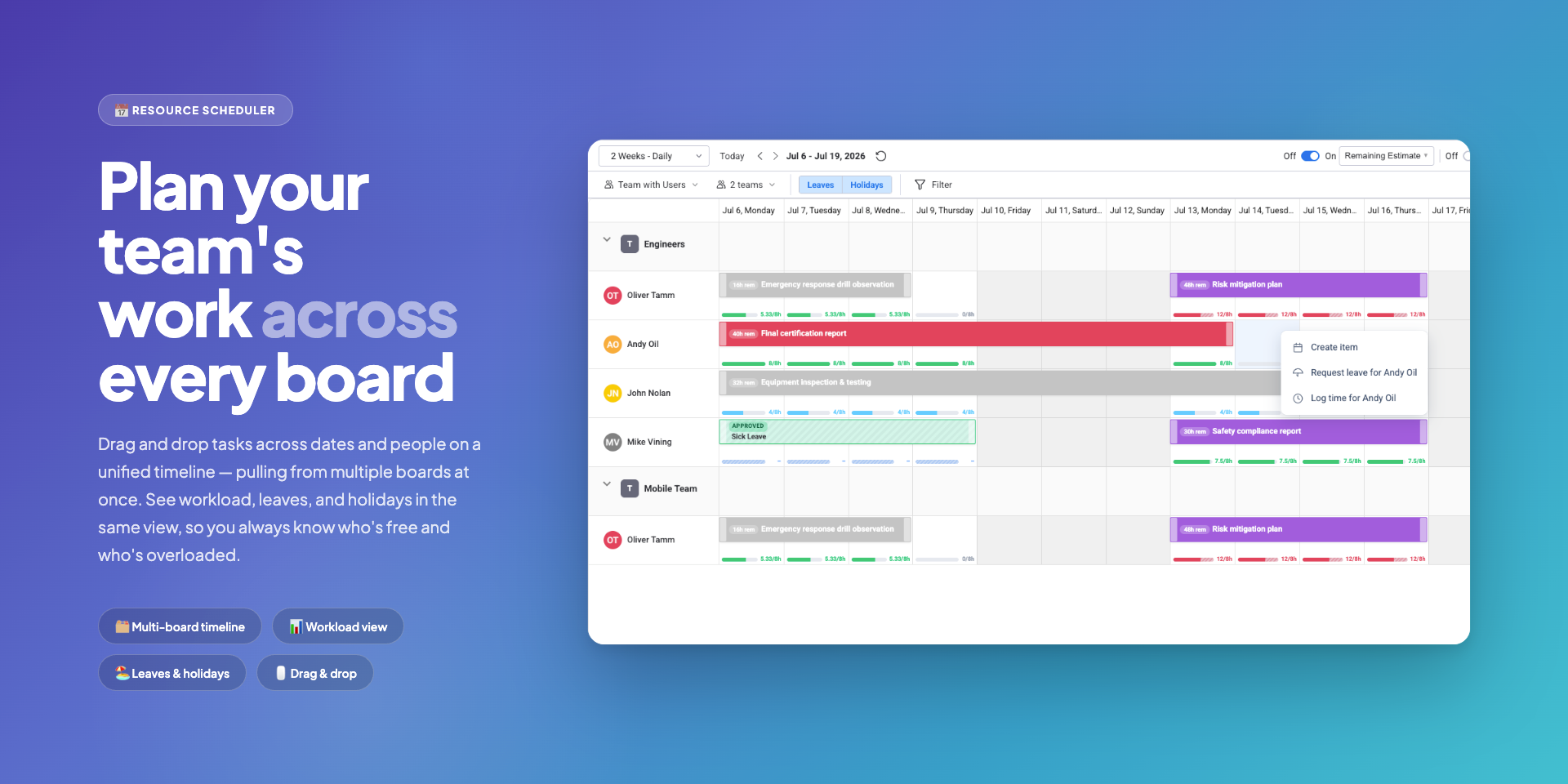
📅 Resource Scheduler — drag tasks across dates and assignees on a Gantt-like timeline. Capacity Management shows color-coded workload per person per day in five modes: Worklog (past) + Workload (future), Remaining Estimate, Availability, Original Estimate, and Number of Items. Define working hours per person or group — with part-time, compressed, and custom schedules all supported.
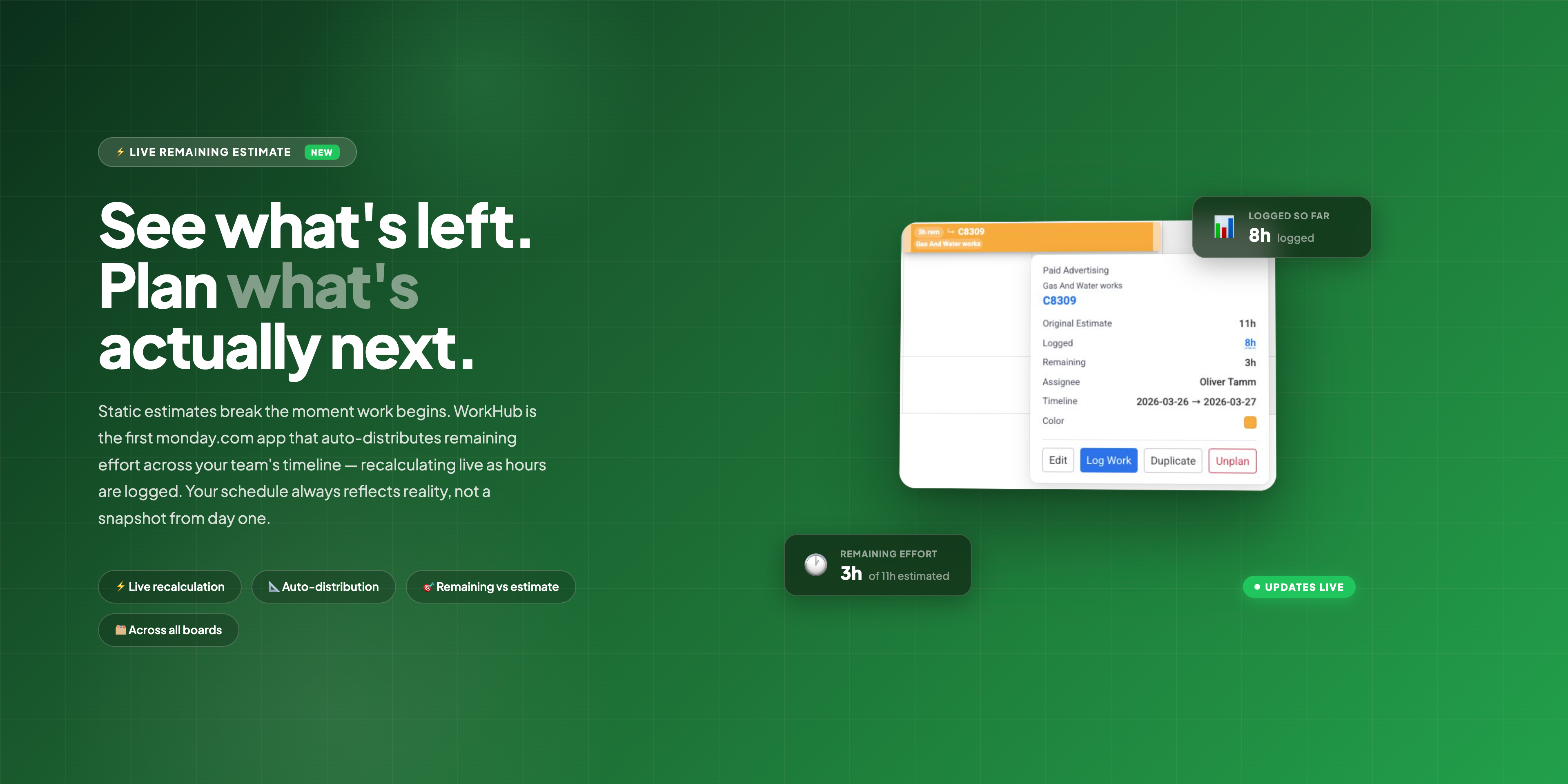
🚀 Remaining Estimates — auto-distributes remaining work across future days. As hours are logged, WorkHub recalculates what's left and updates your workload view instantly. Your plan always answers: "Can we still deliver on time?"
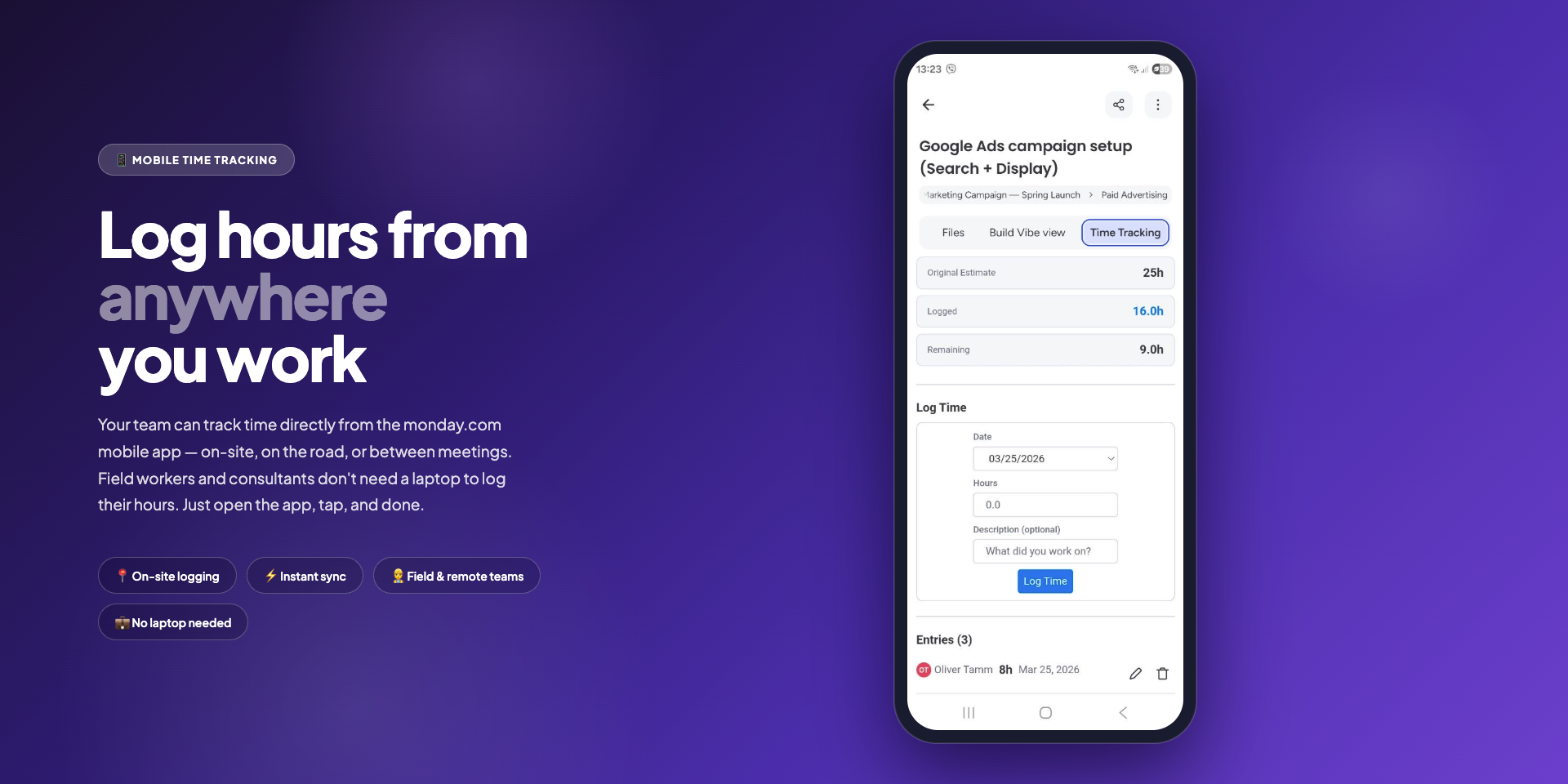
📱 Mobile Time Tracking — log work directly from the monday.com mobile app. Open any item, tap the Time Tracking tab, and record hours. See Original Estimate, Logged, and Remaining at a glance. Perfect for field workers, contractors, and remote teams who aren't at a desk.
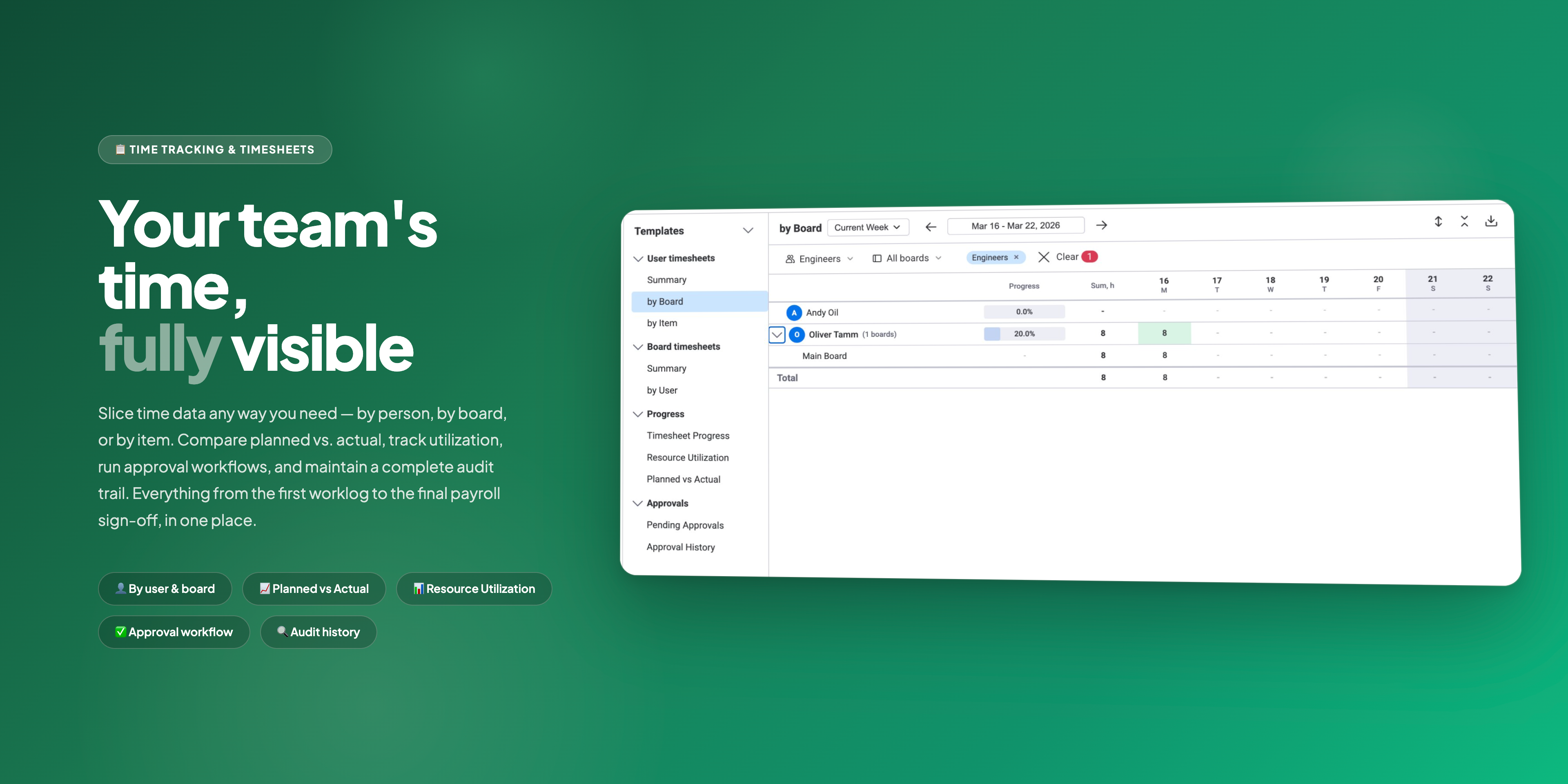
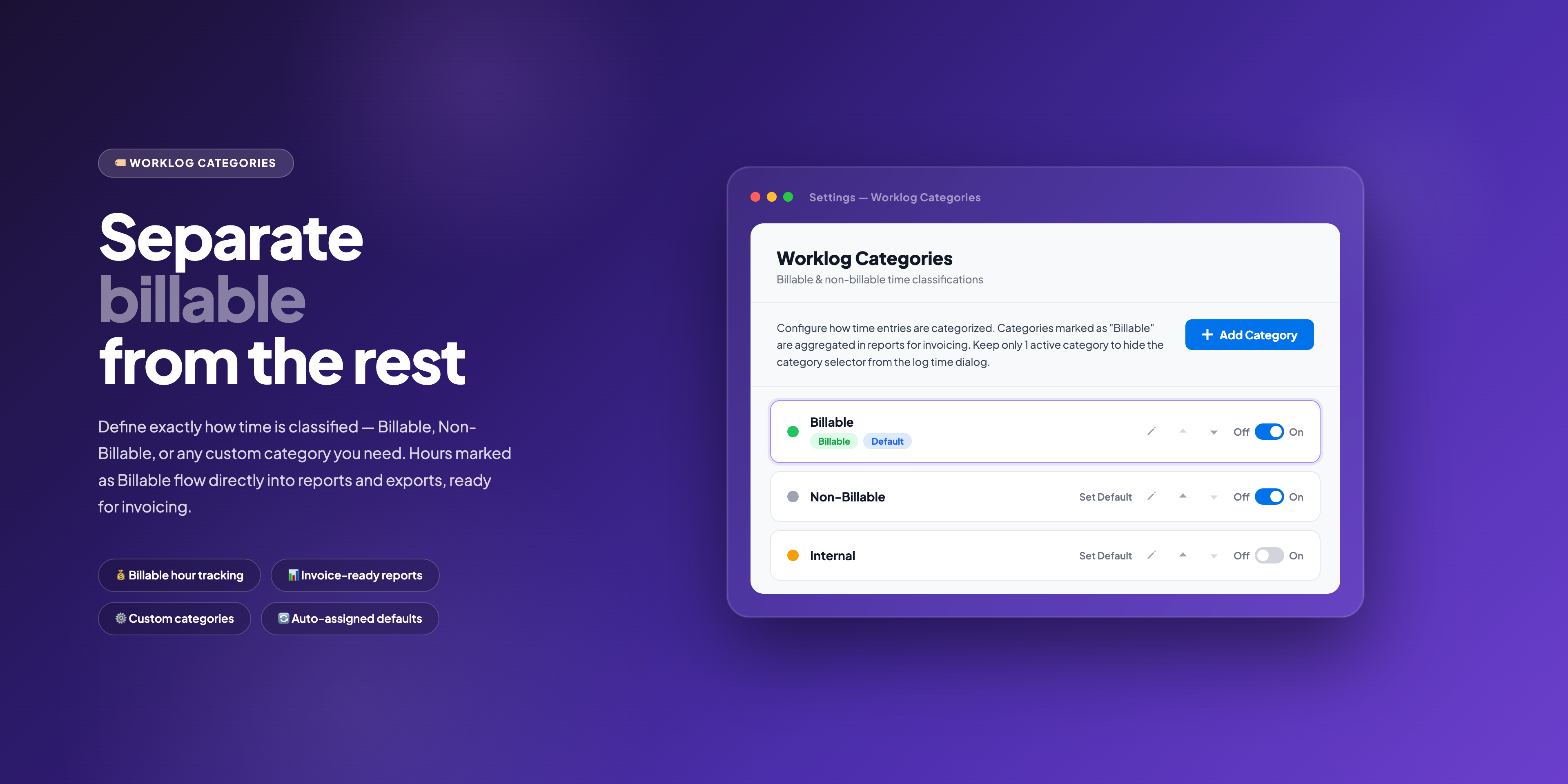
⏱️ Timesheets & Approvals — route timesheets through approval workflows. View by user, board, or item, with summary and progress views. Classify worklogs as Billable or Non-Billable with customizable categories. Managers review, approve, or reject — all within monday.com. Ready for payroll, invoicing, and compliance out of the box.
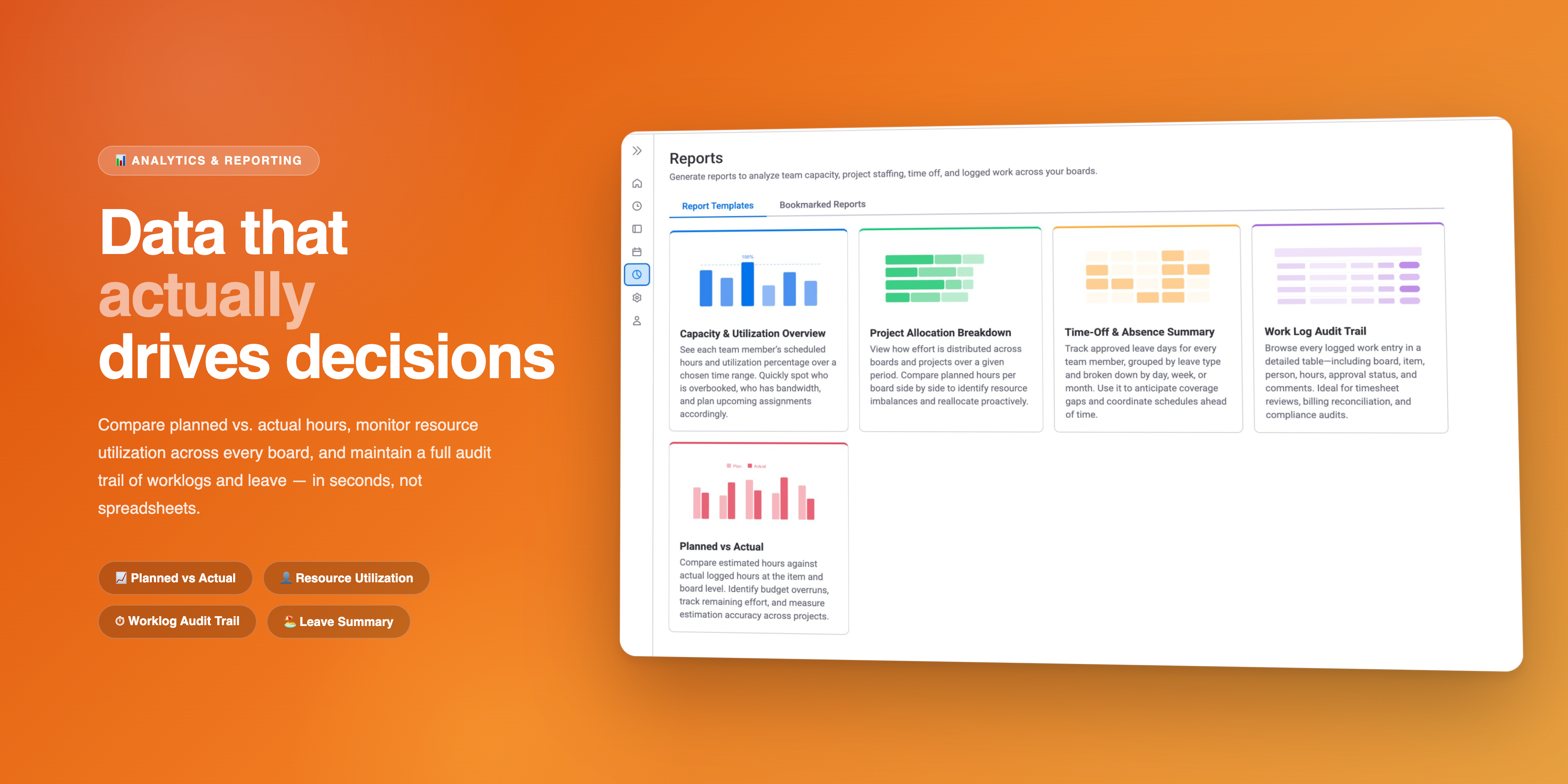
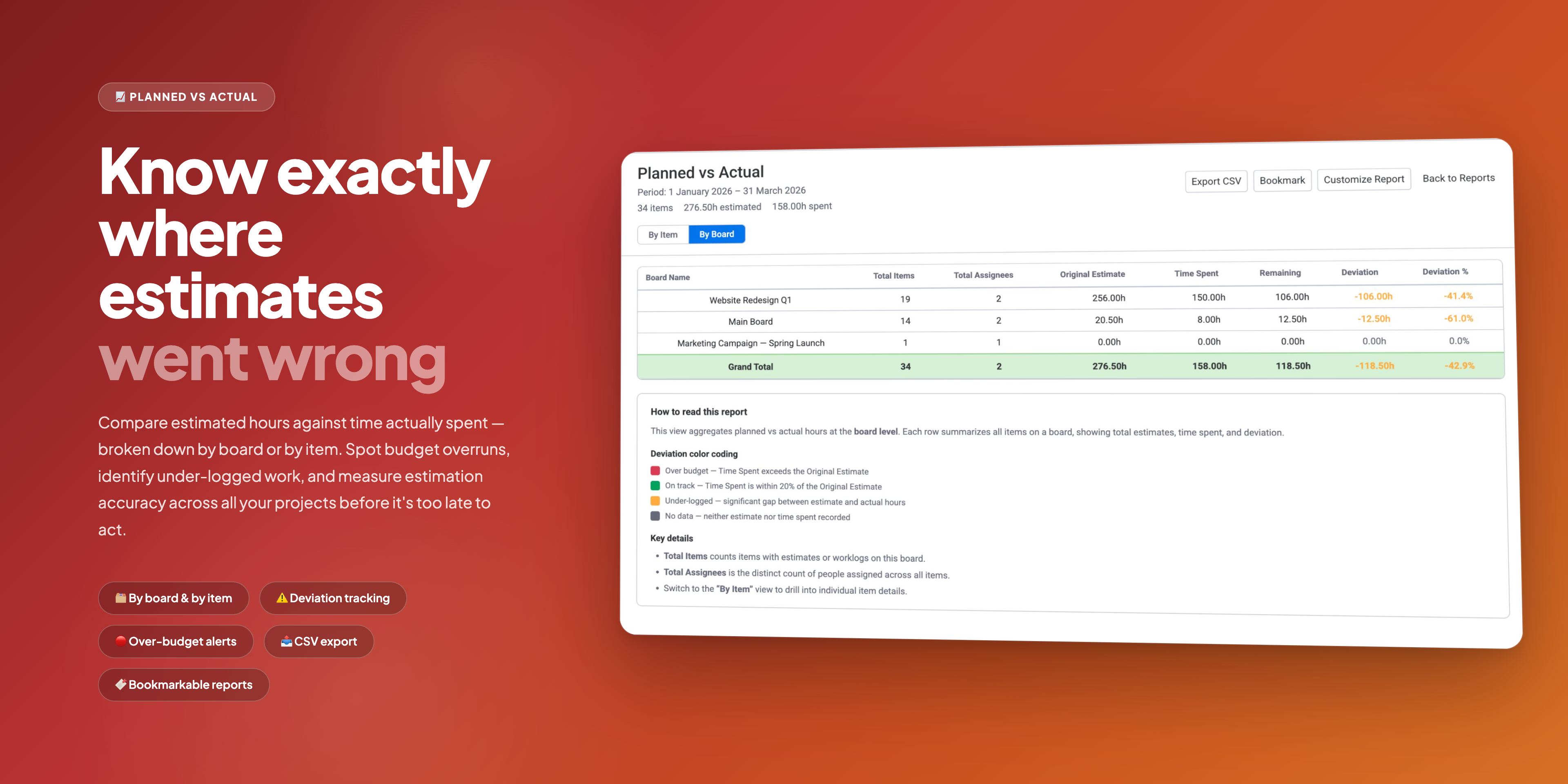
📊 Reports — Capacity & Utilization Overview, Project Allocation Breakdown, Planned vs. Actual, and Time-Off & Absence Summary.
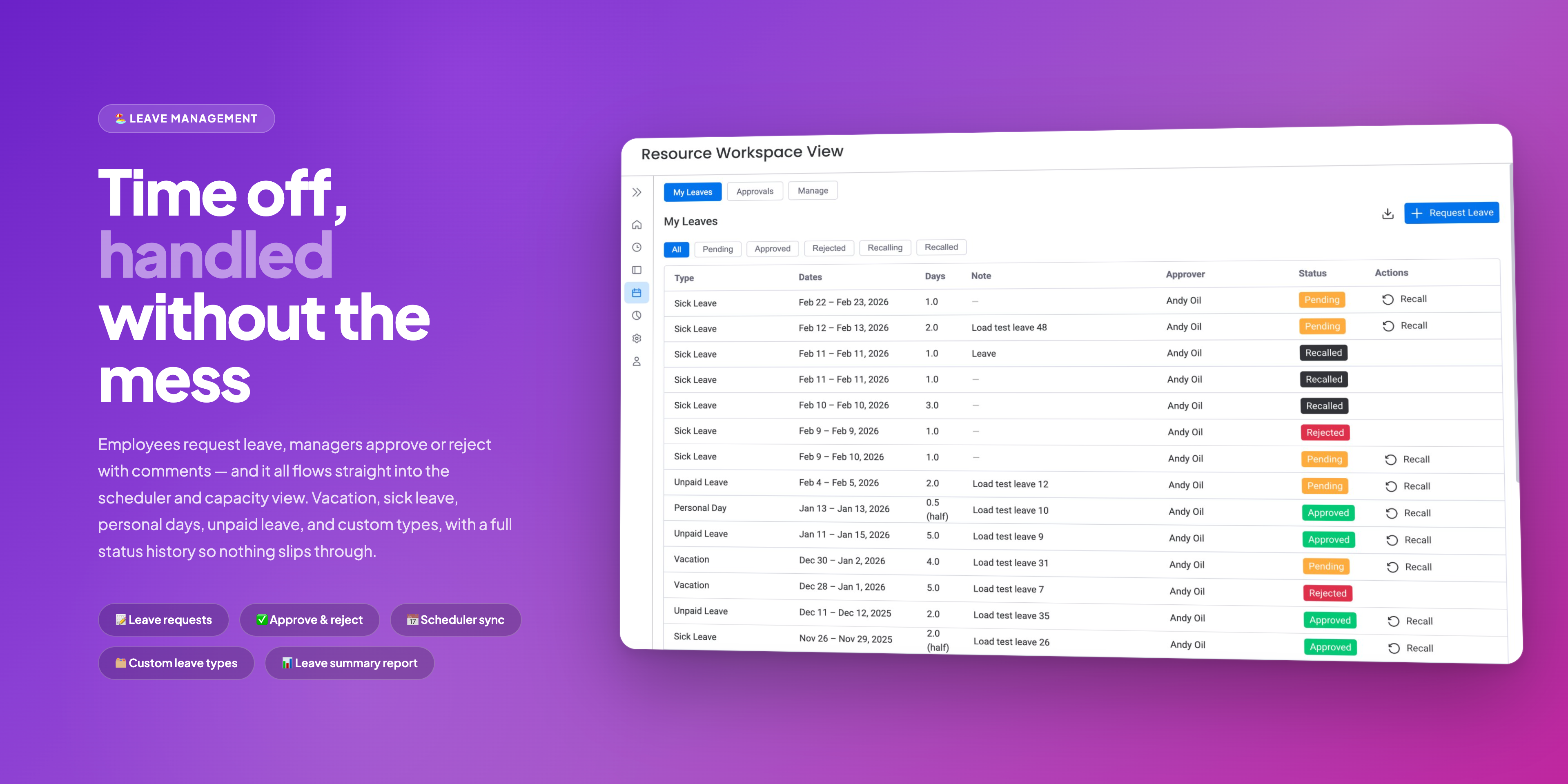
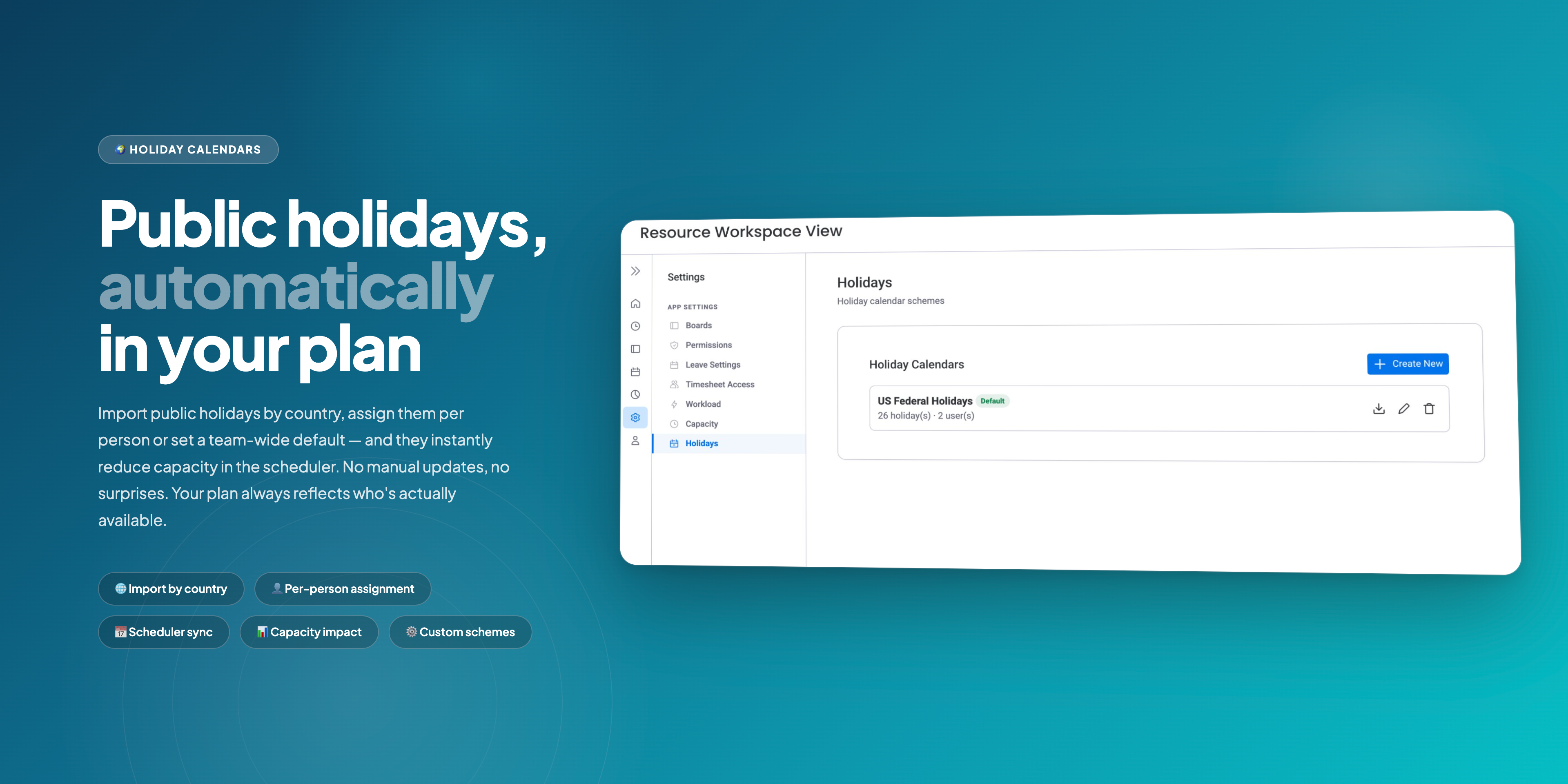
🏖️ Leave & Availability — request and approve vacation, annual leave, sick leave, and custom types. Import public holidays by country and assign per person or team. Approvals sync instantly to capacity and scheduler — no manual adjustments.
Built for teams that need to get it right. Responsive support from the team that builds the product — not a help desk queue.
Missing something? We love hearing from users. If a feature isn't here yet, we'll work with you to build it.
🌐 Documentation · 📅 Book a Demo · 📩 support@reinwok.com
Security & Compliance
Security
Does the developer periodically perform penetration testing?
Does the developer have a dedicated security and privacy point of contact for such issues or questions?
Does the app restrict redirects and forwards only to approved destinations, or show a warning when redirecting to potentially untrusted content?
Does the app protect against mass parameter assignment attacks?
Does the app perform encoding and sanitization on all user supplied parameters to protect against Cross-Site Scripting?
Does the developer protect all state-changing actions against Cross-Site Request Forgery (CSRF)?
Does the developer have mechanisms to notify monday.com in case of a security breach?
Does this developer have a process for installing application-level updates and security patches for the service (such as software packages and databases)?
Compliance
Is the app certified with the information security standard ISO/IEC 27001:2022?
Is the app compliant with the Health Insurance Portability and Accountability Act (HIPAA)?
Is the app certified with System and Organization Controls (SOC 2 or SOC 3)?
Is the app compliant with the General Data Protection Regulation (GDPR)?
Data
Does the app send any data outside of monday.com? If yes, indicate whether the data is customer-submitted (e.g., board names, item names, doc content) or non-customer-submitted (e.g., account ID, board ID, user ID).
Where does the app store logs data?
Where does the app store the app data?
Does the developer ensure application logs do not contain secrets or personally-identifiable information (PII)?
Is customer data segregated from the data of other customers (for example logically or physically)?
Privacy
Does the developer enforce multi-factor authentication on employees access to systems which may process customer data?
Does the developer protect access to customer data based on the principle of least privilege?
Reviews
KW: Work Hub has been an excellent addition to how we use monday.com. The integration is seamless, it has improved visibility, structure, and accountability across our workflows, and it adds real day to day value without unnecessary complexity.
Historical data
Installation history
We have data for December 28, 2024 onwards only. Collected sometime after 00:00 UTC daily.
Total number of installs
Change in total number of installs in last 1 day(s)
Compares the number of installs on each date with 1 days previously:
Change in total number of installs in last 7 day(s)
Compares the number of installs on each date with 7 days previously:
Change in total number of installs in last 30 day(s)
Compares the number of installs on each date with 30 days previously:
Change in total number of installs in last 90 day(s)
Compares the number of installs on each date with 90 days previously:
Change in total number of installs in last 180 day(s)
Compares the number of installs on each date with 180 days previously:
Ratings history
Categories history
Each of the following is a yes/no answer, so the graphs show 1 for yes, and 0 for no.
In "Featured" category?
In "Editor's choice" category?
In "Trending this week" category?
App metadata
ID: 10001107 • App ID: 10883251 • Listing updated: July 6, 2026{
"id": 10001107,
"marketplace_developer_id": 100000168,
"app_id": 10883251,
"app_type": "app",
"security_info": {},
"gallery_assets": [
{
"url": "https://cdn.monday.com/marketplace/10001107/10001107_2026_6_4_8_52_56_7vxfwiq.png",
"type": "image"
},
{
"url": "https://cdn.monday.com/marketplace/10001107/10001107_2026_6_4_8_53_1_sowv79t.png",
"type": "image"
},
{
"url": "https://cdn.monday.com/marketplace/10001107/10001107_2026_6_4_8_53_8_bl14m4n.png",
"type": "image"
},
{
"url": "https://cdn.monday.com/marketplace/10001107/10001107_2026_6_4_8_53_15_paahrex.png",
"type": "image"
},
{
"url": "https://cdn.monday.com/marketplace/10001107/10001107_2026_6_4_8_53_26_3yak379.png",
"type": "image"
},
{
"url": "https://cdn.monday.com/marketplace/10001107/10001107_2026_6_4_8_53_33_iggnf3qi.png",
"type": "image"
},
{
"url": "https://cdn.monday.com/marketplace/10001107/10001107_2026_6_4_8_53_40_wa8zx9eg.png",
"type": "image"
},
{
"url": "https://cdn.monday.com/marketplace/10001107/10001107_2026_6_4_8_53_57_eexz8bc.png",
"type": "image"
},
{
"url": "https://cdn.monday.com/marketplace/10001107/10001107_2026_6_4_8_54_4_sjxllym.png",
"type": "image"
}
],
"description": "<p><strong>WorkHub</strong> is your all-in-one solution for <strong>resource capacity planning </strong>and <strong>time tracking</strong> — designed for project managers, team leads, and operations teams who need full visibility into who's doing what (across all their boards) and whether they have the capacity to do it.</p><p><br></p><p><strong>Why Choose WorkHub?</strong></p><p><br></p><p>📅 <strong>Resource Scheduler</strong> — drag tasks across dates and assignees on a Gantt-like timeline. Capacity Management shows color-coded workload per person per day in five modes: <em>Worklog</em> (past) + <em>Workload</em> (future), <em>Remaining Estimate</em>, <em>Availability</em>, <em>Original Estimate</em>, and <em>Number of Items</em>. Define working hours per person or group — with part-time, compressed, and custom schedules all supported.</p><p><br></p><p>🚀 <strong>Remaining Estimates</strong> — auto-distributes remaining work across future days. As hours are logged, WorkHub recalculates what's left and updates your workload view instantly. Your plan always answers: <em>\"Can we still deliver on time?\"</em></p><p><br></p><p>📱 <strong>Mobile Time Tracking</strong> — log work directly from the monday.com mobile app. Open any item, tap the Time Tracking tab, and record hours. See <strong>Original Estimate</strong>, <strong>Logged</strong>, and <strong>Remaining</strong> at a glance. Perfect for field workers, contractors, and remote teams who aren't at a desk.</p><p><br></p><p>⏱️ <strong>Timesheets & Approvals</strong> — route timesheets through approval workflows. View by user, board, or item, with summary and progress views. Classify worklogs as <strong>Billable</strong> or <strong>Non-Billable</strong> with customizable categories. Managers review, approve, or reject — all within monday.com. Ready for payroll, invoicing, and compliance out of the box.</p><p><br></p><p>📊 <strong>Reports</strong> — Capacity & Utilization Overview, Project Allocation Breakdown, Planned vs. Actual, and Time-Off & Absence Summary.</p><p><br></p><p>🏖️ <strong>Leave & Availability</strong> — request and approve vacation, annual leave, sick leave, and custom types. Import public holidays by country and assign per person or team. Approvals sync instantly to capacity and scheduler — no manual adjustments.</p><p><br></p><p><strong>Built for teams that need to get it right.</strong> Responsive support from the team that builds the product — not a help desk queue.</p><p><br></p><p><strong>Missing something?</strong> We love hearing from users. If a feature isn't here yet, we'll work with you to build it.</p><p>🌐 <a href=\"https://reinwok.com/monday/index.html\" rel=\"noopener noreferrer\" target=\"_blank\">Documentation</a> · 📅 <a href=\"https://reinwok.com/index.html#book-demo\" rel=\"noopener noreferrer\" target=\"_blank\">Book a Demo</a> · 📩 <a href=\"mailto:support@reinwok.com\" rel=\"noopener noreferrer\" target=\"_blank\">support@reinwok.com</a></p>",
"short_description": "Resource planning, time tracking, capacity, leave management",
"thumbnail_url": "https://cdn.monday.com/marketplace/10001107/10001107_2026_2_11_9_30_18_r1go5oy.png",
"logo_url": "https://cdn.monday.com/marketplace/10001107/10001107_2026_2_11_9_29_55_ut94875j.png",
"feedback_url": "support@reinwok.com",
"privacy_policy_url": "https://reinwok.com/privacy-policy.html",
"featured": false,
"name": "Resource Capacity Planning",
"how_to_use_url": "https://reinwok.com/monday/getting-started.html",
"external_pricing_url": null,
"keywords": "resource planning,workload management,time tracking,timesheet,leave management,capacity planning, worklog,resource scheduler,resource management,project management",
"compliance_answers": [
{
"questionId": 19,
"shortAnswer": true,
"detailedAnswer": "Yes. The app sends data to our backend service hosted on Google Cloud Platform (Cloud Run). The data sent includes non-customer-submitted identifiers (account ID, board ID, item ID, user ID) as well as limited customer-submitted content (worklog, descriptions, leave request notes, and user-defined names for saved views, reports, holidays, and capacity schemes)."
},
{
"questionId": 18,
"detailedAnswer": "Application logs are stored in Google Cloud Logging (GCP).",
"logHostingProvider": "other"
},
{
"questionId": 17,
"detailedAnswer": "App data is stored in a PostgreSQL database hosted on Google Cloud Platform (Cloud SQL).",
"dataHostingProvider": "DB"
},
{
"questionId": 14,
"shortAnswer": true,
"detailedAnswer": "Our team has a dedicated point of contact for security and privacy inquiries. Security issues can be reported to support@reinwok.com and will be triaged within 24 hours."
},
{
"questionId": 11,
"shortAnswer": true,
"detailedAnswer": "The app is designed with GDPR principles in mind. We minimize data collection by storing primarily monday.com identifiers rather than personal data - user names and personal details are fetched in real-time from the monday.com API and are not persisted. Customer data is logically isolated using PostgreSQL Row-Level Security. All data is hosted on Google Cloud Platform infrastructure within GDPR-compliant regions. Data is encrypted at rest and in transit. The app supports data deletion upon account uninstallation to fulfill right-to-erasure requirements."
},
{
"questionId": 10,
"shortAnswer": true,
"detailedAnswer": "All redirects in our application are restricted to approved destinations. OAuth flows redirect only to hardcoded monday.com authorization endpoints, and post-authentication redirects use server-configured environment variables — no user-supplied URLs are used for redirection."
},
{
"questionId": 9,
"shortAnswer": true,
"detailedAnswer": "We use NestJS global ValidationPipe with strict whitelisting (whitelist: true, forbidNonWhitelisted: true). All endpoints enforce typed DTOs with class-validator decorators, rejecting any unexpected properties in request payloads."
},
{
"questionId": 8,
"shortAnswer": true,
"detailedAnswer": "Our logging implementation uses structured logging that captures request metadata, error details, and operational events without logging authentication tokens, session secrets, or personally-identifiable information. Sensitive headers (Authorization, X-Monday-Token) are not included in log output. Logs contain only operational data such as request paths, status codes, error messages, and tenant account IDs. Additionally, we have automated checks in our merge process to detect and prevent any accidental logging of sensitive data before code reaches production."
},
{
"questionId": 7,
"shortAnswer": true,
"detailedAnswer": "We enforce multi-factor authentication on all systems that process or have access to customer data, including our Google Cloud Platform console, GitHub repositories. MFA is required for all team members with access to production infrastructure and databases."
},
{
"questionId": 6,
"shortAnswer": true,
"detailedAnswer": "Access to production customer data is restricted based on the principle of least privilege. Our Google Cloud Platform IAM roles are scoped to grant only the minimum permissions required for each team member's role. Direct access to the\nproduction database is limited to essential personnel only. Application secrets and credentials are managed through GCP Secret Manager with access controls. No production customer data is used in development or testing environments."
},
{
"questionId": 5,
"shortAnswer": true,
"detailedAnswer": "Backend validates and constrains all user input via class-validator DTOs. Frontend sanitizes all external data using DOMPurify with zero allowed HTML tags/attributes (plain text only). No unsafe rendering patterns (innerHTML, eval) are used."
},
{
"questionId": 4,
"shortAnswer": true,
"detailedAnswer": "Our application uses stateless JWT-based authentication via Authorization headers (Bearer tokens). Since tokens are not stored in cookies and must be explicitly attached to each request, the application is inherently protected against CSRF attacks. All state-changing actions require a valid session token verified against monday.com's signing secret."
},
{
"questionId": 3,
"shortAnswer": true,
"detailedAnswer": "We have structured logging via GCP Cloud Logging for security event monitoring. In case of a detected security breach, we will notify monday.com's security team promptly via the designated partner communication channels, including details of the incident scope and remediation steps"
},
{
"questionId": 2,
"shortAnswer": true,
"detailedAnswer": "We maintain a regular process for reviewing and applying security patches to all application dependencies and infrastructure. Our application is containerized (Docker) and deployed on Google Cloud Run, enabling rapid deployment of security updates. Dependencies are regularly audited and updated"
},
{
"questionId": 1,
"shortAnswer": true,
"detailedAnswer": "Yes. Customer data is logically segregated using PostgreSQL Row-Level Security (RLS) policies. Every data table includes an account_id column, and RLS policies enforce that each tenant can only access rows matching their own account_id. The tenant context is set at the database session level via middleware after JWT authentication, ensuring data isolation is enforced at the database layer - not just the application layer.\n"
}
],
"created_at": "2026-03-11T09:29:42.000Z",
"updated_at": "2026-07-06T14:13:13.000Z",
"automation_app_id": null,
"marketplace_category_ids": [
10000001,
9,
6
],
"pinned_for_categories_ids": [],
"featured_for_categories_ids": [],
"pricing_data": "14 days trial",
"label": null,
"app_values": [
"Centralize your work on monday.com"
],
"security": false,
"display_in_template_store": false,
"acquisition_source": "No touch",
"is_connector": false,
"show_connections": null,
"terms_of_service_url": "https://reinwok.com/eula.html",
"available_for_tiers": [],
"available_for_products": [],
"google_analytics_tag_id": null,
"is_solution": false,
"cta_override": null,
"app_scope_str": "me:read,boards:read,users:read,teams:read,account:read,boards:write",
"app_client_id": "1e3aec13806ffe709bfb669d7273212b",
"app_color": {
"hsl": {
"h": 260.1923076923077,
"s": 0.7429193899782135,
"l": 0.407190375,
"a": 1
},
"hex": "#4f1bb5",
"rgb": {
"r": 79,
"g": 27,
"b": 181,
"a": 1
},
"hsv": {
"h": 260.1923076923077,
"s": 0.8525,
"v": 0.7097,
"a": 1
},
"oldHue": 260.1923076923077,
"source": "hsv"
},
"plans": [
{
"id": "10883251-1-DEFAULT",
"appPlanId": "DEFAULT",
"name": "default",
"versionId": 1,
"isTrial": true,
"prices": {
"type": "bucket_based",
"buckets": {
"3": {
"monthly": 18,
"yearly": 15
},
"5": {
"monthly": 30,
"yearly": 25
},
"10": {
"monthly": 60,
"yearly": 49
},
"15": {
"monthly": 75,
"yearly": 62
},
"20": {
"monthly": 90,
"yearly": 74
},
"25": {
"monthly": 105,
"yearly": 86
},
"30": {
"monthly": 120,
"yearly": 98
},
"35": {
"monthly": 135,
"yearly": 111
},
"40": {
"monthly": 150,
"yearly": 123
},
"45": {
"monthly": 165,
"yearly": 135
},
"50": {
"monthly": 180,
"yearly": 148
},
"55": {
"monthly": 189,
"yearly": 155
},
"60": {
"monthly": 198,
"yearly": 162
},
"65": {
"monthly": 207,
"yearly": 170
},
"70": {
"monthly": 216,
"yearly": 177
},
"75": {
"monthly": 225,
"yearly": 185
},
"80": {
"monthly": 234,
"yearly": 192
},
"85": {
"monthly": 243,
"yearly": 199
},
"90": {
"monthly": 252,
"yearly": 207
},
"95": {
"monthly": 261,
"yearly": 214
},
"100": {
"monthly": 270,
"yearly": 221
},
"110": {
"monthly": 279,
"yearly": 229
},
"120": {
"monthly": 288,
"yearly": 236
},
"130": {
"monthly": 297,
"yearly": 244
},
"140": {
"monthly": 306,
"yearly": 251
},
"150": {
"monthly": 315,
"yearly": 258
},
"160": {
"monthly": 324,
"yearly": 266
},
"170": {
"monthly": 333,
"yearly": 273
},
"180": {
"monthly": 342,
"yearly": 280
},
"190": {
"monthly": 351,
"yearly": 288
},
"200": {
"monthly": 360,
"yearly": 295
},
"225": {
"monthly": 383,
"yearly": 314
},
"250": {
"monthly": 405,
"yearly": 332
},
"275": {
"monthly": 407,
"yearly": 333
},
"300": {
"monthly": 408,
"yearly": 335
},
"350": {
"monthly": 411,
"yearly": 337
},
"400": {
"monthly": 414,
"yearly": 339
},
"450": {
"monthly": 417,
"yearly": 342
},
"500": {
"monthly": 420,
"yearly": 344
},
"550": {
"monthly": 426,
"yearly": 349
},
"600": {
"monthly": 432,
"yearly": 354
},
"650": {
"monthly": 438,
"yearly": 359
},
"700": {
"monthly": 444,
"yearly": 364
},
"750": {
"monthly": 450,
"yearly": 369
},
"800": {
"monthly": 456,
"yearly": 374
},
"850": {
"monthly": 462,
"yearly": 379
},
"900": {
"monthly": 468,
"yearly": 384
},
"950": {
"monthly": 474,
"yearly": 389
},
"1000": {
"monthly": 480,
"yearly": 394
},
"1100": {
"monthly": 480,
"yearly": 394
},
"1200": {
"monthly": 480,
"yearly": 394
},
"1300": {
"monthly": 480,
"yearly": 394
},
"1400": {
"monthly": 480,
"yearly": 394
},
"1500": {
"monthly": 480,
"yearly": 394
},
"1600": {
"monthly": 480,
"yearly": 394
},
"1700": {
"monthly": 480,
"yearly": 394
},
"1800": {
"monthly": 480,
"yearly": 394
},
"1900": {
"monthly": 480,
"yearly": 394
},
"2000": {
"monthly": 480,
"yearly": 394
},
"2250": {
"monthly": 480,
"yearly": 394
},
"2500": {
"monthly": 480,
"yearly": 394
},
"2750": {
"monthly": 480,
"yearly": 394
},
"3000": {
"monthly": 480,
"yearly": 394
},
"3250": {
"monthly": 480,
"yearly": 394
},
"3500": {
"monthly": 480,
"yearly": 394
},
"3750": {
"monthly": 480,
"yearly": 394
},
"4000": {
"monthly": 480,
"yearly": 394
},
"4250": {
"monthly": 480,
"yearly": 394
},
"4500": {
"monthly": 480,
"yearly": 394
},
"4750": {
"monthly": 480,
"yearly": 394
},
"5000": {
"monthly": 480,
"yearly": 394
},
"6000": {
"monthly": 480,
"yearly": 394
},
"7000": {
"monthly": 480,
"yearly": 394
},
"8000": {
"monthly": 480,
"yearly": 394
},
"9000": {
"monthly": 480,
"yearly": 394
},
"10000": {
"monthly": 480,
"yearly": 394
},
"12500": {
"monthly": 480,
"yearly": 394
},
"15000": {
"monthly": 480,
"yearly": 394
},
"17500": {
"monthly": 480,
"yearly": 394
},
"20000": {
"monthly": 480,
"yearly": 394
},
"25000": {
"monthly": 480,
"yearly": 394
},
"30000": {
"monthly": 480,
"yearly": 394
},
"35000": {
"monthly": 480,
"yearly": 394
},
"40000": {
"monthly": 480,
"yearly": 394
},
"45000": {
"monthly": 480,
"yearly": 394
},
"50000": {
"monthly": 480,
"yearly": 394
},
"60000": {
"monthly": 480,
"yearly": 394
},
"70000": {
"monthly": 480,
"yearly": 394
},
"80000": {
"monthly": 480,
"yearly": 394
},
"90000": {
"monthly": 480,
"yearly": 394
},
"100000": {
"monthly": 480,
"yearly": 394
},
"1000000": {
"monthly": 480,
"yearly": 394
}
}
},
"versionState": "live",
"appId": 10883251,
"description": "Plan, schedule, and track resources across monday.com boards. Manage workloads, capacity, holidays, time tracking, timesheet approvals, leave management, and reporting - all in one app",
"extraData": {
"bullets": [
"Resource planning & task scheduling",
"Workload management with work capacity & scheduled hours",
"Holiday & time-off management ",
"Timesheet approval and Time tracking",
"Workload/Worklog Reporting & Leave approvals"
],
"monthlyFee": null,
"yearlyFee": null
},
"isFree": false,
"isRecommended": false,
"currency": "USD"
},
{
"id": "10883251-2-DEFAULT",
"appPlanId": "DEFAULT",
"name": "default",
"versionId": 2,
"isTrial": true,
"prices": {
"type": "bucket_based",
"buckets": {
"3": {
"monthly": 14,
"yearly": 12
},
"5": {
"monthly": 24,
"yearly": 20
},
"10": {
"monthly": 48,
"yearly": 39
},
"15": {
"monthly": 72,
"yearly": 59
},
"20": {
"monthly": 96,
"yearly": 79
},
"25": {
"monthly": 99,
"yearly": 81
},
"30": {
"monthly": 102,
"yearly": 84
},
"35": {
"monthly": 105,
"yearly": 86
},
"40": {
"monthly": 108,
"yearly": 89
},
"45": {
"monthly": 111,
"yearly": 91
},
"50": {
"monthly": 114,
"yearly": 93
},
"55": {
"monthly": 117,
"yearly": 96
},
"60": {
"monthly": 120,
"yearly": 98
},
"65": {
"monthly": 123,
"yearly": 101
},
"70": {
"monthly": 126,
"yearly": 103
},
"75": {
"monthly": 129,
"yearly": 106
},
"80": {
"monthly": 132,
"yearly": 108
},
"85": {
"monthly": 135,
"yearly": 111
},
"90": {
"monthly": 138,
"yearly": 113
},
"95": {
"monthly": 141,
"yearly": 116
},
"100": {
"monthly": 144,
"yearly": 118
},
"110": {
"monthly": 162,
"yearly": 133
},
"120": {
"monthly": 180,
"yearly": 148
},
"130": {
"monthly": 198,
"yearly": 162
},
"140": {
"monthly": 216,
"yearly": 177
},
"150": {
"monthly": 234,
"yearly": 192
},
"160": {
"monthly": 252,
"yearly": 207
},
"170": {
"monthly": 270,
"yearly": 221
},
"180": {
"monthly": 288,
"yearly": 236
},
"190": {
"monthly": 306,
"yearly": 251
},
"200": {
"monthly": 324,
"yearly": 266
},
"225": {
"monthly": 369,
"yearly": 303
},
"250": {
"monthly": 414,
"yearly": 339
},
"275": {
"monthly": 416,
"yearly": 341
},
"300": {
"monthly": 417,
"yearly": 342
},
"350": {
"monthly": 420,
"yearly": 344
},
"400": {
"monthly": 423,
"yearly": 347
},
"450": {
"monthly": 426,
"yearly": 349
},
"500": {
"monthly": 429,
"yearly": 352
},
"550": {
"monthly": 429,
"yearly": 352
},
"600": {
"monthly": 429,
"yearly": 352
},
"650": {
"monthly": 429,
"yearly": 352
},
"700": {
"monthly": 429,
"yearly": 352
},
"750": {
"monthly": 429,
"yearly": 352
},
"800": {
"monthly": 429,
"yearly": 352
},
"850": {
"monthly": 429,
"yearly": 352
},
"900": {
"monthly": 429,
"yearly": 352
},
"950": {
"monthly": 429,
"yearly": 352
},
"1000": {
"monthly": 429,
"yearly": 352
},
"1100": {
"monthly": 429,
"yearly": 352
},
"1200": {
"monthly": 429,
"yearly": 352
},
"1300": {
"monthly": 429,
"yearly": 352
},
"1400": {
"monthly": 429,
"yearly": 352
},
"1500": {
"monthly": 429,
"yearly": 352
},
"1600": {
"monthly": 429,
"yearly": 352
},
"1700": {
"monthly": 429,
"yearly": 352
},
"1800": {
"monthly": 429,
"yearly": 352
},
"1900": {
"monthly": 429,
"yearly": 352
},
"2000": {
"monthly": 429,
"yearly": 352
},
"2250": {
"monthly": 429,
"yearly": 352
},
"2500": {
"monthly": 429,
"yearly": 352
},
"2750": {
"monthly": 429,
"yearly": 352
},
"3000": {
"monthly": 429,
"yearly": 352
},
"3250": {
"monthly": 429,
"yearly": 352
},
"3500": {
"monthly": 429,
"yearly": 352
},
"3750": {
"monthly": 429,
"yearly": 352
},
"4000": {
"monthly": 429,
"yearly": 352
},
"4250": {
"monthly": 429,
"yearly": 352
},
"4500": {
"monthly": 429,
"yearly": 352
},
"4750": {
"monthly": 429,
"yearly": 352
},
"5000": {
"monthly": 429,
"yearly": 352
},
"6000": {
"monthly": 429,
"yearly": 352
},
"7000": {
"monthly": 429,
"yearly": 352
},
"8000": {
"monthly": 429,
"yearly": 352
},
"9000": {
"monthly": 429,
"yearly": 352
},
"10000": {
"monthly": 429,
"yearly": 352
},
"12500": {
"monthly": 429,
"yearly": 352
},
"15000": {
"monthly": 429,
"yearly": 352
},
"17500": {
"monthly": 429,
"yearly": 352
},
"20000": {
"monthly": 429,
"yearly": 352
},
"25000": {
"monthly": 429,
"yearly": 352
},
"30000": {
"monthly": 429,
"yearly": 352
},
"35000": {
"monthly": 429,
"yearly": 352
},
"40000": {
"monthly": 429,
"yearly": 352
},
"45000": {
"monthly": 429,
"yearly": 352
},
"50000": {
"monthly": 429,
"yearly": 352
},
"60000": {
"monthly": 429,
"yearly": 352
},
"70000": {
"monthly": 429,
"yearly": 352
},
"80000": {
"monthly": 429,
"yearly": 352
},
"90000": {
"monthly": 429,
"yearly": 352
},
"100000": {
"monthly": 429,
"yearly": 352
},
"1000000": {
"monthly": 429,
"yearly": 352
}
}
},
"versionState": "live",
"appId": 10883251,
"description": "Plan, schedule, and track resources across monday.com boards. Manage workloads, capacity, holidays, time tracking, timesheet approvals, leave management, and reporting - all in one app",
"extraData": {
"bullets": [
"Resource planning & task scheduling",
"Workload management with work capacity & scheduled hours",
"Holiday & time-off management ",
"Timesheet approval and Time tracking",
"Workload/Worklog Reporting & Leave approvals"
],
"monthlyFee": null,
"yearlyFee": null
},
"isFree": false,
"isRecommended": false,
"currency": "USD"
},
{
"id": "10883251-3-DEFAULT",
"appPlanId": "DEFAULT",
"name": "default",
"versionId": 3,
"isTrial": true,
"prices": {
"type": "bucket_based",
"buckets": {
"3": {
"monthly": 14,
"yearly": 12
},
"5": {
"monthly": 24,
"yearly": 20
},
"10": {
"monthly": 48,
"yearly": 39
},
"15": {
"monthly": 72,
"yearly": 59
},
"20": {
"monthly": 96,
"yearly": 79
},
"25": {
"monthly": 99,
"yearly": 81
},
"30": {
"monthly": 102,
"yearly": 84
},
"35": {
"monthly": 105,
"yearly": 86
},
"40": {
"monthly": 108,
"yearly": 89
},
"45": {
"monthly": 111,
"yearly": 91
},
"50": {
"monthly": 114,
"yearly": 93
},
"55": {
"monthly": 117,
"yearly": 96
},
"60": {
"monthly": 120,
"yearly": 98
},
"65": {
"monthly": 123,
"yearly": 101
},
"70": {
"monthly": 126,
"yearly": 103
},
"75": {
"monthly": 129,
"yearly": 106
},
"80": {
"monthly": 132,
"yearly": 108
},
"85": {
"monthly": 135,
"yearly": 111
},
"90": {
"monthly": 138,
"yearly": 113
},
"95": {
"monthly": 141,
"yearly": 116
},
"100": {
"monthly": 144,
"yearly": 118
},
"110": {
"monthly": 162,
"yearly": 133
},
"120": {
"monthly": 180,
"yearly": 148
},
"130": {
"monthly": 198,
"yearly": 162
},
"140": {
"monthly": 216,
"yearly": 177
},
"150": {
"monthly": 234,
"yearly": 192
},
"160": {
"monthly": 252,
"yearly": 207
},
"170": {
"monthly": 270,
"yearly": 221
},
"180": {
"monthly": 288,
"yearly": 236
},
"190": {
"monthly": 306,
"yearly": 251
},
"200": {
"monthly": 324,
"yearly": 266
},
"225": {
"monthly": 369,
"yearly": 303
},
"250": {
"monthly": 414,
"yearly": 339
},
"275": {
"monthly": 416,
"yearly": 341
},
"300": {
"monthly": 417,
"yearly": 342
},
"350": {
"monthly": 420,
"yearly": 344
},
"400": {
"monthly": 423,
"yearly": 347
},
"450": {
"monthly": 426,
"yearly": 349
},
"500": {
"monthly": 429,
"yearly": 352
},
"550": {
"monthly": 429,
"yearly": 352
},
"600": {
"monthly": 429,
"yearly": 352
},
"650": {
"monthly": 429,
"yearly": 352
},
"700": {
"monthly": 429,
"yearly": 352
},
"750": {
"monthly": 429,
"yearly": 352
},
"800": {
"monthly": 429,
"yearly": 352
},
"850": {
"monthly": 429,
"yearly": 352
},
"900": {
"monthly": 429,
"yearly": 352
},
"950": {
"monthly": 429,
"yearly": 352
},
"1000": {
"monthly": 429,
"yearly": 352
},
"1100": {
"monthly": 429,
"yearly": 352
},
"1200": {
"monthly": 429,
"yearly": 352
},
"1300": {
"monthly": 429,
"yearly": 352
},
"1400": {
"monthly": 429,
"yearly": 352
},
"1500": {
"monthly": 429,
"yearly": 352
},
"1600": {
"monthly": 429,
"yearly": 352
},
"1700": {
"monthly": 429,
"yearly": 352
},
"1800": {
"monthly": 429,
"yearly": 352
},
"1900": {
"monthly": 429,
"yearly": 352
},
"2000": {
"monthly": 429,
"yearly": 352
},
"2250": {
"monthly": 429,
"yearly": 352
},
"2500": {
"monthly": 429,
"yearly": 352
},
"2750": {
"monthly": 429,
"yearly": 352
},
"3000": {
"monthly": 429,
"yearly": 352
},
"3250": {
"monthly": 429,
"yearly": 352
},
"3500": {
"monthly": 429,
"yearly": 352
},
"3750": {
"monthly": 429,
"yearly": 352
},
"4000": {
"monthly": 429,
"yearly": 352
},
"4250": {
"monthly": 429,
"yearly": 352
},
"4500": {
"monthly": 429,
"yearly": 352
},
"4750": {
"monthly": 429,
"yearly": 352
},
"5000": {
"monthly": 429,
"yearly": 352
},
"6000": {
"monthly": 429,
"yearly": 352
},
"7000": {
"monthly": 429,
"yearly": 352
},
"8000": {
"monthly": 429,
"yearly": 352
},
"9000": {
"monthly": 429,
"yearly": 352
},
"10000": {
"monthly": 429,
"yearly": 352
},
"12500": {
"monthly": 429,
"yearly": 352
},
"15000": {
"monthly": 429,
"yearly": 352
},
"17500": {
"monthly": 429,
"yearly": 352
},
"20000": {
"monthly": 429,
"yearly": 352
},
"25000": {
"monthly": 429,
"yearly": 352
},
"30000": {
"monthly": 429,
"yearly": 352
},
"35000": {
"monthly": 429,
"yearly": 352
},
"40000": {
"monthly": 429,
"yearly": 352
},
"45000": {
"monthly": 429,
"yearly": 352
},
"50000": {
"monthly": 429,
"yearly": 352
},
"60000": {
"monthly": 429,
"yearly": 352
},
"70000": {
"monthly": 429,
"yearly": 352
},
"80000": {
"monthly": 429,
"yearly": 352
},
"90000": {
"monthly": 429,
"yearly": 352
},
"100000": {
"monthly": 429,
"yearly": 352
},
"1000000": {
"monthly": 429,
"yearly": 352
}
}
},
"versionState": "live",
"appId": 10883251,
"description": "Plan, schedule, and track resources across monday.com boards. Manage workloads, capacity, holidays, time tracking, timesheet approvals, leave management, and reporting - all in one app",
"extraData": {
"bullets": [
"Resource planning & task scheduling",
"Workload management with work capacity & scheduled hours",
"Holiday & time-off management ",
"Timesheet approval and Time tracking",
"Workload/Worklog Reporting & Leave approvals"
],
"monthlyFee": null,
"yearlyFee": null
},
"isFree": false,
"isRecommended": false,
"currency": "USD"
},
{
"id": "10883251-4-DEFAULT",
"appPlanId": "DEFAULT",
"name": "default",
"versionId": 4,
"isTrial": true,
"prices": {
"type": "bucket_based",
"buckets": {
"3": {
"monthly": 14,
"yearly": 12
},
"5": {
"monthly": 24,
"yearly": 20
},
"10": {
"monthly": 48,
"yearly": 39
},
"15": {
"monthly": 72,
"yearly": 59
},
"20": {
"monthly": 96,
"yearly": 79
},
"25": {
"monthly": 99,
"yearly": 81
},
"30": {
"monthly": 102,
"yearly": 84
},
"35": {
"monthly": 105,
"yearly": 86
},
"40": {
"monthly": 108,
"yearly": 89
},
"45": {
"monthly": 111,
"yearly": 91
},
"50": {
"monthly": 114,
"yearly": 93
},
"55": {
"monthly": 117,
"yearly": 96
},
"60": {
"monthly": 120,
"yearly": 98
},
"65": {
"monthly": 123,
"yearly": 101
},
"70": {
"monthly": 126,
"yearly": 103
},
"75": {
"monthly": 129,
"yearly": 106
},
"80": {
"monthly": 132,
"yearly": 108
},
"85": {
"monthly": 135,
"yearly": 111
},
"90": {
"monthly": 138,
"yearly": 113
},
"95": {
"monthly": 141,
"yearly": 116
},
"100": {
"monthly": 144,
"yearly": 118
},
"110": {
"monthly": 162,
"yearly": 133
},
"120": {
"monthly": 180,
"yearly": 148
},
"130": {
"monthly": 198,
"yearly": 162
},
"140": {
"monthly": 216,
"yearly": 177
},
"150": {
"monthly": 234,
"yearly": 192
},
"160": {
"monthly": 252,
"yearly": 207
},
"170": {
"monthly": 270,
"yearly": 221
},
"180": {
"monthly": 288,
"yearly": 236
},
"190": {
"monthly": 306,
"yearly": 251
},
"200": {
"monthly": 324,
"yearly": 266
},
"225": {
"monthly": 369,
"yearly": 303
},
"250": {
"monthly": 414,
"yearly": 339
},
"275": {
"monthly": 416,
"yearly": 341
},
"300": {
"monthly": 417,
"yearly": 342
},
"350": {
"monthly": 420,
"yearly": 344
},
"400": {
"monthly": 423,
"yearly": 347
},
"450": {
"monthly": 426,
"yearly": 349
},
"500": {
"monthly": 429,
"yearly": 352
},
"550": {
"monthly": 429,
"yearly": 352
},
"600": {
"monthly": 429,
"yearly": 352
},
"650": {
"monthly": 429,
"yearly": 352
},
"700": {
"monthly": 429,
"yearly": 352
},
"750": {
"monthly": 429,
"yearly": 352
},
"800": {
"monthly": 429,
"yearly": 352
},
"850": {
"monthly": 429,
"yearly": 352
},
"900": {
"monthly": 429,
"yearly": 352
},
"950": {
"monthly": 429,
"yearly": 352
},
"1000": {
"monthly": 429,
"yearly": 352
},
"1100": {
"monthly": 429,
"yearly": 352
},
"1200": {
"monthly": 429,
"yearly": 352
},
"1300": {
"monthly": 429,
"yearly": 352
},
"1400": {
"monthly": 429,
"yearly": 352
},
"1500": {
"monthly": 429,
"yearly": 352
},
"1600": {
"monthly": 429,
"yearly": 352
},
"1700": {
"monthly": 429,
"yearly": 352
},
"1800": {
"monthly": 429,
"yearly": 352
},
"1900": {
"monthly": 429,
"yearly": 352
},
"2000": {
"monthly": 429,
"yearly": 352
},
"2250": {
"monthly": 429,
"yearly": 352
},
"2500": {
"monthly": 429,
"yearly": 352
},
"2750": {
"monthly": 429,
"yearly": 352
},
"3000": {
"monthly": 429,
"yearly": 352
},
"3250": {
"monthly": 429,
"yearly": 352
},
"3500": {
"monthly": 429,
"yearly": 352
},
"3750": {
"monthly": 429,
"yearly": 352
},
"4000": {
"monthly": 429,
"yearly": 352
},
"4250": {
"monthly": 429,
"yearly": 352
},
"4500": {
"monthly": 429,
"yearly": 352
},
"4750": {
"monthly": 429,
"yearly": 352
},
"5000": {
"monthly": 429,
"yearly": 352
},
"6000": {
"monthly": 429,
"yearly": 352
},
"7000": {
"monthly": 429,
"yearly": 352
},
"8000": {
"monthly": 429,
"yearly": 352
},
"9000": {
"monthly": 429,
"yearly": 352
},
"10000": {
"monthly": 429,
"yearly": 352
},
"12500": {
"monthly": 429,
"yearly": 352
},
"15000": {
"monthly": 429,
"yearly": 352
},
"17500": {
"monthly": 429,
"yearly": 352
},
"20000": {
"monthly": 429,
"yearly": 352
},
"25000": {
"monthly": 429,
"yearly": 352
},
"30000": {
"monthly": 429,
"yearly": 352
},
"35000": {
"monthly": 429,
"yearly": 352
},
"40000": {
"monthly": 429,
"yearly": 352
},
"45000": {
"monthly": 429,
"yearly": 352
},
"50000": {
"monthly": 429,
"yearly": 352
},
"60000": {
"monthly": 429,
"yearly": 352
},
"70000": {
"monthly": 429,
"yearly": 352
},
"80000": {
"monthly": 429,
"yearly": 352
},
"90000": {
"monthly": 429,
"yearly": 352
},
"100000": {
"monthly": 429,
"yearly": 352
},
"1000000": {
"monthly": 429,
"yearly": 352
}
}
},
"versionState": "live",
"appId": 10883251,
"description": "Plan, schedule, and track resources across monday.com boards. Manage workloads, capacity, holidays, time tracking, timesheet approvals, leave management, and reporting - all in one app",
"extraData": {
"bullets": [
"Resource planning & task scheduling",
"Workload management with work capacity & scheduled hours",
"Holiday & time-off management ",
"Timesheet approval and Time tracking",
"Workload/Worklog Reporting & Leave approvals"
],
"monthlyFee": null,
"yearlyFee": null
},
"isFree": false,
"isRecommended": false,
"currency": "USD"
},
{
"id": "10883251-5-DEFAULT",
"appPlanId": "DEFAULT",
"name": "default",
"versionId": 5,
"isTrial": true,
"prices": {
"type": "bucket_based",
"buckets": {
"3": {
"monthly": 3,
"yearly": 2
},
"5": {
"monthly": 5,
"yearly": 4
},
"10": {
"monthly": 10,
"yearly": 8
},
"15": {
"monthly": 15,
"yearly": 12
},
"20": {
"monthly": 20,
"yearly": 16
},
"25": {
"monthly": 24,
"yearly": 20
},
"30": {
"monthly": 29,
"yearly": 24
},
"35": {
"monthly": 34,
"yearly": 28
},
"40": {
"monthly": 39,
"yearly": 32
},
"45": {
"monthly": 44,
"yearly": 36
},
"50": {
"monthly": 49,
"yearly": 40
},
"55": {
"monthly": 49,
"yearly": 40
},
"60": {
"monthly": 49,
"yearly": 40
},
"65": {
"monthly": 49,
"yearly": 40
},
"70": {
"monthly": 49,
"yearly": 40
},
"75": {
"monthly": 49,
"yearly": 40
},
"80": {
"monthly": 49,
"yearly": 40
},
"85": {
"monthly": 49,
"yearly": 40
},
"90": {
"monthly": 49,
"yearly": 40
},
"95": {
"monthly": 49,
"yearly": 40
},
"100": {
"monthly": 49,
"yearly": 40
},
"110": {
"monthly": 49,
"yearly": 40
},
"120": {
"monthly": 49,
"yearly": 40
},
"130": {
"monthly": 49,
"yearly": 40
},
"140": {
"monthly": 49,
"yearly": 40
},
"150": {
"monthly": 49,
"yearly": 40
},
"160": {
"monthly": 49,
"yearly": 40
},
"170": {
"monthly": 49,
"yearly": 40
},
"180": {
"monthly": 49,
"yearly": 40
},
"190": {
"monthly": 49,
"yearly": 40
},
"200": {
"monthly": 49,
"yearly": 40
},
"225": {
"monthly": 49,
"yearly": 40
},
"250": {
"monthly": 49,
"yearly": 40
},
"275": {
"monthly": 49,
"yearly": 40
},
"300": {
"monthly": 49,
"yearly": 40
},
"350": {
"monthly": 49,
"yearly": 40
},
"400": {
"monthly": 49,
"yearly": 40
},
"450": {
"monthly": 49,
"yearly": 40
},
"500": {
"monthly": 49,
"yearly": 40
},
"550": {
"monthly": 49,
"yearly": 40
},
"600": {
"monthly": 49,
"yearly": 40
},
"650": {
"monthly": 49,
"yearly": 40
},
"700": {
"monthly": 49,
"yearly": 40
},
"750": {
"monthly": 49,
"yearly": 40
},
"800": {
"monthly": 49,
"yearly": 40
},
"850": {
"monthly": 49,
"yearly": 40
},
"900": {
"monthly": 49,
"yearly": 40
},
"950": {
"monthly": 49,
"yearly": 40
},
"1000": {
"monthly": 49,
"yearly": 40
},
"1100": {
"monthly": 49,
"yearly": 40
},
"1200": {
"monthly": 49,
"yearly": 40
},
"1300": {
"monthly": 49,
"yearly": 40
},
"1400": {
"monthly": 49,
"yearly": 40
},
"1500": {
"monthly": 49,
"yearly": 40
},
"1600": {
"monthly": 49,
"yearly": 40
},
"1700": {
"monthly": 49,
"yearly": 40
},
"1800": {
"monthly": 49,
"yearly": 40
},
"1900": {
"monthly": 49,
"yearly": 40
},
"2000": {
"monthly": 49,
"yearly": 40
},
"2250": {
"monthly": 49,
"yearly": 40
},
"2500": {
"monthly": 49,
"yearly": 40
},
"2750": {
"monthly": 49,
"yearly": 40
},
"3000": {
"monthly": 49,
"yearly": 40
},
"3250": {
"monthly": 49,
"yearly": 40
},
"3500": {
"monthly": 49,
"yearly": 40
},
"3750": {
"monthly": 49,
"yearly": 40
},
"4000": {
"monthly": 49,
"yearly": 40
},
"4250": {
"monthly": 49,
"yearly": 40
},
"4500": {
"monthly": 49,
"yearly": 40
},
"4750": {
"monthly": 49,
"yearly": 40
},
"5000": {
"monthly": 49,
"yearly": 40
},
"6000": {
"monthly": 49,
"yearly": 40
},
"7000": {
"monthly": 49,
"yearly": 40
},
"8000": {
"monthly": 49,
"yearly": 40
},
"9000": {
"monthly": 49,
"yearly": 40
},
"10000": {
"monthly": 49,
"yearly": 40
},
"12500": {
"monthly": 49,
"yearly": 40
},
"15000": {
"monthly": 49,
"yearly": 40
},
"17500": {
"monthly": 49,
"yearly": 40
},
"20000": {
"monthly": 49,
"yearly": 40
},
"25000": {
"monthly": 49,
"yearly": 40
},
"30000": {
"monthly": 49,
"yearly": 40
},
"35000": {
"monthly": 49,
"yearly": 40
},
"40000": {
"monthly": 49,
"yearly": 40
},
"45000": {
"monthly": 49,
"yearly": 40
},
"50000": {
"monthly": 49,
"yearly": 40
},
"60000": {
"monthly": 49,
"yearly": 40
},
"70000": {
"monthly": 49,
"yearly": 40
},
"80000": {
"monthly": 49,
"yearly": 40
},
"90000": {
"monthly": 49,
"yearly": 40
},
"100000": {
"monthly": 49,
"yearly": 40
},
"1000000": {
"monthly": 49,
"yearly": 40
}
}
},
"versionState": "live",
"appId": 10883251,
"description": "Plan, schedule, and track resources across monday.com boards. Manage workloads, capacity, holidays, time tracking, timesheet approvals, leave management, and reporting - all in one app",
"extraData": {
"bullets": [
"Resource capacity planning",
"Workload management with work capacity & scheduled hours",
"Holiday & time-off management ",
"Timesheet approval and Time tracking",
"Workload/Worklog Reporting & Leave approvals"
],
"monthlyFee": null,
"yearlyFee": null
},
"isFree": false,
"isRecommended": false,
"currency": "USD"
},
{
"id": "10883251-6-DEFAULT",
"appPlanId": "DEFAULT",
"name": "default",
"versionId": 6,
"isTrial": true,
"prices": {
"type": "bucket_based",
"buckets": {
"3": {
"monthly": 14,
"yearly": 12
},
"5": {
"monthly": 24,
"yearly": 20
},
"10": {
"monthly": 48,
"yearly": 39
},
"15": {
"monthly": 72,
"yearly": 59
},
"20": {
"monthly": 96,
"yearly": 79
},
"25": {
"monthly": 99,
"yearly": 81
},
"30": {
"monthly": 102,
"yearly": 84
},
"35": {
"monthly": 105,
"yearly": 86
},
"40": {
"monthly": 108,
"yearly": 89
},
"45": {
"monthly": 111,
"yearly": 91
},
"50": {
"monthly": 114,
"yearly": 93
},
"55": {
"monthly": 117,
"yearly": 96
},
"60": {
"monthly": 120,
"yearly": 98
},
"65": {
"monthly": 123,
"yearly": 101
},
"70": {
"monthly": 126,
"yearly": 103
},
"75": {
"monthly": 129,
"yearly": 106
},
"80": {
"monthly": 132,
"yearly": 108
},
"85": {
"monthly": 135,
"yearly": 111
},
"90": {
"monthly": 138,
"yearly": 113
},
"95": {
"monthly": 141,
"yearly": 116
},
"100": {
"monthly": 144,
"yearly": 118
},
"110": {
"monthly": 162,
"yearly": 133
},
"120": {
"monthly": 180,
"yearly": 148
},
"130": {
"monthly": 198,
"yearly": 162
},
"140": {
"monthly": 216,
"yearly": 177
},
"150": {
"monthly": 234,
"yearly": 192
},
"160": {
"monthly": 252,
"yearly": 207
},
"170": {
"monthly": 270,
"yearly": 221
},
"180": {
"monthly": 288,
"yearly": 236
},
"190": {
"monthly": 306,
"yearly": 251
},
"200": {
"monthly": 324,
"yearly": 266
},
"225": {
"monthly": 369,
"yearly": 303
},
"250": {
"monthly": 414,
"yearly": 339
},
"275": {
"monthly": 416,
"yearly": 341
},
"300": {
"monthly": 417,
"yearly": 342
},
"350": {
"monthly": 420,
"yearly": 344
},
"400": {
"monthly": 423,
"yearly": 347
},
"450": {
"monthly": 426,
"yearly": 349
},
"500": {
"monthly": 429,
"yearly": 352
},
"550": {
"monthly": 429,
"yearly": 352
},
"600": {
"monthly": 429,
"yearly": 352
},
"650": {
"monthly": 429,
"yearly": 352
},
"700": {
"monthly": 429,
"yearly": 352
},
"750": {
"monthly": 429,
"yearly": 352
},
"800": {
"monthly": 429,
"yearly": 352
},
"850": {
"monthly": 429,
"yearly": 352
},
"900": {
"monthly": 429,
"yearly": 352
},
"950": {
"monthly": 429,
"yearly": 352
},
"1000": {
"monthly": 429,
"yearly": 352
},
"1100": {
"monthly": 429,
"yearly": 352
},
"1200": {
"monthly": 429,
"yearly": 352
},
"1300": {
"monthly": 429,
"yearly": 352
},
"1400": {
"monthly": 429,
"yearly": 352
},
"1500": {
"monthly": 429,
"yearly": 352
},
"1600": {
"monthly": 429,
"yearly": 352
},
"1700": {
"monthly": 429,
"yearly": 352
},
"1800": {
"monthly": 429,
"yearly": 352
},
"1900": {
"monthly": 429,
"yearly": 352
},
"2000": {
"monthly": 429,
"yearly": 352
},
"2250": {
"monthly": 429,
"yearly": 352
},
"2500": {
"monthly": 429,
"yearly": 352
},
"2750": {
"monthly": 429,
"yearly": 352
},
"3000": {
"monthly": 429,
"yearly": 352
},
"3250": {
"monthly": 429,
"yearly": 352
},
"3500": {
"monthly": 429,
"yearly": 352
},
"3750": {
"monthly": 429,
"yearly": 352
},
"4000": {
"monthly": 429,
"yearly": 352
},
"4250": {
"monthly": 429,
"yearly": 352
},
"4500": {
"monthly": 429,
"yearly": 352
},
"4750": {
"monthly": 429,
"yearly": 352
},
"5000": {
"monthly": 429,
"yearly": 352
},
"6000": {
"monthly": 429,
"yearly": 352
},
"7000": {
"monthly": 429,
"yearly": 352
},
"8000": {
"monthly": 429,
"yearly": 352
},
"9000": {
"monthly": 429,
"yearly": 352
},
"10000": {
"monthly": 429,
"yearly": 352
},
"12500": {
"monthly": 429,
"yearly": 352
},
"15000": {
"monthly": 429,
"yearly": 352
},
"17500": {
"monthly": 429,
"yearly": 352
},
"20000": {
"monthly": 429,
"yearly": 352
},
"25000": {
"monthly": 429,
"yearly": 352
},
"30000": {
"monthly": 429,
"yearly": 352
},
"35000": {
"monthly": 429,
"yearly": 352
},
"40000": {
"monthly": 429,
"yearly": 352
},
"45000": {
"monthly": 429,
"yearly": 352
},
"50000": {
"monthly": 429,
"yearly": 352
},
"60000": {
"monthly": 429,
"yearly": 352
},
"70000": {
"monthly": 429,
"yearly": 352
},
"80000": {
"monthly": 429,
"yearly": 352
},
"90000": {
"monthly": 429,
"yearly": 352
},
"100000": {
"monthly": 429,
"yearly": 352
},
"1000000": {
"monthly": 429,
"yearly": 352
}
}
},
"versionState": "live",
"appId": 10883251,
"description": "Plan, schedule, and track resources across monday.com boards. Manage workloads, capacity, holidays, time tracking, timesheet approvals, leave management, and reporting - all in one app",
"extraData": {
"bullets": [
"Resource capacity planning ",
"Workload management with work capacity & scheduled hours",
"Holiday & time-off management ",
"Timesheets and Time tracking",
"Utilization and Planned vs Actual reports"
],
"monthlyFee": null,
"yearlyFee": null
},
"isFree": false,
"isRecommended": false,
"currency": "USD"
}
],
"app_live_version": {
"updated_at": "2026-03-25T20:19:19.368Z",
"id": 13623399
},
"pricing_model": null,
"monetization": {
"monetizationType": "monday",
"hasFreePlan": false,
"hasPaidPlan": true,
"hasTrialPlan": true
},
"badges_data": {
"security": false,
"app_values": [
"Centralize your work on monday.com"
],
"pricing_data": "14 days trial",
"acquisition_source": "No touch",
"display_in_template_store": false
},
"data": {
"is_solution": false,
"is_connector": false,
"available_for_tiers": [],
"terms_of_service_url": "https://reinwok.com/eula.html",
"available_for_products": [],
"google_analytics_tag_id": null
},
"display": null,
"installsDelta": {
"totalInstalls": 24,
"sevenDays": -1,
"thirtyDays": 1,
"ninetyDays": 5
}
}