
SequenceDiagram.org for monday
4 installs, since February 5, 2026. 2 installs/month. Updated February 4, 2026.
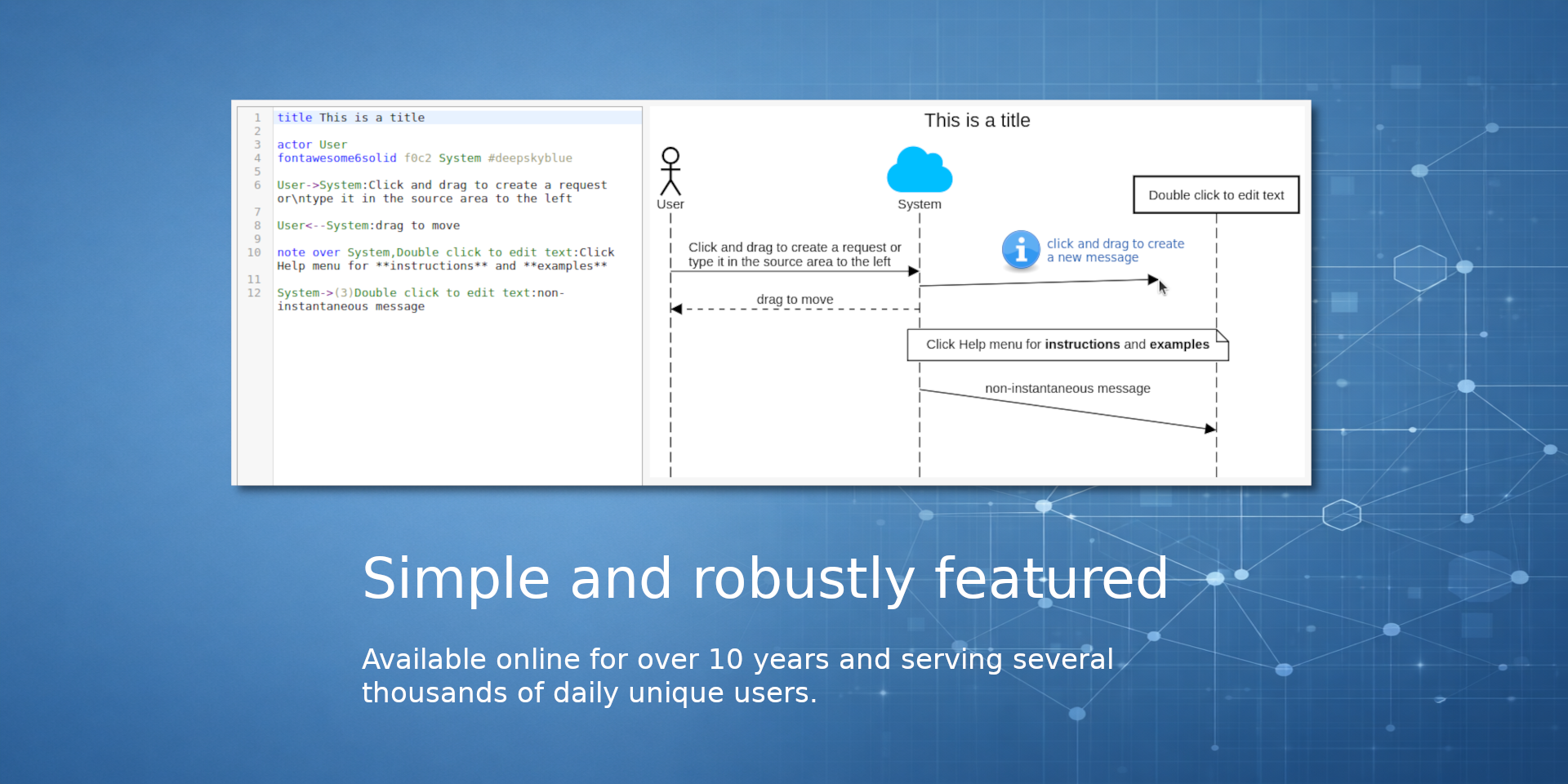
Sequence diagrams using text or draw via Drag and Drop.
Accelerate technical planning with SequenceDiagram.org for monday
Create, edit, and visualize complex logic flows directly within your Items, Boards, and Workdocs to keep your team aligned and your documentation up to date.
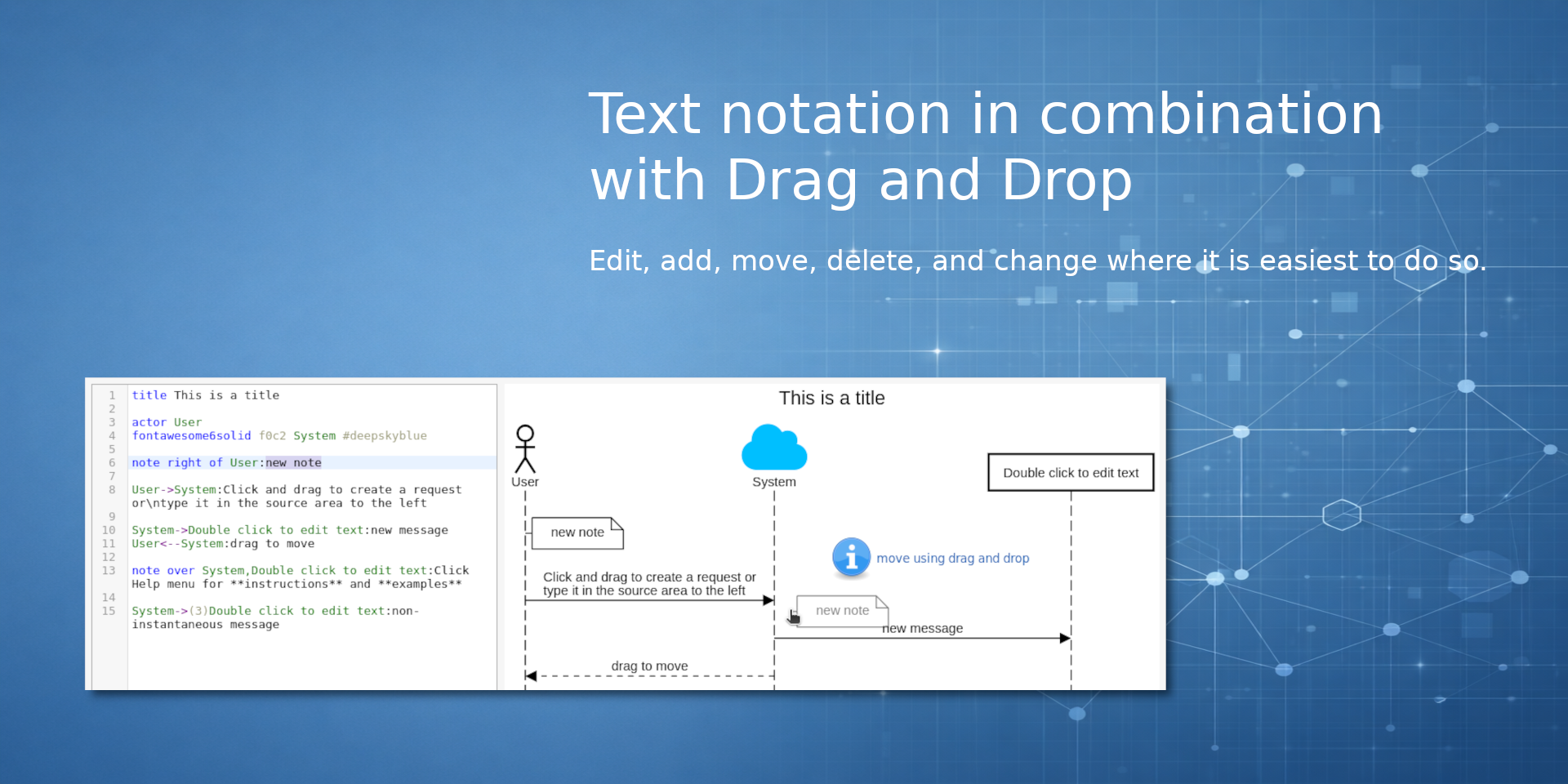
Enhance your technical specifications with live, embedded sequence diagrams. Experience the unique hybrid editing model that allows you to script diagrams using simple text notation or draw them using drag-and-drop, giving you the flexibility to work at the speed of thought.
Key Features:
- Hybrid Editing: Combine the speed of text notation with the intuition of drag-and-drop. Edit, add, move, and delete elements using whichever method is fastest for you in the moment.
- Deep Integration: Embed diagrams anywhere you work. Add a high-level architecture view to a Board, attach a specific reproduction flow to a Bug Item, or document API logic inside a Workdoc.
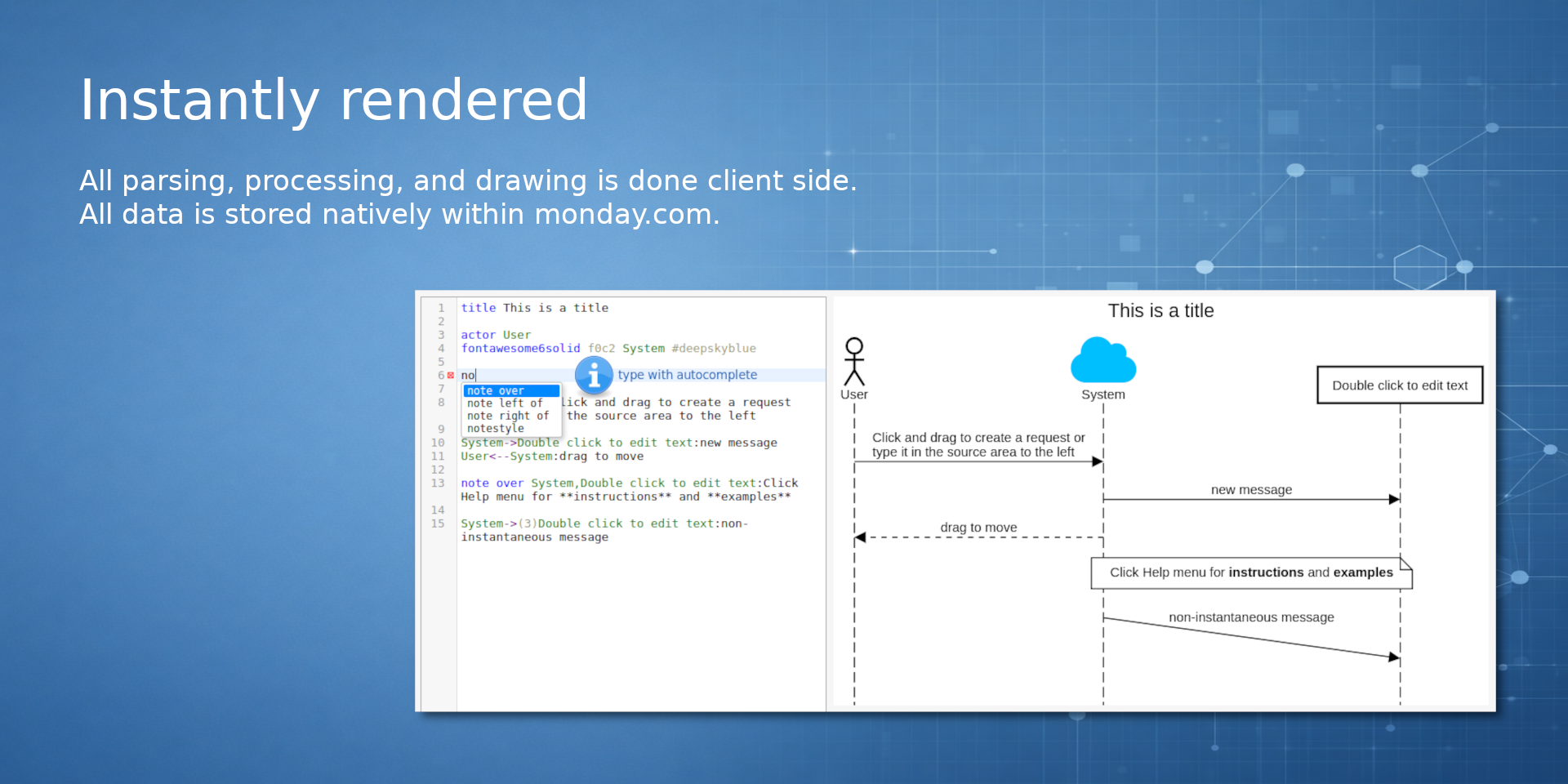
- Uncompromised Security: All parsing, processing, and drawing is performed 100% client-side. Your diagram data is stored natively within monday.com, ensuring your data never leaves your account for maximum compliance.
About SequenceDiagram.org:
SequenceDiagram.org is a robust modeling tool available online for over 10 years, serving thousands of unique daily users. It is designed to make creating and maintaining sequence diagrams as efficient as possible by bridging the gap between text-based generation and visual interaction.
Security & Compliance
The app developer did not provide the security and compliance information for this app.
Reviews
No reviews yet.
Historical data
Installation history
We have data for December 28, 2024 onwards only. Collected sometime after 00:00 UTC daily.
Total number of installs
Change in total number of installs in last 1 day(s)
Compares the number of installs on each date with 1 days previously:
Change in total number of installs in last 7 day(s)
Compares the number of installs on each date with 7 days previously:
Change in total number of installs in last 30 day(s)
Compares the number of installs on each date with 30 days previously:
Change in total number of installs in last 90 day(s)
Compares the number of installs on each date with 90 days previously:
Change in total number of installs in last 180 day(s)
Compares the number of installs on each date with 180 days previously:
Ratings history
Categories history
Each of the following is a yes/no answer, so the graphs show 1 for yes, and 0 for no.
In "Featured" category?
In "Editor's choice" category?
In "Trending this week" category?
App metadata
ID: 10001047 • App ID: 10769511 • Listing updated: February 5, 2026{
"id": 10001047,
"marketplace_developer_id": 100000155,
"app_id": 10769511,
"app_type": "app",
"security_info": {},
"gallery_assets": [
{
"url": "https://cdn.monday.com/marketplace/10001047/10001047_2026_1_5_9_21_34_5wqx0pk.png",
"type": "image"
},
{
"url": "https://cdn.monday.com/marketplace/10001047/10001047_2026_1_5_9_21_42_mf9heje.png",
"type": "image"
},
{
"url": "https://cdn.monday.com/marketplace/10001047/10001047_2026_1_5_9_21_52_ca4g4ua.png",
"type": "image"
}
],
"description": "<p><strong>Accelerate technical planning with </strong><a href=\"http://sequencediagram.org/\" rel=\"noopener noreferrer\" target=\"_blank\"><strong>SequenceDiagram.org</strong></a><strong> for monday</strong></p><p>Create, edit, and visualize complex logic flows directly within your Items, Boards, and Workdocs to keep your team aligned and your documentation up to date.</p><p>Enhance your technical specifications with live, embedded sequence diagrams. Experience the unique <strong>hybrid editing model</strong> that allows you to script diagrams using simple text notation <em>or</em> draw them using drag-and-drop, giving you the flexibility to work at the speed of thought.</p><p><strong>Key Features:</strong></p><ul><li><strong>Hybrid Editing:</strong> Combine the speed of text notation with the intuition of drag-and-drop. Edit, add, move, and delete elements using whichever method is fastest for you in the moment.</li><li><strong>Deep Integration:</strong> Embed diagrams anywhere you work. Add a high-level architecture view to a <strong>Board</strong>, attach a specific reproduction flow to a <strong>Bug Item</strong>, or document API logic inside a <strong>Workdoc</strong>.</li><li><strong>Uncompromised Security:</strong> All parsing, processing, and drawing is performed 100% client-side. Your diagram data is stored <strong>natively within </strong><a href=\"http://monday.com/\" rel=\"noopener noreferrer\" target=\"_blank\"><strong>monday.com</strong></a>, ensuring your data never leaves your account for maximum compliance.</li></ul><p><strong>About </strong><a href=\"http://sequencediagram.org/\" rel=\"noopener noreferrer\" target=\"_blank\"><strong>SequenceDiagram.org</strong></a><strong>:</strong></p><p><a href=\"http://sequencediagram.org/\" rel=\"noopener noreferrer\" target=\"_blank\">SequenceDiagram.org</a> is a robust modeling tool available online for over 10 years, serving thousands of unique daily users. It is designed to make creating and maintaining sequence diagrams as efficient as possible by bridging the gap between text-based generation and visual interaction.</p>",
"short_description": "Sequence diagrams using text or draw via Drag and Drop.",
"thumbnail_url": "https://cdn.monday.com/marketplace/10001047/10001047_2026_1_5_9_20_46_wwdi7yr.png",
"logo_url": "https://cdn.monday.com/marketplace/10001047/10001047_2026_1_5_9_20_18_wchn1vp.png",
"feedback_url": "https://sequencediagramorg.atlassian.net/servicedesk/customer/portals",
"privacy_policy_url": "https://sequencediagram.org/privacypolicy.html",
"featured": false,
"name": "SequenceDiagram.org for monday",
"how_to_use_url": "https://sequencediagram.org/instructions.html",
"external_pricing_url": null,
"keywords": "sequence,diagram,uml",
"compliance_answers": [],
"created_at": "2026-02-05T09:19:39.932Z",
"updated_at": "2026-02-05T09:27:29.502Z",
"automation_app_id": null,
"marketplace_category_ids": [
10000000
],
"pinned_for_categories_ids": [],
"featured_for_categories_ids": [],
"pricing_data": "14 days trial",
"label": null,
"app_values": [
"Make data-driver decisions"
],
"security": false,
"display_in_template_store": false,
"acquisition_source": "No touch",
"is_connector": false,
"terms_of_service_url": "https://sequencediagram.org/termsofservice.html",
"available_for_tiers": [],
"available_for_products": [],
"google_analytics_tag_id": null,
"is_solution": false,
"app_scope_str": "",
"app_client_id": "1c6206e8b69781a45fe56cb1b1f490a7",
"app_color": {
"hsl": {
"h": 196.7307692307692,
"s": 0.6419753086419753,
"l": 0.6823529411764706,
"a": 1
},
"hex": "#7ac5e2",
"rgb": {
"r": 122,
"g": 197,
"b": 226,
"a": 1
},
"hsv": {
"h": 196.7307692307692,
"s": 0.4601769911504424,
"v": 0.8862745098039215,
"a": 1
},
"oldHue": 199.99999999999997,
"source": "hex"
},
"plans": [
{
"id": "10769511-1-DEFAULT",
"appPlanId": "DEFAULT",
"name": "default",
"versionId": 1,
"isTrial": true,
"prices": {
"type": "bucket_based",
"buckets": {
"5": {
"monthly": 0,
"yearly": 0
},
"10": {
"monthly": 3,
"yearly": 2
},
"15": {
"monthly": 5,
"yearly": 4
},
"20": {
"monthly": 6,
"yearly": 5
},
"25": {
"monthly": 8,
"yearly": 6
},
"30": {
"monthly": 9,
"yearly": 7
},
"35": {
"monthly": 11,
"yearly": 9
},
"40": {
"monthly": 12,
"yearly": 10
},
"45": {
"monthly": 14,
"yearly": 11
},
"50": {
"monthly": 15,
"yearly": 12
},
"55": {
"monthly": 17,
"yearly": 14
},
"60": {
"monthly": 18,
"yearly": 15
},
"65": {
"monthly": 20,
"yearly": 16
},
"70": {
"monthly": 21,
"yearly": 17
},
"75": {
"monthly": 23,
"yearly": 18
},
"80": {
"monthly": 24,
"yearly": 20
},
"85": {
"monthly": 26,
"yearly": 21
},
"90": {
"monthly": 27,
"yearly": 22
},
"95": {
"monthly": 29,
"yearly": 23
},
"100": {
"monthly": 30,
"yearly": 25
},
"110": {
"monthly": 33,
"yearly": 27
},
"120": {
"monthly": 36,
"yearly": 30
},
"130": {
"monthly": 39,
"yearly": 32
},
"140": {
"monthly": 42,
"yearly": 34
},
"150": {
"monthly": 45,
"yearly": 37
},
"160": {
"monthly": 48,
"yearly": 39
},
"170": {
"monthly": 51,
"yearly": 42
},
"180": {
"monthly": 54,
"yearly": 44
},
"190": {
"monthly": 57,
"yearly": 47
},
"200": {
"monthly": 60,
"yearly": 49
},
"225": {
"monthly": 68,
"yearly": 55
},
"250": {
"monthly": 75,
"yearly": 62
},
"275": {
"monthly": 78,
"yearly": 64
},
"300": {
"monthly": 80,
"yearly": 66
},
"350": {
"monthly": 85,
"yearly": 70
},
"400": {
"monthly": 90,
"yearly": 74
},
"450": {
"monthly": 95,
"yearly": 78
},
"500": {
"monthly": 100,
"yearly": 82
},
"550": {
"monthly": 105,
"yearly": 86
},
"600": {
"monthly": 110,
"yearly": 90
},
"650": {
"monthly": 115,
"yearly": 94
},
"700": {
"monthly": 120,
"yearly": 98
},
"750": {
"monthly": 125,
"yearly": 103
},
"800": {
"monthly": 130,
"yearly": 107
},
"850": {
"monthly": 135,
"yearly": 111
},
"900": {
"monthly": 140,
"yearly": 115
},
"950": {
"monthly": 145,
"yearly": 119
},
"1000": {
"monthly": 150,
"yearly": 123
},
"1100": {
"monthly": 156,
"yearly": 128
},
"1200": {
"monthly": 162,
"yearly": 133
},
"1300": {
"monthly": 168,
"yearly": 138
},
"1400": {
"monthly": 174,
"yearly": 143
},
"1500": {
"monthly": 180,
"yearly": 148
},
"1600": {
"monthly": 186,
"yearly": 153
},
"1700": {
"monthly": 192,
"yearly": 157
},
"1800": {
"monthly": 198,
"yearly": 162
},
"1900": {
"monthly": 204,
"yearly": 167
},
"2000": {
"monthly": 210,
"yearly": 172
},
"2250": {
"monthly": 225,
"yearly": 185
},
"2500": {
"monthly": 240,
"yearly": 197
},
"2750": {
"monthly": 255,
"yearly": 209
},
"3000": {
"monthly": 270,
"yearly": 221
},
"3250": {
"monthly": 285,
"yearly": 234
},
"3500": {
"monthly": 300,
"yearly": 246
},
"3750": {
"monthly": 315,
"yearly": 258
},
"4000": {
"monthly": 330,
"yearly": 271
},
"4250": {
"monthly": 345,
"yearly": 283
},
"4500": {
"monthly": 360,
"yearly": 295
},
"4750": {
"monthly": 375,
"yearly": 308
},
"5000": {
"monthly": 390,
"yearly": 320
},
"6000": {
"monthly": 430,
"yearly": 353
},
"7000": {
"monthly": 470,
"yearly": 385
},
"8000": {
"monthly": 510,
"yearly": 418
},
"9000": {
"monthly": 550,
"yearly": 451
},
"10000": {
"monthly": 590,
"yearly": 484
},
"12500": {
"monthly": 615,
"yearly": 504
},
"15000": {
"monthly": 640,
"yearly": 525
},
"17500": {
"monthly": 665,
"yearly": 545
},
"20000": {
"monthly": 690,
"yearly": 566
},
"25000": {
"monthly": 740,
"yearly": 607
},
"30000": {
"monthly": 790,
"yearly": 648
},
"35000": {
"monthly": 840,
"yearly": 689
},
"40000": {
"monthly": 890,
"yearly": 730
},
"45000": {
"monthly": 940,
"yearly": 771
},
"50000": {
"monthly": 990,
"yearly": 812
},
"60000": {
"monthly": 1090,
"yearly": 894
},
"70000": {
"monthly": 1190,
"yearly": 976
},
"80000": {
"monthly": 1290,
"yearly": 1058
},
"90000": {
"monthly": 1390,
"yearly": 1140
},
"100000": {
"monthly": 1490,
"yearly": 1222
},
"1000000": {
"monthly": 1490,
"yearly": 1222
}
}
},
"versionState": "live",
"appId": 10769511,
"description": "Free for up to 5 seats. Upgrade as you grow.",
"extraData": {
"bullets": [
"Dashboard Widget (also for workdocs)",
"Board View",
"Item View"
],
"monthlyFee": null,
"yearlyFee": null
},
"isFree": true,
"isRecommended": false,
"currency": "USD"
},
{
"id": "10769511-2-DEFAULT",
"appPlanId": "DEFAULT",
"name": "default",
"versionId": 2,
"isTrial": true,
"prices": {
"type": "bucket_based",
"buckets": {
"5": {
"monthly": 0,
"yearly": 0
},
"10": {
"monthly": 3,
"yearly": 2
},
"15": {
"monthly": 5,
"yearly": 4
},
"20": {
"monthly": 6,
"yearly": 5
},
"25": {
"monthly": 8,
"yearly": 6
},
"30": {
"monthly": 9,
"yearly": 7
},
"35": {
"monthly": 11,
"yearly": 9
},
"40": {
"monthly": 12,
"yearly": 10
},
"45": {
"monthly": 14,
"yearly": 11
},
"50": {
"monthly": 15,
"yearly": 12
},
"55": {
"monthly": 17,
"yearly": 14
},
"60": {
"monthly": 18,
"yearly": 15
},
"65": {
"monthly": 20,
"yearly": 16
},
"70": {
"monthly": 21,
"yearly": 17
},
"75": {
"monthly": 23,
"yearly": 18
},
"80": {
"monthly": 24,
"yearly": 20
},
"85": {
"monthly": 26,
"yearly": 21
},
"90": {
"monthly": 27,
"yearly": 22
},
"95": {
"monthly": 29,
"yearly": 23
},
"100": {
"monthly": 30,
"yearly": 25
},
"110": {
"monthly": 33,
"yearly": 27
},
"120": {
"monthly": 36,
"yearly": 30
},
"130": {
"monthly": 39,
"yearly": 32
},
"140": {
"monthly": 42,
"yearly": 34
},
"150": {
"monthly": 45,
"yearly": 37
},
"160": {
"monthly": 48,
"yearly": 39
},
"170": {
"monthly": 51,
"yearly": 42
},
"180": {
"monthly": 54,
"yearly": 44
},
"190": {
"monthly": 57,
"yearly": 47
},
"200": {
"monthly": 60,
"yearly": 49
},
"225": {
"monthly": 68,
"yearly": 55
},
"250": {
"monthly": 75,
"yearly": 62
},
"275": {
"monthly": 78,
"yearly": 64
},
"300": {
"monthly": 80,
"yearly": 66
},
"350": {
"monthly": 85,
"yearly": 70
},
"400": {
"monthly": 90,
"yearly": 74
},
"450": {
"monthly": 95,
"yearly": 78
},
"500": {
"monthly": 100,
"yearly": 82
},
"550": {
"monthly": 105,
"yearly": 86
},
"600": {
"monthly": 110,
"yearly": 90
},
"650": {
"monthly": 115,
"yearly": 94
},
"700": {
"monthly": 120,
"yearly": 98
},
"750": {
"monthly": 125,
"yearly": 103
},
"800": {
"monthly": 130,
"yearly": 107
},
"850": {
"monthly": 135,
"yearly": 111
},
"900": {
"monthly": 140,
"yearly": 115
},
"950": {
"monthly": 145,
"yearly": 119
},
"1000": {
"monthly": 150,
"yearly": 123
},
"1100": {
"monthly": 156,
"yearly": 128
},
"1200": {
"monthly": 162,
"yearly": 133
},
"1300": {
"monthly": 168,
"yearly": 138
},
"1400": {
"monthly": 174,
"yearly": 143
},
"1500": {
"monthly": 180,
"yearly": 148
},
"1600": {
"monthly": 186,
"yearly": 153
},
"1700": {
"monthly": 192,
"yearly": 157
},
"1800": {
"monthly": 198,
"yearly": 162
},
"1900": {
"monthly": 204,
"yearly": 167
},
"2000": {
"monthly": 210,
"yearly": 172
},
"2250": {
"monthly": 225,
"yearly": 185
},
"2500": {
"monthly": 240,
"yearly": 197
},
"2750": {
"monthly": 255,
"yearly": 209
},
"3000": {
"monthly": 270,
"yearly": 221
},
"3250": {
"monthly": 285,
"yearly": 234
},
"3500": {
"monthly": 300,
"yearly": 246
},
"3750": {
"monthly": 315,
"yearly": 258
},
"4000": {
"monthly": 330,
"yearly": 271
},
"4250": {
"monthly": 345,
"yearly": 283
},
"4500": {
"monthly": 360,
"yearly": 295
},
"4750": {
"monthly": 375,
"yearly": 308
},
"5000": {
"monthly": 390,
"yearly": 320
},
"6000": {
"monthly": 430,
"yearly": 353
},
"7000": {
"monthly": 470,
"yearly": 385
},
"8000": {
"monthly": 510,
"yearly": 418
},
"9000": {
"monthly": 550,
"yearly": 451
},
"10000": {
"monthly": 590,
"yearly": 484
},
"12500": {
"monthly": 615,
"yearly": 504
},
"15000": {
"monthly": 640,
"yearly": 525
},
"17500": {
"monthly": 665,
"yearly": 545
},
"20000": {
"monthly": 690,
"yearly": 566
},
"25000": {
"monthly": 740,
"yearly": 607
},
"30000": {
"monthly": 790,
"yearly": 648
},
"35000": {
"monthly": 840,
"yearly": 689
},
"40000": {
"monthly": 890,
"yearly": 730
},
"45000": {
"monthly": 940,
"yearly": 771
},
"50000": {
"monthly": 990,
"yearly": 812
},
"60000": {
"monthly": 1090,
"yearly": 894
},
"70000": {
"monthly": 1190,
"yearly": 976
},
"80000": {
"monthly": 1290,
"yearly": 1058
},
"90000": {
"monthly": 1390,
"yearly": 1140
},
"100000": {
"monthly": 1490,
"yearly": 1222
},
"1000000": {
"monthly": 1490,
"yearly": 1222
}
}
},
"versionState": "live",
"appId": 10769511,
"description": "Free for up to 5 seats. Upgrade as you grow.",
"extraData": {
"bullets": [
"Dashboard Widget (also for workdocs)",
"Board View",
"Item View"
],
"monthlyFee": null,
"yearlyFee": null
},
"isFree": true,
"isRecommended": false,
"currency": "USD"
}
],
"app_live_version": {
"updated_at": "2026-02-04T19:54:50.131Z",
"id": 12648483
},
"pricing_model": null,
"badges_data": {
"pricing_data": "14 days trial",
"app_values": [
"Make data-driver decisions"
],
"security": false,
"acquisition_source": "No touch",
"display_in_template_store": false
},
"data": {
"is_connector": false,
"google_analytics_tag_id": null,
"is_solution": false,
"terms_of_service_url": "https://sequencediagram.org/termsofservice.html",
"available_for_tiers": [],
"available_for_products": []
},
"display": null,
"installsDelta": {
"totalInstalls": 4,
"sevenDays": 0,
"thirtyDays": 0
}
}