
Out Of Office Assistant
6 installs, since January 25, 2026. 2 installs/month. Updated February 13, 2026.
Automatically route work when users are out of office.
Out of Office Assistant keeps work moving when teammates are away by automatically posting clear updates, routing ownership to backups, and replying when an OOO user is @mentioned.
Free 14-day trial • Setup in minutes • Rule-based
How it works (3 steps)
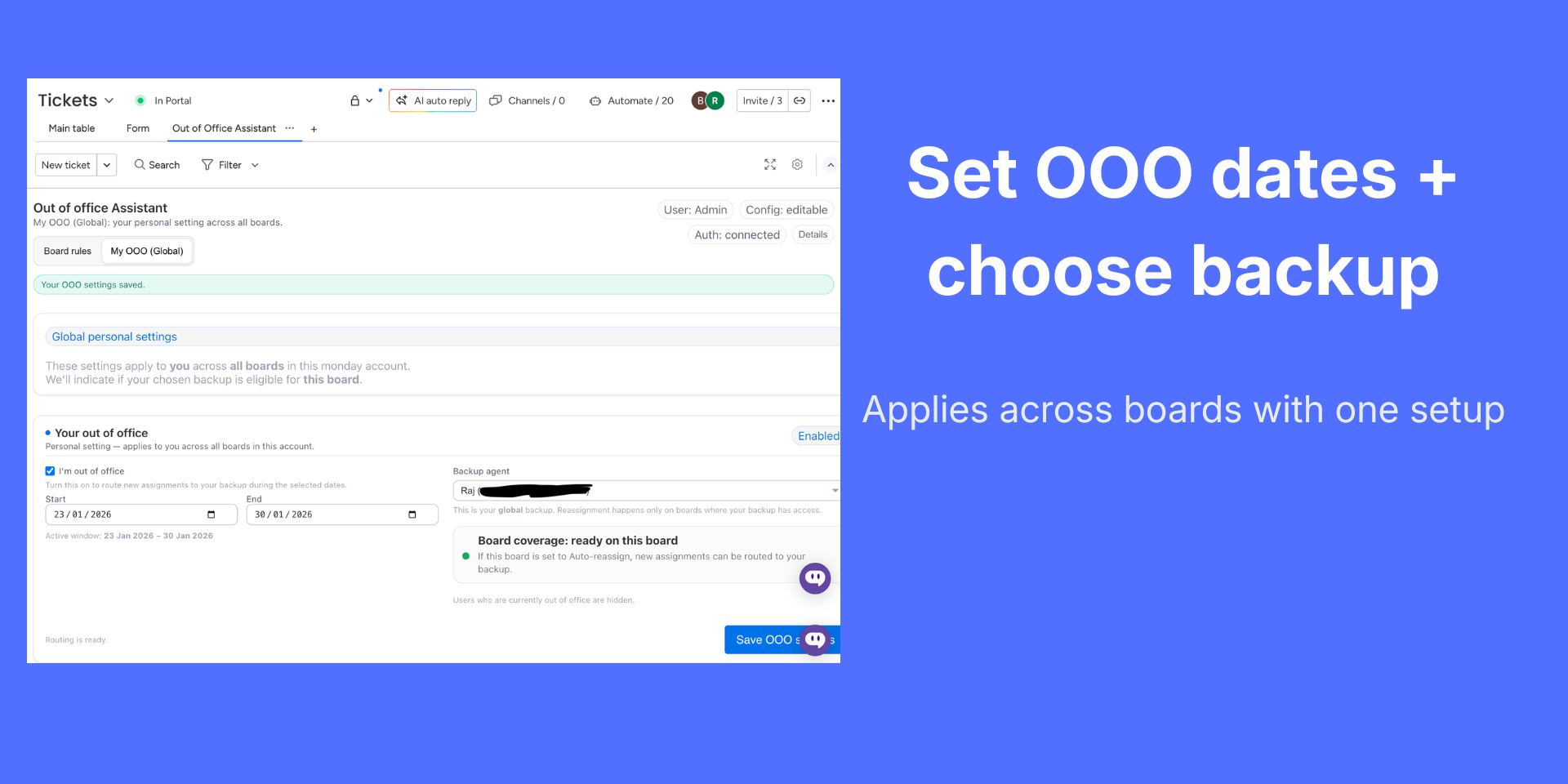
- Each user sets OOO dates and chooses a global backup person
- Admin selects the Owner (People) column and sets board behavior
- When the owner is OOO, the app posts updates, notifies the right people, and can route work to the backup
Key features
Per-user OOO + backup (global)
Users set start/end dates and pick a backup once—applies across boards in the account.
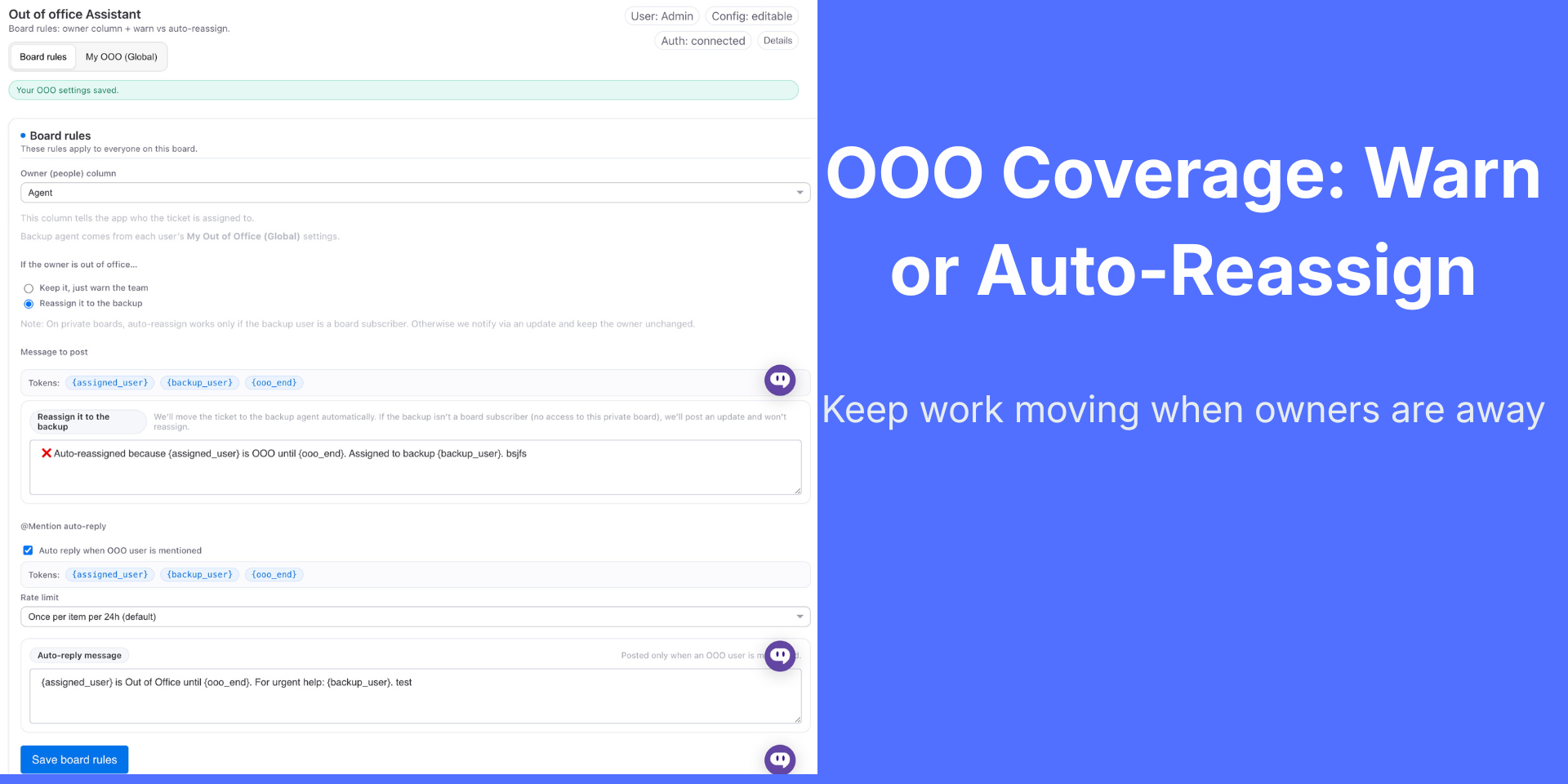
Board rules: Warn or Auto-reassign
Admins control behavior per board:
- Warn: keep owner unchanged and post a clear update
- Auto-reassign: move ownership to the backup to prevent blocked work
Safe behavior on private boards
If the backup isn’t a subscriber (no access), the app won’t break permissions— it posts an update and keeps the owner unchanged.
Custom update templates (placeholders)
Create messages using placeholders like:
{assigned_user}, {backup_user}, {ooo_end}
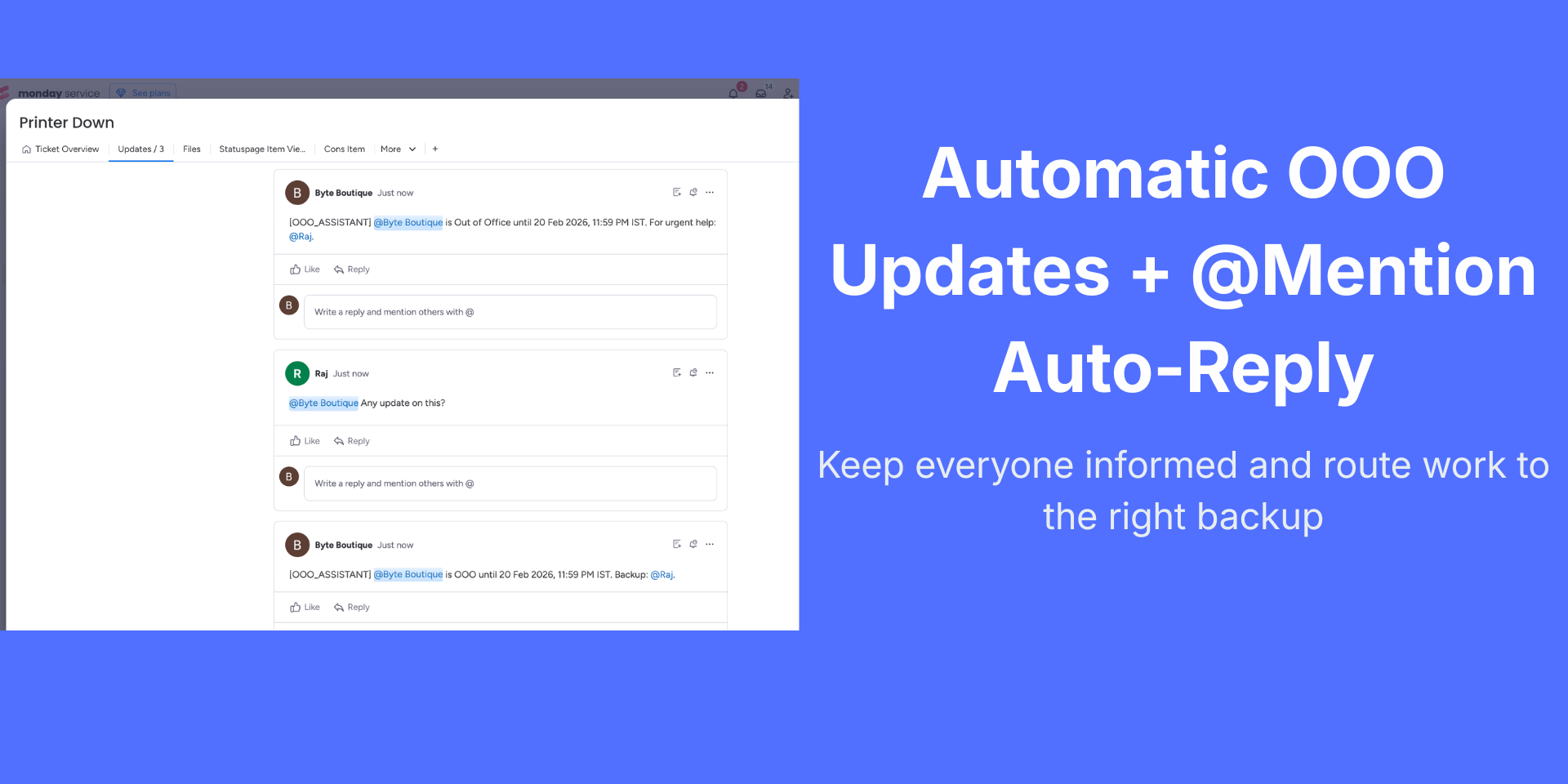
@Mention auto-reply (with rate limits)
When someone @mentions a user who is OOO, the app can auto-reply with the backup contact. Built-in rate limits prevent noisy repeated replies.
Conflict-free backup selection
Users who are currently out of office are excluded from backup choices to avoid routing to unavailable people.
Problems this solves
- Work stuck with unavailable owners
- Manual reassignment during leave and holidays
- Unclear coverage and missed follow-ups
- Repeated pings to teammates who are away
Ideal for
Support & Ops ticketing, project delivery, incident response, and any team that needs reliable backup ownership during absences.
Need help getting started? Book a personal demo, or contact us for any questions at support@lanceops.com.
Security & Compliance
The app developer did not provide the security and compliance information for this app.
Reviews
No reviews yet.
Historical data
Installation history
We have data for December 28, 2024 onwards only. Collected sometime after 00:00 UTC daily.
Total number of installs
Change in total number of installs in last 1 day(s)
Compares the number of installs on each date with 1 days previously:
Change in total number of installs in last 7 day(s)
Compares the number of installs on each date with 7 days previously:
Change in total number of installs in last 30 day(s)
Compares the number of installs on each date with 30 days previously:
Change in total number of installs in last 90 day(s)
Compares the number of installs on each date with 90 days previously:
Change in total number of installs in last 180 day(s)
Compares the number of installs on each date with 180 days previously:
Ratings history
Categories history
Each of the following is a yes/no answer, so the graphs show 1 for yes, and 0 for no.
In "Featured" category?
In "Editor's choice" category?
In "Trending this week" category?
App metadata
ID: 10001034 • App ID: 10681886 • Listing updated: March 1, 2026{
"id": 10001034,
"marketplace_developer_id": 100000144,
"app_id": 10681886,
"app_type": "app",
"security_info": {},
"gallery_assets": [
{
"url": "https://cdn.monday.com/marketplace/10001034/10001034_2026_1_23_1_6_4_ei04m2b.mp4",
"type": "video"
},
{
"url": "https://cdn.monday.com/marketplace/10001034/10001034_2026_1_23_1_7_7_wr6kk34.png",
"type": "image"
},
{
"url": "https://cdn.monday.com/marketplace/10001034/10001034_2026_1_23_1_7_14_ywzyyuo.png",
"type": "image"
},
{
"url": "https://cdn.monday.com/marketplace/10001034/10001034_2026_1_23_1_7_22_k3djd4n.png",
"type": "image"
}
],
"description": "<p>Out of Office Assistant keeps work moving when teammates are away by automatically posting clear updates, routing ownership to backups, and replying when an OOO user is @mentioned.</p><p><br></p><p><strong>Free 14-day trial • Setup in minutes • Rule-based</strong></p><p><strong>How it works (3 steps)</strong></p><ol><li>Each user sets OOO dates and chooses a global backup person</li><li>Admin selects the Owner (People) column and sets board behavior</li><li>When the owner is OOO, the app posts updates, notifies the right people, and can route work to the backup</li></ol><p><br></p><p><strong>Key features</strong></p><p><strong>Per-user OOO + backup (global)</strong></p><p>Users set start/end dates and pick a backup once—applies across boards in the account.</p><p><strong>Board rules: Warn or Auto-reassign</strong></p><p>Admins control behavior per board:</p><ul><li><strong>Warn:</strong> keep owner unchanged and post a clear update</li><li><strong>Auto-reassign:</strong> move ownership to the backup to prevent blocked work</li></ul><p><br></p><p><strong>Safe behavior on private boards</strong></p><p>If the backup isn’t a subscriber (no access), the app won’t break permissions— it posts an update and keeps the owner unchanged.</p><p><br></p><p><strong>Custom update templates (placeholders)</strong></p><p>Create messages using placeholders like:</p><p>{assigned_user}, {backup_user}, {ooo_end}</p><p><br></p><p><strong>@Mention auto-reply (with rate limits)</strong></p><p>When someone @mentions a user who is OOO, the app can auto-reply with the backup contact. Built-in rate limits prevent noisy repeated replies.</p><p><br></p><p><strong>Conflict-free backup selection</strong></p><p>Users who are currently out of office are excluded from backup choices to avoid routing to unavailable people.</p><p><br></p><p><strong>Problems this solves</strong></p><ul><li>Work stuck with unavailable owners</li><li>Manual reassignment during leave and holidays</li><li>Unclear coverage and missed follow-ups</li><li>Repeated pings to teammates who are away</li></ul><p><br></p><p><strong>Ideal for</strong></p><p>Support & Ops ticketing, project delivery, incident response, and any team that needs reliable backup ownership during absences.</p><p>Need help getting started? <a href=\"https://cal.com/lanceops/30min\" rel=\"noopener noreferrer\" target=\"_blank\"><strong>Book</strong></a> a personal demo, or contact us for any questions at <a href=\"mailto:support@lanceops.com.\" rel=\"noopener noreferrer\" target=\"_blank\">support@lanceops.com.</a></p><p><br></p>",
"short_description": "Automatically route work when users are out of office.",
"thumbnail_url": "https://cdn.monday.com/marketplace/10001034/10001034_2026_0_25_17_21_50_dxm06mf.png",
"logo_url": "https://cdn.monday.com/marketplace/10001034/10001034_2026_0_25_17_22_37_rlxxf88.png",
"feedback_url": "support@lanceops.com",
"privacy_policy_url": "https://lanceops.com/privacy",
"featured": false,
"name": "Out Of Office Assistant",
"how_to_use_url": "https://lanceops.com/products/ooo-assistant#how-to-use",
"external_pricing_url": null,
"keywords": "out of office,OOO,vacation tracker,leave management,coverage,backup assignee,auto reassign,handoff,mention auto-reply,PTO",
"compliance_answers": [],
"created_at": "2026-01-25T17:21:26.863Z",
"updated_at": "2026-03-01T12:03:52.000Z",
"automation_app_id": null,
"marketplace_category_ids": [
8,
6,
5
],
"pinned_for_categories_ids": [],
"featured_for_categories_ids": [],
"pricing_data": null,
"label": null,
"app_values": [
"Everyday tasks"
],
"security": false,
"display_in_template_store": false,
"acquisition_source": "No touch",
"is_connector": false,
"terms_of_service_url": "https://lanceops.com/terms",
"available_for_tiers": [],
"available_for_products": [],
"google_analytics_tag_id": null,
"is_solution": false,
"app_scope_str": "boards:read,boards:write,updates:read,updates:write,users:read,webhooks:write,me:read",
"app_client_id": "bd9889e8ea219cb1607613dce5ba3bea",
"app_color": {
"hsl": {
"h": 199.99999999999997,
"s": 1,
"l": 0.7,
"a": 1
},
"hex": "#66ccff",
"rgb": {
"r": 102,
"g": 204,
"b": 255,
"a": 1
},
"hsv": {
"h": 199.99999999999997,
"s": 0.6,
"v": 1,
"a": 1
},
"oldHue": 232.12121212121212,
"source": "hex"
},
"plans": [
{
"id": "10681886-1-DEFAULT",
"appPlanId": "DEFAULT",
"name": "default",
"versionId": 1,
"isTrial": true,
"prices": {
"type": "bucket_based",
"buckets": {
"3": {
"monthly": 9,
"yearly": 7
},
"5": {
"monthly": 15,
"yearly": 12
},
"10": {
"monthly": 30,
"yearly": 25
},
"15": {
"monthly": 44,
"yearly": 36
},
"20": {
"monthly": 59,
"yearly": 48
},
"25": {
"monthly": 72,
"yearly": 59
},
"30": {
"monthly": 86,
"yearly": 70
},
"35": {
"monthly": 99,
"yearly": 81
},
"40": {
"monthly": 113,
"yearly": 92
},
"45": {
"monthly": 126,
"yearly": 103
},
"50": {
"monthly": 140,
"yearly": 114
},
"55": {
"monthly": 153,
"yearly": 125
},
"60": {
"monthly": 166,
"yearly": 136
},
"65": {
"monthly": 179,
"yearly": 147
},
"70": {
"monthly": 192,
"yearly": 158
},
"75": {
"monthly": 206,
"yearly": 169
},
"80": {
"monthly": 219,
"yearly": 179
},
"85": {
"monthly": 232,
"yearly": 190
},
"90": {
"monthly": 245,
"yearly": 201
},
"95": {
"monthly": 258,
"yearly": 212
},
"100": {
"monthly": 272,
"yearly": 223
},
"110": {
"monthly": 297,
"yearly": 244
},
"120": {
"monthly": 323,
"yearly": 264
},
"130": {
"monthly": 348,
"yearly": 285
},
"140": {
"monthly": 374,
"yearly": 306
},
"150": {
"monthly": 399,
"yearly": 327
},
"160": {
"monthly": 425,
"yearly": 348
},
"170": {
"monthly": 450,
"yearly": 369
},
"180": {
"monthly": 476,
"yearly": 390
},
"190": {
"monthly": 501,
"yearly": 411
},
"200": {
"monthly": 527,
"yearly": 432
},
"225": {
"monthly": 590,
"yearly": 484
},
"250": {
"monthly": 654,
"yearly": 536
},
"275": {
"monthly": 716,
"yearly": 587
},
"300": {
"monthly": 777,
"yearly": 637
},
"350": {
"monthly": 900,
"yearly": 738
},
"400": {
"monthly": 1023,
"yearly": 839
},
"450": {
"monthly": 1146,
"yearly": 940
},
"500": {
"monthly": 1269,
"yearly": 1041
},
"550": {
"monthly": 1385,
"yearly": 1135
},
"600": {
"monthly": 1500,
"yearly": 1230
},
"650": {
"monthly": 1616,
"yearly": 1325
},
"700": {
"monthly": 1731,
"yearly": 1419
},
"750": {
"monthly": 1847,
"yearly": 1514
},
"800": {
"monthly": 1962,
"yearly": 1609
},
"850": {
"monthly": 2078,
"yearly": 1704
},
"900": {
"monthly": 2193,
"yearly": 1798
},
"950": {
"monthly": 2309,
"yearly": 1893
},
"1000": {
"monthly": 2424,
"yearly": 1988
},
"1100": {
"monthly": 2640,
"yearly": 2165
},
"1200": {
"monthly": 2856,
"yearly": 2342
},
"1300": {
"monthly": 3072,
"yearly": 2519
},
"1400": {
"monthly": 3288,
"yearly": 2696
},
"1500": {
"monthly": 3504,
"yearly": 2873
},
"1600": {
"monthly": 3720,
"yearly": 3050
},
"1700": {
"monthly": 3936,
"yearly": 3228
},
"1800": {
"monthly": 4152,
"yearly": 3405
},
"1900": {
"monthly": 4368,
"yearly": 3582
},
"2000": {
"monthly": 4584,
"yearly": 3759
},
"2250": {
"monthly": 5124,
"yearly": 4202
},
"2500": {
"monthly": 5664,
"yearly": 4644
},
"2750": {
"monthly": 6204,
"yearly": 5087
},
"3000": {
"monthly": 6744,
"yearly": 5530
},
"3250": {
"monthly": 7284,
"yearly": 5973
},
"3500": {
"monthly": 7824,
"yearly": 6416
},
"3750": {
"monthly": 8364,
"yearly": 6858
},
"4000": {
"monthly": 8904,
"yearly": 7301
},
"4250": {
"monthly": 9444,
"yearly": 7744
},
"4500": {
"monthly": 9984,
"yearly": 8187
},
"4750": {
"monthly": 10524,
"yearly": 8630
},
"5000": {
"monthly": 11064,
"yearly": 9072
},
"6000": {
"monthly": 13014,
"yearly": 10671
},
"7000": {
"monthly": 14964,
"yearly": 12270
},
"8000": {
"monthly": 16914,
"yearly": 13869
},
"9000": {
"monthly": 18864,
"yearly": 15468
},
"10000": {
"monthly": 20814,
"yearly": 17067
},
"12500": {
"monthly": 24564,
"yearly": 20142
},
"15000": {
"monthly": 28314,
"yearly": 23217
},
"17500": {
"monthly": 32064,
"yearly": 26292
},
"20000": {
"monthly": 35814,
"yearly": 29367
},
"25000": {
"monthly": 41064,
"yearly": 33672
},
"30000": {
"monthly": 46314,
"yearly": 37977
},
"35000": {
"monthly": 46464,
"yearly": 38100
},
"40000": {
"monthly": 46614,
"yearly": 38223
},
"45000": {
"monthly": 46764,
"yearly": 38346
},
"50000": {
"monthly": 46914,
"yearly": 38469
},
"60000": {
"monthly": 47214,
"yearly": 38715
},
"70000": {
"monthly": 47514,
"yearly": 38961
},
"80000": {
"monthly": 47814,
"yearly": 39207
},
"90000": {
"monthly": 48114,
"yearly": 39453
},
"100000": {
"monthly": 48414,
"yearly": 39699
},
"1000000": {
"monthly": 48414,
"yearly": 39699
}
}
},
"versionState": "live",
"appId": 10681886,
"description": "Automate Out-of-Office coverage in monday. Post clear item updates, optionally auto-reassign to backups when eligible, and send rate-limited @mention auto-replies. Built-in safeguards prevent reassignment when access is missing or backup is also OOO.",
"extraData": {
"bullets": [
"Prevent delays by flagging tickets owned by OOO users",
"Auto-reassign to the right backup when coverage is set",
"Post clear item updates so everyone knows who is covering",
"Avoid wrong reassignments when backup lacks board access",
"Reduce manual triage and keep SLAs on track automatically"
],
"monthlyFee": null,
"yearlyFee": null
},
"isFree": false,
"isRecommended": false,
"currency": "USD"
},
{
"id": "10681886-2-DEFAULT",
"appPlanId": "DEFAULT",
"name": "default",
"versionId": 2,
"isTrial": true,
"prices": {
"type": "bucket_based",
"buckets": {
"3": {
"monthly": 6,
"yearly": 5
},
"5": {
"monthly": 10,
"yearly": 8
},
"10": {
"monthly": 20,
"yearly": 16
},
"15": {
"monthly": 30,
"yearly": 24
},
"20": {
"monthly": 39,
"yearly": 32
},
"25": {
"monthly": 48,
"yearly": 39
},
"30": {
"monthly": 57,
"yearly": 47
},
"35": {
"monthly": 66,
"yearly": 54
},
"40": {
"monthly": 75,
"yearly": 62
},
"45": {
"monthly": 84,
"yearly": 69
},
"50": {
"monthly": 93,
"yearly": 76
},
"55": {
"monthly": 102,
"yearly": 83
},
"60": {
"monthly": 111,
"yearly": 91
},
"65": {
"monthly": 119,
"yearly": 98
},
"70": {
"monthly": 128,
"yearly": 105
},
"75": {
"monthly": 137,
"yearly": 112
},
"80": {
"monthly": 146,
"yearly": 120
},
"85": {
"monthly": 155,
"yearly": 127
},
"90": {
"monthly": 163,
"yearly": 134
},
"95": {
"monthly": 172,
"yearly": 141
},
"100": {
"monthly": 181,
"yearly": 148
},
"110": {
"monthly": 198,
"yearly": 162
},
"120": {
"monthly": 215,
"yearly": 176
},
"130": {
"monthly": 232,
"yearly": 190
},
"140": {
"monthly": 249,
"yearly": 204
},
"150": {
"monthly": 266,
"yearly": 218
},
"160": {
"monthly": 283,
"yearly": 232
},
"170": {
"monthly": 300,
"yearly": 246
},
"180": {
"monthly": 317,
"yearly": 260
},
"190": {
"monthly": 334,
"yearly": 274
},
"200": {
"monthly": 351,
"yearly": 288
},
"225": {
"monthly": 394,
"yearly": 323
},
"250": {
"monthly": 436,
"yearly": 358
},
"275": {
"monthly": 477,
"yearly": 391
},
"300": {
"monthly": 518,
"yearly": 425
},
"350": {
"monthly": 600,
"yearly": 492
},
"400": {
"monthly": 682,
"yearly": 559
},
"450": {
"monthly": 764,
"yearly": 627
},
"500": {
"monthly": 846,
"yearly": 694
},
"550": {
"monthly": 923,
"yearly": 757
},
"600": {
"monthly": 1000,
"yearly": 820
},
"650": {
"monthly": 1077,
"yearly": 883
},
"700": {
"monthly": 1154,
"yearly": 946
},
"750": {
"monthly": 1231,
"yearly": 1009
},
"800": {
"monthly": 1308,
"yearly": 1073
},
"850": {
"monthly": 1385,
"yearly": 1136
},
"900": {
"monthly": 1462,
"yearly": 1199
},
"950": {
"monthly": 1539,
"yearly": 1262
},
"1000": {
"monthly": 1616,
"yearly": 1325
},
"1100": {
"monthly": 1760,
"yearly": 1443
},
"1200": {
"monthly": 1904,
"yearly": 1561
},
"1300": {
"monthly": 2048,
"yearly": 1679
},
"1400": {
"monthly": 2192,
"yearly": 1797
},
"1500": {
"monthly": 2336,
"yearly": 1916
},
"1600": {
"monthly": 2480,
"yearly": 2034
},
"1700": {
"monthly": 2624,
"yearly": 2152
},
"1800": {
"monthly": 2768,
"yearly": 2270
},
"1900": {
"monthly": 2912,
"yearly": 2388
},
"2000": {
"monthly": 3056,
"yearly": 2506
},
"2250": {
"monthly": 3416,
"yearly": 2801
},
"2500": {
"monthly": 3776,
"yearly": 3096
},
"2750": {
"monthly": 4136,
"yearly": 3392
},
"3000": {
"monthly": 4496,
"yearly": 3687
},
"3250": {
"monthly": 4856,
"yearly": 3982
},
"3500": {
"monthly": 5216,
"yearly": 4277
},
"3750": {
"monthly": 5576,
"yearly": 4572
},
"4000": {
"monthly": 5936,
"yearly": 4868
},
"4250": {
"monthly": 6296,
"yearly": 5163
},
"4500": {
"monthly": 6656,
"yearly": 5458
},
"4750": {
"monthly": 7016,
"yearly": 5753
},
"5000": {
"monthly": 7376,
"yearly": 6048
},
"6000": {
"monthly": 8676,
"yearly": 7114
},
"7000": {
"monthly": 9976,
"yearly": 8180
},
"8000": {
"monthly": 11276,
"yearly": 9246
},
"9000": {
"monthly": 12576,
"yearly": 10312
},
"10000": {
"monthly": 13876,
"yearly": 11378
},
"12500": {
"monthly": 16376,
"yearly": 13428
},
"15000": {
"monthly": 18876,
"yearly": 15478
},
"17500": {
"monthly": 21376,
"yearly": 17528
},
"20000": {
"monthly": 23876,
"yearly": 19578
},
"25000": {
"monthly": 27376,
"yearly": 22448
},
"30000": {
"monthly": 30876,
"yearly": 25318
},
"35000": {
"monthly": 30976,
"yearly": 25400
},
"40000": {
"monthly": 31076,
"yearly": 25482
},
"45000": {
"monthly": 31176,
"yearly": 25564
},
"50000": {
"monthly": 31276,
"yearly": 25646
},
"60000": {
"monthly": 31476,
"yearly": 25810
},
"70000": {
"monthly": 31676,
"yearly": 25974
},
"80000": {
"monthly": 31876,
"yearly": 26138
},
"90000": {
"monthly": 32076,
"yearly": 26302
},
"100000": {
"monthly": 32276,
"yearly": 26466
},
"1000000": {
"monthly": 32276,
"yearly": 26466
}
}
},
"versionState": "live",
"appId": 10681886,
"description": "Automate Out-of-Office coverage in monday. Post clear item updates, optionally auto-reassign to backups when eligible, and send rate-limited @mention auto-replies. Built-in safeguards prevent reassignment when access is missing or backup is also OOO.",
"extraData": {
"bullets": [
"Prevent delays by flagging tickets owned by OOO users",
"Auto-reassign to the right backup when coverage is set",
"Post clear item updates so everyone knows who is covering",
"Avoid wrong reassignments when backup lacks board access",
"Reduce manual triage and keep SLAs on track automatically"
],
"monthlyFee": null,
"yearlyFee": null
},
"isFree": false,
"isRecommended": false,
"currency": "USD"
},
{
"id": "10681886-3-Free",
"appPlanId": "Free",
"name": "Free",
"versionId": 3,
"isTrial": false,
"prices": {
"type": "standard",
"monthly": 0,
"yearly": 0
},
"versionState": "live",
"appId": 10681886,
"description": "Description: Keep work moving during absences with OOO coverage, updates, optional reassignment, and @mention auto-replies.",
"extraData": {
"bullets": [
"Includes 1 board",
"Includes all pro features"
],
"monthlyFee": 0,
"yearlyFee": 0
},
"isFree": true,
"isRecommended": false,
"currency": "USD"
},
{
"id": "10681886-3-pro_flat_30",
"appPlanId": "pro_flat_30",
"name": "Pro",
"versionId": 3,
"isTrial": true,
"prices": {
"type": "standard",
"monthly": 30,
"yearly": 25
},
"versionState": "live",
"appId": 10681886,
"description": "Description: Keep work moving during absences with OOO coverage, updates, optional reassignment, and @mention auto-replies.",
"extraData": {
"bullets": [
"Auto-post OOO updates using customizable message tokens",
"Optional auto-reassign to backup to prevent blocked work",
"Safe behavior on private boards when backup lacks access",
"@mention auto-reply with customizable templates",
"Rate limits to avoid repeated replies on the same item"
],
"monthlyFee": 30,
"yearlyFee": 25
},
"isFree": false,
"isRecommended": true,
"currency": "USD"
}
],
"app_live_version": {
"updated_at": "2026-02-13T10:48:50.618Z",
"id": 12816130
},
"pricing_model": null,
"badges_data": {
"app_values": [
"Everyday tasks"
],
"security": false,
"acquisition_source": "No touch",
"display_in_template_store": false
},
"data": {
"is_connector": false,
"google_analytics_tag_id": null,
"is_solution": false,
"terms_of_service_url": "https://lanceops.com/terms",
"available_for_tiers": [],
"available_for_products": []
},
"display": null,
"installsDelta": {
"totalInstalls": 6,
"sevenDays": 0,
"thirtyDays": 0
}
}