Auto-create board variations using smart group combinations
Flexi Template Creator
Template creation in monday.com should be fast, flexible, and fully personalized all in just one click.
Flexi Template Creatorempowers teams to generate multiple custom boards from a single master template.
Key Benefits
1.Create multiple custom boardsfrom a single master template
2.Define mandatory and optional groups with full control
3.Generate multiple board combinations in one action, saving time and effort
4.Customize board names for better clarity and organization
5.Maintain consistency while allowing flexibility across teams
Smart Features
Checkbox-Based Group Selection
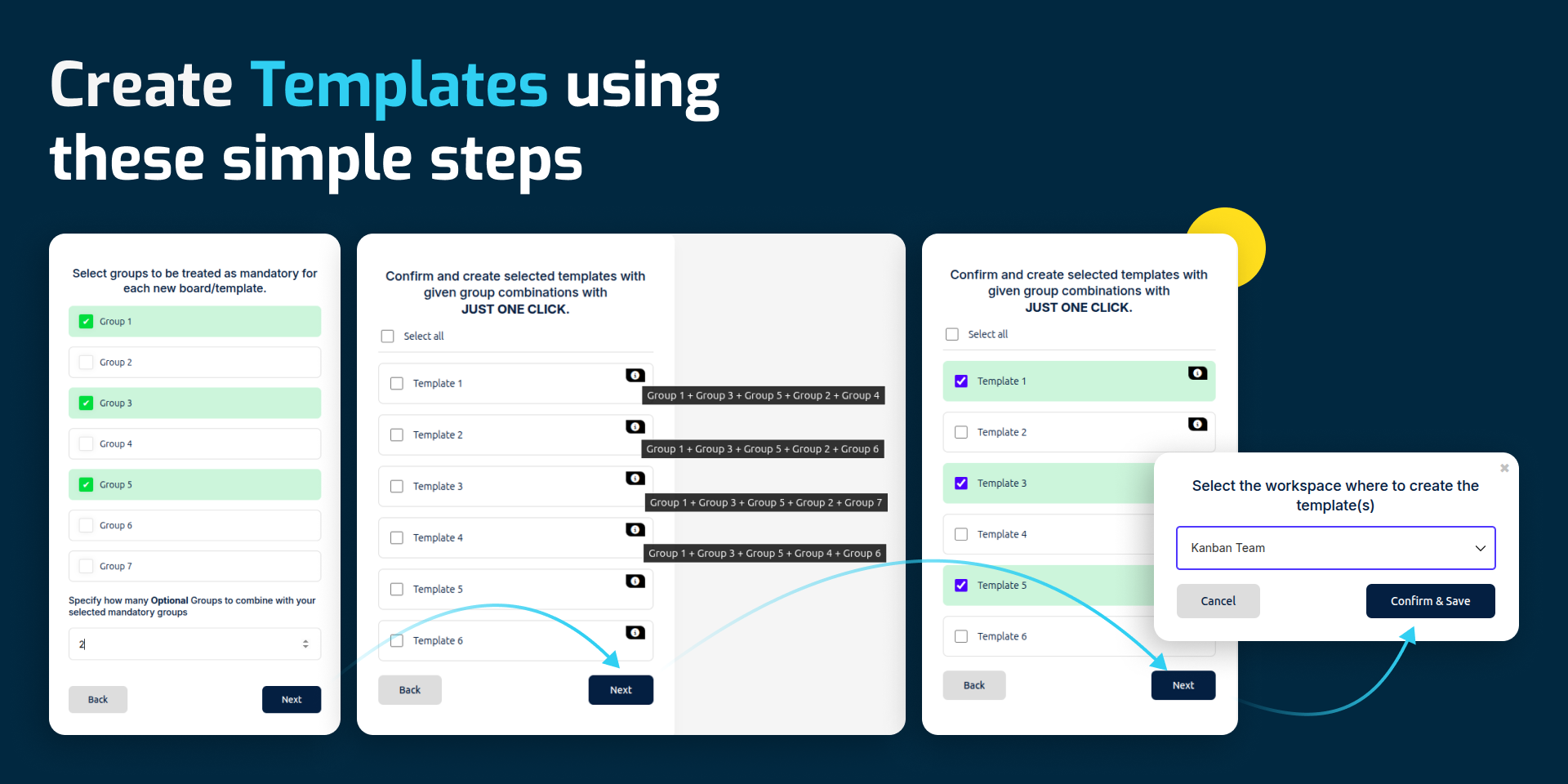
Select groups from your master board using an intuitive interface. Easily mark groups as mandatory or optional no complexity involved.
Automatic Group Combination Generation
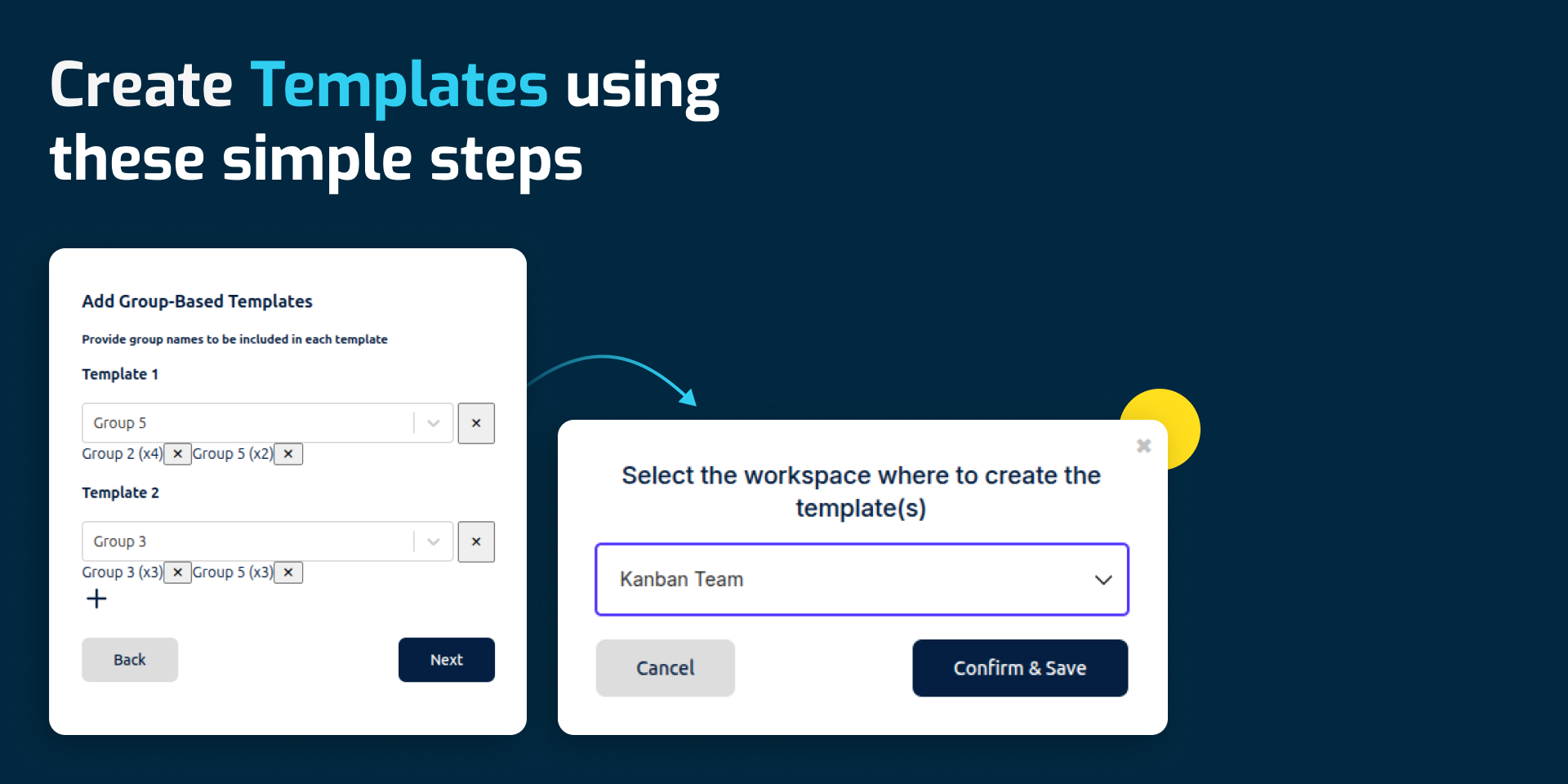
Specify how many optional groups should be combined with mandatory ones, and it will automatically generate all valid board combinations.
One Click Board Creation
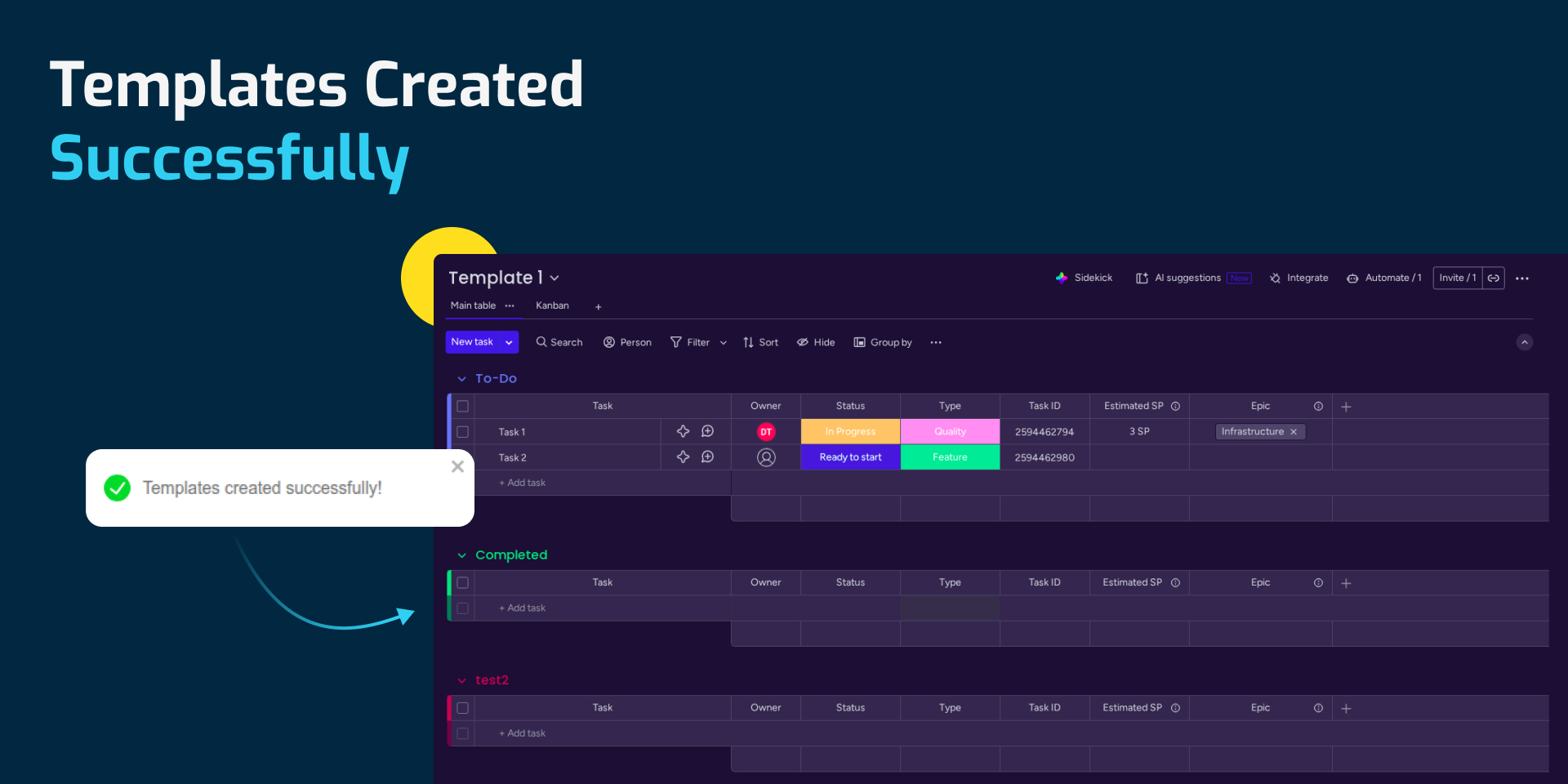
Skip repetitive setup work. Confirm your selections and create all customized boards instantly by a single click.
Workspace Assignment
Assign newly created boards to the appropriate workspace to keep your monday.com account structured and organized.
Custom Board Naming
Add unique, meaningful names to each generated board for easy identification and tracking.
How to Use Flexi Template Creator
Frequently Asked Questions
1.Install the app from the monday.com Marketplace.
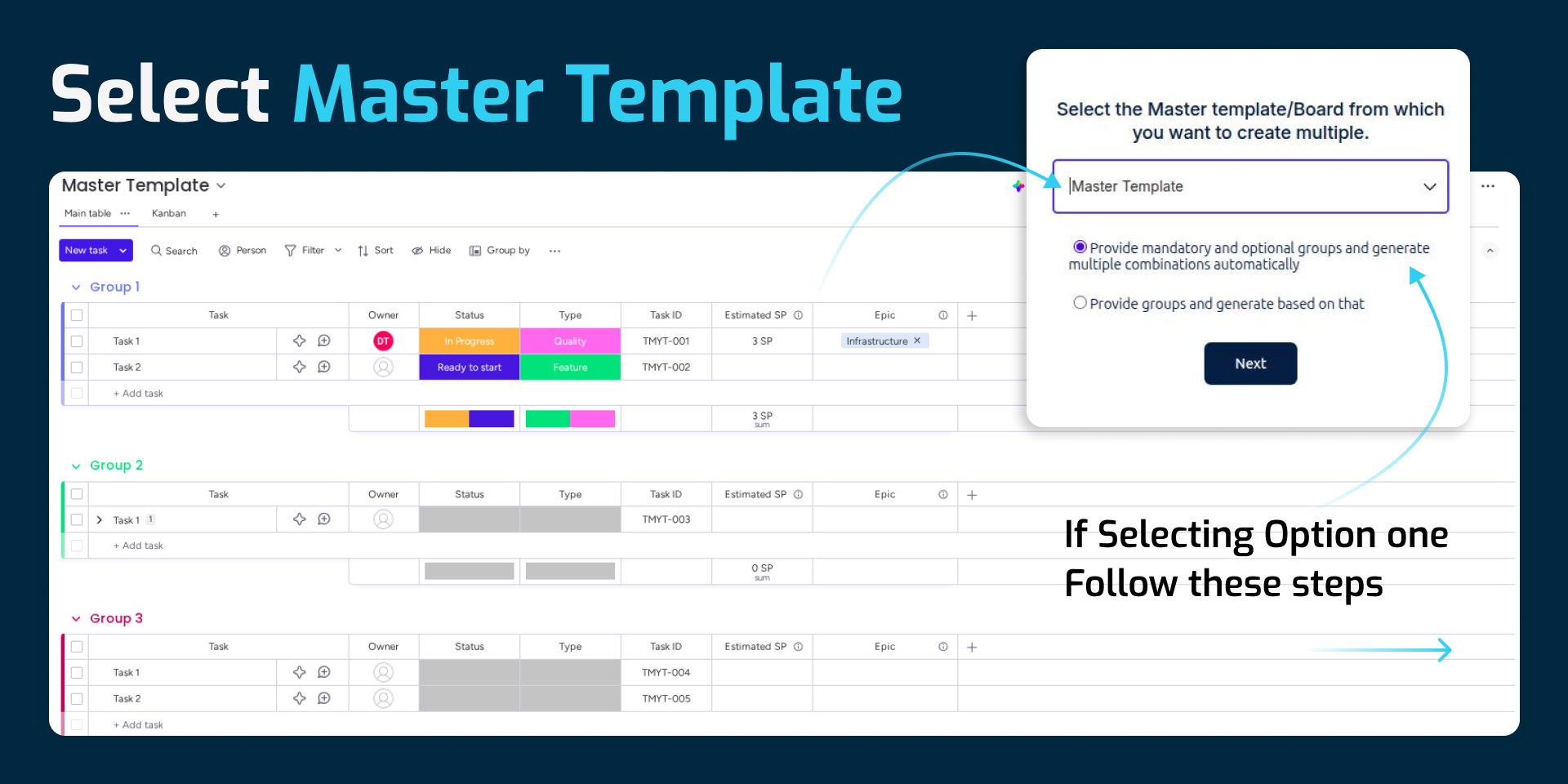
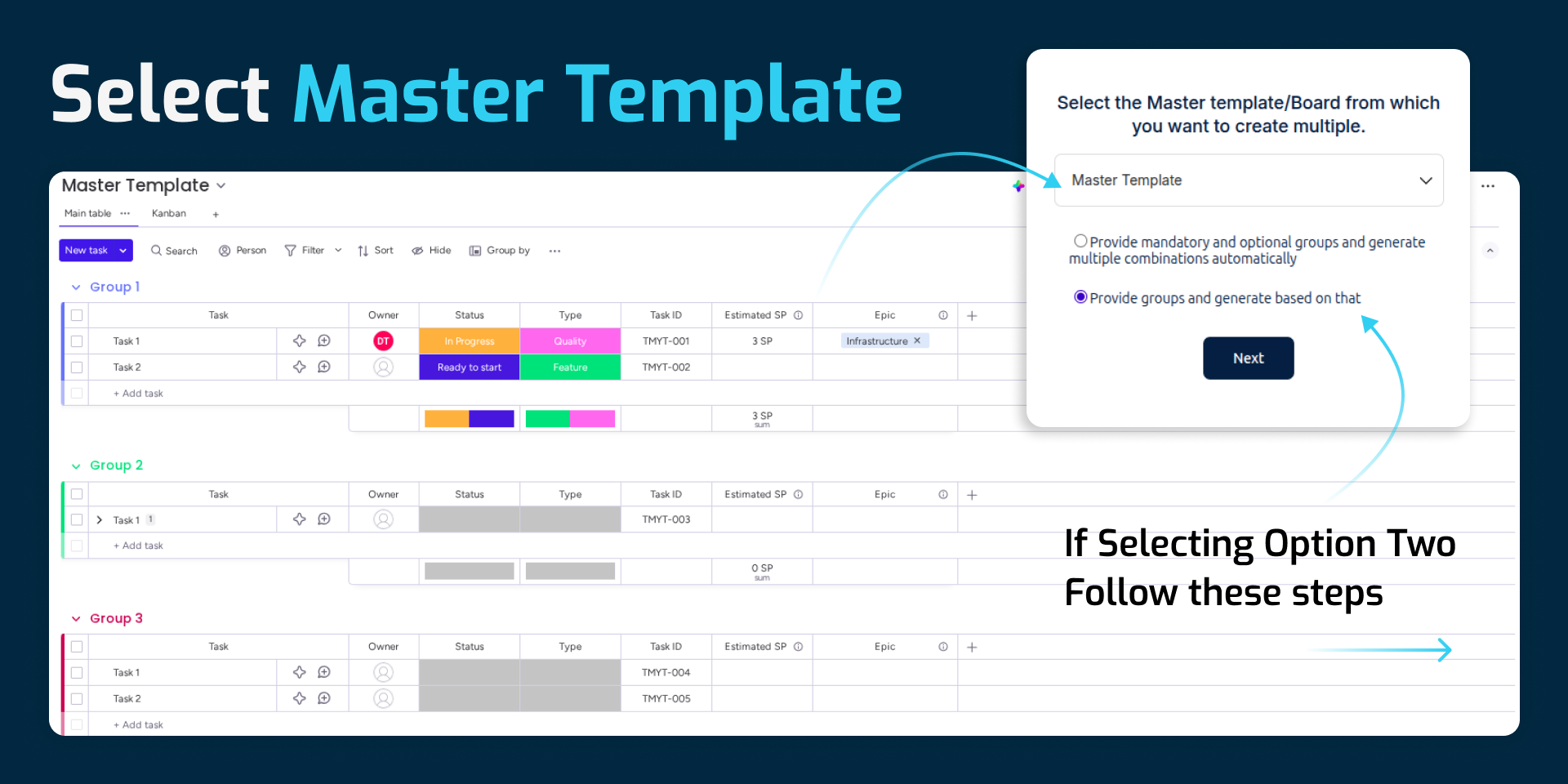
2.Select a master board or existing template.
3.Choose mandatory groups (included in every board).
4.Select optional groups and define how many should be included per combination.
5.Customize board names, if required.
6.Select the target workspace.
7. Click Create all boards are generated instantly.
How is this better than manually duplicating boards?Generates multiple board variations at once using dynamic group combinations, eliminating repetitive duplication and manual adjustments.
Can this be used for recurring processes?
Yes.
Does it support custom naming for generated boards?Absolutely. You can assign a unique name to each board before creation.
{
"id": 10001102,
"marketplace_developer_id": 100000032,
"app_id": 10512573,
"app_type": "app",
"security_info": {},
"gallery_assets": [
{
"url": "https://cdn.monday.com/marketplace/10001102/10001102_2026_2_4_14_18_27_b43811k.png",
"type": "image"
},
{
"url": "https://cdn.monday.com/marketplace/10001102/10001102_2026_2_4_14_18_30_8tyqc6.png",
"type": "image"
},
{
"url": "https://cdn.monday.com/marketplace/10001102/10001102_2026_2_4_14_18_33_ceavvdt.png",
"type": "image"
},
{
"url": "https://cdn.monday.com/marketplace/10001102/10001102_2026_2_4_14_18_35_4c8a1rs.png",
"type": "image"
},
{
"url": "https://cdn.monday.com/marketplace/10001102/10001102_2026_2_4_14_18_38_03g0zry.png",
"type": "image"
}
],
"description": "<p><strong>Flexi Template Creator</strong></p><p><strong>Template creation in monday.com should be fast, flexible, and fully personalized all in just one click.</strong></p><p>Flexi Template Creator<strong> </strong>empowers teams to generate multiple custom boards from a single master template.</p><p><strong>Key Benefits</strong></p><p>1.Create multiple custom boardsfrom a single master template</p><p>2.Define mandatory and optional groups with full control</p><p>3.Generate multiple board combinations in one action, saving time and effort</p><p>4.Customize board names for better clarity and organization</p><p>5.Maintain consistency while allowing flexibility across teams</p><p>Smart Features</p><p><strong>Checkbox-Based Group Selection</strong></p><p>Select groups from your master board using an intuitive interface. Easily mark groups as mandatory or optional no complexity involved.</p><p><strong>Automatic Group Combination Generation</strong></p><p>Specify how many optional groups should be combined with mandatory ones, and it will automatically generate all valid board combinations.</p><p><strong>One Click Board Creation</strong></p><p>Skip repetitive setup work. Confirm your selections and create all customized boards instantly by a single click.</p><p><strong>Workspace Assignment</strong></p><p>Assign newly created boards to the appropriate workspace to keep your monday.com account structured and organized.</p><p><strong>Custom Board Naming</strong></p><p>Add unique, meaningful names to each generated board for easy identification and tracking.</p><p><strong>How to Use Flexi Template Creator</strong></p><p>Frequently Asked Questions</p><p>1.Install the app from the monday.com Marketplace.</p><p>2.Select a master board or existing template.</p><p>3.Choose mandatory groups (included in every board).</p><p>4.Select optional groups and define how many should be included per combination.</p><p>5.Customize board names, if required.</p><p>6.Select the target workspace.</p><p>7. Click Create all boards are generated instantly.</p><p>How is this better than manually duplicating boards?Generates multiple board variations at once using dynamic group combinations, eliminating repetitive duplication and manual adjustments.</p><p><strong>Can this be used for recurring processes?</strong></p><p>Yes.</p><p><strong>Does it support custom naming for generated boards?</strong>Absolutely. You can assign a unique name to each board before creation.</p><p><strong>Is automation included?</strong></p><p>Not at this time.</p><p>Need Help?</p><p>📩Email:producthelp@transfunnel.com</p><p>🌐Website<strong>:</strong><a href=\"https://www.transfunnel.com/\" rel=\"noopener noreferrer\" target=\"_blank\">https://www.transfunnel.com</a></p><p>📅<a href=\"https://outlook.office.com/bookwithme/user/d95708ea308d48219ab1fb2152e305e1@transfunnel.com/meetingtype/iXaAgyxcvEarkGvvBXKrBg2?anonymous&ep=mcard\" rel=\"noopener noreferrer\" target=\"_blank\">Book a Demo</a></p>",
"short_description": "Auto-create board variations using smart group combinations",
"thumbnail_url": "https://cdn.monday.com/marketplace/10001102/10001102_2026_2_4_14_18_23_d3zdo5jh.png",
"logo_url": "https://cdn.monday.com/marketplace/10001102/10001102_2026_2_4_14_18_20_lx81dmw.png",
"feedback_url": "producthelp@transfunnel.com",
"privacy_policy_url": "https://app.transfunnel.com/privacy-policy",
"featured": false,
"name": "Flexi Template Creator",
"how_to_use_url": "https://app.transfunnel.com/flexi-template-creator",
"external_pricing_url": null,
"keywords": "board setup automation,process automation,template builder,board management,project templates,group-based templates,board cloning,bulk board creation,multiple board creation,board template generator",
"compliance_answers": [],
"created_at": "2026-03-04T14:17:47.208Z",
"updated_at": "2026-03-04T14:18:44.230Z",
"automation_app_id": null,
"marketplace_category_ids": [],
"pinned_for_categories_ids": [],
"featured_for_categories_ids": [],
"pricing_data": "Free plan available",
"label": null,
"app_values": [
"Easier resource management"
],
"security": false,
"display_in_template_store": false,
"acquisition_source": "No touch",
"is_connector": false,
"terms_of_service_url": "https://app.transfunnel.com/terms-of-service",
"available_for_tiers": [],
"available_for_products": [],
"google_analytics_tag_id": null,
"is_solution": false,
"app_scope_str": "boards:read,boards:write,account:read,me:read,workspaces:read,workspaces:write",
"app_client_id": "95090acf0508a80c15f5bcc578496053",
"app_color": "#564190",
"plans": null,
"app_live_version": {
"updated_at": "2026-02-20T09:40:17.624Z",
"id": 12958393
},
"pricing_model": null,
"badges_data": {
"pricing_data": "Free plan available",
"app_values": [
"Easier resource management"
],
"security": false,
"acquisition_source": "No touch",
"display_in_template_store": false
},
"data": {
"is_connector": false,
"google_analytics_tag_id": null,
"is_solution": false,
"terms_of_service_url": "https://app.transfunnel.com/terms-of-service",
"available_for_tiers": [],
"available_for_products": []
},
"display": null,
"installsDelta": {
"totalInstalls": 6
}
}