Centralized notes for the same item across multiple boards
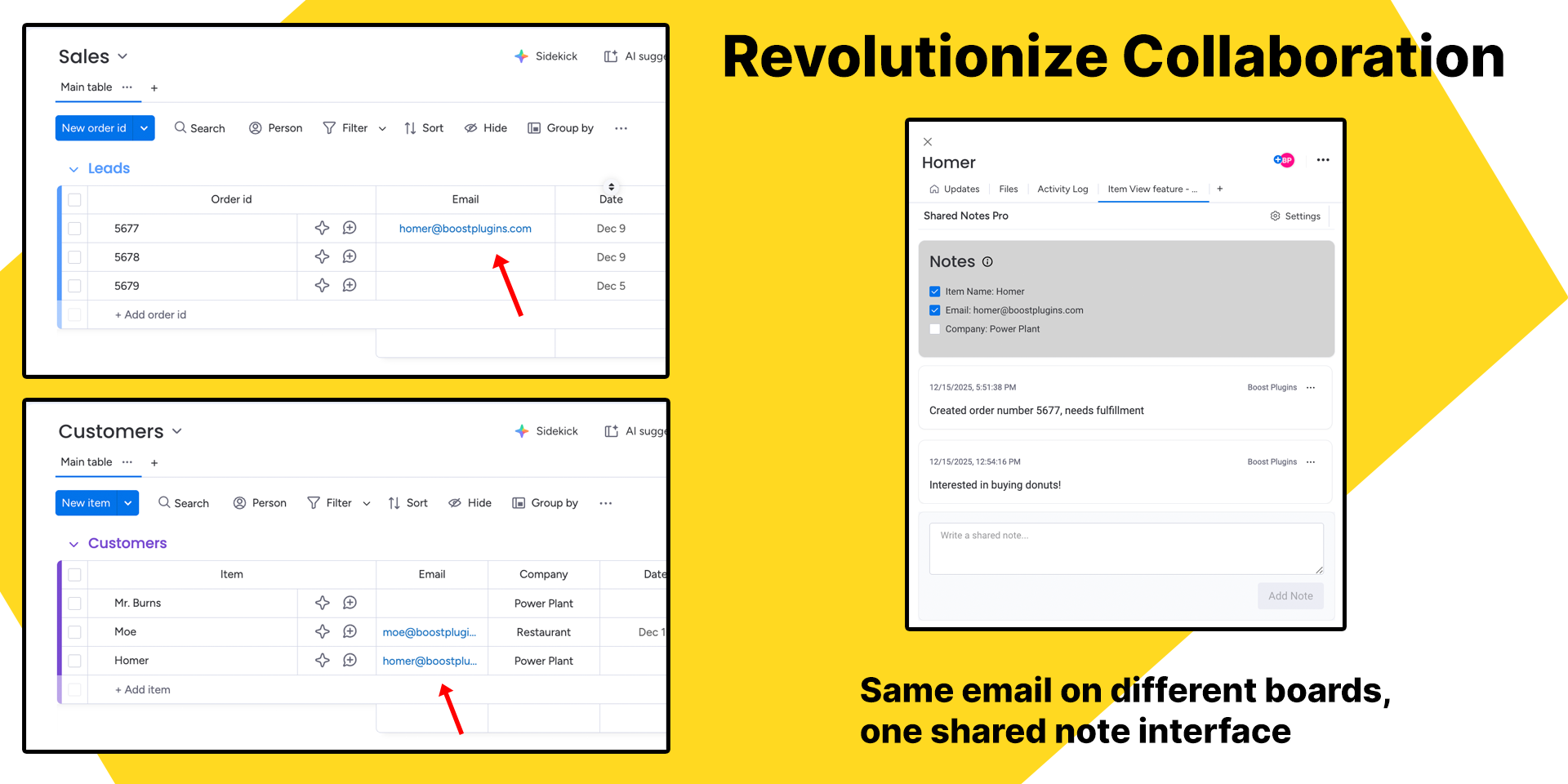
Enrich your monday.com boards with synced notes for contacts or general line items across multiple boards!
Who Needs Shared Notes?
Any monday.com user that has boards that track contact names, emails, phone numbers, order ids, and any other uniquely identifying piece of information!
How Does It Work?
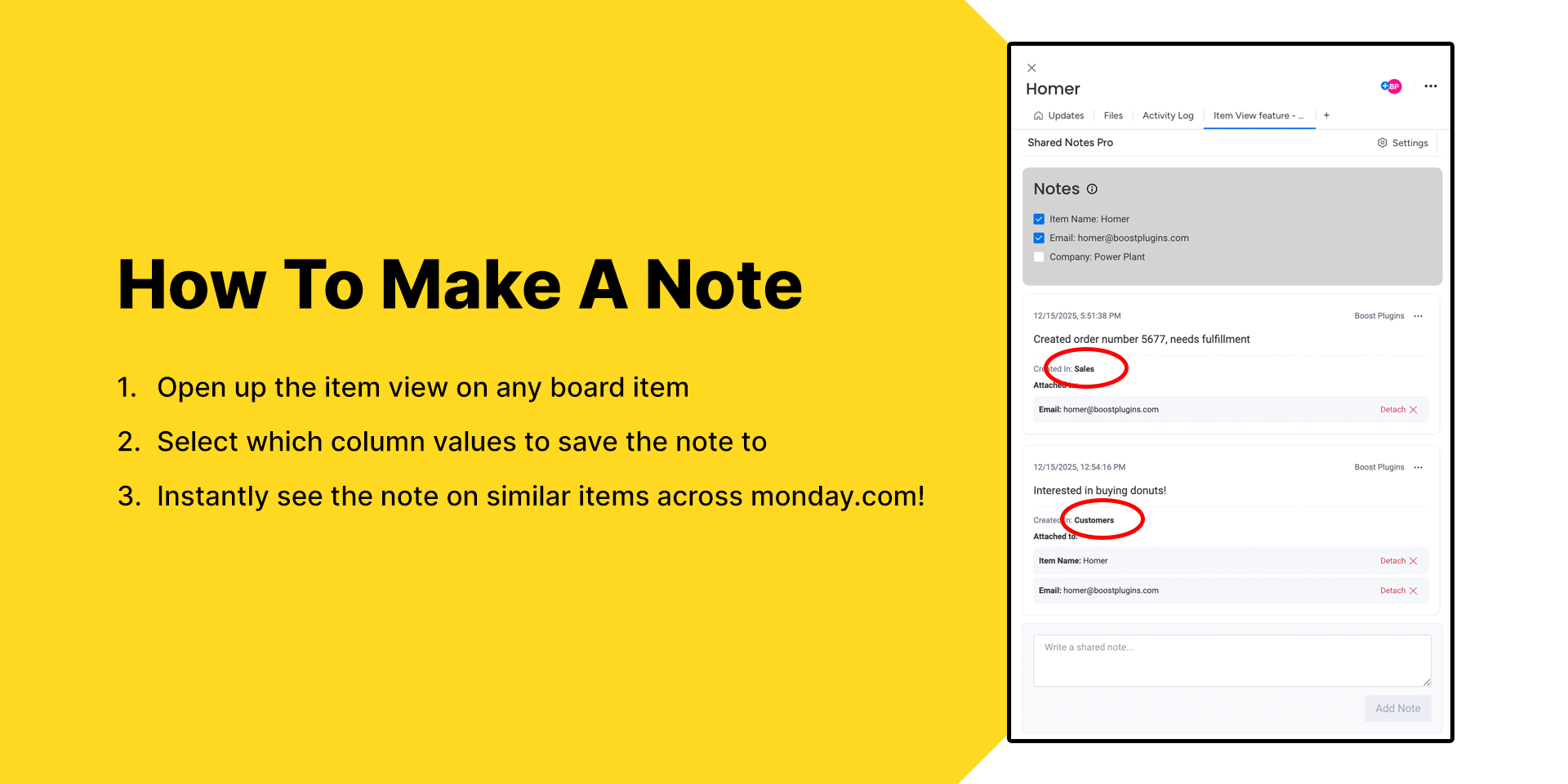
For any item in your boards, simply open up the item view and write a note that you want to capture. Select which columns you want to save the note to, and then press save!
Every item in your workspace with that same column value (or values) will display the captured note.
Why Do Shared Notes Matter?
When you manage multiple boards in monday.com, the same people, companies, tickets, or line items often appear in different workflows... yet their context doesn’t follow them!
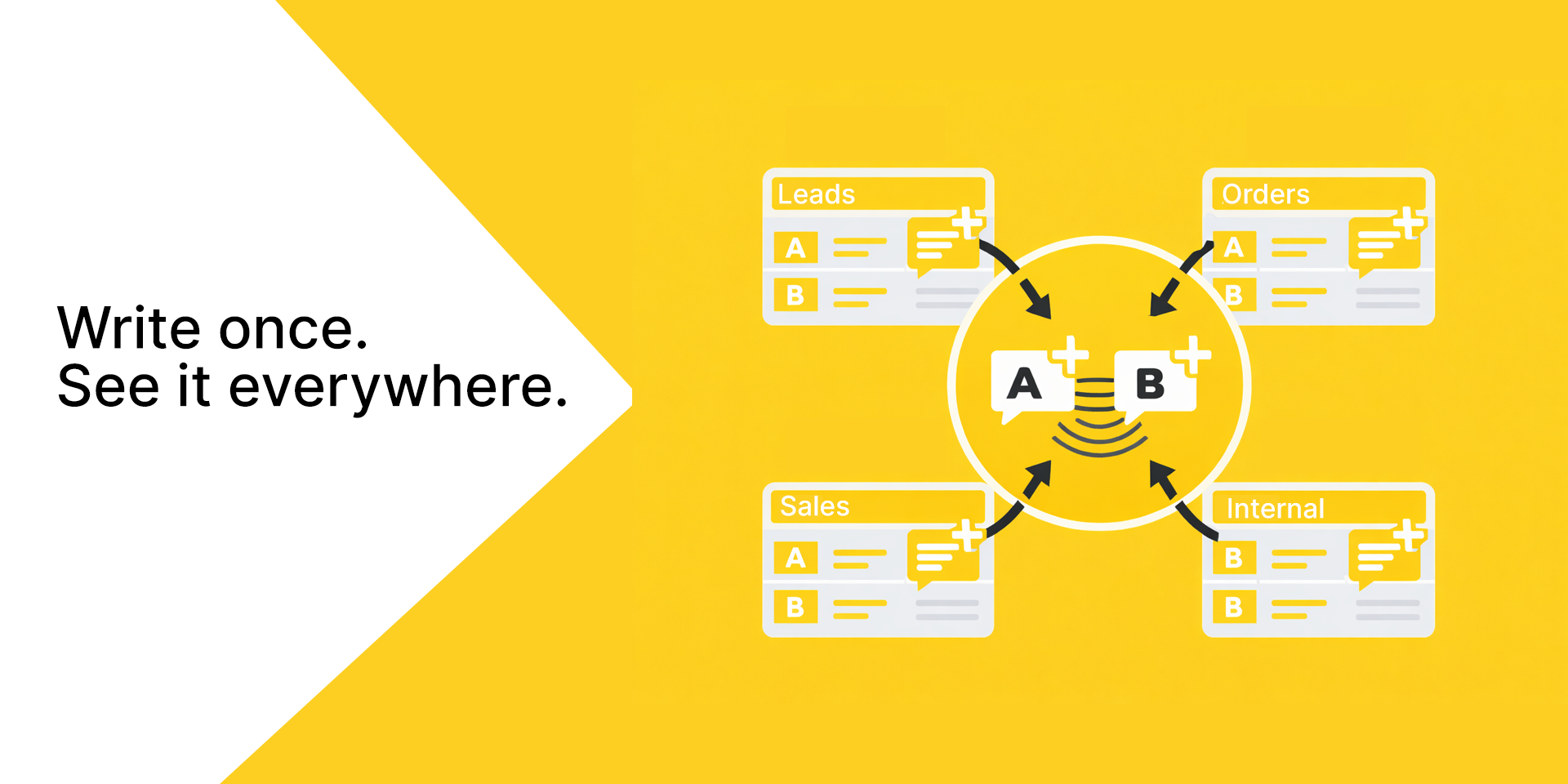
Shared Notes Pro solves this by centralizing the information that should follow an item wherever it appears. Whether you’re tracking an order fulfillment through sales, operations and support, or following up with a customer across multiple sales channels, you’ll never have to re-write or hunt for your team's notes again. Add a note once, and instantly surface that insight everywhere it matters.
Security & Compliance
The app developer did not provide the security and compliance information for this app.
Reviews
No reviews yet.
Historical data
Installation history
We have data for December 28, 2024 onwards only. Collected sometime after 00:00 UTC daily.
Total number of installs
Change in total number of installs in last 1 day(s)
Compares the number of installs on each date with 1 days previously:
Max
Min
Current
Change in total number of installs in last 7 day(s)
Compares the number of installs on each date with 7 days previously:
Max
Min
Current
Change in total number of installs in last 30 day(s)
Compares the number of installs on each date with 30 days previously:
Max
Min
Current
Change in total number of installs in last 90 day(s)
Compares the number of installs on each date with 90 days previously:
Max
Min
Current
Change in total number of installs in last 180 day(s)
Compares the number of installs on each date with 180 days previously:
Max
Min
Current
Ratings history
Categories history
Each of the following is a yes/no answer, so the graphs show 1 for yes, and 0 for no.
{
"id": 10001020,
"marketplace_developer_id": 100000039,
"app_id": 10712631,
"app_type": "app",
"security_info": {},
"gallery_assets": [
{
"url": "https://cdn.monday.com/marketplace/10001020/10001020_2026_0_8_9_59_8_loirp7p.mp4",
"type": "video"
},
{
"url": "https://cdn.monday.com/marketplace/10001020/10001020_2026_0_8_9_59_44_6i2t7zbk.png",
"type": "image"
},
{
"url": "https://cdn.monday.com/marketplace/10001020/10001020_2026_0_8_9_59_47_s41vmsbf.png",
"type": "image"
},
{
"url": "https://cdn.monday.com/marketplace/10001020/10001020_2026_0_8_9_59_50_l9nrhvc.png",
"type": "image"
}
],
"description": "<p>Enrich your <a href=\"http://monday.com/\" rel=\"noopener noreferrer\" target=\"_blank\">monday.com</a> boards with synced notes for contacts or general line items across multiple boards!</p><p><strong>Who Needs Shared Notes?</strong></p><p>Any <a href=\"http://monday.com/\" rel=\"noopener noreferrer\" target=\"_blank\">monday.com</a> user that has boards that track contact names, emails, phone numbers, order ids, and any other uniquely identifying piece of information!</p><p><strong>How Does It Work?</strong></p><p>For any item in your boards, simply open up the item view and write a note that you want to capture. Select which columns you want to save the note to, and then press save!</p><p>Every item in your workspace with that same column value (or values) will display the captured note.</p><p><strong>Why Do Shared Notes Matter?</strong></p><p>When you manage multiple boards in <a href=\"http://monday.com/\" rel=\"noopener noreferrer\" target=\"_blank\">monday.com</a>, the same people, companies, tickets, or line items often appear in different workflows... yet their context doesn’t follow them!</p><p>Shared Notes Pro solves this by centralizing the information that should follow an item wherever it appears. Whether you’re tracking an order fulfillment through sales, operations and support, or following up with a customer across multiple sales channels, you’ll never have to re-write or hunt for your team's notes again. Add a note once, and instantly surface that insight everywhere it matters.</p>",
"short_description": "Centralized notes for the same item across multiple boards",
"thumbnail_url": "https://cdn.monday.com/marketplace/10001020/10001020_2026_0_8_9_58_39_22sksya.png",
"logo_url": "https://cdn.monday.com/marketplace/10001020/10001020_2026_0_8_9_58_6_33bex1eh.png",
"feedback_url": "support@boostplugins.com",
"privacy_policy_url": "https://boostplugins.com/docs/shared-notes-monday/privacy",
"featured": false,
"name": "Shared Notes Pro",
"how_to_use_url": "https://boostplugins.com/docs/shared-notes-monday/quickstart",
"external_pricing_url": null,
"keywords": "notes,shared,collaboration,mirror columns,sync",
"compliance_answers": [],
"created_at": "2026-01-08T09:55:21.143Z",
"updated_at": "2026-01-08T10:07:27.979Z",
"automation_app_id": null,
"marketplace_category_ids": [
10000001,
8,
4
],
"pinned_for_categories_ids": [],
"featured_for_categories_ids": [],
"pricing_data": "14 day trial",
"label": null,
"app_values": [
"Centralize your work on monday.com"
],
"security": false,
"display_in_template_store": false,
"acquisition_source": "No touch",
"is_connector": false,
"terms_of_service_url": "https://boostplugins.com/docs/shared-notes-monday/terms",
"available_for_tiers": [],
"available_for_products": [],
"google_analytics_tag_id": null,
"is_solution": false,
"app_scope_str": "boards:read,users:read,account:read,me:read",
"app_client_id": "596ff53a21f6572de1987d85f562923b",
"app_color": {
"hsl": {
"h": 44.69635627530365,
"s": 0.968627450980392,
"l": 0.5,
"a": 1
},
"hex": "#fbbc04",
"rgb": {
"r": 251,
"g": 188,
"b": 4,
"a": 1
},
"hsv": {
"h": 44.69635627530365,
"s": 0.9840637450199202,
"v": 0.984313725490196,
"a": 1
},
"oldHue": 38.757763975155285,
"source": "hex"
},
"plans": [
{
"id": "10712631-1-free",
"appPlanId": "free",
"name": "Free",
"versionId": 1,
"isTrial": false,
"prices": {
"type": "standard",
"monthly": 0,
"yearly": 0
},
"versionState": "live",
"appId": 10712631,
"description": "A free plan suitable for most organizations",
"extraData": {
"bullets": [
"📦 All default features noted in the description",
"✏️ Attach notes to any phone number, email, or text",
"👀 Automatically share notes between board items",
"➕ Up to 1000 new notes each month"
],
"monthlyFee": 0,
"yearlyFee": 0
},
"isFree": true,
"isRecommended": false,
"currency": "USD"
},
{
"id": "10712631-1-pro",
"appPlanId": "pro",
"name": "Pro",
"versionId": 1,
"isTrial": false,
"prices": {
"type": "standard",
"monthly": 10,
"yearly": 8
},
"versionState": "live",
"appId": 10712631,
"description": "A pro plan for large organizations and heavy usage",
"extraData": {
"bullets": [
"📦 All default features noted in the description",
"✏️ Attach notes to any phone number, email, or text",
"👀 Automatically share notes between board items",
"🔄 Unlimited notes across all boards each month",
"👉 Your whole organization for one fixed price. No per-user pricing or fees."
],
"monthlyFee": 10,
"yearlyFee": 8
},
"isFree": false,
"isRecommended": false,
"currency": "USD"
}
],
"app_live_version": {
"updated_at": "2025-12-23T19:21:52.158Z",
"id": 12096121
},
"pricing_model": null,
"badges_data": {
"pricing_data": "14 day trial",
"app_values": [
"Centralize your work on monday.com"
],
"security": false,
"acquisition_source": "No touch",
"display_in_template_store": false
},
"data": {
"is_connector": false,
"google_analytics_tag_id": null,
"is_solution": false,
"terms_of_service_url": "https://boostplugins.com/docs/shared-notes-monday/terms",
"available_for_tiers": [],
"available_for_products": []
},
"display": null,
"installsDelta": {
"totalInstalls": 5,
"sevenDays": 1,
"thirtyDays": 1
}
}