App metadata ID: 10000984 • App ID: 10433049 • Listing updated: December 5, 2025 View app data JSON {
"id": 10000984,
"marketplace_developer_id": 10000088,
"app_id": 10433049,
"app_type": "app",
"security_info": {},
"gallery_assets": [
{
"url": "https://cdn.monday.com/marketplace/10000984/10000984_2025_11_1_14_0_54_hgau13rh.png",
"type": "image"
},
{
"url": "https://cdn.monday.com/marketplace/10000984/10000984_2025_11_1_14_1_1_l9dthsk.png",
"type": "image"
},
{
"url": "https://cdn.monday.com/marketplace/10000984/10000984_2025_11_1_14_1_7_byhepvj.png",
"type": "image"
},
{
"url": "https://cdn.monday.com/marketplace/10000984/10000984_2025_11_1_14_1_13_pxuqi9x.png",
"type": "image"
},
{
"url": "https://cdn.monday.com/marketplace/10000984/10000984_2025_11_1_14_1_19_5ijvrzgf.png",
"type": "image"
},
{
"url": "https://cdn.monday.com/marketplace/10000984/10000984_2025_11_1_14_1_51_0qru4mr.mp4",
"type": "video"
}
],
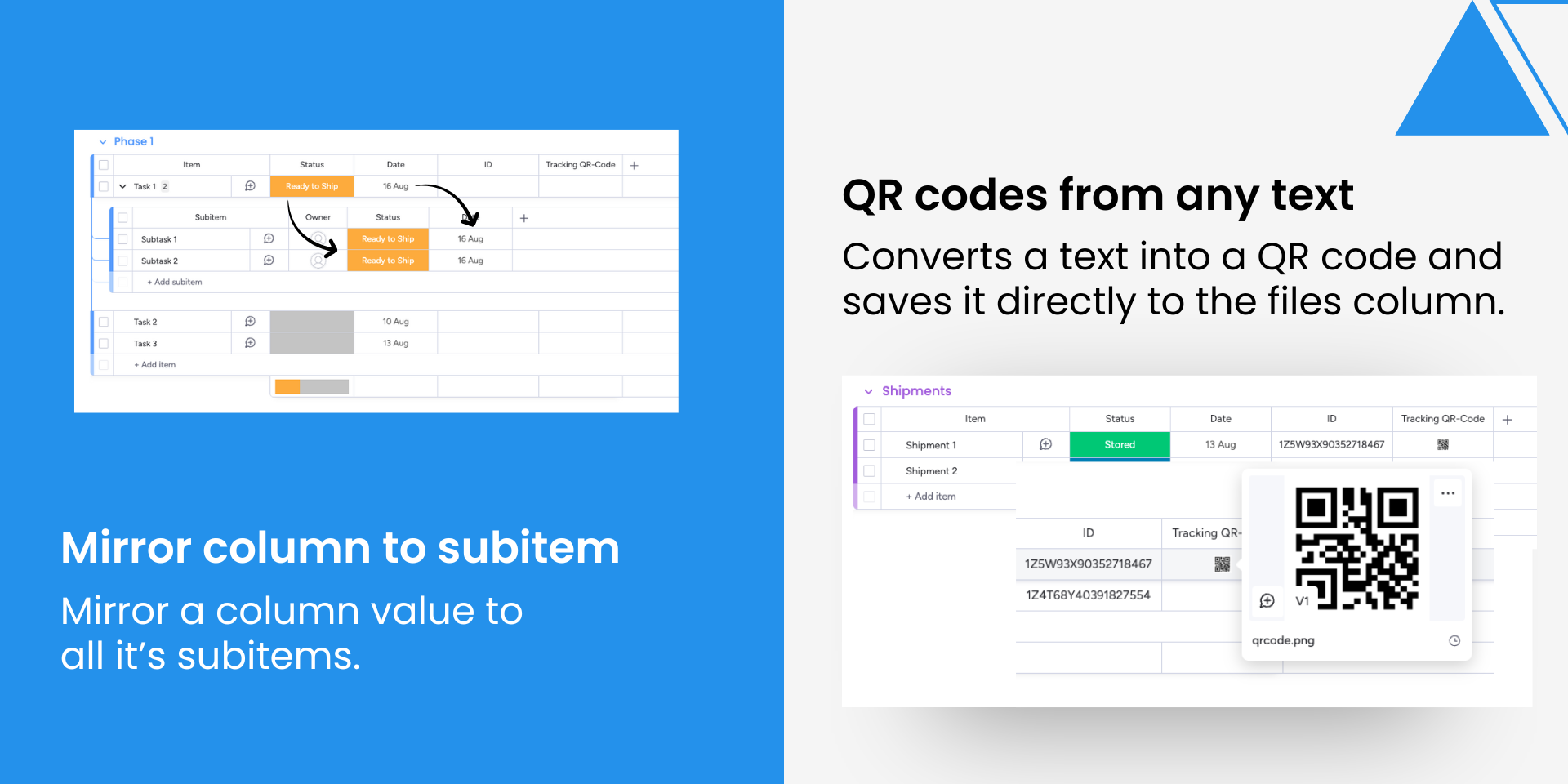
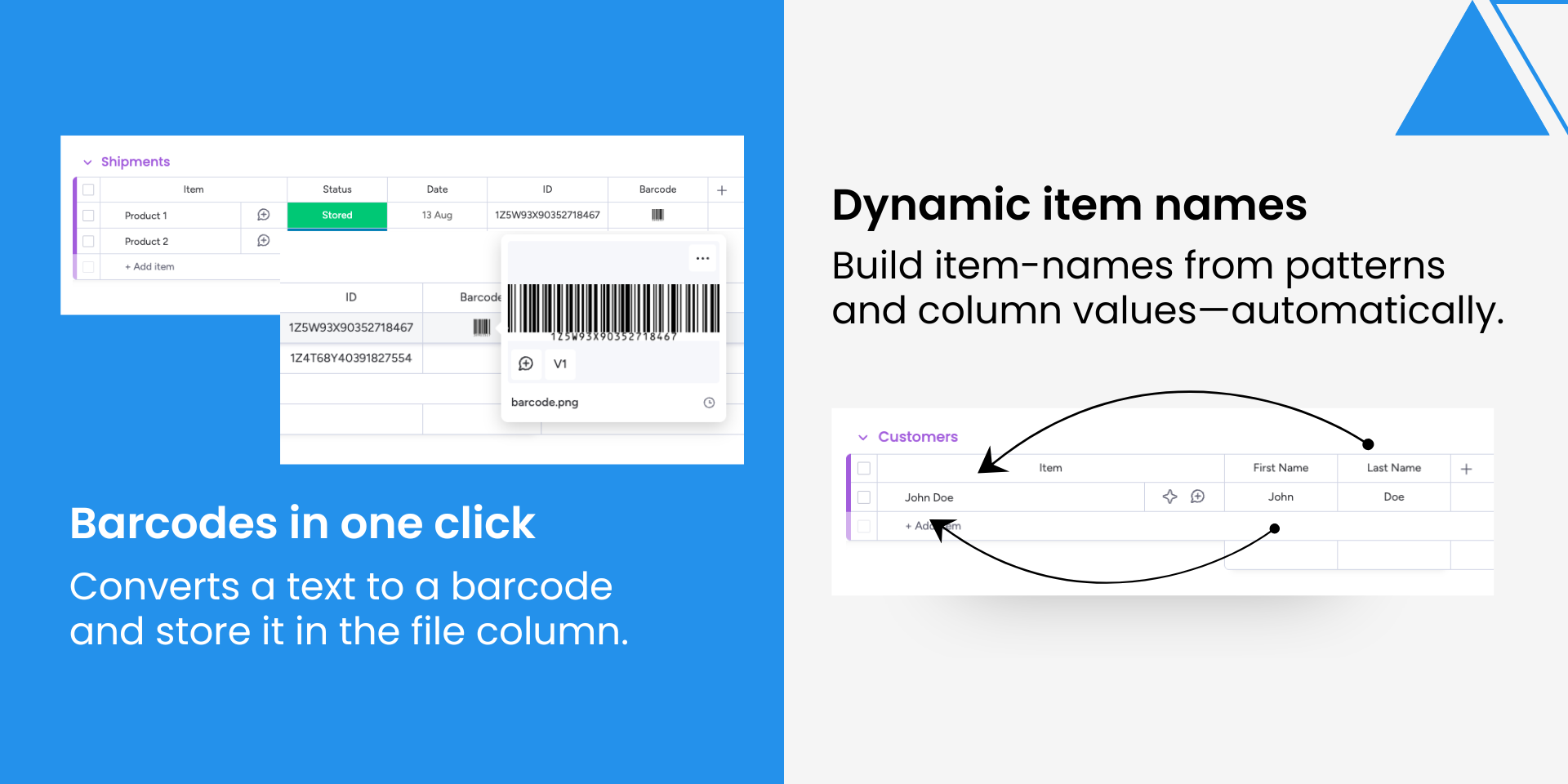
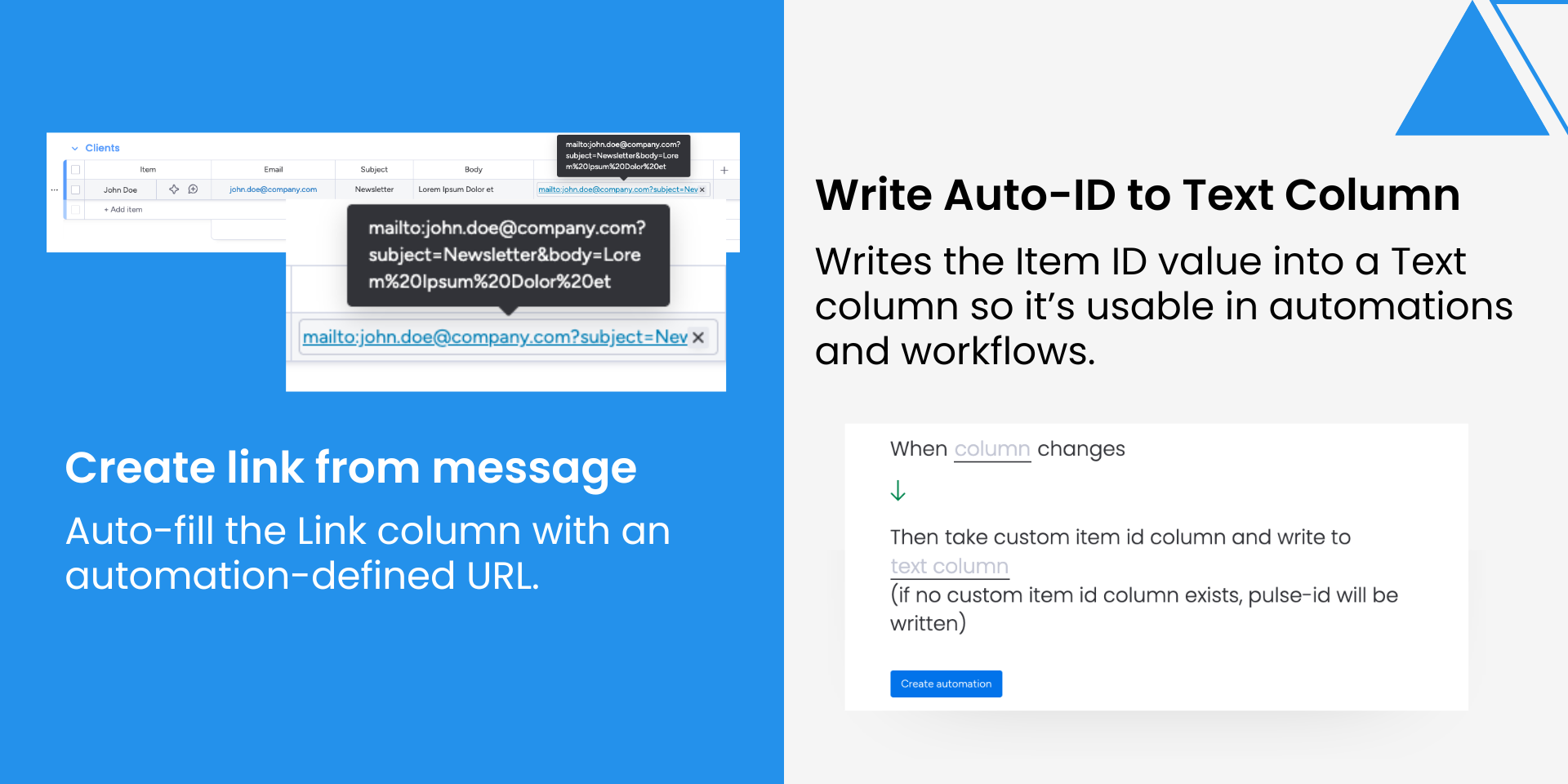
"description": "<p>🚀 Enhance monday.com with the automations you’ve been missing — with our Swiss-Made Automation Toolkit! 🇨🇭</p><p><br></p><p>Take your monday.com boards to the next level with a curated set of powerful automation recipes that go beyond native limits. Built with Swiss precision, this toolkit is your Swiss Army knife for automations — versatile, reliable, and ready for any task.</p><p><br></p><p>Enforce naming conventions, auto-generate QR or barcodes, mirror data from items to subitems — all without code or complexity. Just clear, intuitive automations that save time and keep your workspace consistent.</p><p><br></p><p>💡 Why teams love it</p><p><br></p><p>Boost productivity: Eliminate repetitive steps and manual errors.</p><p><br></p><p>Stay consistent: Enforce naming and data rules across boards.</p><p><br></p><p>Unlock flexibility: Add advanced logic native automations can’t handle.</p><p><br></p><p>Save time: Configure in minutes, scale instantly.</p><p><br></p><p>⚙️ Key Features</p><p><br></p><p>🔄 Mirror Main Item Values into Subitems</p><p>Keep key fields like status, quantities, or dates synced across levels.</p><p><br></p><p>📱 Generate QR Codes from Text</p><p>Turn text into QR codes and store them in file columns — ideal for links, tickets, or IDs.</p><p><br></p><p>🏷️ Generate Barcodes from Text</p><p>Create barcodes from text for inventory or logistics.</p><p><br></p><p>📝 Set Item Name from Automation Message</p><p>Auto-assign names using static text or dynamic column values.</p><p><br></p><p>🔗 Generate Links from Message</p><p>Populate link columns dynamically using URLs or column values.</p><p><br></p><p>🔢 Write Auto-ID into Text Column</p><p>Expose and store custom or pulse IDs directly inside automations.</p><p><br></p><p>💬 Write Message into Text Column</p><p>Insert static or dynamic messages into text columns for reuse across workflows.</p><p><br></p><p>✨ Designed for teams who want to push monday.com beyond its limits — smart, scalable, and Swiss-made. 🇨🇭</p>",
"short_description": "One app, many features. The automation tool you're missing.",
"thumbnail_url": "https://cdn.monday.com/marketplace/10000984/10000984_2025_11_1_13_59_54_exntly6i.png",
"logo_url": "https://cdn.monday.com/marketplace/10000984/10000984_2025_11_1_13_59_30_25zyf66.png",
"feedback_url": "https://www.blinno.ch/en/support",
"privacy_policy_url": "https://cdn.prod.website-files.com/65ca37798f322a6daf6ae840/68f1f40ff12b86798cf58748_Privacy%20Policy-Blinno-Apps.pdf",
"featured": false,
"name": "MultiTool",
"how_to_use_url": "https://www.blinno.ch/en/blinno-produkte/multitool",
"external_pricing_url": null,
"keywords": "automation,workflow,productivity,integration,QR,email,data helper",
"compliance_answers": [],
"created_at": "2025-12-01T13:58:29.644Z",
"updated_at": "2025-12-05T10:20:09.584Z",
"automation_app_id": null,
"marketplace_category_ids": [
10000001,
8,
6
],
"pinned_for_categories_ids": [],
"featured_for_categories_ids": [],
"pricing_data": "Free plan available",
"label": null,
"app_values": [
"Perfect for automations"
],
"security": false,
"display_in_template_store": false,
"acquisition_source": "No touch",
"is_connector": false,
"terms_of_service_url": "https://cdn.prod.website-files.com/65ca37798f322a6daf6ae840/68f1f3776a7c6ab378bb4497_Terms%20of%20Service-Blinno-Apps.pdf",
"available_for_tiers": [],
"available_for_products": [],
"google_analytics_tag_id": "G-2S9XVQZGE3",
"is_solution": false,
"app_scope_str": "notifications:write,users:read,boards:write,boards:read",
"app_client_id": "07b27e8de68e1e0c51232ee15d6d0af9",
"app_color": {
"hsl": {
"h": 205.2173913043478,
"s": 0,
"l": 1,
"a": 1
},
"hex": "#ffffff",
"rgb": {
"r": 255,
"g": 255,
"b": 255,
"a": 1
},
"hsv": {
"h": 205.2173913043478,
"s": 0,
"v": 1,
"a": 1
},
"oldHue": 205.2173913043478,
"source": "hex"
},
"plans": [
{
"id": "10433049-1-free",
"appPlanId": "free",
"name": "Free",
"versionId": 1,
"isTrial": false,
"prices": {
"type": "standard",
"monthly": 0,
"yearly": 0
},
"versionState": "live",
"appId": 10433049,
"description": "Provides 250 credits per month, ideal for beginners who want to explore basic features with a small allowance.",
"extraData": {
"bullets": [
"All Features",
"250 Credits"
],
"monthlyFee": 0,
"yearlyFee": 0
},
"isFree": true,
"isRecommended": false,
"currency": "USD"
},
{
"id": "10433049-1-starter",
"appPlanId": "starter",
"name": "Starter",
"versionId": 1,
"isTrial": false,
"prices": {
"type": "standard",
"monthly": 9,
"yearly": 8
},
"versionState": "live",
"appId": 10433049,
"description": "Offers 1,000 credits per month, perfect for light, regular use and small projects.",
"extraData": {
"bullets": [
"All Features",
"1,000 Credits"
],
"monthlyFee": 9,
"yearlyFee": 8
},
"isFree": false,
"isRecommended": false,
"currency": "USD"
},
{
"id": "10433049-1-basic",
"appPlanId": "basic",
"name": "Basic",
"versionId": 1,
"isTrial": false,
"prices": {
"type": "standard",
"monthly": 25,
"yearly": 21
},
"versionState": "live",
"appId": 10433049,
"description": "Includes 5,000 credits per month, a solid option for users with moderate, recurring needs.",
"extraData": {
"bullets": [
"All Features",
"5,000 Credits"
],
"monthlyFee": 25,
"yearlyFee": 21
},
"isFree": false,
"isRecommended": false,
"currency": "USD"
},
{
"id": "10433049-1-pro",
"appPlanId": "pro",
"name": "Pro",
"versionId": 1,
"isTrial": false,
"prices": {
"type": "standard",
"monthly": 45,
"yearly": 38
},
"versionState": "live",
"appId": 10433049,
"description": "Gives 10,000 credits per month, suitable for professionals who require reliable performance.",
"extraData": {
"bullets": [
"All Features",
"10,000 Credits"
],
"monthlyFee": 45,
"yearlyFee": 38
},
"isFree": false,
"isRecommended": false,
"currency": "USD"
},
{
"id": "10433049-1-premium",
"appPlanId": "premium",
"name": "Premium",
"versionId": 1,
"isTrial": false,
"prices": {
"type": "standard",
"monthly": 75,
"yearly": 64
},
"versionState": "live",
"appId": 10433049,
"description": "Delivers 20,000 credits per month, ideal for intensive usage and greater flexibility.",
"extraData": {
"bullets": [
"All Features",
"20,000 Credits"
],
"monthlyFee": 75,
"yearlyFee": 64
},
"isFree": false,
"isRecommended": false,
"currency": "USD"
},
{
"id": "10433049-1-enterprise",
"appPlanId": "enterprise",
"name": "Enterprise",
"versionId": 1,
"isTrial": false,
"prices": {
"type": "standard",
"monthly": 120,
"yearly": 102
},
"versionState": "live",
"appId": 10433049,
"description": "Supplies 35,000 credits per month, built for organizations with large teams and demanding workflows.",
"extraData": {
"bullets": [
"All Features",
"35,000 Credits"
],
"monthlyFee": 120,
"yearlyFee": 102
},
"isFree": false,
"isRecommended": false,
"currency": "USD"
},
{
"id": "10433049-1-platin",
"appPlanId": "platin",
"name": "Platin",
"versionId": 1,
"isTrial": false,
"prices": {
"type": "standard",
"monthly": 300,
"yearly": 255
},
"versionState": "live",
"appId": 10433049,
"description": "Grants 100,000 credits per month, designed for high usage and complex systems.",
"extraData": {
"bullets": [
"All Features",
"100,000 Credits"
],
"monthlyFee": 300,
"yearlyFee": 255
},
"isFree": false,
"isRecommended": false,
"currency": "USD"
}
],
"app_live_version": {
"updated_at": "2025-11-28T10:24:40.104Z",
"id": 11876407
},
"pricing_model": null,
"badges_data": {
"pricing_data": "Free plan available",
"app_values": [
"Perfect for automations"
],
"security": false,
"acquisition_source": "No touch",
"display_in_template_store": false
},
"data": {
"is_connector": false,
"google_analytics_tag_id": "G-2S9XVQZGE3",
"is_solution": false,
"terms_of_service_url": "https://cdn.prod.website-files.com/65ca37798f322a6daf6ae840/68f1f3776a7c6ab378bb4497_Terms%20of%20Service-Blinno-Apps.pdf",
"available_for_tiers": [],
"available_for_products": []
},
"display": null,
"installsDelta": {
"totalInstalls": 20,
"sevenDays": 0,
"thirtyDays": 0,
"ninetyDays": 6
}
}